Show Diff
approvedby ivan-lednev
Render Git diffs in your notes.
🐞 Create issues, feature requests, share your ideas
Purpose
This plugin lets you render Git diff output in your notes that looks like this:
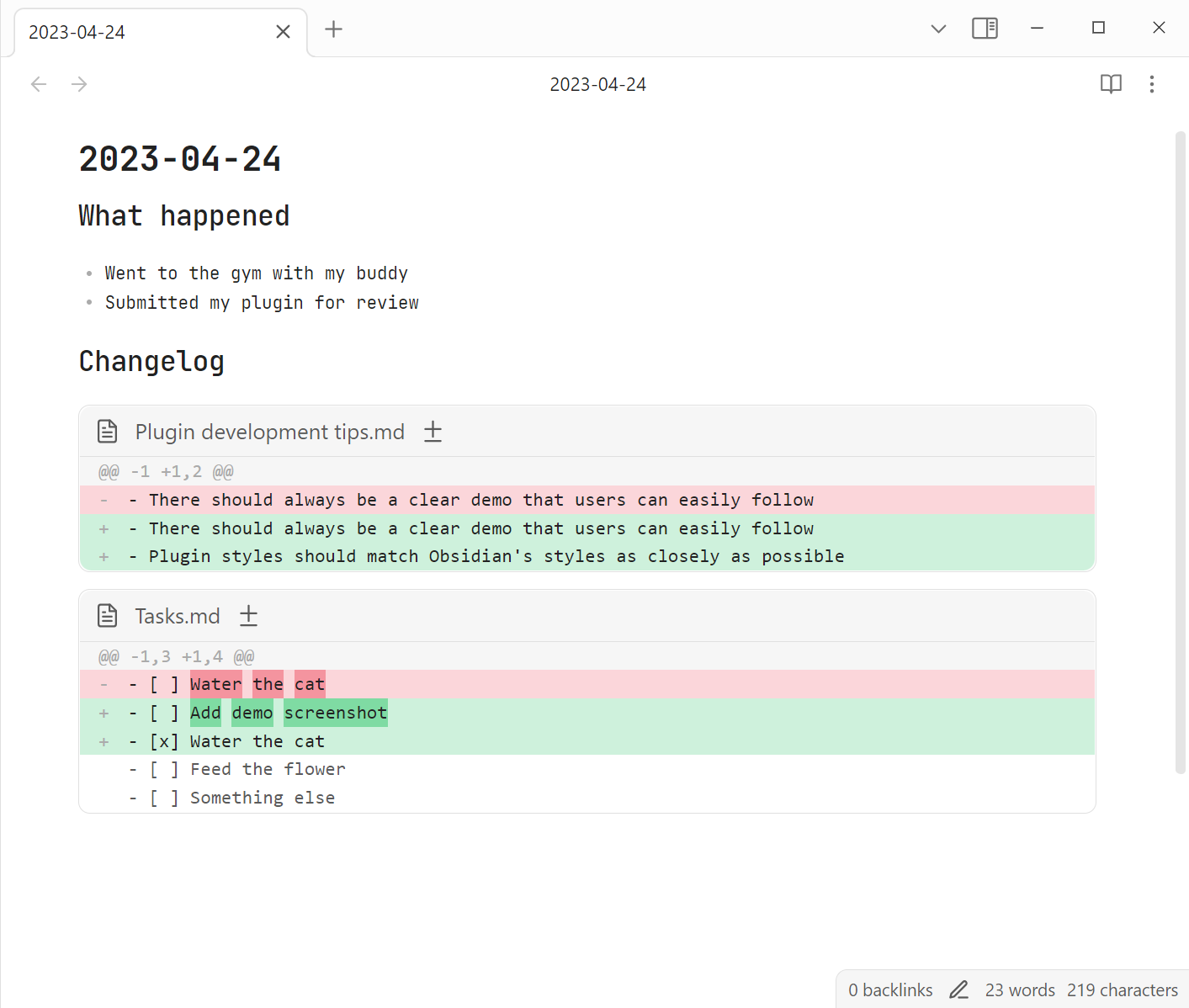
I personally use it in a combo with obsidian-git to revise what I've been working on a given day, like an automatic changelog, but you can point it to any repo in your file system.
Usage
For the plugin to work on your vault, it should be a git repository. You can add automatic git backups to your vault with obsidian-git.
The plugin renders Markdown code blocks with the show-diff language tag. An empty code block will show a diff between today and yesterday:
```show-diff
```
dates
With dates you can specify a date range to show changes for:
```show-diff
dates:
  from: 2021-01-01
  to: 2021-01-02
```
commits
With commits you can specify a commit range to show changes for:
```show-diff
commits:
  from: HEAD^
  to: HEAD
```
path
This defaults to the vault you're in, but you can point the plugin to any repository in your file system:
```show-diff
path: /path/to/my-pet-project
```
exclude
.obsidian (Obsidian's settings & cache) is excluded by default. You can override this with a single path:
```show-diff
exclude: trash
```
or with a list of paths:
```show-diff
exclude:
  - trash
  - archive
  - .obsidian
```
Command: Generate diff code block for today
The plugin provides a command to quickly insert in a note a code block like this:
```show-diff
dates:
  from: 2023-04-23
  to: 2023-04-24
```
Contributing
If you noticed a bug or thought of some way to improve the plugin, feel free to create an issue: https://github.com/ivan-lednev/obsidian-automatic-changelog/issues.
Pull-requests are also welcome! If you want to contribute but don't know where to start, you can create an issue or write me an email: bishop1860@gmail.com.
You can also support me by buying me a coffee:

Acknowledgements
I've used the following plugins as a reference:
For plugin developers
Search results and similarity scores are powered by semantic analysis of your plugin's README. If your plugin isn't appearing for searches you'd expect, try updating your README to clearly describe your plugin's purpose, features, and use cases.