Sidemark
approvedby Adam Coddington
Google Docs-style comments and suggested edits, kept in Sidemark (MRSF) .review.yaml sidecars so your Markdown stays clean. - This plugin has not been manually reviewed by Obsidian staff.

Sidemark for Obsidian

Comments and edit suggestions for Obsidian notes, stored next to each note instead of inside it.
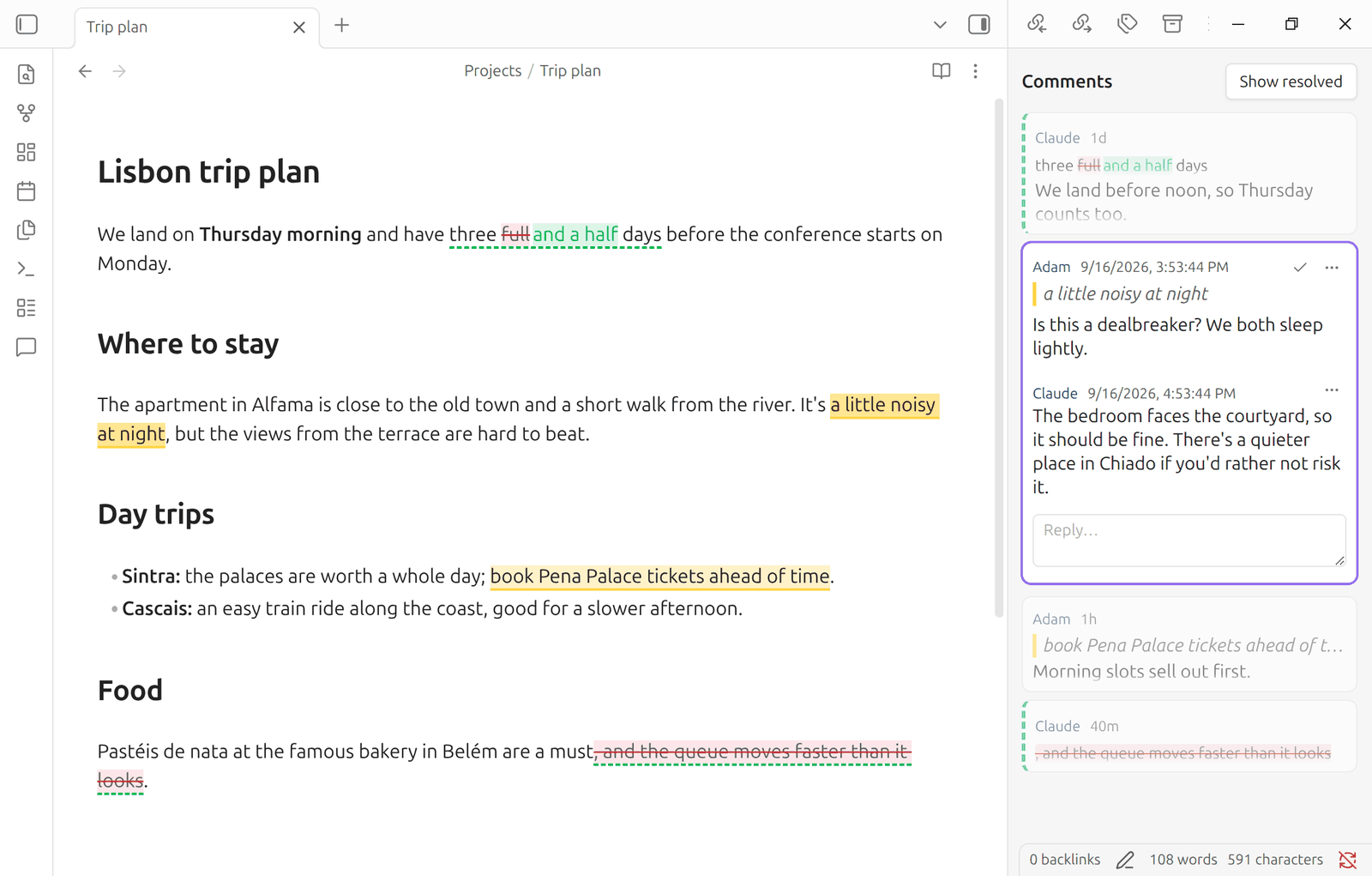
Select text and add a comment or suggest an edit. The passage is highlighted in the editor, and the discussion lives in a sidebar. Everything is saved to a sidecar file, Your Note.md.review.yaml, in the MRSF / Sidemark format. Your notes stay plain Markdown, and other tools see nothing unusual in them.
Why Sidemark?
Most ways of commenting on Obsidian notes put the comments in the note: as hidden HTML, as CriticMarkup, or as a block at the end. Sidemark keeps them out of the note entirely, in a sidecar file that follows an open specification other tools already read and write. The same comments work with the Sidemark VS Code extension, the mrsf command-line tool, and the @mrsf/mcp server for AI assistants.
| Sidemark | Tandem Comments | Commentator (CriticMarkup) | Redline | SideNote | |
|---|---|---|---|---|---|
| Where comments live | .review.yaml sidecar | Block at the end of the note | Inline in the note | .review.md sidecar | Plugin data (data.json) |
| Note file untouched | ✅ | ⚠️ block appended | ❌ | ⚠️ adds ^block IDs | ✅ |
| Format shared with other tools | ✅ MRSF: VS Code, CLI, MCP | ⚠️ plain JSON | ✅ CriticMarkup | ⚠️ documented, Redline only | ❌ |
| Anchored to | Text range | Text range | Text range | Whole block | Text range |
| Follows edits | ✅ | ✅ | n/a | ✅ | ✅ |
| Replies | ✅ | ✅ | ✅ | ❌ | ? |
| Resolve / reopen | ✅ | ✅ | ? | ✅ | ⚠️ |
| Suggested edits | ✅ | ✅ | ✅ | ❌ | ❌ |
| Follows renames | ✅ | n/a | n/a | ✅ | ✅ |
Based on each project's documentation as of September 2026; "?" means it isn't documented. "n/a" means the comments are inside the note, so they move with the text anyway. Corrections are welcome.
[!NOTE] Sidemark is an unofficial fork of Leon Pawelzik's Tandem Comments, and would not have been possible without it. The difference is where comments are stored: Tandem keeps them in a block inside each note, and Sidemark uses MRSF sidecar files. If you're happy with comments stored inside your notes, use Tandem Comments.
Features
- Comment on any selected text, reply in threads, then resolve or reopen them.
- Suggest an edit (a replacement for the selected text), then accept or decline it. Accepting rewrites the passage in the note.
- Open suggestions are shown in the note itself: only the words that would change are struck through, with the new words right after them (this can be turned off in settings). The sidebar card, and the preview while you write a suggestion, show the change the same way.
- Highlights follow the text as you type, including inside tables. Updated positions are saved to the sidecar automatically.
- Drift: when the commented text itself is edited, the sidebar shows what it now reads. MRSF keeps the reviewer's original selection in
selected_textand the current text inanchored_text. - Orphans: comments whose passage was deleted are listed as orphaned, and their "Re-anchor…" button attaches them to new text (see Re-anchoring).
- Re-anchoring: to move an open thread to different text (say, you highlighted the wrong passage), choose "Re-anchor…" from the thread's ⋯ menu, select the new text in the note, then click "Re-anchor to selection". The thread stays selected in the sidebar while you pick the text.
- Unread comments: comments by other people (or by an AI assistant) that you haven't read yet are marked: a dot on a closed thread, a count in the sidebar's header, and a "New" line in an open thread where the new replies begin. Opening a thread marks it read; the ⋯ menus have "Mark as unread" and "Mark all as read". What you've read is kept in the plugin's settings, not in the sidecar, so it's yours alone, and syncs with your plugin settings. Comments that existed before you updated to this version count as read.
- Outside edits: changes to the note or its sidecar made outside Obsidian (sync, git, an AI assistant, the
mrsftool) are picked up live. - Renames and deletes: renaming or moving a note moves its sidecar and updates its
documentfield; renaming a folder is handled too. Deleting a note moves its sidecar to the trash with it. - Comment text is rendered as Markdown, so
[[wikilinks]]work and show hover previews. - Commands to remove resolved threads, and to export a note's comments to
<Note> – Comments.mdnext to it. The export opens in a new tab; exporting again replaces the previous export. - Tandem Comments conversion: a button in settings (also available as a command) converts every note's
tandem-commentsblock into a sidecar.
Installing
Sidemark is in the Obsidian community plugin directory: open Settings → Community plugins → Browse in Obsidian, search for Sidemark, then install and enable it.
To install it by hand instead, download main.js, manifest.json and styles.css from the latest release into <your vault>/.obsidian/plugins/sidemark/, then enable Sidemark under Settings → Community plugins.
If you use Obsidian Sync, turn on syncing of "other file types" so the .review.yaml files are synced.
Using it
- Add a comment: select text, then use Add comment from the right-click menu or the command palette. Type in the sidebar and press Enter.
- Suggest an edit: select text, then use Suggest edit. Edit the proposed replacement and optionally explain why. Clear the replacement to suggest deleting the text.
- Review suggestions from the note: hover over a suggestion for ✓ (accept) and ✕ (decline) buttons. The commands Accept current suggestion, Decline current suggestion, Go to next suggestion and Go to previous suggestion can be bound to hotkeys.
- Compact threads: the panel shows each thread briefly: author, time, a line of the quoted text and the start of the comment. Selecting a thread (click it, or put the cursor in its passage) expands it to show its replies and the reply box; Esc collapses it. A thread with an unsent reply stays expanded.
- Resolve and decide: each card's actions sit in its top-right corner (shown on hover until the card is selected): ✓ resolves a comment or accepts a suggestion, ✕ declines a suggestion, and ↺ reopens a resolved thread.
- Open a thread: click a highlight to open its thread; click the quote in the sidebar to jump to the passage.
- Edit your own text: double-click a comment's text to edit it. The
…menu copies or deletes a comment. - Undoing an accepted suggestion: Undo restores the note's text, but the suggestion stays marked accepted. Use Show resolved threads in the sidebar's ⋯ menu, then the ↺ (Reopen) button on its card, to act on it again.
The file format
Sidecars follow MRSF v1.0. Sidemark adds a few extension fields, which MRSF tools keep intact:
| Field | Meaning |
|---|---|
x_prefix / x_suffix | Up to 20 characters before and after the quote, used to tell identical quotes apart. Together with selected_text, these match the prefix, exact and suffix of a W3C TextQuoteSelector, the quote anchoring Tandem Comments uses. |
x_suggestion | { replacement, result? } on a root comment with type: suggestion. An empty replacement suggests deleting the passage. The root's text is the optional explanation; result is accepted or declined once decided. |
x_tandem_id | The original ID of a comment converted from Tandem Comments. |
An example:
mrsf_version: "1.0"
document: Projects/Plan.md
comments:
  - id: 0818f29c-400a-4124-8420-185d6fdc18fa
    author: Adam
    timestamp: 2026-09-16T08:53:51.151Z
    text: Is this too cliché? See [[Style guide]]
    resolved: false
    line: 7
    end_line: 7
    start_column: 4
    end_column: 15
    selected_text: quick brown
    anchored_text: QUICK brown
    x_prefix: "The "
    x_suffix: " fox jumps over the "
  - id: 27f0f28c-0559-4c46-8951-5d2359b8bb6c
    author: Claude
    timestamp: 2026-09-16T08:54:12.000Z
    text: Agreed, rewording.
    resolved: false
    reply_to: 0818f29c-400a-4124-8420-185d6fdc18fa
Where Sidemark deliberately differs from the spec:
- Comment text is rendered as Markdown, although MRSF defines it as plain text.
- Resolving a thread resolves its replies too. MRSF tracks
resolvedon each comment separately; the spec allows resolving them together. - Deleting a thread's first comment deletes the whole thread. Deleting a reply follows MRSF §9.1: any replies to it are kept and re-attached to its parent.
The plugin never rewrites a sidecar it can't fully parse. It shows the error in the sidebar and leaves the file alone. When it does write, unchanged parts keep their formatting and YAML comments.
Working with AI assistants and other tools
Run MRSF tools from the vault root so document paths match:
npx @mrsf/cli list "Projects/Plan.md"
npx @mrsf/cli add "Projects/Plan.md" -a "Claude" -t "Consider a table here" -l 12 --selected-text "the three options"
npx @mrsf/cli reanchor "Projects/Plan.md"
Anything these tools write shows up in Obsidian immediately.
For Claude Code, open Settings → Sidemark → Claude Code and use Install skill. It writes a ready-made skill to ~/.claude/skills/sidemark-comments/SKILL.md that teaches Claude the sidecar format and this plugin's conventions — anchoring, threads, suggestions, and what to leave alone. Desktop only, since the skill is written outside the vault, and it replaces whatever is already at that path.
Limitations
- No highlights in Reading view; comments are shown in the sidebar and in the editor (Live Preview and Source mode).
- The positions of resolved threads aren't updated while you type. They are found again from their text when reopened.
- There is no runtime schema validation (it would double the bundle size); use
mrsf validatefor strict checks. - Sidecars are always stored next to their notes; MRSF's
sidecar_rootsetting isn't supported yet.
Development
npm install
npm run build   # type-check and bundle to main.js
npm run dev     # rebuild on change
npm test        # vitest
Credits
- Sidemark is forked from Tandem Comments by Leon Pawelzik and its contributors (MIT). The editor highlighting, table support, sidebar, suggestions and settings are their design and code, adapted here; see the git history before the fork for their work.
- The storage format and the anchoring library (
@mrsf/cli) come from MRSF by Wictor Wilén (MIT).
For plugin developers
Search results and similarity scores are powered by semantic analysis of your plugin's README. If your plugin isn't appearing for searches you'd expect, try updating your README to clearly describe your plugin's purpose, features, and use cases.