by Zhe Zhou
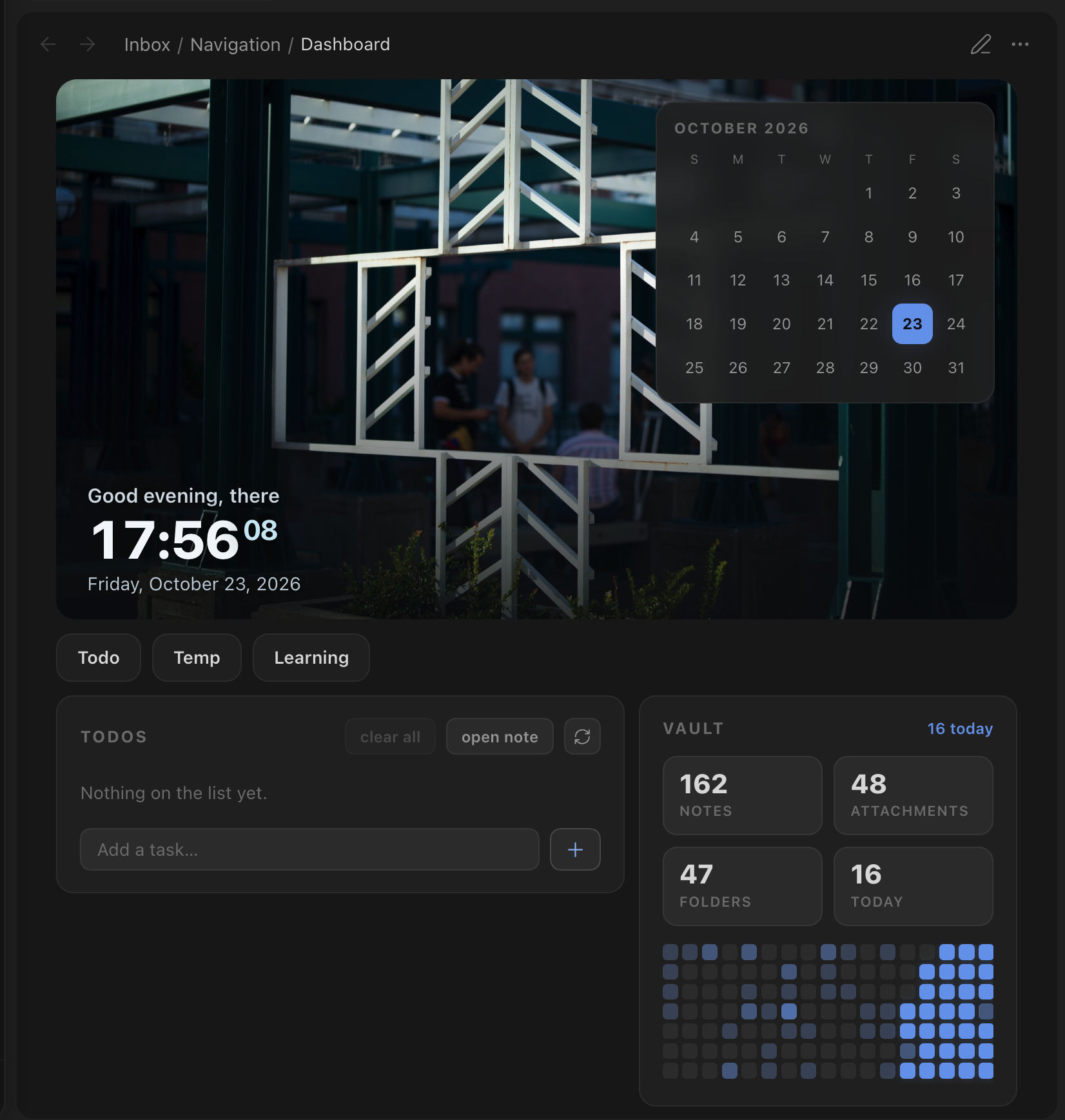
Turn any note into a home dashboard with a banner clock, a calendar, quick links, a Markdown-backed todo list and vault activity.
Simboard
A widget-based home dashboard for Obsidian. Drop a
simboard code block into any note and get:
- Banner: a wallpaper with a greeting, a live clock and today's date
- Calendar: the current month; days with a daily note get a dot and open the note on click (it floats over the banner)
- Quick links: a row of buttons that open your most-used notes
- Todos: a todo list backed by a plain markdown file. Add, check off, delete, drag to reorder; finished items are cleaned up after a few days
- Vault stats: note, attachment and folder counts, plus an 18-week activity heatmap
Colors come from your theme, so Simboard works with any community theme. There is also an optional high-contrast e-ink mode.
Simboard is desktop-only for now.
Usage
```simboard
```
An empty block shows the default widgets (set in Settings → Simboard). To pick widgets and their order, or to pass per-widget options, use YAML:
```simboard
widgets: banner, calendar, todos, vault-stats
name: Alex                # greeting name (else the note's `name` property)
banner:
  path: Attachments/wallpapers/   # overrides the banner image for this block
  ratio: 21 / 9
```
| Widget id | Layout |
|---|---|
banner | full width |
calendar | over the banner, otherwise a card |
quick-links | full width |
todos | card |
vault-stats | card |
Cards that are next to each other share a row and stack on narrow panes.
Commands
| Command | What it does |
|---|---|
| Simboard: Open dashboard | Opens the dashboard note (also on the ribbon icon). Reuses an open tab. |
| Simboard: Insert dashboard block | Inserts an empty simboard block at the cursor. |
| Simboard: Refresh dashboards | Re-renders every open dashboard. |
Set the dashboard note in the settings. If you leave it empty, the first note
that contains a simboard block is used.
Full-page dashboard
Add the simboard-home CSS class to the note. It hides the note's title and
properties and lets the dashboard use the full pane width:
---
cssclasses:
  - simboard-home
---
Todo file format
Todos are ordinary markdown checkboxes in one file (set it in the settings), written in the Tasks date format:
## Todos
- [ ] Write the report 📅 2026-10-23
- [x] Book flights 📅 2026-10-20 ✅ 2026-10-22
New todos go under the ## Todos heading. Finished todos stay in the file for
the keep period and are then removed.
Installation
Until Simboard is in the community plugin list, install it with
BRAT (zhezhou1106/obsidian-simboard),
or copy main.js, manifest.json and styles.css from the latest release into
<vault>/.obsidian/plugins/simboard/.
Development
npm install
cp .env.example .env.local   # set OBSIDIAN_VAULT to your vault
npm run dev                  # watch + build + sync into the vault + hot reload
npm run build                # type-check + one-off build (also syncs)
npm run lint                 # Obsidian's official review rules (eslint-plugin-obsidianmd)
npm run dev:test             # same as dev/build, but for the vault in .env.test.local
npm run build:test
With .env.local set, each build copies main.js, manifest.json and
styles.css to <vault>/.obsidian/plugins/simboard/. If the
Obsidian CLI is installed, the plugin is also
reloaded in the running app.
Project layout
src/
├─ main.ts                    plugin entry: services, code block, settings tab
├─ core/
│  ├─ types.ts                DashboardWidget / WidgetScope / WidgetContext
│  ├─ DashboardRenderer.ts    layout, per-widget refresh, holds, slots
│  └─ blockConfig.ts          parses the simboard code block (YAML)
├─ widgets/
│  ├─ registry.ts             list of available widgets
│  └─ <id>/<Name>Widget.ts    one folder per widget
├─ services/                  TodoStore, ActivityTracker, DailyNotesService
├─ settings/                  types, defaults, normalize (migrations), tab
├─ i18n/                      UI strings (en.ts) + t()
├─ utils/                     date / DOM helpers
└─ styles/                    index.css → base, layout, page, widgets/*, eink
Adding a widget
- Create
src/widgets/<id>/<Name>Widget.tsthat exports aDashboardWidget:collect(ctx)gathers data (it can be async)render(el, data, ctx, scope)builds the DOM withcreateElshouldRefresh(file)says which vault changes should refresh the widget
- Register it in
src/widgets/registry.ts. - Add
src/styles/widgets/<id>.css, import it fromsrc/styles/index.css, and scope every rule under.simboard. - Put any settings in their own group in
settings/types.ts,defaults.tsandnormalize.ts.
Releasing
npm version patch            # bumps package.json, manifest.json, versions.json
git push && git push --tags  # the Release workflow drafts a GitHub release
License
For plugin developers
Search results and similarity scores are powered by semantic analysis of your plugin's README. If your plugin isn't appearing for searches you'd expect, try updating your README to clearly describe your plugin's purpose, features, and use cases.