Supernovae Tab
approvedby sikoso774
A galaxy-themed new tab for Obsidian — animated starfield, space aesthetics, and your vault at the center of the universe. - This plugin has not been manually reviewed by Obsidian staff.
Supernovae Tab — Obsidian Plugin
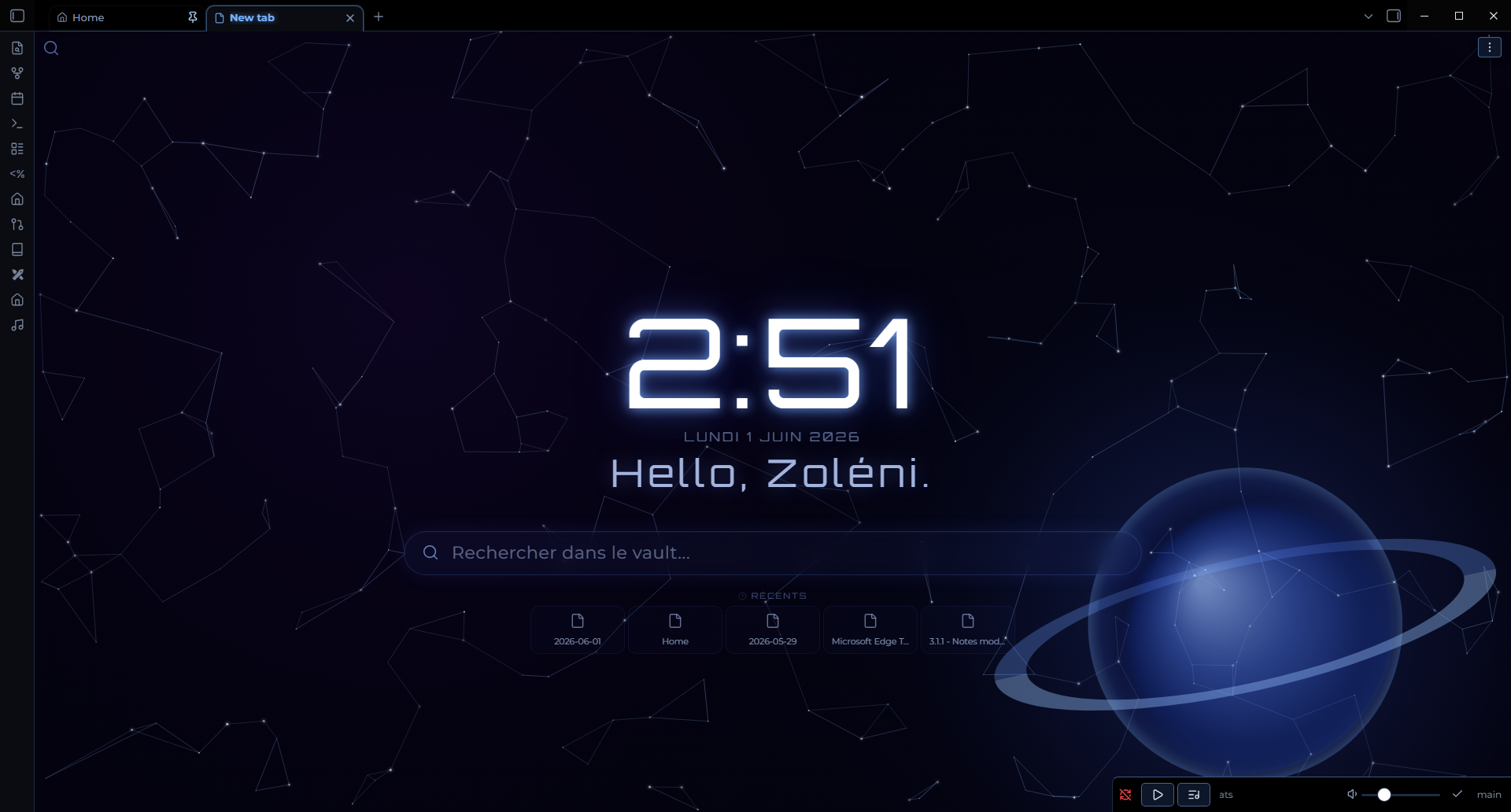
A galaxy-themed new tab experience for Obsidian. Every new tab opens an animated starfield with your time, greeting, search, recent files, and more — all floating in deep space.
Features
New Tab — Galaxy View
Every new empty tab is replaced by the galaxy view:
- Animated starfield — twinkling stars, a shooting star, and color nebulae (violet + blue)
- Constellation lines — stars connected to their nearest neighbors, softly pulsing
- Ringed planet — a blue gas giant with a perspective ring in the corner
- Live clock — large Orbitron display, 12h or 24h format
- Date — displayed below the clock
- Greeting — personalized message with time-of-day and your name
- Search bar — opens your preferred search plugin
- Recent files — your 5 most recently edited notes
- Bookmarks — from all bookmarks or a specific group
- Quote — a random quote from the built-in list or your own custom quotes

Home Dashboard
Create a note named Home.md in your vault. Whenever you open it, Supernovae Tab intercepts the navigation and displays a dedicated Home Dashboard instead:
- Same galaxy background as the new tab
- Navigation buttons — configurable links to your key notes and folders
- Recent files — your 5 most recently edited notes
- Active projects — automatically lists notes with
Type: Projectandstatus: activein their frontmatter - Tab protection — clicking any file from the Home Dashboard opens it in a new tab, preserving the Home view
Tip: Use
{{today}}as a navigation link path to automatically open today's daily note (formatYYYY-MM-DD).
A pencil button (✏️) in the view header lets you edit Home.md directly without leaving the dashboard workflow.
Mobile support
⚠️ Supernovae Tab is not stable on phones and tablets yet (iOS and Android): the animated view can exhaust the mobile app's memory.
Since 1.2.0 the plugin is disabled on mobile by default: it only keeps its settings tab there, and new tabs stay Obsidian's default. You can turn Settings → Supernovae Tab → Disable on mobile off at your own risk (restart the app to apply). Desktop is unaffected.
Installation
Via Community Plugins (recommended)
- Open Obsidian Settings → Community Plugins
- Search for Supernovae Tab
- Click Install, then Enable
Manual
- Download the latest release from GitHub Releases
- Copy
main.js,manifest.json, andstyles.cssinto your vault at.obsidian/plugins/supernovae-tab/ - Enable the plugin in Settings → Community Plugins
Settings
All settings are available under Settings → Supernovae Tab.
| Section | Options |
|---|---|
| Mobile | Disable the plugin on phones and tablets (on by default) |
| Search | Show/hide top-left search button and inline search bar; choose the search provider plugin |
| Time | Show/hide the clock; 12-hour or 24-hour format |
| Greeting | Your name (used via {{name}}); show/hide greeting; custom greeting text |
| Recent files | Show/hide the recent files section |
| Bookmarks | Show/hide bookmarks; display all bookmarks or a specific group |
| Home Dashboard | Edit the navigation links list |
| Quotes | Show/hide quotes; choose between built-in quotes, your own, or both |
Greeting placeholders
| Placeholder | Value |
|---|---|
{{greeting}} | Time-of-day greeting (e.g. Good morning) |
{{name}} | Your name from settings (fallback: explorer) |
Supported search providers
- Obsidian Core Quick Switcher
- Omnisearch
- Another Quick Switcher
- Quick Switcher++
Home Dashboard — Active Projects
Supernovae Tab automatically surfaces your active projects without any manual configuration. Just add this frontmatter to a note:
---
Type: Project
status: active
---
It will appear in the Active projects section of your Home Dashboard.
Credits
- Inspired by Beautitab by Andrew McGivery (MIT License) — architecture and plugin structure
- Font: Orbitron via Google Fonts
- Part of the Nebulux visual ecosystem
Reporting Issues
Open an issue on GitHub with as much detail as possible — Obsidian version, plugin version, and a screenshot if relevant.
License
MIT
For plugin developers
Search results and similarity scores are powered by semantic analysis of your plugin's README. If your plugin isn't appearing for searches you'd expect, try updating your README to clearly describe your plugin's purpose, features, and use cases.