New Tab
approvedby Marcus Breiden
Creates a customizable new tab view with beautiful backgrounds, quotes, search, and more. - This plugin has not been manually reviewed by Obsidian staff.
New Tab
A plugin for Obsidian that replaces the empty new-tab view with a customizable dashboard — beautiful backgrounds, a clock, a greeting, a quote, quick search, bookmarks, and recently edited files.
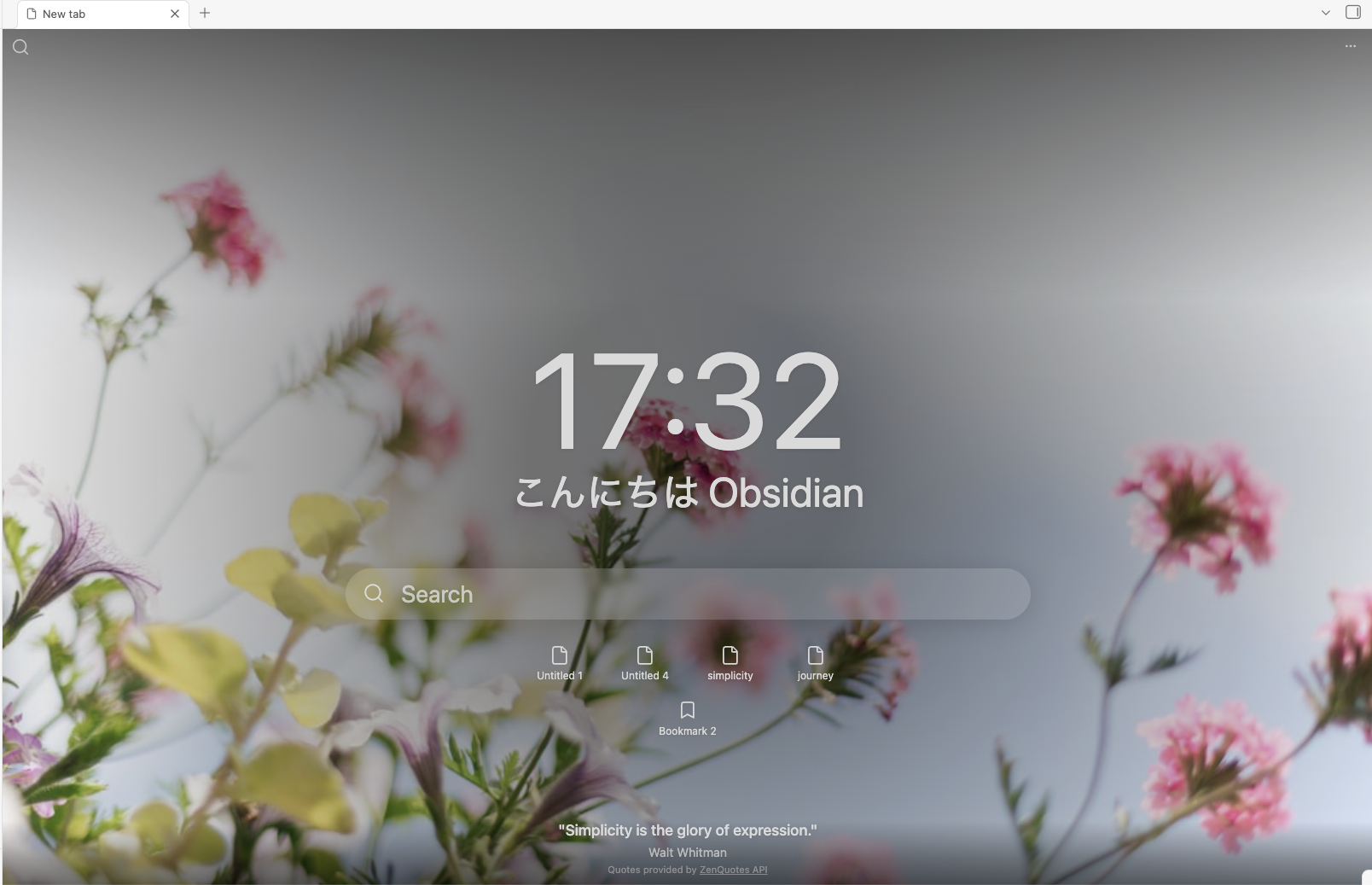
This is a personal version of, and derived from, obsidian-beautitab by Andrew McGivery (MIT). See Attribution.
Features
- Backgrounds — seasonal/holiday themes via Unsplash, your own local images, a custom URL, or transparent modes.
- Clock — 12- or 24-hour.
- Greeting — customizable and time-of-day aware, with markdown (
**bold**,*italic*) support, in 10 languages out of the box: English, Deutsch, Español, Français, Português, Italiano, Nederlands, Русский, 中文 (简体), and 日本語. - Quote — built-in online quotes (ZenQuotes) or your own custom quotes.
- Search — a top-left search button and an inline search box, each wired to a search provider of your choice.
- Bookmarks — from all groups or a specific group.
- Recent files — the five most recently edited notes.
- Text styles — give each element its own font, size, weight, italic, and color through reusable styles, with a system-font picker on desktop.
- Every element is individually toggleable and styleable from the settings tab, which is organized into a tab per element.
Install
New Tab is available in Obsidian's community plugin directory:
- Open Settings → Community plugins (turn off Restricted mode if it's on).
- Click Browse, search for New Tab, and choose the entry by Marcus Breiden.
- Click Install, then Enable.
Then open a new tab (Ctrl/Cmd + T) — the empty tab becomes the New Tab view. For pre-release (BRAT) installs, verifying, and updating, see docs/installation.md.
Migrating from BeautiTab
NewTab is derived from BeautiTab, so it can bring your existing BeautiTab configuration across in one click. When BeautiTab is set up in your vault, NewTab offers a one-time, opt-in, non-destructive import on first run — and leaves an Import from BeautiTab button in the settings tab if you dismiss it. See docs/migration.md for what carries over and what doesn't.
Documentation
Development
npm install
npm run dev      # esbuild watch (writes main.js + styles.css to the repo root)
npm run build    # typecheck + production build into build/
npm test         # vitest
npm run lint     # eslint (obsidianmd) + stylelint (scss)
To QA in a real Obsidian instance, this repo ships a test vault at test/NewTab/
with hot-reload. Open it as a vault and run:
DEPLOY_VAULT=1 npm run build
This mirrors the build into the vault's plugin folder with a dev-stamped version
so Obsidian reloads the bundle on every build. The canonical manifest.json is
never modified.
For user-facing guides — installation, configuration, usage, and known issues — see the docs/ directory.
Adding a greeting language
The {{greeting}} time-of-day phrase is translated per language in
React/Utils/greetings.ts. To add yours, add one
entry to GREETINGS (keyed by Obsidian's locale code, e.g. de) with the
morning/afternoon/evening phrases, plus a matching name in LANGUAGE_LABELS —
then open a PR. Nothing else needs to change; it appears in the Greeting
language dropdown automatically.
Privacy
New Tab is local-first and makes only a few optional, toggleable network requests (backgrounds, quotes). See PRIVACY.md.
Attribution
This plugin is derived from obsidian-beautitab by Andrew McGivery, used under the MIT License. Background images are served by Unsplash; built-in online quotes come from the ZenQuotes API.
Special thanks to Mara-Li, whose maintained fork Mara-Li/obsidian-beautitab fixed many of the issues in the original plugin — it's the version I ran until building New Tab, and several of her fixes informed this one.
License
MIT © Marcus Breiden
For plugin developers
Search results and similarity scores are powered by semantic analysis of your plugin's README. If your plugin isn't appearing for searches you'd expect, try updating your README to clearly describe your plugin's purpose, features, and use cases.