by SunnyYYLin
A lightweight tree-aware task manager with Tasks-compatible emoji metadata.
TaskLite
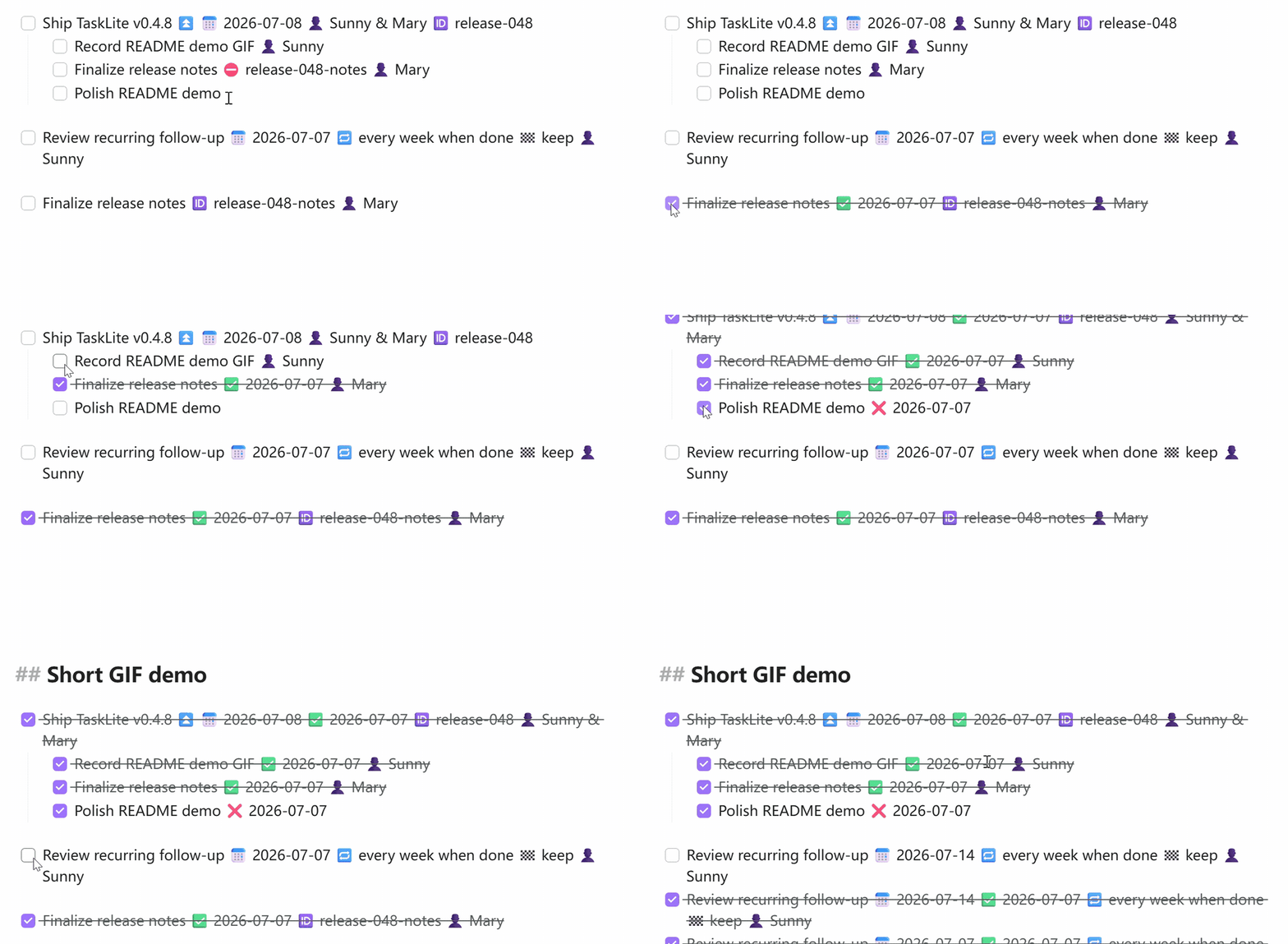
TaskLite is a lightweight, tree-aware Obsidian task plugin compatible with the Tasks plugin's emoji metadata format. It focuses on editing and rendering standard Markdown task lines.
Features
- Tasks-compatible emoji metadata (dates, recurrence, priority, assignee, etc.)
- Tree-aware toggling: finish/unfinish cascades to children and bubbles to parent
- Recurring tasks with automatic next occurrence creation
- Automatic done/cancelled dates
- Live Preview checkbox interception
@emoji input suggestions on task lines- Best-effort import of custom status settings from the Tasks plugin
- External task reconciliation (detects checkbox changes from other plugins)
tasks: ignorefrontmatter to exclude files from scanning
Task Line Format
- [ ] Task description ⏳ 2026-01-01 📅 2026-01-15 🔁 every week 👤 Mary
Supported Emoji Fields
| Emoji | Field | Example |
|---|---|---|
| 🔺 | Priority: highest | 🔺 |
| ⏫ | Priority: high | ⏫ |
| 🔼 | Priority: medium | 🔼 |
| 🔽 | Priority: low | 🔽 |
| ⏬ | Priority: lowest | ⏬ |
| 🛫 | Start date | 🛫 2026-01-01 |
| ➕ | Created date | ➕ 2026-01-01 |
| ⏳ | Scheduled date | ⏳ 2026-01-01 |
| 📅 | Due date | 📅 2026-01-15 |
| ✅ | Done date | ✅ 2026-01-10 |
| ❌ | Cancelled date | ❌ 2026-01-10 |
| 🔁 | Recurrence | 🔁 every week |
| 🏁 | On completion | 🏁 delete |
| ⛔ | Depends on | ⛔ task-id |
| 🆔 | Task ID | 🆔 my-task |
| 👤 | Assignee | 👤 Mary |
Supported Recurrence Rules
every day,every week,every month,every yearevery N days,every N weeks,every N months,every N yearsevery weekdayevery week on Monday,every week on Fridayevery month on the 1stevery day when done(recurrence relative to completion date)
Ignoring Files
Add tasks: ignore to a file's YAML frontmatter to exclude it from TaskLite scanning:
---
tasks: ignore
---
File-level Tasks (Frontmatter Tasks)
You can turn an entire file (like a project note or a daily note) into a single task. This is particularly useful for tracking high-level projects or notes that themselves represent a task.
To enable this, add task: true (or a status symbol) to the file's YAML frontmatter:
---
task: true
description: "Review quarterly roadmap"
status: " "
priority: "⏫"
due: "2026-06-30"
assignee: "Alice & Bob"
---
Supported Frontmatter Fields
task: Set totrue(or any truthy value) to enable the file task.status: The status symbol (e.g." "for todo,"x"for done) or keywords (e.g.,todo,done,in-progress,cancelled). Keywords are case-insensitive and format-preserving. Status symbols with spaces (like" ") should be quoted.description: The task description. If omitted, the file's basename will be used.priority: Task priority. Supports emoji (🔺,⏫,🔼,🔽,⏬) or keyword (highest,high,medium,low,lowest).due/scheduled/start/created/done/cancelled: Dates inYYYY-MM-DDformat.recurrence: Recurrence rules (e.g.,every week).assignee/person: The person assigned (supports array or a single string with names separated by&).onCompletion: On-completion actions (deleteorkeep).id: Unique task ID.dependsOn: Depends on task IDs.
Body Tasks Connection
Any root-level task lines (indented at depth 0, i.e. not indented under another list item) within the body of a file-task note are automatically treated as subtasks of the file task.
- Toggling the status of a file task can cascade status changes to all list tasks in its body (depending on settings).
- Completing all list tasks in the body can bubble up to automatically complete the file-level task (depending on settings).
Creating Tasks & Task Syntax
A task in TaskLite is a standard Markdown checklist item (e.g., - [ ]) followed by a description and metadata emojis.
Task Emojis & Fields
Append these emojis to your task description to add metadata:
- 📅 Due Date:
📅 YYYY-MM-DD(e.g.,📅 2026-06-30) - ⏳ Scheduled Date:
⏳ YYYY-MM-DD(e.g.,⏳ 2026-06-25) - 🛫 Start Date:
🛫 YYYY-MM-DD(e.g.,🛫 2026-06-20) - ➕ Created Date:
➕ YYYY-MM-DD(automatically added upon creation) - 🔁 Recurrence:
🔁 <rule>(e.g.,🔁 every week,🔁 every weekday,🔁 every 2 days) - 👤 Assignee:
👤 <name>or👤 <name1> & <name2>(e.g.,👤 Mary,👤 Alice & Bob) - 🏁 On Completion:
🏁 deleteor🏁 keep(controls whether a recurring task is deleted/kept on completion) - 🆔 Task ID:
🆔 <id>(for task dependency identification) - ⛔ Depends On:
⛔ <id>(specifies parent/dependent tasks) - Priority: Add one of the following priority emojis at the end of the task line:
- Highest:
🔺 - High:
⏫ - Medium:
🔼 - Low:
🔽 - Lowest:
⏬
- Highest:
Indentation and Subtasks (Tree Structure)
TaskLite is tree-aware. Simply indent your list items using tabs or spaces to create subtasks:
- [ ] Parent task
    - [ ] Subtask 1 (completes automatically when Parent task is finished)
    - [ ] Subtask 2
Quick Input with Emoji Auto-Suggest
When typing a task line, type @ to open the emoji auto-suggest menu, allowing you to quickly insert date placeholders, priority symbols, assignees, or recurring rules.
Commands
| Command | ID | Description |
|---|---|---|
| Toggle task | toggle-task | Cycle through task states (todo → done → todo) |
| Toggle task cancellation | toggle-task-cancellation | Cycle through cancellation states |
| Cancel task | cancel-task | Mark task as cancelled |
| Uncancel task | uncancel-task | Restore cancelled task |
| Import status settings | import-tasks-status-settings | Import from Tasks plugin |
Development
bun install          # Install dependencies
bun test             # Run tests
bun run build        # Production build (tsc + esbuild)
bun run dev          # Development mode (watch)
bun run lint         # ESLint check
Release
Push a tag matching x.y.z to trigger automatic GitHub release:
bun pm version patch # Bumps version in manifest.json and versions.json
git push && git push --tags
License
0BSD
For plugin developers
Search results and similarity scores are powered by semantic analysis of your plugin's README. If your plugin isn't appearing for searches you'd expect, try updating your README to clearly describe your plugin's purpose, features, and use cases.