by yujia
Collect every task in the vault into one note, grouped by status and by source note, with four checkbox states and a hide button that never edits your notes.
Todo Overview
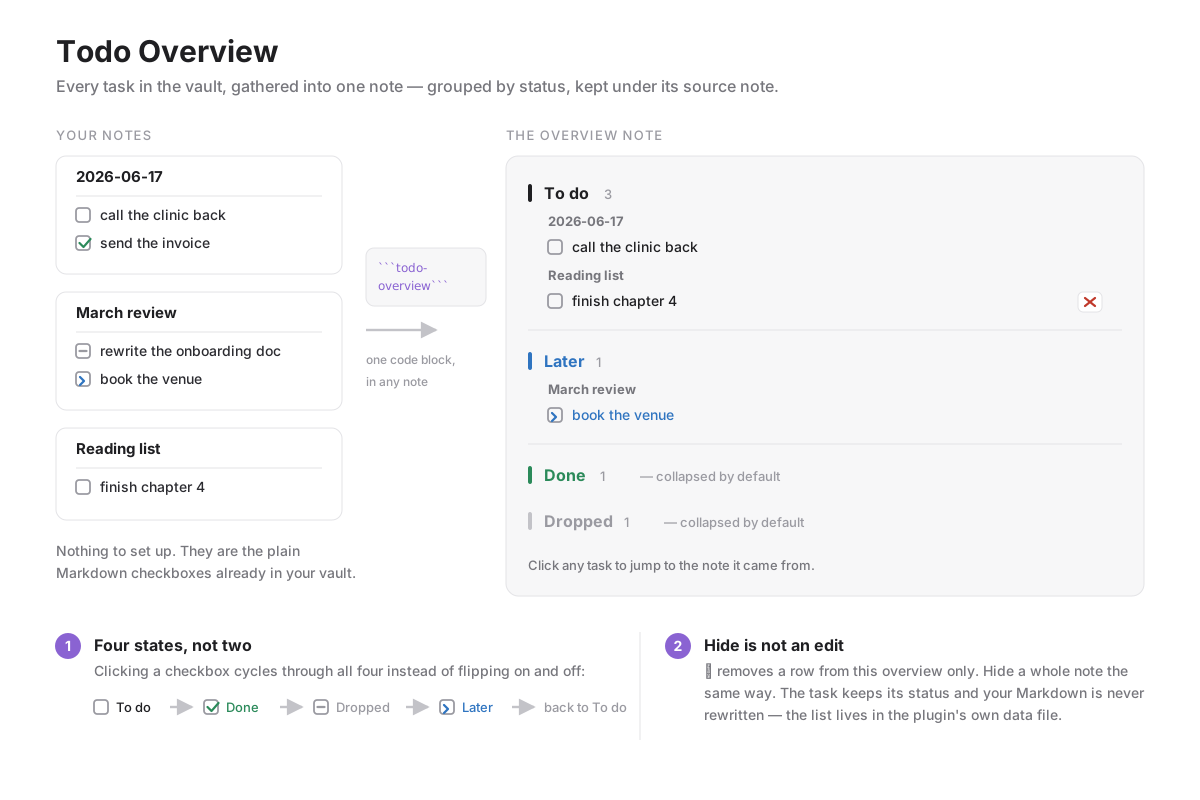
Collect every task in your vault into one note, grouped by status and kept under the note it came from. No front matter, no tags, no separate task syntax — it reads the plain Markdown checkboxes you already write.
Usage
Put this code block in any note:
```todo-overview
```
That note becomes the overview. Every other Markdown file in the vault is scanned for checkbox lines, and the results are grouped into four statuses, then by source note. To do and Later start expanded; Done and Dropped start collapsed. Clicking a task opens the note it came from.
Four states, not two
Obsidian's checkbox flips between empty and x. This plugin cycles through four, both when you click a checkbox in a note and through the command Cycle the task status on this line (give it a hotkey in Settings → Hotkeys; it applies to every line in the selection):
| Markdown | Status |
|---|---|
- [ ] | To do |
- [x] | Done |
- [-] | Dropped |
- [>] | Later |
These are ordinary characters inside the checkbox, so the notes stay readable, stay valid Markdown, and keep working if you ever disable the plugin.
Hiding is not editing
Some tasks do not need to be done and do not deserve to be marked done — they just do not belong in the overview. The ✕ on a row hides that one task; Hide this note hides everything from one file. Either way the task keeps its status and nothing is written to your notes: the hidden list lives in the plugin's own data.json. Press Hidden (n) in the toolbar to see what is hidden and restore any of it.
Notes
- The overview is built on demand when the block renders. Use Refresh after editing tasks elsewhere.
- The note holding the block is skipped, so the overview never lists itself.
- Reading every Markdown file is how the overview is assembled; nothing leaves your vault and no network access is used.
- The interface follows Obsidian's own language setting: Chinese when the app is in Chinese, English everywhere else.
Installing
Community plugins → Browse → search for Todo Overview.
Manually: download main.js, manifest.json and styles.css from the latest release into <vault>/.obsidian/plugins/todo-overview/, then enable it in Settings.
Development
npm install
npm run dev     # watch build into main.js
npm test        # smoke test against a stubbed Obsidian API
npm run build   # production build
Releases are built by GitHub Actions from a version tag and signed with build provenance.
License
MIT
For plugin developers
Search results and similarity scores are powered by semantic analysis of your plugin's README. If your plugin isn't appearing for searches you'd expect, try updating your README to clearly describe your plugin's purpose, features, and use cases.