by chilipeppers
Pull Google Analytics 4, Google Search Console, Plausible and PostHog traffic metrics into your notes, with daily note automation.
Traffic Recap
⭐ If Traffic Recap saves you time, a star helps other marketers, SEOs and indie makers find it. Found a bug or have an idea? Open an issue.



Your Google Analytics 4, Google Search Console, Plausible and PostHog metrics, right inside Obsidian.
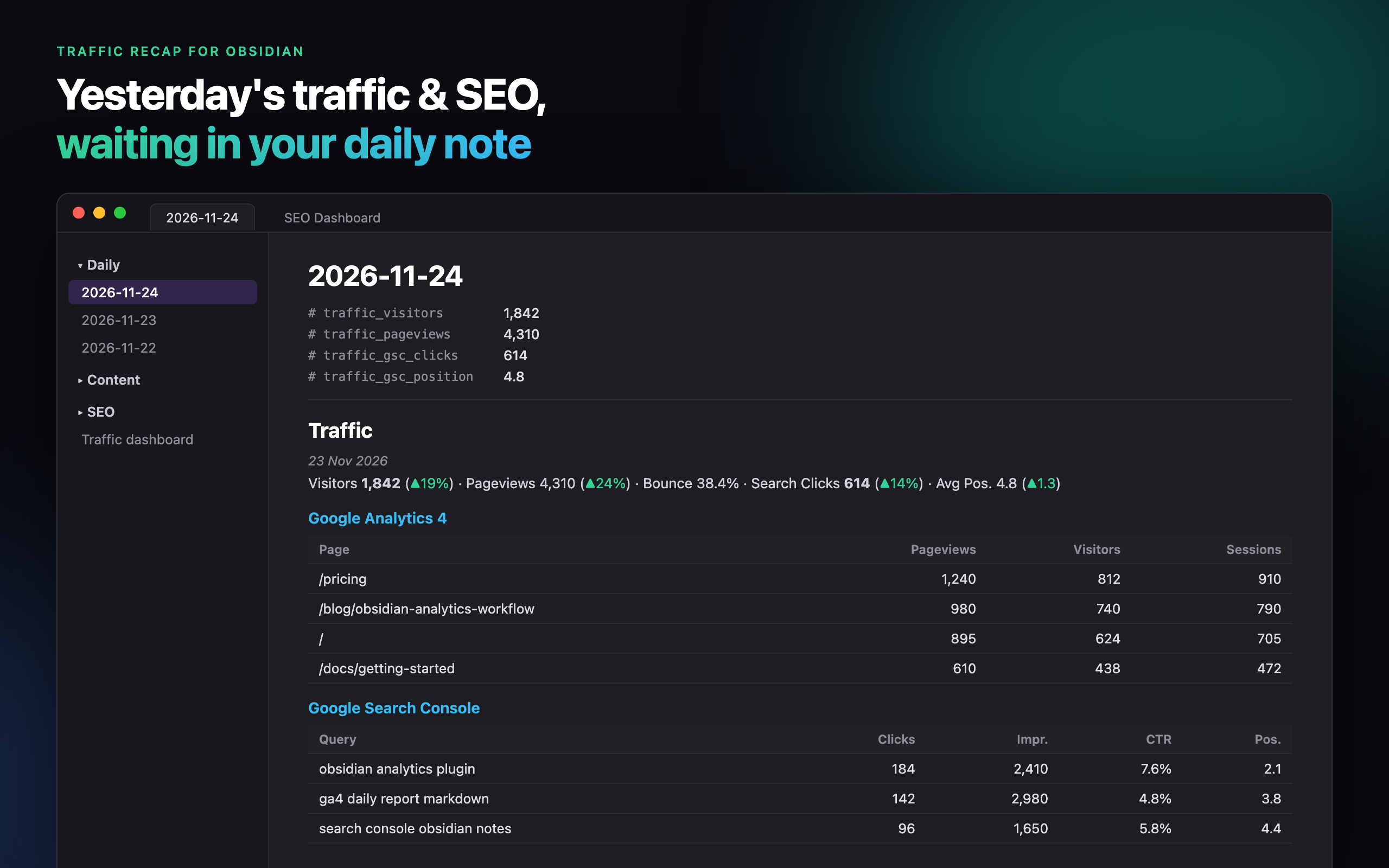
Traffic Recap pulls website visitors, pageviews, top pages and Search Console queries into clean Markdown tables and daily note properties — ready to chart with Obsidian Bases or Dataview.
Features
- Google Analytics 4 (GA4): active users, sessions, pageviews, bounce rate, key events and top pages
- Google Search Console (GSC): clicks, impressions, CTR, average position (with ▲/▼ position delta), top queries and optional lag-day offset
- Plausible Analytics: visitors, pageviews, bounce rate, visit duration and top pages (Cloud or self-hosted)
- PostHog: unique visitors, sessions, pageviews and top paths via HogQL (US, EU or self-hosted)
- Daily note automation: works with core Daily notes and Periodic Notes
- Note properties:
traffic_visitors,traffic_sessions,traffic_pageviews,traffic_bounce_rate,traffic_gsc_clicks,traffic_gsc_impressions,traffic_gsc_ctr,traffic_gsc_position - Live block: embed a
traffic-recapblock with Refresh, Copy,filterandlimitoptions - Secret Storage: supports Obsidian 1.11.4+ built-in Secret Storage so tokens stay out of
data.json - Works on mobile & includes Demo mode
Live block
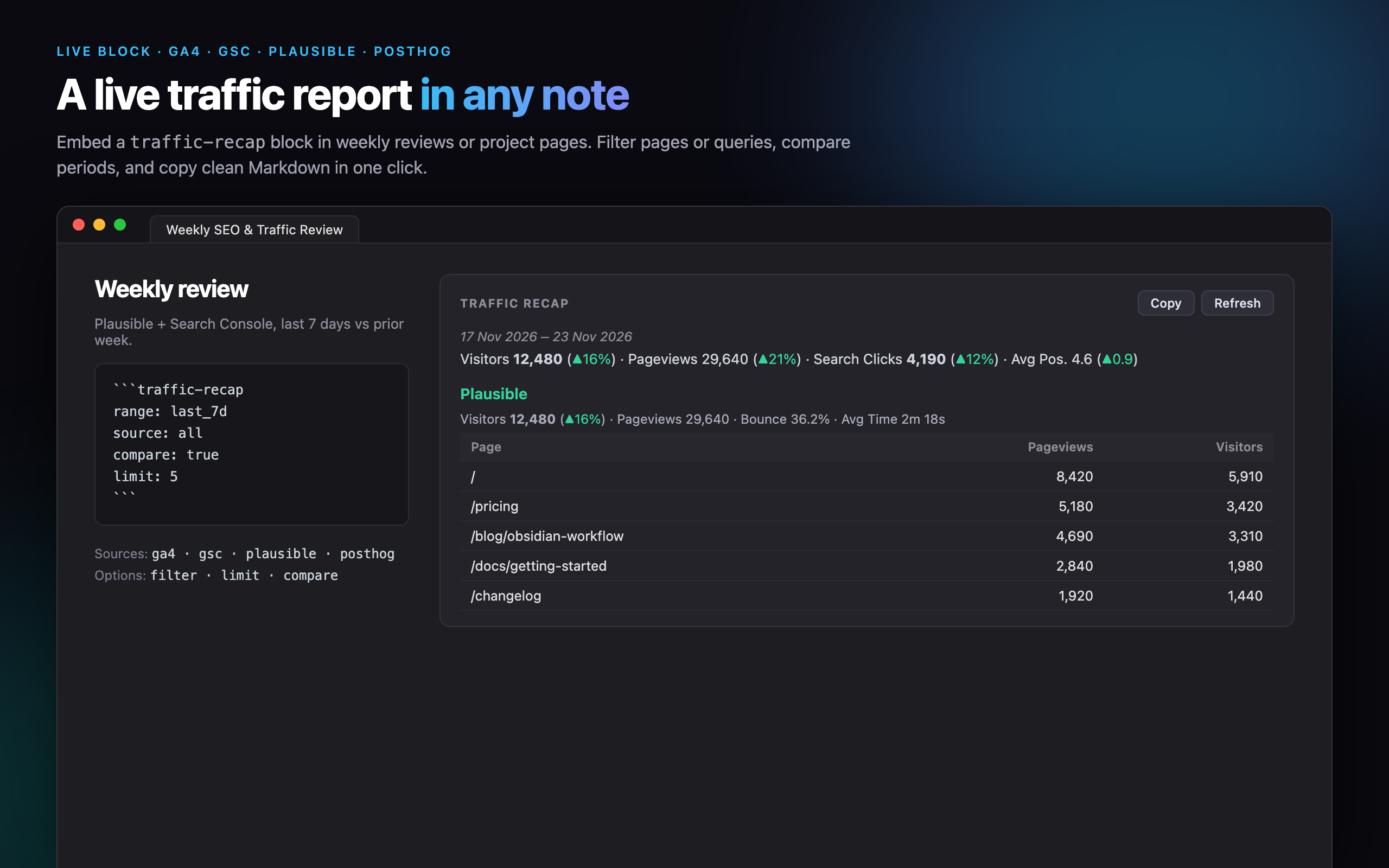
```traffic-recap
range: last_7d
source: all
compare: true
```
Options:
range:today,yesterday,last_7d,last_14d,last_30d(anylast_Nd),this_month,last_month,YYYY-MM-DD, orYYYY-MM-DD..YYYY-MM-DDsource:all,ga4,gsc,plausibleorposthogcompare:trueorfalsefilter: optional case-insensitive substring filter on page path or querylimit: optional maximum rows per table
Privacy
- Requests go only to
oauth2.googleapis.com,analyticsdata.googleapis.com,www.googleapis.com, your Plausible host and your PostHog host. - On Obsidian 1.11.4+, secrets can be stored in Obsidian's built-in Secret Storage outside
data.json.
Install
Install manually by copying main.js, manifest.json and styles.css from the latest release to <vault>/.obsidian/plugins/traffic-recap/ and enabling the plugin.
License
MIT © 2026 David (chi-li-peppers)
For plugin developers
Search results and similarity scores are powered by semantic analysis of your plugin's README. If your plugin isn't appearing for searches you'd expect, try updating your README to clearly describe your plugin's purpose, features, and use cases.