by UNcore
Use an AI assistant to search, understand, and update your Obsidian notes—with clear controls over what it can change.
UNagent
Use an AI assistant to search, understand, and update your Obsidian notes—with clear controls over what it can change.
Connect your own model provider and API key; UNagent sends requests directly to that provider. See Data and safety for what leaves Obsidian and how file changes are reviewed.
中文文档 · Install from Obsidian · Releases and update notes
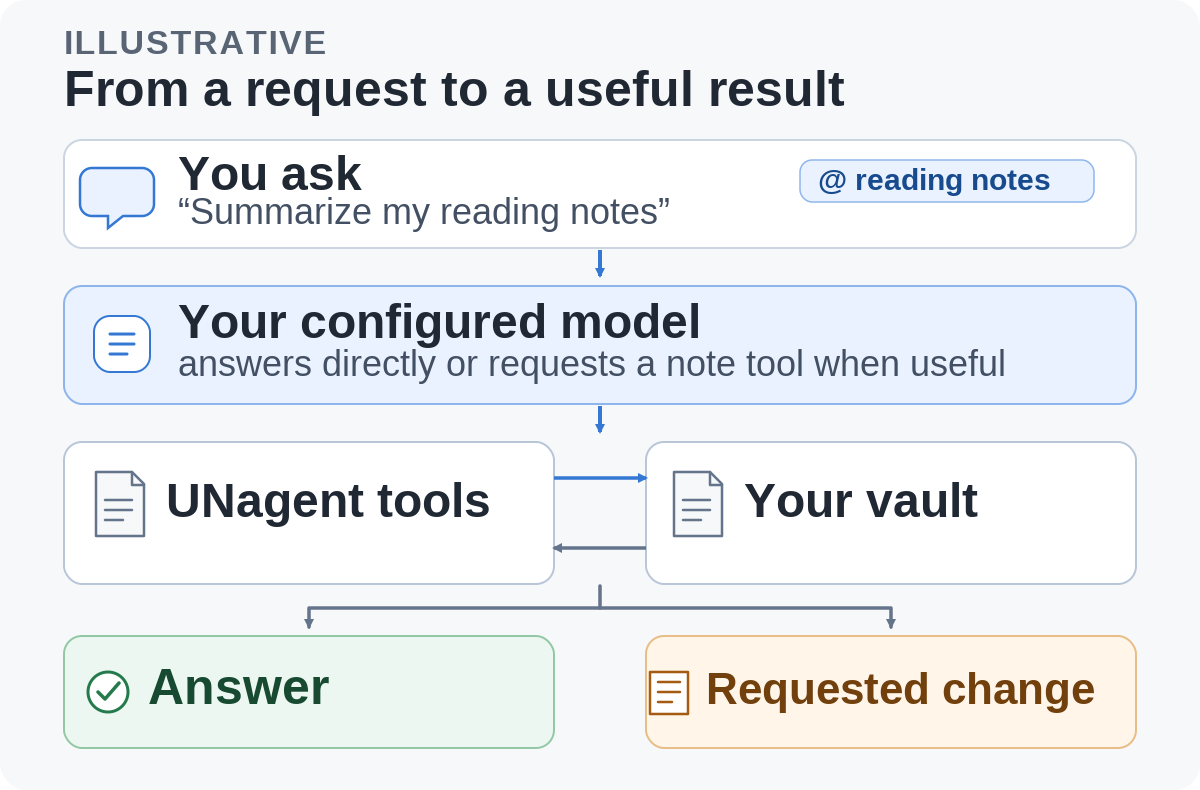
Illustrative flow. A request does not always call a tool; file review follows the action and approval mode.
What you can do
- Ask questions about your notes. Search and read Markdown notes, then discuss the results with the model. Optional semantic search uses a remote embedding service and keeps its vector cache in the vault.
- Make changes with review. In the default and automatic approval modes, create and edit actions run first and appear as cards you can accept or reject; edits include a diff. Moves and deletions ask first. In no-ask mode, managed edits and deletions run without an extra prompt. Supported edits and deletions can be undone from a saved snapshot.
- Bring the assistant to your current work. Open the chat, or use the Quick Composer over a note, Canvas, Excalidraw, PDF, or a UNreader book/article view. The Quick Composer sends into the same conversation as the chat.
- Choose your interface language. UNagent follows Obsidian's language by default. To set it manually, open Settings → UNagent → General → Language & appearance → Language mode and choose English mode or Chinese mode.
- Reference related material. In the composer,
@selects notes,@@folders, and@@@tags. If UNreader or UNmemos is installed, entry rows also let you select RSS articles or memo cards. - Manage UNcore plugins directly. With current UNreader, UNagent can manage feeds and articles, read/star/save state, books and shelf categories, progress lookup, and highlights/bookmarks through UNreader's supported automation API. UNmemos management now includes permanent deletion by exact memo ID, in addition to search, creation, editing, batch updates, relations, and layout.
- Read more than notes.
book_readreads EPUB, FB2, MOBI, AZW3, and TXT files.fetch_urlconverts a web page to Markdown. Neither is a general PDF or office-document reader. - Collaborate across conversations. Start a new chat immediately; ordinary existing and new chats can collaborate on demand. Reference them from the
@conversation entry, or explicitly ask them to perform a task. Each chat retains its own model and workspace; inserting a reference alone does not start a task. - Learn with
teach. This optional preset builds a learning workspace with short lessons, practice and learning records. It is enabled by default; your existing skill with the same name takes priority. - Add optional guidance and tools. Skills are plain-text guides. Remote MCP servers can add tools, but they are optional and should only be connected when trusted.
Quick start
UNagent uses your own model account. Provider usage fees, if any, are billed by that provider.
1. Install
Recommended: in Obsidian, open Settings → Community plugins → Browse, search for UNagent, then choose Install and Enable.
To install or update manually, download the three files from the latest GitHub Release and place them in your vault:
<your vault>/.obsidian/plugins/unagent/
├── main.js
├── manifest.json
└── styles.css
In Obsidian, go to Settings → Community plugins, enable UNagent, then open it from the ribbon icon or the Open UNagent chat command.
2. Connect a model
Open Settings → UNagent → Models → + Add provider. Choose OpenAI-compatible, Anthropic, or OpenAI Responses; enter the provider's API key; then add a model name. The default API address is filled in for the selected protocol and can be changed.
3. Start with one request
For example: “Search my notes about reading and summarize the main ideas.” You can switch models with /model, set reasoning with /think, or choose a search mode with /search.
In the default and automatic approval modes, create/edit actions appear in a review card after they run. Read the approval and security boundaries before using tools that change files or call remote services.
Optional external agents
For Codex or Claude Code on the same computer, open Settings → UNagent → Connections → External AI communication. Install the separate UNagent Connect 0.2.1 package and follow its installation and pairing guide. The Hub requires Node.js 22.13 or newer. Automatic execution is off by default and requires explicit setup; pairing does not launch an agent. The original manual bridge remains supported. Phone/tablet access to a computer’s local Hub is not supported.
The optional WeChat connection is configured under Settings → UNagent → Connections → WeChat connection on a computer. Scan with WeChat and chat through ClawBot. The first connection creates an editable sub-agent for WeChat research and knowledge-base questions. Select its model, thinking strength and search mode in WeChat settings; these choices apply to new WeChat tasks on this device. The computer and Obsidian must remain running. Send images or files to save them to the vault and get a receipt. Send /发文件 file-name to receive a copy of an existing vault file as a WeChat attachment. For duplicate names, the bot asks for the full vault-relative path. Files are limited to 25 MB each. With UNmemos hosting the bot in combined mode, update both plugins and route incoming files to UNagent when you want AI to handle them. Send /全文 to expand a long answer in WeChat. Reading the contents of an attachment depends on its format and the configured model. Tool approvals remain in Obsidian. Binding may replace a previous WeChat bot connection.
Data and safety
- Your model provider receives the conversation context it needs. This can include note excerpts and tool results. UNagent does not provide a proxy, account, telemetry, or analytics service.
- Collaboration shares the task and necessary context with its recipient. This can include selected notes and results sent to that recipient’s configured model provider. Ordinary existing and new chats are discoverable and readable by connected participants without a per-chat switch. Referencing or reading a chat does not start a task; delegation requires an explicit execution request. External connections use authenticated local HTTP; do not pair untrusted agents. Approvals remain with the user in the receiving application, and interrupted work is not replayed automatically.
- API keys use Obsidian Keychain by default. Keychain values stay on the current device and do not travel with vault sync or backups. An explicit per-credential “synced plaintext fallback” remains available for users who accept that risk; in that mode the credential is written to the vault's
data.json. - Network use is optional by feature. Model requests go to your configured provider. Semantic search uses a remote embedding API if enabled. MCP calls go to servers you add.
fetch_urlsends the requested URL to that website, and the page text can then enter the model context. - WeChat is optional. When connected, messages and replies pass through Tencent's WeChat service and conversation context goes to your configured model provider. The connection credential, message-processing queue and reply context are stored in plaintext in this device's Obsidian local storage, outside the vault; chat and task history are saved by UNagent in the configured vault data folder. Disconnecting removes the connection credential but does not delete conversation or task history. Do not share device storage with untrusted users.
- Conversation memory is local by default. After the chat runtime first starts, saved chats are organized in the background while Obsidian remains open, even if the chat panel is later closed. Original serializable messages, including full tool output held in memory before normal chat-history trimming, are stored separately under
<aiFolder>/memory-v1; credentials and inline base64 attachments are omitted. Local summaries and search do not use the network. If “Use the model to refine summaries” is enabled, up to 10,000 characters from that saved chat are sent to your configured model provider in one request (output capped at 240 tokens); provider charges may apply. The model receives no tools. Turning off automatic organization pauses queued work; deleting a conversation removes its archive, summaries, index entry, and queue item. Previously trimmed legacy chats are best-effort and cannot regain text that was already lost. fetch_urlblocks loopback, private-network and common local addresses. It checks the final URL after redirects, refuses binary files and non-HTTP(S) schemes, and marks page content as untrusted reference data.- Skills are instructions, not programs. Their text is added to the model context, so use skills only from sources you trust.
- MCP servers are remote and outside the vault's undo system. Their annotations are supplied by the server and are not proof that a tool is safe. Connect only servers you trust.
- Deletion follows one approval setting. Note, folder, conversation, memo, feed, category, annotation, and MCP server deletion use the current UNagent approval mode. The running conversation cannot delete itself, and conversations with active work are refused. Memo and UNreader deletions do not cross into unrelated files. Folder undo remains limited to text files and at most 200 files / 500 KB.
- Desktop-only shell access:
run_commandruns commands on your computer and is available only on desktop. Every command shows its full text and requires confirmation. Child processes inherit only a small allowlist of environment variables, and common token shapes are redacted from output before it enters the model context.
Compatibility and limits
- The release manifest declares Obsidian 1.11.4 as the minimum app version and is not desktop-only.
- Chat and vault tools are available on mobile and desktop.
run_commandis desktop-only; the WeChat connection runs on a desktop computer, with WeChat available on your phone. - Version 1.4.0 passed the full automated test suite, type checking, review-equivalent lint and production build. Live-model evaluation and physical-device acceptance on phones and tablets remain unverified.
- Vault search covers Markdown notes. It does not search inside images, PDFs, or ebooks.
book_readsupports EPUB, FB2, MOBI, AZW3, and TXT. DRM-protected books are not supported. PDF and Office documents are not read by UNagent.- UNreader article references and UNmemos card references appear only when the corresponding plugin provides its data.
Releases and source
Obsidian delivers plugin updates through its official Community plugin channel. See GitHub Releases for published versions and their update notes.
More from UNcore
- UNreader — Read ebooks and manage RSS feeds inside Obsidian.
- UNmemos — Capture short notes as native Canvas cards, stored locally.
License
UNcore Source Available License — source-visible, not an open-source license. Reading and auditing the source is permitted for Obsidian's plugin review and personal learning or research. Commercial use, modification, redistribution, and republishing require prior written permission. The Community directory marks the listing as privately source-reviewed; the public repository contains a minified main.js, while the source is kept in a private repository for review. See LICENSE. The bundled teach preset is adapted from Matt Pocock’s skills under the MIT license; its attribution and license are included in the preset and LICENSE.
中文文档
在 Obsidian 里用 AI 搜索、理解和整理笔记,并清楚掌握它能改什么。
连接你自己的模型服务和 API Key;UNagent 会直接向该服务发送请求。关于哪些内容会离开 Obsidian、文件改动如何复核,请先看数据与安全边界。
English · 从 Obsidian 安装 · 版本与更新说明
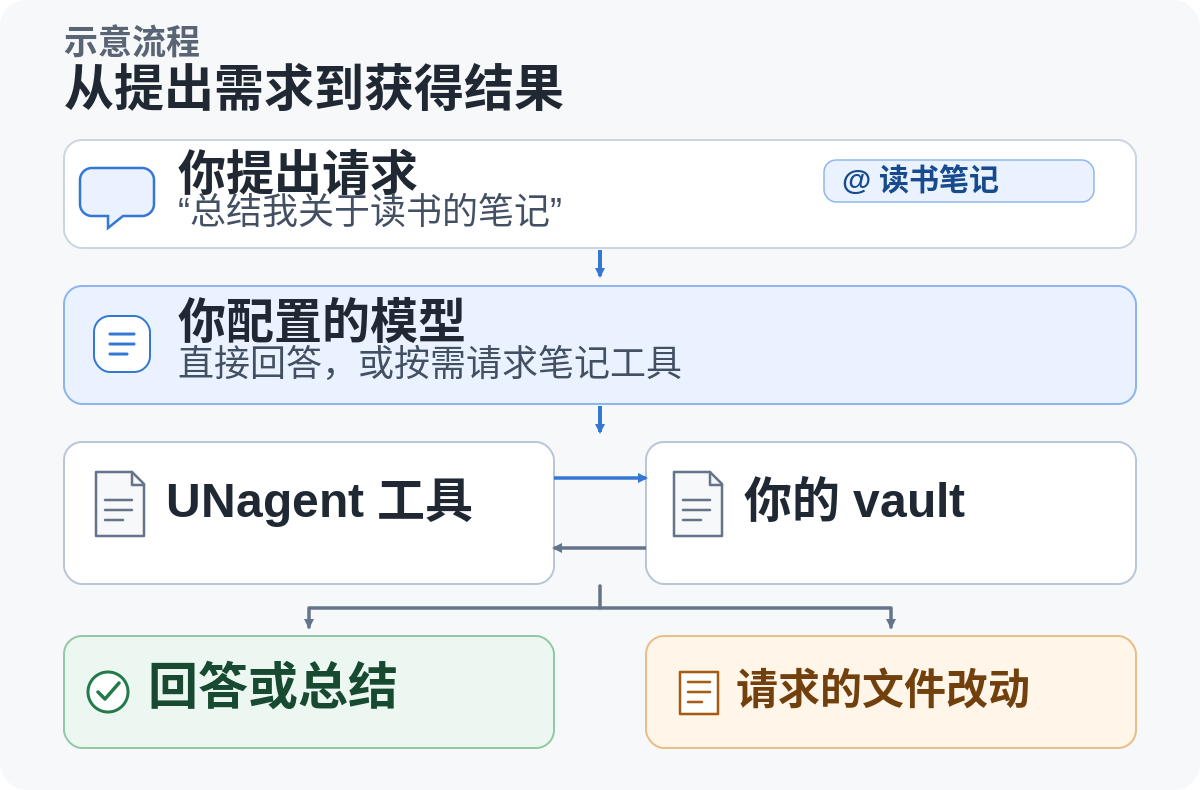
示意流程:每次请求不一定调用工具;文件复核方式取决于动作和审批模式。
能做什么
- 围绕笔记提问。 搜索、阅读 Markdown 笔记,再和模型讨论结果。可选语义检索会使用远程向量服务,并把向量缓存保存在 vault 中。
- 改动有确认。 默认和自动审批模式下,新建与编辑动作执行后会显示卡片供你接受或拒绝;编辑卡片带差异对比。移动和删除会先询问;切到免询模式后,受管理的编辑与删除不再额外弹窗。支持的编辑和删除可以通过保存的快照撤销。
- 在当前页面快速提问。 可以打开对话面板,也可以在笔记、Canvas、Excalidraw、PDF 或 UNreader 的书籍/文章页面上打开正文快速输入框。它和对话面板共用同一段会话。
- 选择界面语言。 默认跟随 Obsidian 的语言;也可以在设置 → UNagent → 通用 / General → 语言与外观 / Language & appearance → 语言模式 / Language mode中选择英文模式 / English mode或中文模式。
- 引用相关内容。 输入框里用
@找笔记、@@找文件夹、@@@找标签。安装 UNreader 或 UNmemos 后,还能从入口行选择 RSS 文章或卡片。 - 直接管理 UNcore 插件。 新版 UNreader 接入后,UNagent 可以管理订阅和文章、已读 / 星标 / 保存状态、书籍和书架分类、阅读进度查询、高亮与书签;UNmemos 则在原有查找、创建、修改、批量整理、关联和布局之外,新增按精确 memo ID 永久删除。
- 读取网页和电子书。
book_read支持 EPUB、FB2、MOBI、AZW3、TXT;fetch_url把网页转成 Markdown。它们都不是通用 PDF 或办公文档阅读器。 - 让多个对话协作。 新建后直接聊天,普通新旧对话都可按需参与协作。可从
@的「对话」入口引用它,也可明确要求它接收任务。各对话保留自己的模型与工作范围;插入引用本身不会派任务。 - 用
teach持续学习。 通过短课、练习和学习记录建立学习工作区。该预设默认开启、可以关闭;你已有的同名技能优先。 - 按需扩展。 Skill 是纯文本操作指南;远程 MCP 服务可以增加工具,但都是可选项,只连接你信任的服务。
快速上手
UNagent 使用你自己的模型账户;如服务商收费,费用由服务商收取。
1. 安装
推荐方式:在 Obsidian 打开设置 → 第三方插件 → 浏览,搜索 UNagent,然后点击安装和启用。
如需手动安装或更新,从最新 GitHub Release下载三个文件,放到 vault:
<你的 vault>/.obsidian/plugins/unagent/
├── main.js
├── manifest.json
└── styles.css
然后在 Obsidian 设置 → 第三方插件中启用 UNagent,通过左侧栏图标或命令面板里的 Open UNagent chat 打开。
2. 连接模型
打开 设置 → UNagent → 模型 → + 添加厂商。选择 OpenAI 兼容、Anthropic 或 OpenAI Responses 协议,填写服务商 API Key,再添加模型名称。选择协议后会预填 API 地址,你也可以修改。
3. 试着提出一个请求
例如:“搜索我关于读书的笔记,并总结主要观点。”你可以用 /model 切换模型、用 /think 设置思考强度、用 /search 选择检索模式。
默认和自动审批模式下,新建/编辑动作执行后会进入复核卡片。使用会改文件或访问网络的工具前,请先阅读审批与安全边界。
可选的外部 AI 通讯
需要连接同一台电脑上的 Codex 或 Claude Code 时,打开设置 → UNagent → 连接 → 外部 AI 通讯,安装独立的 UNagent Connect 0.2.1 通讯包,按包内说明安装与配对。Hub 需要 Node.js 22.13 或更新版本;自动执行默认关闭,需明确配置,配对本身不会启动外部 Agent。原有手动桥接仍保留。不支持手机/平板连接电脑上的本机 Hub。
可在电脑上打开 设置 → UNagent → 连接 → 微信连接,扫码后通过微信 ClawBot 对话。首次连接会创建可编辑的微信子代理,适合资料检索与知识库问答;可在微信设置中选择模型、思考强度和检索模式,对本设备之后的新微信任务生效。电脑上的 Obsidian 需要保持运行。可以发送图片或文件到库里,微信会回复保存结果。发送 /发文件 文件名 可取回库内原文件,遇到同名时按提示填写库内完整路径。单个文件上限 25 MB。如果是 UNmemos 在聚合模式下代收微信,需要同时更新两个插件。希望 AI 处理发来的附件时,请把它分流给 UNagent。长回答可在微信发送 /全文 展开。AI 能否读取附件内容取决于文件格式和使用的模型。需要授权的操作仍在 Obsidian 内确认;新绑定可能替换已有的微信机器人连接。
数据与安全边界
- 模型服务商会收到对话所需的上下文。 其中可能包括笔记摘录和工具结果。UNagent 不提供代理、账号、遥测或统计服务。
- 协作会把任务及必要资料交给接收方。 其中可能包含选定的笔记和结果,并进入接收方所配置模型的上下文。所有普通新旧对话均可被已连接的参与方发现和读取,无需逐个开启;引用或读取本身不派任务,明确要求执行时才派发。外部接入使用经过认证的本机 HTTP,不要配对不可信 Agent。操作确认仍由接收软件中的用户处理,中断任务不会自动重做。
- API Key 默认保存在 Obsidian Keychain 中。 Keychain 按设备保存,不随笔记库同步或备份。需要跨设备自动同步的用户可以逐项显式选择“同步明文后备”;该模式会把凭据写入 vault 的
data.json,风险也由用户明确承担。 - 联网按功能发生。 模型请求发往你配置的服务商;启用语义检索时会调用远程向量服务;MCP 请求发往你添加的服务器;
fetch_url会把网址发给对应网站,网页正文之后也可能进入模型上下文。 - 微信连接为可选功能。 开启后,消息与回复经过腾讯微信服务,对话上下文也会发往你配置的模型服务商。微信连接凭据、消息处理队列和回复上下文以明文存储在本设备的 Obsidian 本地存储中,不随笔记库同步;对话和任务记录保存在所设置的库内数据目录。断开连接会删除连接凭据,不会删除已有对话或任务记录。请勿与不可信的人共享设备存储。
- 历史对话默认在本地整理。 聊天运行层首次启动后,只要 Obsidian 仍开着,就会在后台整理已保存对话,之后关闭聊天面板也不影响。完整的可序列化消息(包括普通会话文件裁剪前、已在插件内存中的工具输出)单独保存在
<aiFolder>/memory-v1;凭据字段和内嵌 base64 附件不归档。本地摘要和检索不联网。开启“使用模型改写摘要”后,每个待整理对话最多发送 10,000 字符到你配置的模型服务商,输出最多 240 tokens,服务商可能收费;该请求不带工具。关闭自动整理会暂停队列;删除对话会同时删除原文归档、摘要、索引项和队列任务。旧对话只能整理当前还留存的内容,无法恢复以前已裁掉的文字。 fetch_url会拦截本机、局域网和常见本地地址。 它还会复查重定向后的最终地址、拒绝二进制文件和非 HTTP(S) 地址,并把网页内容标为不可信参考资料。- Skill 是提示文本,不是程序。 它的内容会交给模型,因此只使用可信来源的 Skill。
- MCP 服务在远端运行,不受 vault 撤销功能保护。 工具安全标记由服务端提供,不能证明工具一定安全。只连接你信任的服务。
- 删除统一服从一个审批设置。 笔记、文件夹、对话、memo、订阅、书架分类、标注和 MCP 服务的删除,都按 UNagent 当前审批模式处理。正在回答的对话不能删除自己;仍有运行中协作任务的对话也会拒绝删除。memo 与 UNreader 的删除不会波及无关文件。文件夹撤销仍只支持文本文件,最多 200 个文件或 500 KB。
- 桌面专属的本地命令:
run_command会在你的电脑上运行命令,只在桌面端提供。每条命令都会显示完整内容并要求确认;子进程只继承少量必要环境变量,常见令牌也会在输出进入模型前脱敏。
兼容性与限制
- 发布包的 manifest 声明最低支持 Obsidian 1.11.4,插件并非桌面专用。
- 移动端和桌面端都可使用对话与 vault 工具;
run_command仅限桌面。微信连接由电脑负责运行,可在手机微信里聊天。 - 1.4.0 已通过完整自动化测试、类型检查、审核同口径 lint 与生产构建;真实模型评测与手机/平板真机验收仍需实体设备覆盖。
- 库内搜索只覆盖 Markdown 笔记,不会搜索图片、PDF 或电子书内部内容。
book_read支持 EPUB、FB2、MOBI、AZW3、TXT,不支持 DRM 保护的书籍。UNagent 不读取 PDF 和办公文档。- RSS 文章与 UNmemos 卡片引用,需要相应插件提供数据后才会出现。
版本与源码
插件更新通过 Obsidian 官方第三方插件渠道提供;已发布版本和对应更新说明见 GitHub Releases。
UNcore 的其他 Obsidian 插件
许可证
UNcore Source Available License——源码可见,但不是开源许可证。允许为 Obsidian 官方审核、个人学习或研究阅读和审计源码;商业使用、修改、再分发和再发布需事先取得书面许可。社区目录显示本插件的私有源码已通过审核;公开仓包含压缩后的 main.js,源码保存在私有审核仓库。详见 LICENSE。内置 teach 预设改编自 Matt Pocock 的 skills,该部分遵循 MIT 许可,署名及许可全文保留在预设和 LICENSE 中。
For plugin developers
Search results and similarity scores are powered by semantic analysis of your plugin's README. If your plugin isn't appearing for searches you'd expect, try updating your README to clearly describe your plugin's purpose, features, and use cases.