Weilanx Mind Map
unlistedby Azure12355
XMind-style mind maps stored as plain JSON (.wmind): themes, structures, markers, notes, relationships, summaries and boundaries. Friendly to AI agents.

English | 中文 | Official Site | For Agents | Quick Start | File Format | Agent CLI | Development | Feedback










🧠 Weilanx Mind Map
Weilanx Mind Map is an XMind-style mind map editor for VS Code (plus Cursor and Windsurf) and Obsidian. Both open the same files.
Each map is a single .wmind file containing plain JSON, structured as a nested tree. You drag and edit on a canvas. AI agents read and write the file directly, or use the bundled wm.mjs CLI. Changes on either side show up live.
❤️ If you like it, a star 🌟 helps a lot!
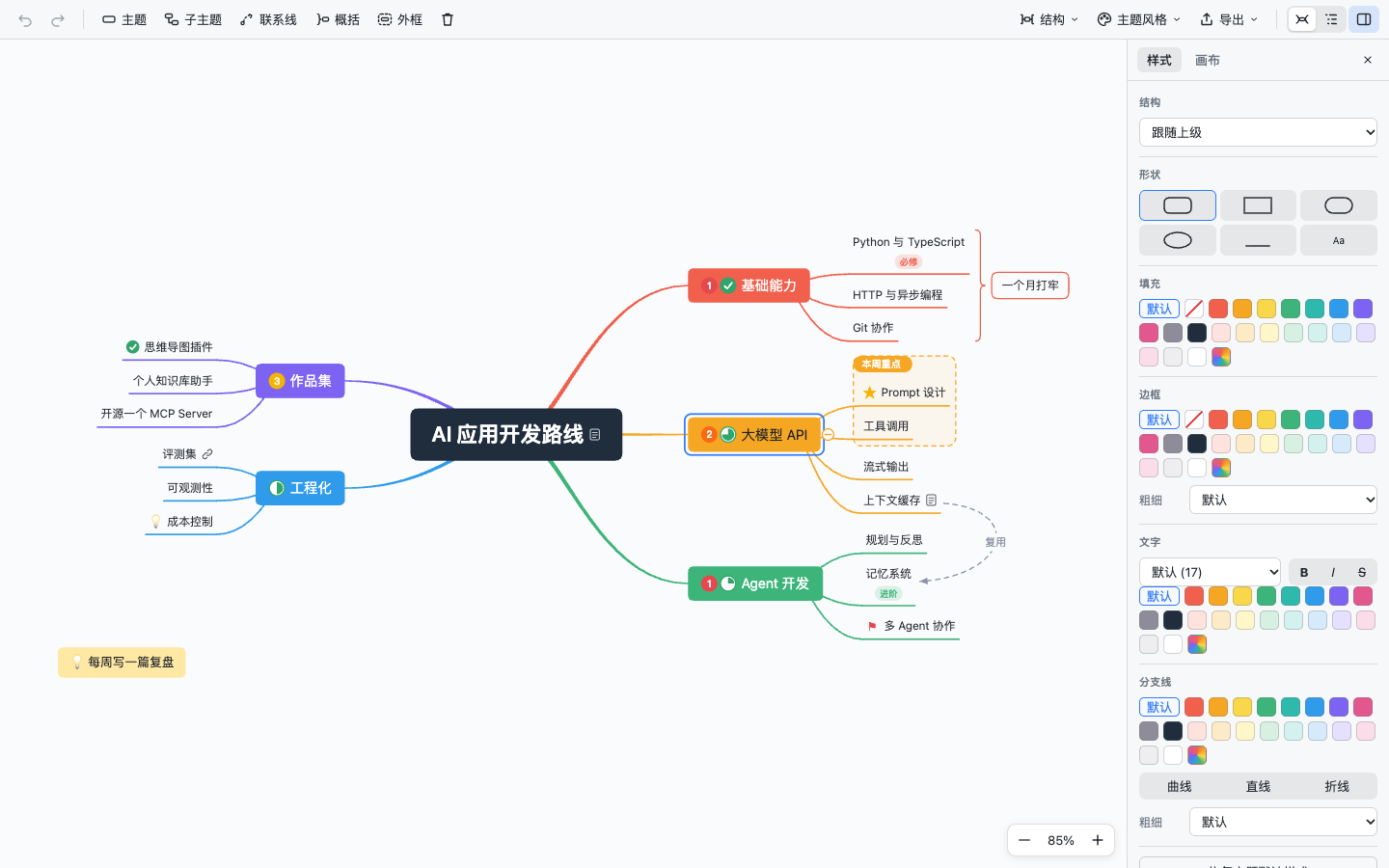
🌟 Key Features
- Feels like XMind:
- 🌈 Rainbow branches with tapered main curves; subtopics fan out on smooth curves into their underlines
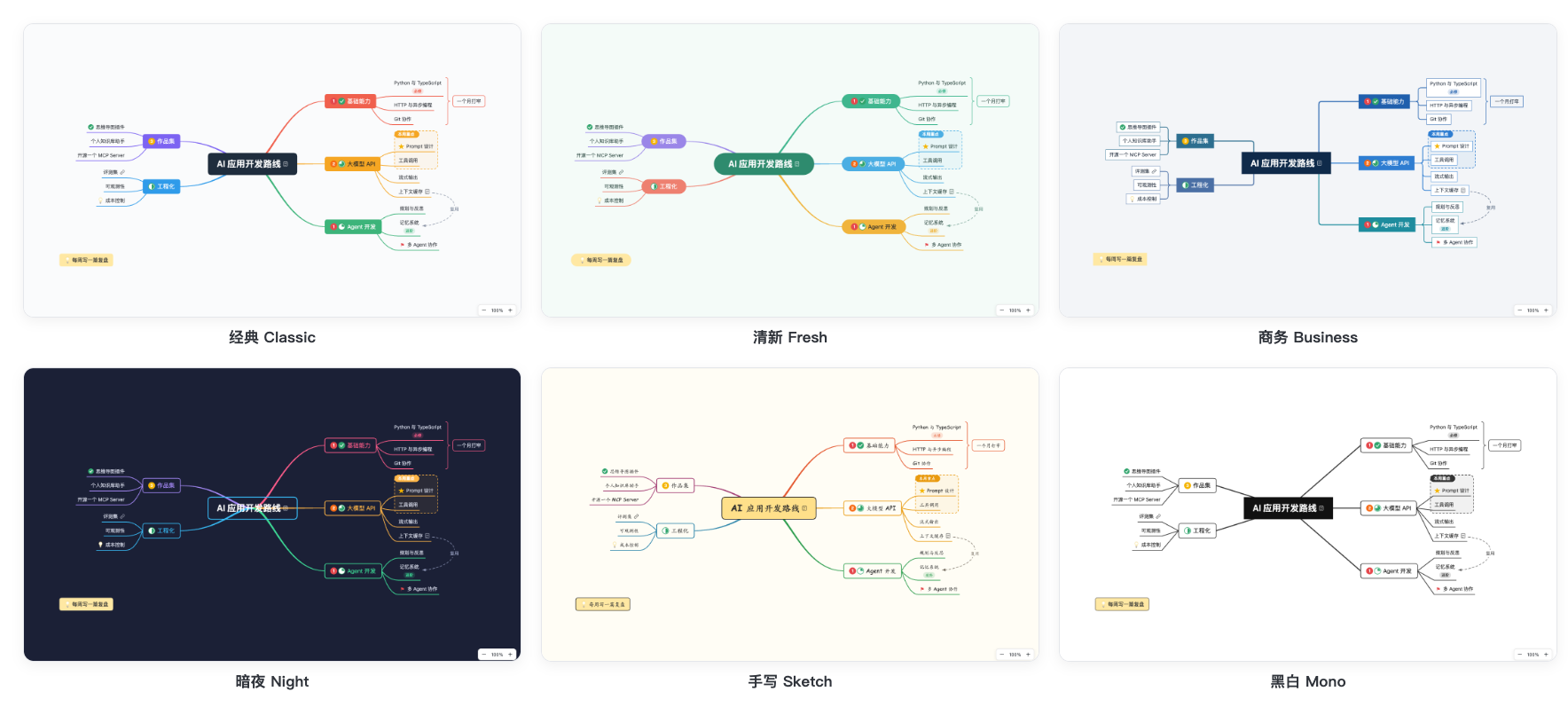
- 🎨 6 built-in themes (Classic, Fresh, Business, Night, Sketch, Mono), each with light and dark variants that follow your editor
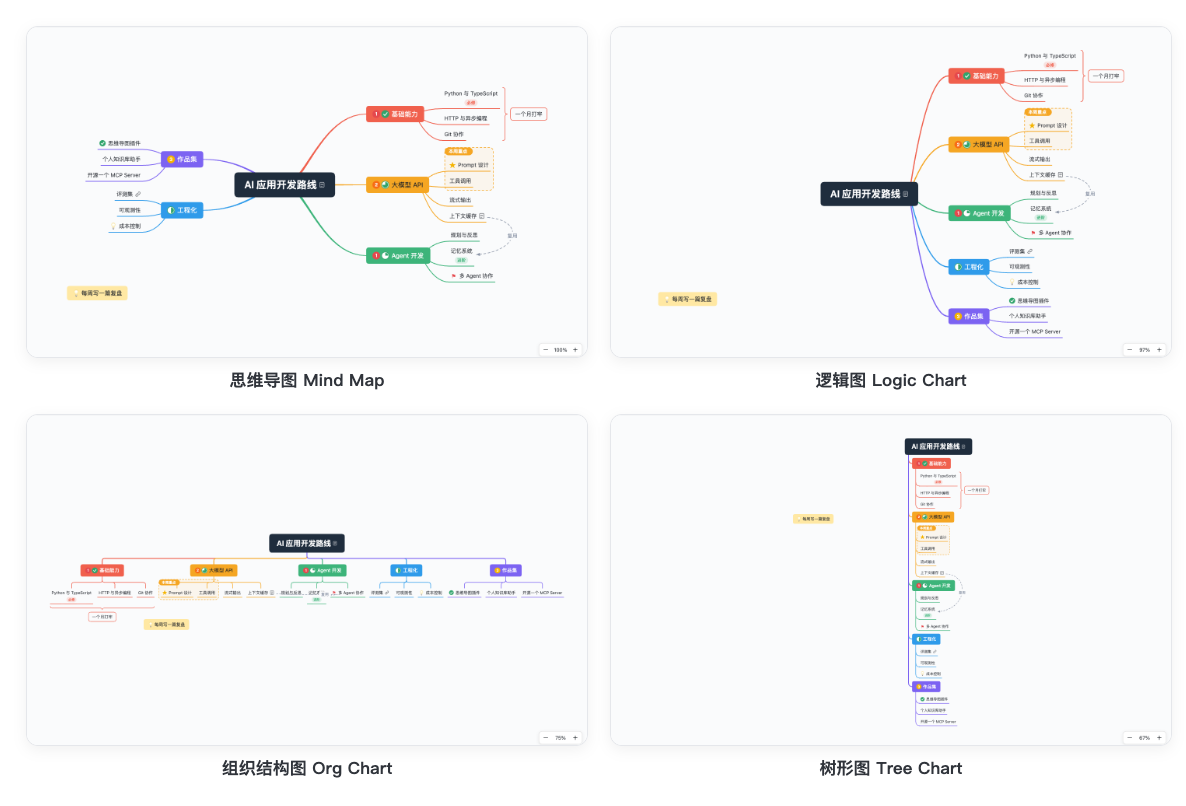
- 🧭 4 structures (mind map, logic chart, org chart, tree chart), for the whole map or a single branch
- Editing:
- ⌨️ XMind shortcuts:
Enteradds a sibling,Taba child,Shift+Taba parent.Space/F2or just typing starts editing (IME supported) - 🖱 Drag to re-parent or reorder; drop on empty canvas to make a floating topic.
Shift-drag to marquee select,Cmd-click to multi-select - ↩️ Undo / redo. Copy and paste whole subtrees, or paste Markdown / indented text
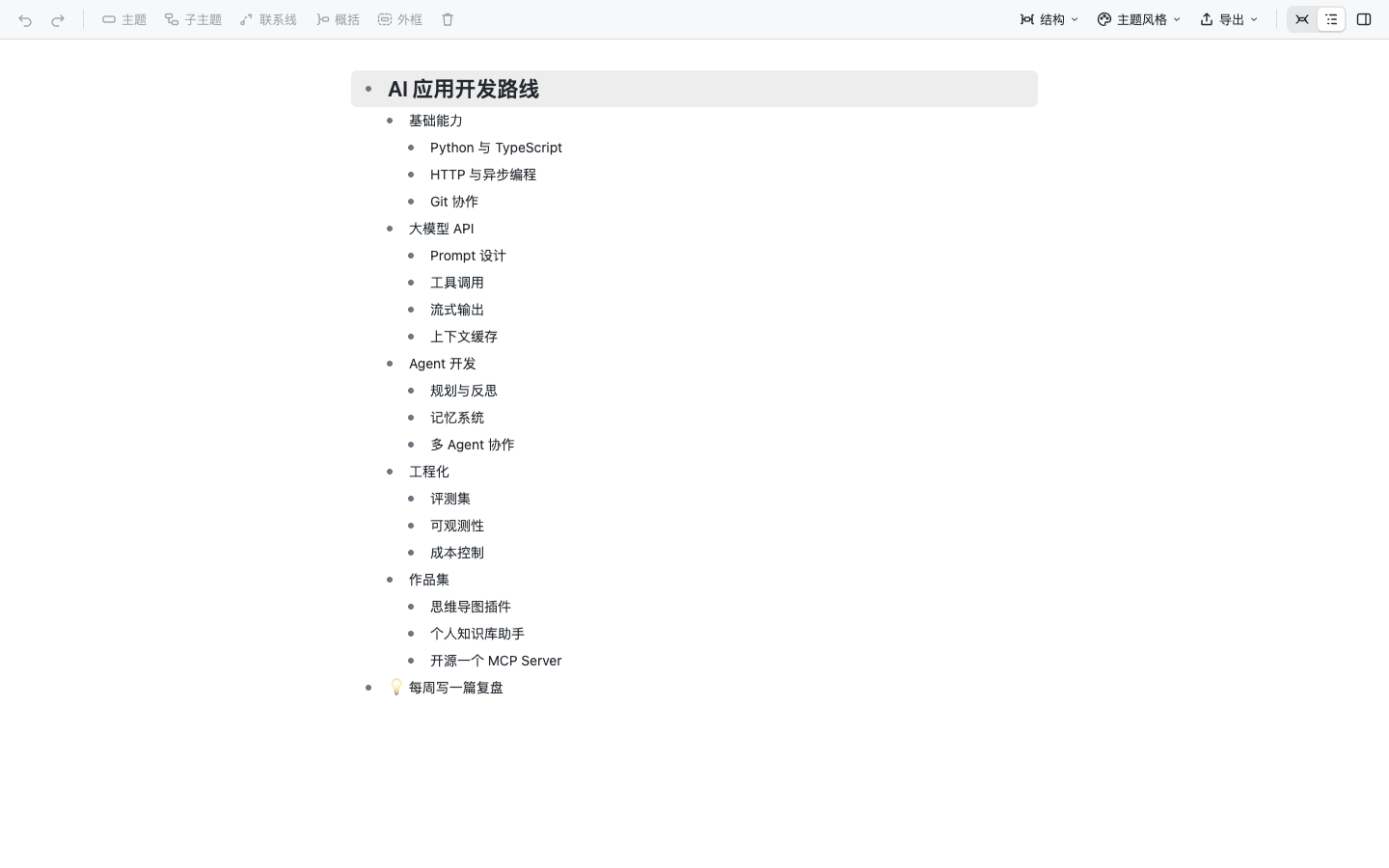
- 🗒 Outline view: edit the whole map as an indented list
- Styling and content:
- 🖌 Format panel: shape, fill, border, text (size, bold, italic, strike, color), branch line (color, width, curve / straight / elbow), applied to one topic or many
- 🏷 Markers (priority, task progress, flags, stars, smileys, symbols), labels, notes, links
- 🔗 Relationships (draggable control points, optional text), summaries, boundaries, floating topics
- Import and export:
- 🖼 Export PNG (2x), SVG or a Markdown outline
- 📝 Right-click a Markdown file to turn it into a map
- Agent-friendly:
- 🤖 Nested-tree JSON that reads like an outline. Only non-default values are written, and new topics can omit
id - 🧾 Fixed key order and indentation, so git diffs stay clean
- 🛠 Ships with a skill and the zero-dependency CLI
wm.mjs: token-cheap outlines, topics addressed by path (Product/MVP), validation - 🔄 Saves after every edit; open canvases refresh when the file changes on disk
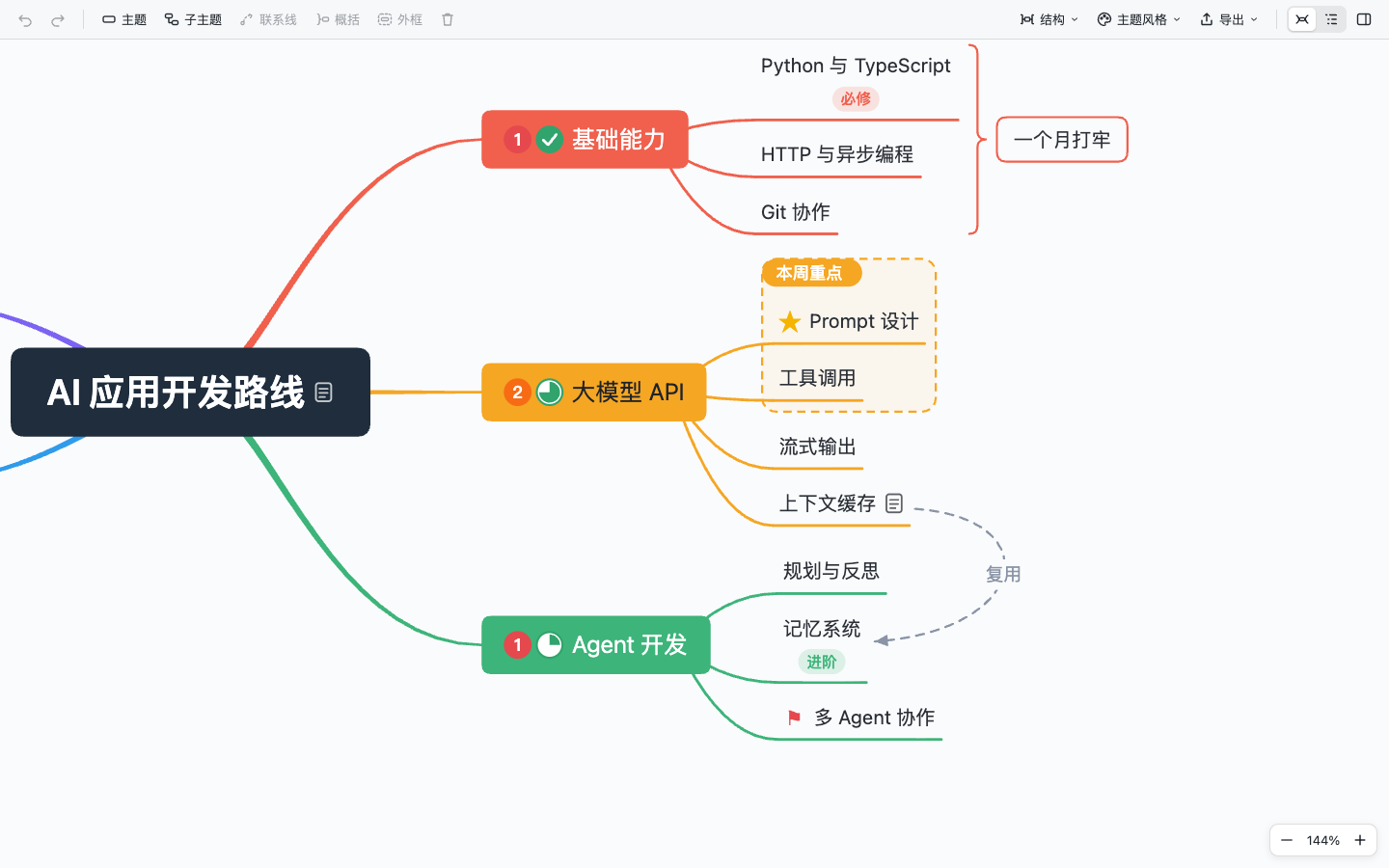 | 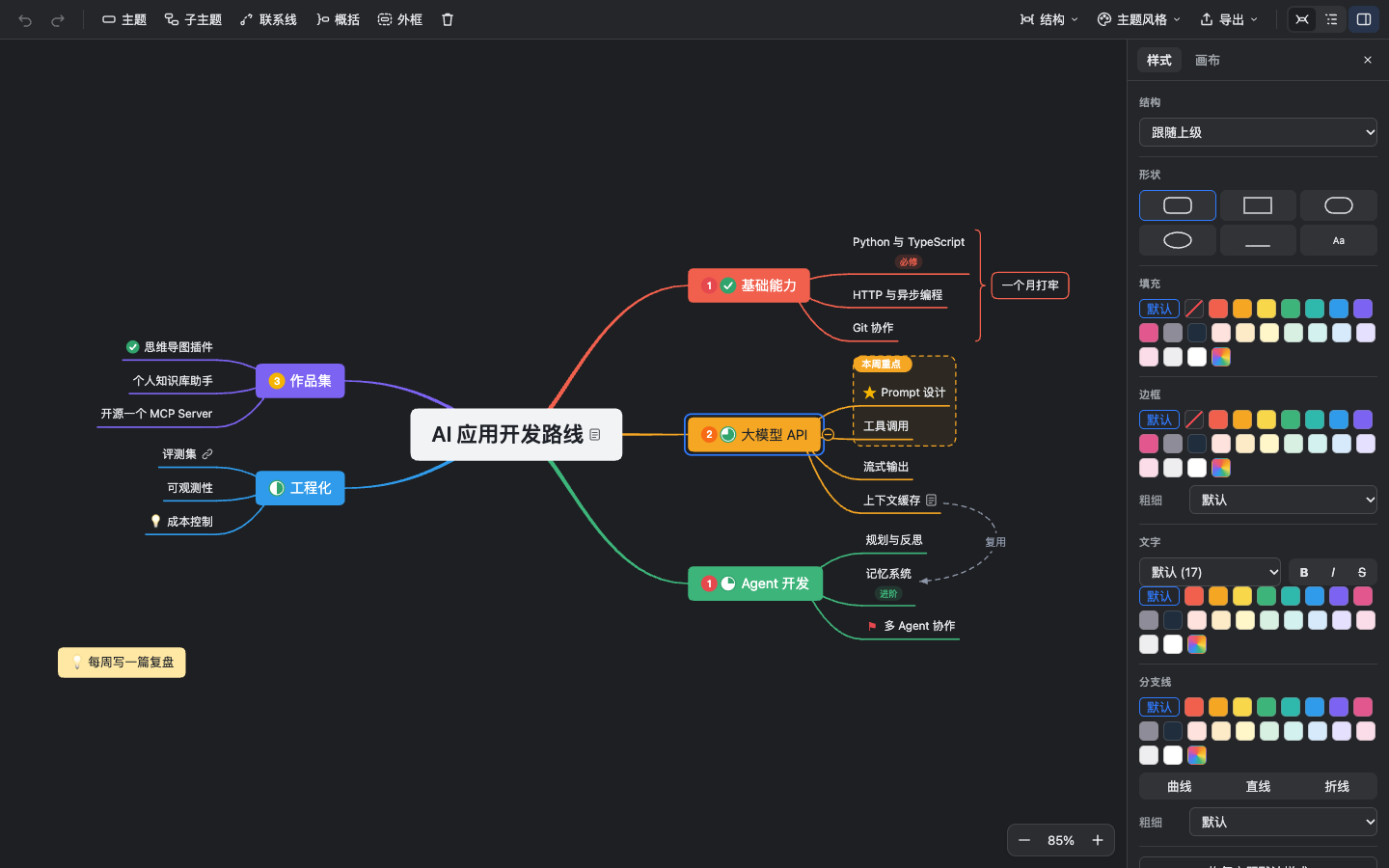 |
| Markers, labels, notes, summary, boundary, relationship | Follows your editor's dark mode |
🎨 Six themes
🧭 Four structures
🗒 Outline view
🤖 Install with an AI agent
Paste this into Claude Code, Codex, Cursor or any agent with a terminal:
Install the Weilanx Mind Map plugin and its agent skill for me.
Follow https://github.com/Azure12355/weilanx-mind-map/blob/main/docs/install-for-agents.md,
verify the install, then tell me the result.
Or run the installer yourself (macOS / Linux). It finds VS Code, Cursor, Windsurf and Insiders, then installs into each one and verifies it:
curl -fsSL https://raw.githubusercontent.com/Azure12355/weilanx-mind-map/main/scripts/install.sh | bash
For Obsidian, pass your vault path. To install the agent skill, use --skill:
curl -fsSL https://raw.githubusercontent.com/Azure12355/weilanx-mind-map/main/scripts/install.sh | bash -s -- --obsidian "/path/to/vault"
curl -fsSL https://raw.githubusercontent.com/Azure12355/weilanx-mind-map/main/scripts/install.sh | bash -s -- --skill
Put
WM_EDITOR=cursorbeforebashto install into one editor only. Full steps and checks for agents:docs/install-for-agents.md.
🚀 Quick Start
VS Code
- Download
weilanx-mind-map.vsixfrom the latest release. - In the Extensions view, choose
···→ Install from VSIX..., or runcode --install-extension weilanx-mind-map.vsix --force. - Open any
.wmindfile (tryexamples/AI应用开发路线.wmind), or right-click a folder → Create Mind Map (.wmind).
Obsidian
- Download
main.js,manifest.jsonandstyles.cssfrom the latest release into<vault>/.obsidian/plugins/weilanx-mind-map/. Or install it with BRAT usingAzure12355/weilanx-mind-map. - Enable Weilanx Mind Map under Settings → Community plugins.
- Open a
.wmindfile, or create one with the ribbon icon. Right-click a Markdown note to convert it. In Obsidian, links can also be[[note]].
⌨️ Shortcuts
| Action | Keys |
|---|---|
| Add sibling / child / parent | Enter / Tab / Shift+Tab |
| Insert sibling before | Shift+Enter |
| Edit text | Space, F2, double-click, or just start typing |
| New line / finish editing | Shift+Enter / Enter or Esc |
| Delete | Delete / Backspace |
| Navigate / swap with sibling | Arrow keys / Cmd+↑ Cmd+↓ |
| Fold / unfold | Cmd+/ or click the dot at the branch end |
| Undo / redo | Cmd+Z / Cmd+Shift+Z |
| Zoom in / out / fit | Cmd+= / Cmd+- / Cmd+0 |
| Pan / zoom | Drag background, Space + drag / Cmd + wheel, pinch |
| Multi-select / marquee | Cmd-click / Shift-drag |
| New floating topic | Double-click the background |
On Windows / Linux, use Ctrl instead of Cmd.
📄 File Format
{
  "version": 1,
  "theme": "fresh",
  "root": {
    "id": "a1b2c3",
    "text": "Product plan",
    "children": [
      {
        "id": "k9x2m1",
        "text": "Research",
        "markers": ["priority-1", "task-50"],
        "summaries": [{ "id": "s1", "from": "p0q9w8", "to": "p0q9w9", "text": "Two weeks" }],
        "children": [
          { "id": "p0q9w8", "text": "10 interviews", "labels": ["qualitative"] },
          { "id": "p0q9w9", "text": "500 surveys", "note": "Markdown note" }
        ]
      },
      { "id": "z7y6x5", "text": "MVP", "style": { "fill": "#FFE8A3" } }
    ]
  },
  "relationships": [{ "id": "r1", "from": "k9x2m1", "to": "z7y6x5", "text": "feeds" }]
}
- Nested tree: the indentation is the hierarchy.
- Only non-default values are written: no
stylemeans "follow the theme", andcollapsedappears only whentrue. - New topics may omit
id: the plugin fills it in. - Summaries and boundaries name their first and last child by id, so ranges stay correct when siblings are inserted.
- Themes:
classic·fresh·business·night·sketch·mono. Structures:map·logic·org·tree.
Every field is described in references/format.md, and the schema is schema/wmind.schema.json. In VS Code, Open as JSON Text (editor title bar) gives you schema completion and validation.
🛠 For Agents
skills/weilanx-mind-map is a ready-made skill: SKILL.md, a format reference, and the zero-dependency CLI wm.mjs (Node 18+). The plugin and wm.mjs share the same parser and serializer, so their output is byte-identical.
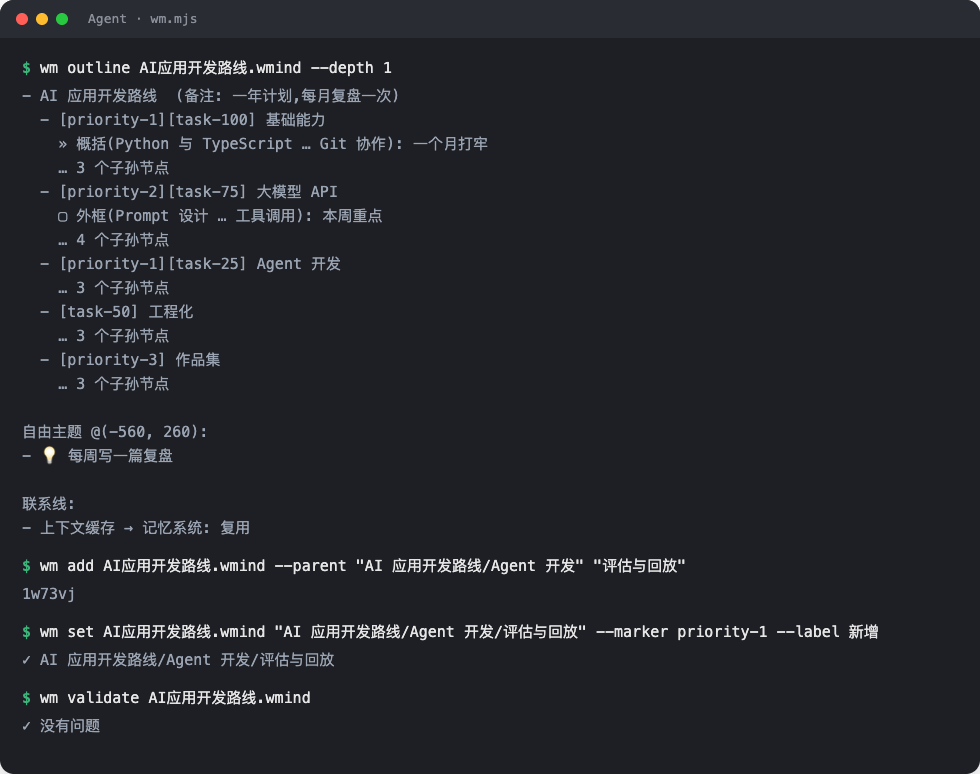
WM="node skills/weilanx-mind-map/scripts/wm.mjs"
$WM outline plan.wmind --ids                         # indented outline, cheapest to read
$WM add plan.wmind --parent "Product plan/MVP" "Export" "Import"
$WM set plan.wmind "Product plan/MVP/Export" --marker priority-1 --style fill=#FFE8A3
$WM rel plan.wmind "Product plan/Research" "Product plan/MVP" --text feeds
$WM from-md notes.md -o notes.wmind                  # Markdown outline → map
$WM validate plan.wmind
If the file is open in the plugin, the canvas redraws after every agent edit.
⚙️ Settings
| Setting | Default | Description |
|---|---|---|
wmind.autoSave (VS Code) | true | Save right after every edit so agents always read the latest content |
| Save after every edit (Obsidian) | on | When off, Obsidian's 2-second delayed save is used |
🔧 Development
npm install
npm run dev:web          # preview the canvas in a browser (localStorage stands in for the file)
npm test                 # core unit tests + wm.mjs integration tests
npm run typecheck

npm run package          # build weilanx-mind-map.vsix
npm run build:obsidian   # Obsidian plugin -> dist/obsidian/{main.js,manifest.json,styles.css}
npm run dev:obsidian -- --out "/path/to/vault/.obsidian/plugins/weilanx-mind-map"   # rebuild on change
| Folder | Purpose |
|---|---|
src/core | File format, edit operations, themes, layout engine, Markdown conversion (pure TS, shared) |
webview/src | React canvas, shared by VS Code and Obsidian |
src/vscode · src/obsidian | The two host shells |
src/cli | The wm.mjs CLI (built into skills/weilanx-mind-map/scripts/) |
📝 Roadmap
- 📥 Import / export XMind
.xmindfiles - 🖼 Images inside topics
- 📑 Multiple sheets per file
- 📝 Embed maps in Obsidian notes with
![[map.wmind]] - 🏪 Publish to the VS Code Marketplace and Obsidian community plugins
🤝 Contributing
Issues and pull requests are welcome! Please make sure npm test and npm run typecheck pass first.
📜 License
MIT © Azure12355
For plugin developers
Search results and similarity scores are powered by semantic analysis of your plugin's README. If your plugin isn't appearing for searches you'd expect, try updating your README to clearly describe your plugin's purpose, features, and use cases.