Routine Progress
unlistedby Baymurat785
Score your day with points, watch it move like a stock, and keep streaks going.
Routine Progress
Your day is a stock. An Obsidian plugin that turns your daily routine into numbers you can see move.
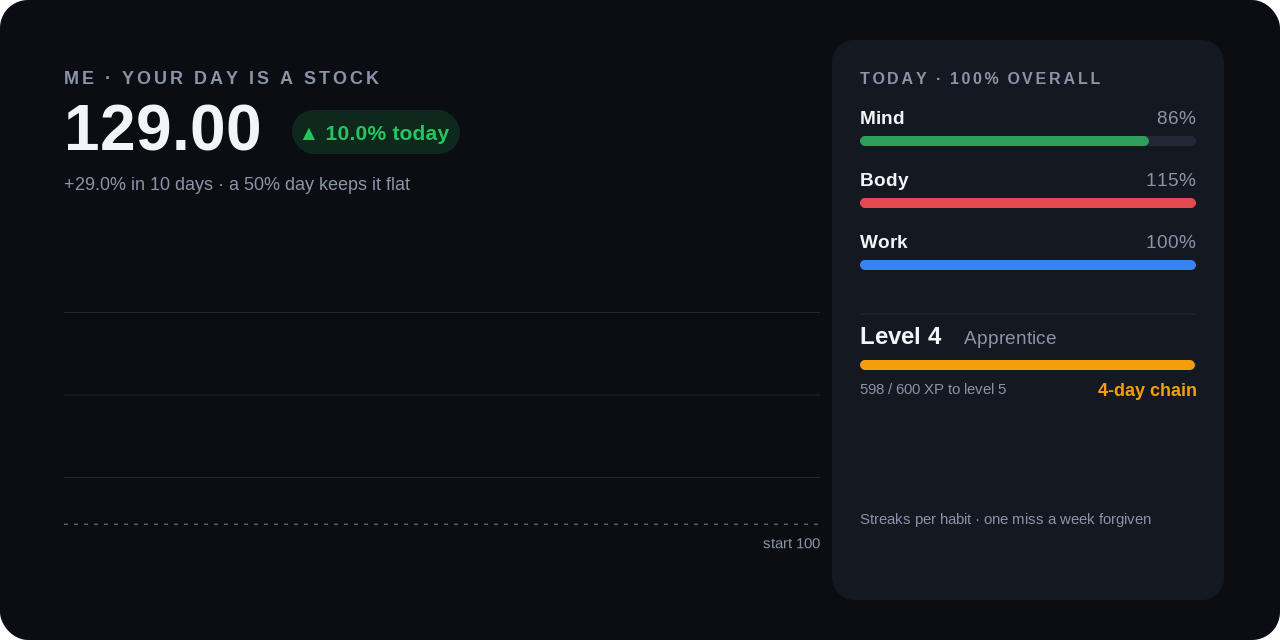
Checkboxes say whether you did something. They don't say how much, and they don't show the trend. This plugin gives every habit points, adds them up per category, and draws your days as a line that goes up on good days and down on bad ones.
The idea
- Points, not checkboxes. Every habit earns points. Counted habits (pages, reps, hours) earn points per unit, so more effort shows as more progress.
- Your day is a stock. Your routine has a price that starts at 100. A good day moves it up, a weak day moves it down, a skipped day pulls it down. Consistency compounds.
- Sick days are fair. Tick "Sick day" and the price holds flat. Being ill shouldn't look like failure.
- It's a game. XP, levels, a daily minimum to keep the chain alive, and streaks per habit.
- It lives on your Lock Screen. The plugin saves your graph as
progress-wallpaper.png, ready to set as a phone wallpaper.
Try it
- Download this repo.
- Open
example-vaultas a vault in Obsidian. - Turn on community plugins when Obsidian asks.
- Open
Progress.md.
Today's note is created from Templates/Daily.md automatically.
Use it in your own vault
Copy main.js and manifest.json into <your vault>/.obsidian/plugins/routine-progress/, then turn the plugin on in Settings → Community plugins. Also copy Templates/Daily.md and Progress.md from the example vault.
Daily notes live in Daily/ and are named YYYY-MM-DD.md.
Make it yours
Your habits and their points are set in POINTS at the top of main.js. Each ## heading in the daily note is a category. Edit both to match your routine, then reload the plugin.
License
MIT
For plugin developers
Search results and similarity scores are powered by semantic analysis of your plugin's README. If your plugin isn't appearing for searches you'd expect, try updating your README to clearly describe your plugin's purpose, features, and use cases.