Checkin Grid
unlistedby dongyue12
Markdown-native habit tracker: a clickable check-in grid rendered from a checkin code block. Click, rename and delete habits without leaving reading view.
Checkin Grid
一个把打卡表格塞进笔记正文的 Obsidian 插件。数据就是几行 markdown,格子只是它的一层可点视图——不改 data.json、不建索引、不锁进某个插件里。
为什么再做一版
已有插件大多把打卡记录存在自己的 data.json 里。这意味着:换插件记录就没了,git 同步时它是二进制黑箱,手机上想改一条要开电脑。
这个插件反过来:打卡记录写在代码块里,一行一个习惯。
- 背单词 | 2026-11-05, 2026-11-06
- 到梦空间活动 | 2026-11-07
- 早起
好处很直接:
- 笔记本身就是备份,
git log能看到哪天打了卡; - 手机、电脑、纯文本编辑器都能改,格式坏了也能一眼看出;
- 关掉插件,数据还在,只是不渲染成表格。
特性
| 能力 | 说明 |
|---|---|
| 代码块渲染 | ```checkin / ```daka / ```打卡 三种写法都认 |
| 点格子打卡 | 点一下写入日期,再点一下取消,立刻写回文件 |
| 连续天数 | 右侧自动算连续打卡天数,断一天就归零 |
| 完成率 | 当前窗口内的完成百分比(窄屏自动隐藏,把宽度让给格子) |
| 7/14/30 天窗口 | 底部一键切换,选择会记住 |
| 默认定位到今天 | 打开笔记就滚到最右,今天永远在视野里;顶栏「回到今天」可随时复位 |
| 行内改名 | 点习惯名或铅笔图标就地编辑,Enter 保存、Esc 取消,重名会被拦下 |
| 行内删除 | 垃圾桶图标 → 二次确认,删的时候会告诉你有几天记录一起没了 |
| 移动端 | 格子放大到适合手指点、习惯列固定在左侧、表格不撑破页面 |
安装
- 到 Releases 下载
main.js、manifest.json、styles.css; - 放进
<你的库>/.obsidian/plugins/checkin-grid/; - 重载 Obsidian(
Ctrl+R),在 设置 → 第三方插件 里启用 Checkin Grid。
文件夹名必须是 checkin-grid,要和 manifest.json 里的 id 一致。
用法
新建一条笔记,插入代码块:
```checkin
- 背单词 | 2026-11-05, 2026-11-06
- 到梦空间活动
```
- 每行是
- 习惯名 | 日期, 日期,日期格式YYYY-MM-DD,竖线后面可以完全省略(等于一次都没打)。 - 习惯名里的空格没问题;想加备注就写在竖线后、日期的前面不行——那里只放日期。要写说明,放在代码块外面。
- 删习惯 = 删掉那一行(或者点行内垃圾桶,更安全)。
界面说明
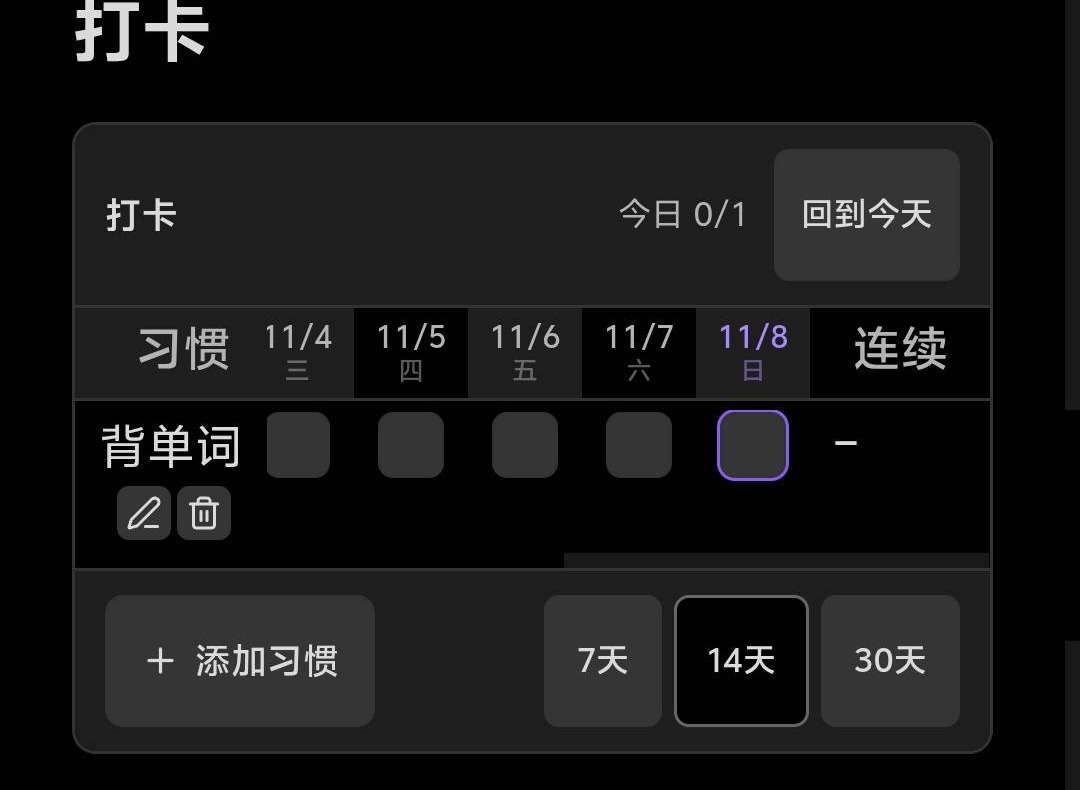
打卡                                    今日 2/3   回到今天
┌────────┬──────┬──────┬──────┬──────┬──────┬────┐
│ 习惯   │ 11/4 │ 11/5 │ 11/6 │ 11/7 │ 11/8 │连续│完成│
├────────┼──────┼──────┼──────┼──────┼──────┼────┤
│ 背单词 │  ▢   │  ▣   │  ▣   │  ▢   │  ▣   │ 1  │60% │
└────────┴──────┴──────┴──────┴──────┴──────┴────┘
[+ 添加习惯]                          [7天] [14天] [30天]
- 今日 x/y:今天已完成 / 总习惯数,全打完会变色。
- 今天那一列:描边高亮;未来的格子是灰的,点不动。
- 连续:从今天(或昨天)往前数,连着打了几天。
- 完成:当前窗口(7/14/30 天)的完成百分比。
和同步插件一起用
打卡数据是笔记正文,所以用 vault-sync-git / obsidian-git 时它跟普通笔记一样同步:手机上打完卡,回到电脑 git log 能看到改动;冲突了也是文本冲突,能手改。
建议把习惯放一条独立笔记(比如 打卡.md),同步时不容易和别人正在编辑的长文撞上。
已知限制
- 不支持「每周 N 次」这类目标,只有「打没打」。
- 日期窗口是「最近 N 天」,不支持自由翻到上个月。
- 没有提醒/通知,也没有统计图表。
- 一天只能记一次(没有次数概念)。
开发
无构建步骤,仓库里的 main.js 就是 Obsidian 直接加载的产物。
git clone git@github.com:dongyue12/obsidian-checkin-grid.git
# 复制到 <vault>/.obsidian/plugins/checkin-grid/
node --check main.js   # 语法检查
数据结构:
- 代码块内:
- 名称 | YYYY-MM-DD, YYYY-MM-DD - 插件数据(
data.json):只存窗口天数{ "days": 7 },不含打卡记录
许可
MIT,详见 LICENSE。
English
Checkin Grid renders a clickable habit grid from a fenced checkin code block. The data lives in your note as plain lines (- habit | 2026-11-05, 2026-11-06), so it survives plugin removal, syncs through git like any other text, and can be edited on a phone or in any text editor.
Click a cell to check in, click again to undo. Streaks and window completion are computed on the fly. Rename or delete habits inline with hover buttons — no need to switch to source mode. The table auto-scrolls to today on open, keeps the habit column sticky on narrow screens, and offers 7 / 14 / 30 day windows.
Install: drop main.js, manifest.json, styles.css into <vault>/.obsidian/plugins/checkin-grid/ and enable it. MIT licensed.
For plugin developers
Search results and similarity scores are powered by semantic analysis of your plugin's README. If your plugin isn't appearing for searches you'd expect, try updating your README to clearly describe your plugin's purpose, features, and use cases.