by shovy
A dashboard for your vault: note and word trends, writing streak heatmap, task completion, tags and link stats.
Note Pulse
English | 中文
Note Pulse is an Obsidian plugin that opens a dashboard of your vault in one view: today's writing and streak, note and word count trends, a writing heatmap, task completion, and tag, folder and link stats.
The UI is in Chinese. It follows your light or dark theme, has no external dependencies (all charts are plain SVG), and works on desktop and mobile.
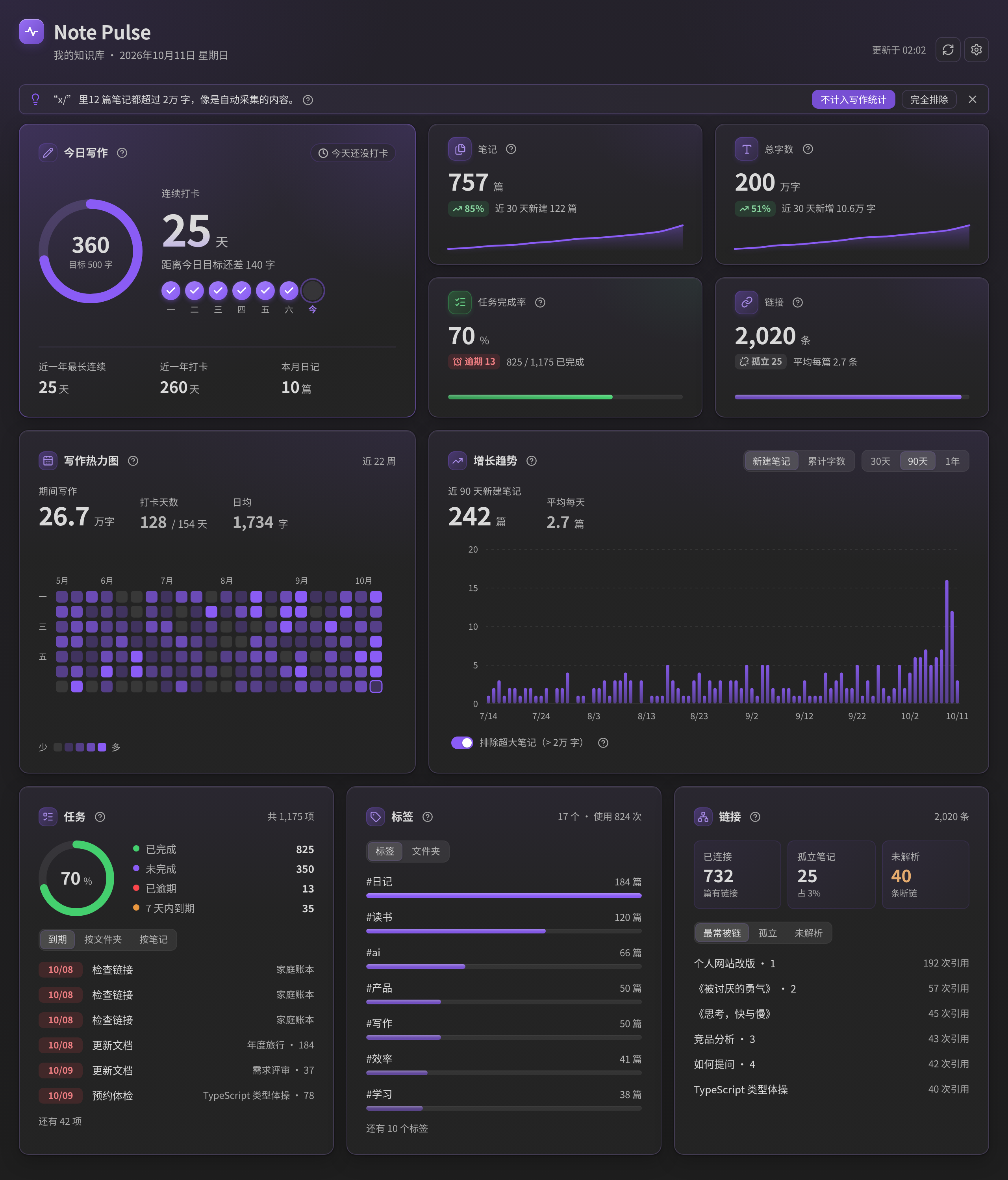
Light theme and narrow layout
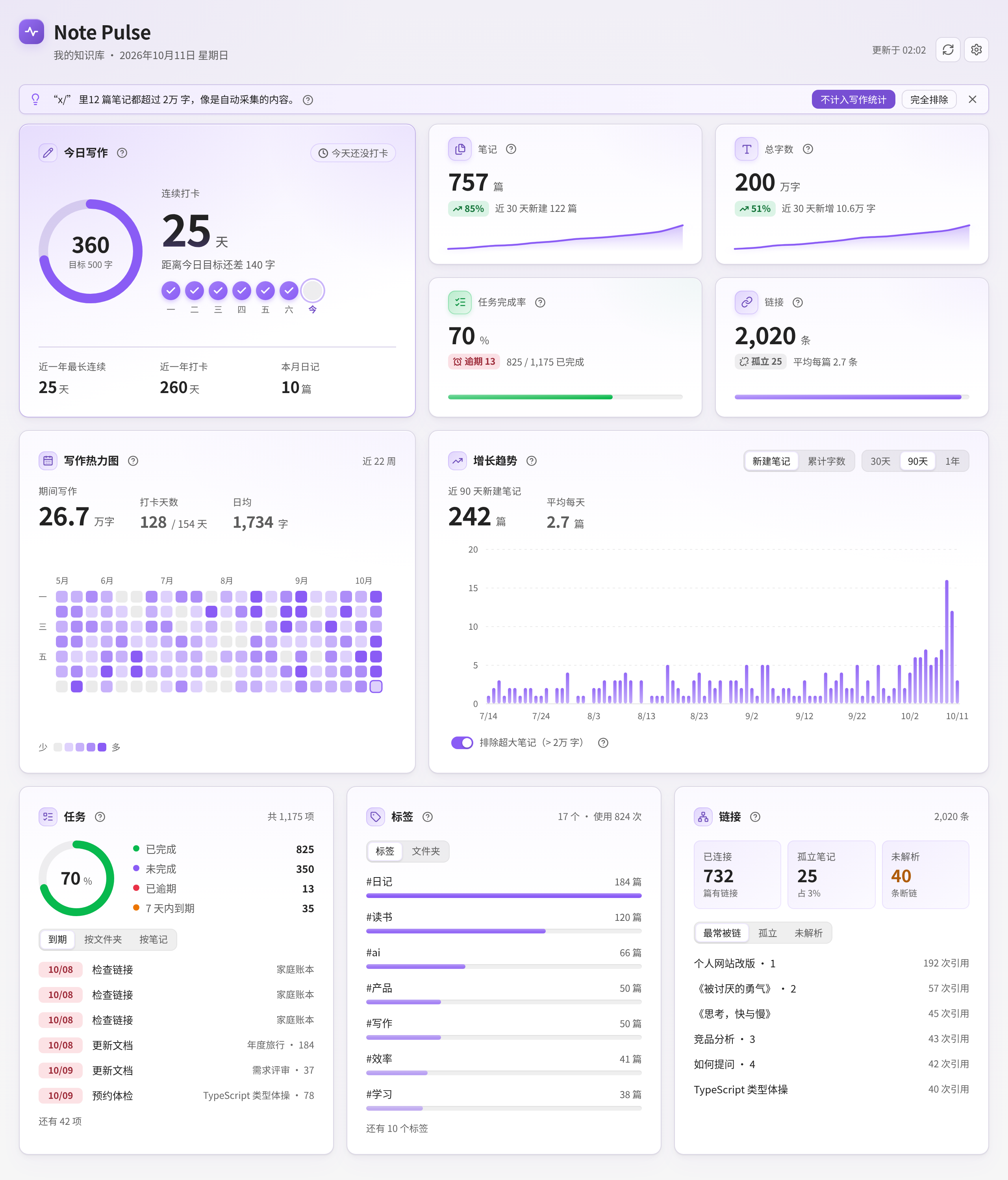

Screenshots are rendered with sample data.
Features
| Panel | What it shows |
|---|---|
| Today's writing | Progress ring for today's words vs. your daily goal, current streak, last 7 days, longest streak, check-in days in the past year, daily notes this month |
| Stat cards | Total notes and total words (with 30-day change and a 12-week sparkline), task completion rate (with overdue count), total links (with orphan notes and connectivity) |
| Writing heatmap | Recent weeks sized to the view width; hover for words written and notes changed or created; click a day to list notes modified that day. Keyboard: focus it, then use the arrow keys and Enter |
| Growth trend | New notes per day (default) or cumulative words, over 30 days, 90 days or 1 year, with hover values. A switch excludes oversized notes so auto-collected files cannot distort the curve |
| Tasks | Done, open, overdue and due within 7 days; due list jumps straight to the task line; open tasks by folder or by note. Understands 📅 YYYY-MM-DD, ⏳ and [due:: ]; - [-] counts as cancelled |
| Tags and folders | Most used tags (click to search), note and word counts per top-level folder (click to reveal) |
| Links | Linked notes, orphan notes, unresolved links; lists of most linked notes, orphans and common unresolved links |
Every note in the dashboard is clickable (mouse or keyboard). The dashboard refreshes automatically (debounced) when your vault changes, and only computes while it is visible. Word counts are cached on disk, so a restart only re-reads notes that changed. Tags, links and tasks come from Obsidian's metadata cache; word counts are cached by modification time, so later refreshes only re-read changed files.
Installation
From Community plugins (after approval)
- Open Settings → Community plugins → Browse.
- Search for Note Pulse, then install and enable it.
Manual
- Download
main.js,manifest.jsonandstyles.cssfrom the latest release. - Put them in
<your vault>/.obsidian/plugins/note-pulse/. - Reload Obsidian and enable Note Pulse under Settings → Community plugins.
Usage
Click the dashboard icon in the left ribbon, or run the command 打开看板 (Open dashboard) from the command palette. Use 刷新看板数据 (Refresh dashboard) to recompute.
Settings
| Setting | Description |
|---|---|
| Excluded folders | Notes in these folders are ignored completely, one per line or comma separated |
| Collection / clipping folders | Folders for web clippings or automated dumps. Their notes still count as notes, but not toward word trends, the heatmap, streaks or the "new notes" curve |
| Exclude oversized notes (threshold) | Notes longer than this (default 20,000 words) do not count toward writing stats. The dashboard says what was excluded and has a one-click switch |
| Daily notes folder | Notes named YYYY-MM-DD here count as daily notes; leave empty to search the whole vault |
| Daily word goal | A day counts toward your streak when it reaches this many words (or has a daily note); 0 means any writing counts |
| Heatmap mode | Smart (default): days since you enabled the plugin use real daily added words, recorded even while the dashboard is closed; earlier days are estimated from modified dates. By modified date: a note's full word count goes to the day it was last modified (rough). By daily added words: measured data only |
| Created date fields | Frontmatter fields such as created: 2025-01-01 used as the creation date, useful when sync resets file times |
| Auto refresh and delay | Refresh after vault changes, and the debounce delay |
| Open notes in new tab | Keep the dashboard open when you click a note |
Keeping the numbers honest
- Oversized notes and clipping folders. A single auto-collected file with 200,000 characters can outweigh a year of writing. Note Pulse excludes notes over the threshold from writing stats by default, lets you mark whole folders as "collection" folders, and suggests it in a banner when it finds a folder where most notes are oversized.
- The word trend is based on current word counts. It adds each note's current word count on its creation date. It is not a historical snapshot, so editing an old note changes the past. The chart says so, and "new notes per day" is the default view for that reason.
- Creation dates can be wrong after sync. If many notes share one creation day, a banner points you to the created-date field setting.
- Streaks count a day when it reaches the daily goal, or you wrote a daily note with at least 10 words. An empty template does not count. The current streak is not broken by today until the day is over.
Notes and limits
- Word counts are approximate. Frontmatter, code blocks, comments, URLs, embeds and Markdown syntax are removed; each CJK character counts as one word, other languages are counted by words.
- Creation time defaults to the file's ctime, which sync tools (iCloud, Git, …) may reset. Add a
createdfrontmatter field for accurate trends. - The cumulative word trend assigns each note's current word count to its creation date. It is not a historical snapshot.
- "Added words" only counts increases: rewriting a paragraph to the same length adds nothing, and deleting text does not subtract.
- The "links" figure counts links between notes, not image or file embeds.
- The UI is Chinese only for now.
- Dates use your local time zone.
- Clicking a tag needs the core Search plugin enabled.
- The plugin reads your notes locally only. It makes no network requests and collects no data.
Development
npm install
npm run dev     # watch build
npm run build   # type check + production build -> main.js
src/
├── main.ts      # entry: view, commands, ribbon icon, auto refresh, background word tracking, persistence
├── view.ts      # dashboard view and panels
├── stats.ts     # statistics (words, tasks, links, tags, folders, daily notes)
├── charts.ts    # SVG charts: trend, sparkline, ring, bar list, tooltip
└── settings.ts  # settings tab
Settings and the daily word log live in data.json; the per-note word-count cache lives in cache.json next to it (safe to delete, it is rebuilt).
To release, run npm version <patch|minor|major> (updates manifest.json and versions.json), run npm run build, then create a GitHub release whose tag matches the version (no v prefix) and attach main.js, manifest.json and styles.css.
Changelog
1.2.4
Clean-up release for the Obsidian community plugin review. No visual change, apart from one tiny detail noted below.
- Minimum Obsidian version is now 1.7.2 (was 1.4.0). The dashboard uses
Workspace.revealLeaf(), which was added in 1.7.2. - No more
!importantinstyles.css. The few places that had to override Obsidian's default button, heading and padding styles now do it with more specific selectors instead. The hero ring size is passed to CSS as a variable. I compared computed styles and screenshots (light, dark, desktop, narrow, phone, tablet, reduced motion) against 1.2.3 and they match, including the phone bottom padding and no-jump behaviour from 1.2.3. - Browser-compatibility lint.
column-gapon grid layouts is written asgap; the "unresolved link" underline is a plain underline instead of a dotted one (the only visible change); the temporarydisplay: contentswrapper used while redrawing a card is now set from code. - Type-safety and lint fixes. The few private Obsidian internals (global search, file explorer, settings dialog) are accessed through small typed interfaces with no
anyand no lint-disable comments; promises are handled explicitly (void) in click handlers;window.setTimeoutis used for popout windows; aninstanceof/type-guard replaces aTFilecast; unnecessary regex escapes and type assertions removed; the cache file is parsed into a typed shape. - Settings are declared once and rendered both by
getSettingDefinitions()(Obsidian 1.13+, so settings show up in settings search) and by the classicdisplay()for older versions. The reset button uses the same style class as before. - Build: the
builtin-modulesdev dependency was replaced by Node's ownmodule.builtinModules.
1.2.3
- Mobile: the last card is no longer hidden behind the floating bottom bar. The dashboard had its padding reset to zero, which also removed the room Obsidian leaves for the mobile navigation bar (back / forward / search / new / tabs / menu). On phones and tablets the scroll area now has bottom padding equal to the navbar height plus the safe area, so the "Links" card can be scrolled fully clear of it.
- Mobile: tapping inside a card no longer makes the page jump. Switching a tab in Tasks, Tags or Links only redraws that card, keeps the scroll position, and the card never gets shorter than it has been (a shorter tab used to shrink the page and push the view up when you were at the bottom). Full refreshes also keep the scroll position, focus no longer scrolls the page, tapping a list row no longer focuses it, and a tap that does not move your finger can no longer change the scroll position. Sticky "hover" shadows on touch screens are disabled.
1.2.2
- Removed the decorative concentric arcs from the "today" card. The faint rings in its top-right corner are gone, along with leftover header pulse-line styles. The progress ring, the card's soft gradient and the gradient logo badge are unchanged.
1.2.1
- Removed the pulse line from the header. The faint decorative line behind the title is gone; the gradient logo badge stays.
- Softer glows. The accent glows are now about half as strong in both light and dark: the corner glows on the page background, the hero card's rings and glow, the card and KPI tints, and the glow under the sparklines and trend line. Layout, colours and text contrast are unchanged.
1.2.0
- A richer look, same layout. The dashboard no longer sits on flat white/grey. The page now has a soft vertical wash with faint accent glows in the top corners; cards have a gentle tinted gradient, a 1px highlight along the top edge and layered shadows; the header gets a gradient logo badge and a faint pulse line.
- Hero card. The "today" card has a stronger accent gradient with decorative concentric rings, and the streak number is lightly shaded.
- Icon chips and charts. Card and KPI icons sit in gradient chips (the task-completion card uses green), sparklines and the trend line get a soft glow, trend bars fade from top to bottom, and progress bars have a subtle sheen.
- Works with your theme. Everything is derived from Obsidian's own colour variables and
color-mix()on the theme's accent colour, so it follows light/dark themes and custom accent colours. It uses only CSS and inline SVG (no images), and falls back to flat colours wherecolor-mix()isn't available. - Readability. Secondary text, status badges (up/down, overdue, due soon) and the primary button were darkened slightly so text keeps at least WCAG AA contrast (4.5:1) on the new backgrounds in the default light and dark themes. Animations still respect "reduce motion".
1.1.2
- Fix: hovering a "?" showed two tooltips. Obsidian pops up its own tooltip for any element that has an
aria-label, on top of Note Pulse's own bubble. Accessible names now live in visually hidden text (aria-labelledby), so only one tooltip appears. The same cleanup was applied to the heatmap, trend chart, KPI cards, ring, lists, and tab buttons; only the icon-only buttons (refresh, settings, close) keep Obsidian's own tooltip, as their single one. - Fix: the writing heatmap had lost its gradient. Levels were tied to your daily goal, so if you usually write far more than the goal almost every day landed in the top two shades. Levels now come from percentiles of your own writing days (about 30% / 60% / 85%), so all four shades get used whatever your pace; with very little data it falls back to ratios of your daily goal. Colours were also redone: a clearer five-step ramp, and empty days are now a neutral grey so the lightest level no longer blends in.
1.1.1
- Explanations moved into "?" icons. The footnote lines under cards (for example "14.9万 words of collected / oversized notes are not counted" under Total words, the notes under the trend chart, and the heatmap mode line) are gone. Each card now has a small "?" next to its title; hover it or focus it with the keyboard (Tab) to read the explanation in a tooltip. The cards keep a uniform height and the charts are no longer pushed up.
- The switch that excludes oversized notes stays, with its details (counts, largest files) in its own "?".
- Welcome and suggestion banners are now a compact single row with a × to dismiss them for good.
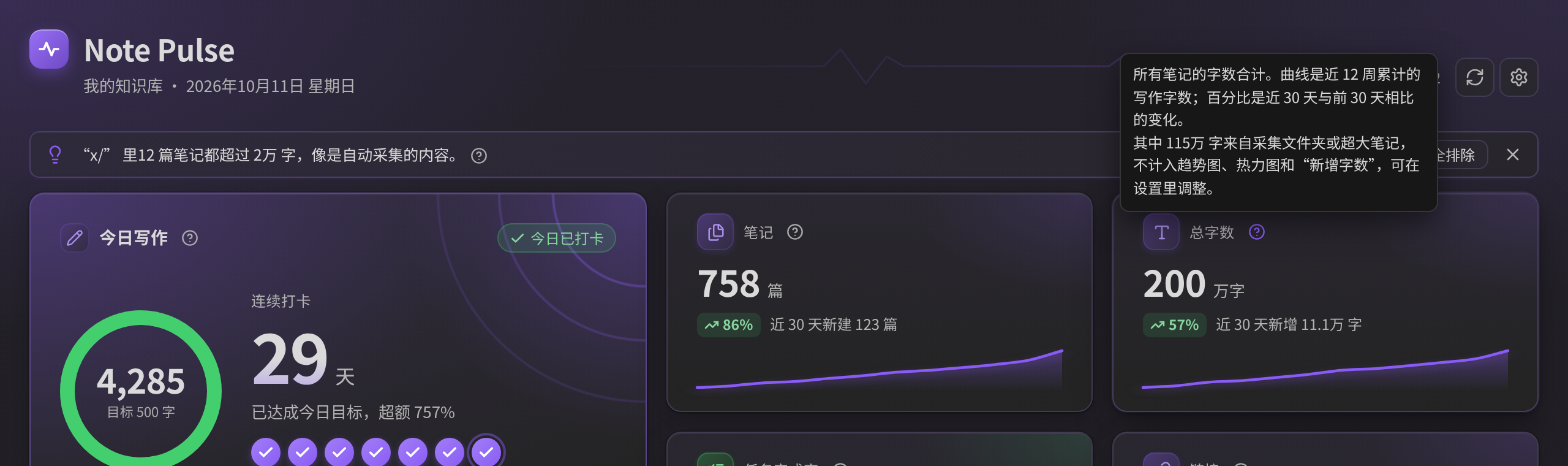
1.1.0
- Fix: auto-collected files distorted the trend. Notes over a threshold (default 20,000 words) are excluded from word trends, the heatmap and streaks, with a visible note of what was excluded and a switch to include them. New "collection folders" setting; a banner suggests folders that look auto-collected, with one-click buttons.
- Growth trend now defaults to new notes per day; the cumulative word curve is labelled as based on current word counts.
- Heatmap default is now Smart: measured daily added words from the day you enabled the plugin (recorded in the background, even when the dashboard is closed), estimates before that. Estimates are marked in the tooltip.
- Daily notes with fewer than 10 words no longer count as a check-in. "Longest streak" is labelled as covering the past year.
- Word counting: counts Greek, Arabic, Hangul and other scripts by word (Hangul was counted per syllable); fixed possible slowdowns on huge pasted text.
- Word-count cache is stored on disk, so restarting Obsidian no longer re-reads every note. Saving no longer rewrites a large
data.jsonon every refresh. - Does not compute while the dashboard is hidden behind another tab; refreshes at midnight; "links" no longer counts image embeds.
- Accessibility: keyboard focus and Enter/Space for every clickable row, tab roles, arrow-key navigation in the heatmap, higher-contrast secondary text, chart descriptions. Switching a tab no longer rebuilds the whole dashboard or drops focus.
- Empty-vault and error states; first-run welcome banner; settings page grouped into sections.
1.0.0
First release.
License
MIT © FengBuL
中文说明
Note Pulse(笔记脉搏)是一个 Obsidian 插件,在一个页面里集中展示你仓库的各项数据:今日写作与连续打卡、笔记与字数趋势、写作热力图、任务完成情况,以及标签、文件夹和链接统计。
界面为中文,自动适配明暗主题,没有任何外部依赖(图表均为原生 SVG),桌面端和移动端都能用。
功能
| 区块 | 内容 |
|---|---|
| 今日写作 | 今日字数与每日目标的进度环、当前连续打卡天数、近 7 天打卡、最长连续、近一年打卡天数、本月日记数 |
| 指标卡 | 笔记总数、总字数(带近 30 天变化和近 12 周迷你折线)、任务完成率(含逾期数)、链接总数(含孤立笔记数和连通率) |
| 写作热力图 | 按看板宽度显示最近若干周;悬停查看当天写作字数、修改和新建笔记数;点击格子查看当天修改过的笔记;聚焦后可用方向键和回车操作 |
| 增长趋势 | 默认显示每天新建笔记数,也可看累计字数;范围 30 天、90 天、1 年。有“排除超大笔记”开关,自动采集的文件不会再把曲线拉歪 |
| 任务 | 已完成、未完成、已逾期、7 天内到期;到期列表点击直接跳到任务所在行;可按文件夹或笔记查看未完成任务。识别 📅 YYYY-MM-DD、⏳、[due:: ],- [-] 视为已取消 |
| 标签 / 文件夹 | 标签使用排行(点击搜索)、各顶层文件夹的笔记数和字数(点击在文件列表中定位) |
| 链接 | 已连接笔记、孤立笔记、未解析链接;最常被链接、孤立笔记、常见未解析链接三个列表 |
看板中的笔记都可以点击(也支持键盘)打开。仓库内容变化后会自动刷新(带防抖,只在看板可见时计算)。字数缓存会保存在磁盘上,重启后只重新读取改动过的笔记。
安装
插件市场(审核通过后): 打开「设置 → 第三方插件 → 浏览」,搜索 Note Pulse,安装并启用。
手动安装:
- 从 最新 Release 下载
main.js、manifest.json、styles.css。 - 放进
<你的仓库>/.obsidian/plugins/note-pulse/(.obsidian是隐藏文件夹,Mac 上按Cmd+Shift+.显示)。 - 重启 Obsidian,在「设置 → 第三方插件」中启用 Note Pulse。
使用: 点左侧边栏的看板图标,或在命令面板运行「打开看板」。
设置项
| 设置 | 说明 |
|---|---|
| 排除的文件夹 | 其中的笔记完全不参与统计,每行一个或用逗号分隔 |
| 采集 / 剪藏文件夹 | 网页剪藏、自动抓取之类的文件夹。里面的笔记仍计入笔记总数,但不计入字数趋势、热力图、打卡和“新建笔记”曲线 |
| 排除超大笔记(阈值) | 超过该字数(默认 2 万)的笔记不计入写作统计;看板上会注明排除了哪些,并提供一键开关 |
| 日记文件夹 | 文件名为 YYYY-MM-DD 的笔记视为日记;留空则在整个仓库中识别 |
| 每日字数目标 | 当天字数达到目标即算打卡(写了日记也算);设为 0 表示有写作就算 |
| 写作热力图统计方式 | 智能(默认):启用插件之后按每日实际新增字数记录(看板关着也记),之前按最后修改日估算;按修改日:笔记全文字数计入最后修改的那天(较粗略);按每日新增字数:只用实测数据 |
| 创建日期字段名 | frontmatter 中的 created: 2025-01-01 等字段优先作为创建日期,适合同步后文件时间不准的情况 |
| 自动刷新 / 延迟 | 内容变化后自动刷新及防抖时间 |
| 在新标签页打开笔记 | 点击看板中的笔记时是否新开标签页 |
让数字更可信
- 超大笔记与采集文件夹。 一个 20 万字的自动采集文件,可能比你一年写的字还多。Note Pulse 默认把超过阈值的笔记排除出写作统计,支持把整个文件夹标记为“采集文件夹”;发现某个文件夹里大部分笔记都超大时,会在看板顶部提示,并给出一键按钮。
- 字数趋势用的是“当前字数”。 它把每篇笔记现在的字数记在创建日上,不是历史快照,修改旧笔记会改变过去的曲线。图上有说明,默认视图也改成了“每天新建笔记数”。
- 同步后创建时间可能不准。 如果很多笔记的创建日期是同一天,看板会提示你设置创建日期字段。
- 打卡:当天达到每日目标,或写了不少于 10 字的日记就算;空模板不算。今天还没结束时不会打断当前连续天数。
说明与限制
- 字数是近似值:去除 frontmatter、代码块、注释、URL、嵌入和 Markdown 符号;中日韩文字每字计 1,其他语言按单词计。
- 创建时间默认取文件 ctime,iCloud、Git 等同步可能会重置它,建议在 frontmatter 写
created字段。 - 累计字数趋势是把每篇笔记“当前”字数计入其创建日期,并非历史快照。
- “新增字数”只统计增加:把一段话改写成同样长度不会增加,删除文字也不会扣减。
- “链接”统计的是笔记之间的链接,不含图片和文件嵌入。
- 目前界面只有中文。
- 日期使用本机时区。点击标签需要启用核心插件「搜索」。
- 插件只在本地读取笔记,不联网,不收集任何数据。
更新日志
1.2.4
为通过 Obsidian 官方插件审核做的整理,界面不变(只有下面注明的一处极小细节)。
- 最低 Obsidian 版本改为 1.7.2(原来是 1.4.0)。看板用到的
Workspace.revealLeaf()是 1.7.2 才加入的。 styles.css里不再使用!important。 原来用它去盖过 Obsidian 默认的按钮、标题、内边距样式,现在改用更具体的选择器;今日卡的圆环尺寸改为通过 CSS 变量传入。我把计算样式和截图(浅色、深色、桌面、窄屏、手机、平板、减少动态效果)和 1.2.3 逐项对比,结果一致,1.2.3 的手机底部留白和不弹动也都保留。- 浏览器兼容性提示。 网格布局里的
column-gap改写成gap;“未解析链接”的下划线由点状改成普通实线(唯一能看出的变化);重绘卡片时临时用的display: contents容器改为在代码里设置。 - 类型安全和规范检查。 少数 Obsidian 内部入口(全局搜索、文件管理器、设置窗口)改用小型的类型声明访问,不再有
any,也没有关闭检查的注释;点击处理里的异步调用都显式处理;弹出窗口使用window.setTimeout;用类型判断代替TFile强制转换;去掉不必要的正则转义和类型断言;缓存文件按明确的结构解析。 - 设置项只定义一次, 同时用于
getSettingDefinitions()(Obsidian 1.13 及以上,设置项会出现在设置搜索里)和旧版本使用的display()。“重置”按钮的样式和原来一样。 - 构建: 开发依赖
builtin-modules换成了 Node 自带的module.builtinModules。
1.2.3
- 手机端:最后一张卡片不再被底部悬浮栏盖住。 看板把内边距清成了 0,连带去掉了 Obsidian 给手机导航栏(后退 / 前进 / 搜索 / 新建 / 标签页 / 菜单)留的空间。现在手机和平板上,滚动区域底部会留出导航栏高度加安全区的空白,“链接”卡可以完整滚到导航栏上方。
- 手机端:点卡片里任意位置不再让整页弹动。 在任务、标签、链接里切换标签页只重绘那一张卡片,滚动位置保持不变,卡片高度也只增不减(以前切到较短的标签页会让页面变矮,在底部时视图就被顶上去)。整页刷新同样保持滚动位置,聚焦不再带动页面滚动,点列表行不再让它获得焦点,手指没有移动的一次轻点也不会再改变滚动位置。触屏上粘住的“悬停”阴影也关掉了。
1.2.2
- 去掉了“今日写作”卡右上角的装饰弧线。 那几圈淡淡的同心圆没有了,页头残留的脉搏线样式也一并清掉。进度环、卡片的柔和渐变和渐变 Logo 徽章保持不变。
1.2.1
- 去掉了页头的脉搏线。 标题后面那条淡淡的装饰线没有了,渐变 Logo 徽章保留。
- 光晕调淡。 浅色和深色主题下,强调色光晕都减弱到约原来的一半:页面背景顶部两角的光晕、“今日写作”卡的同心圆和光晕、卡片和 KPI 卡的染色,以及迷你曲线和趋势线下方的光晕。布局、配色和文字对比度不变。
1.2.0
- 背景和卡片更有层次,布局不变。 看板不再是单调的纯白/纯灰:页面有一层柔和的纵向渐变,顶部两角带极淡的强调色光晕;卡片有微弱的染色渐变、顶边 1px 高光和分层阴影;页头多了渐变 Logo 徽章和一条淡淡的脉搏线。
- 焦点卡。 “今日写作”卡的强调色渐变更浓,加了装饰性的同心圆,连续天数的大数字带一点渐变。
- 图标和图表。 卡片和 KPI 图标放进渐变底的小徽章(任务完成率用绿色),迷你曲线和趋势线带柔和的光晕,趋势柱子上深下浅,进度条有一点光泽。
- 适配你的主题。 全部颜色取自 Obsidian 的主题变量,并用
color-mix()从主题强调色派生,所以会跟随浅色/深色主题和自定义强调色。只用 CSS 和内联 SVG,没有图片;不支持color-mix()的环境会退回纯色。 - 可读性。 次要文字、状态标签(上升/下降、逾期、临近到期)和主按钮的颜色略微加深,在默认浅色和深色主题下文字对比度都不低于 WCAG AA(4.5:1)。动画仍然遵循“减少动态效果”。
1.1.2
- 修复:悬停“?”会同时弹出两个提示。 Obsidian 会给所有带
aria-label属性的元素自动弹一个提示,和插件自己的气泡叠在一起。现在无障碍名称改放在视觉隐藏的文字里,只会出现一个提示。热力图、趋势图、统计卡片、圆环、列表和标签页按钮也做了同样处理;只有纯图标按钮(刷新、设置、关闭)保留 Obsidian 自带的提示,且是它们唯一的提示。 - 修复:写作热力图的深浅渐变没了。 以前深浅按每日目标字数划分,平时写得远超目标时,几乎每天都落在最深的两档。现在按你自己有写作那些天的分位数划分(约 30% / 60% / 85%),不管写多写少,四档深浅都会用到;数据很少时才退回按目标字数的比例。配色也重做了:五档层次更分明,没写的日子改成中性灰,最浅一档不会再和空格混在一起。
1.1.1
- 说明文字改成“?”小图标。 卡片下方的注释行(比如“总字数”下面的“其中 14.9万 字(采集 / 超大笔记)不计入写作统计”、趋势图下方的说明、热力图的模式提示)全部去掉了。现在每张卡片标题旁有一个小问号,鼠标悬停或用键盘 Tab 聚焦,就会在气泡里显示说明。卡片高度统一,图表也不会再被顶上去。
- “排除超大笔记”开关保留,它的篇数、最大文件等细节收进了它自己的问号里。
- 欢迎提示和建议提示改成紧凑的一行,点右侧的 × 就不再显示。
1.1.0
- 修复:自动采集的文件会让趋势失真。 超过阈值(默认 2 万字)的笔记不再计入字数趋势、热力图和打卡,看板会注明排除了什么,并有开关可以改回包含。新增“采集文件夹”设置;发现疑似采集的文件夹时,顶部提示并给出一键按钮。
- 增长趋势默认显示每天新建笔记数;累计字数曲线明确标注“基于当前字数”。
- 热力图默认改为智能模式:启用插件之后用实测的每日新增字数(看板关着也会在后台记录),之前按修改日估算,估算值在悬浮提示里标注。
- 不足 10 字的日记不再算打卡;“最长连续”标明为近一年。
- 字数统计:希腊文、阿拉伯文、韩文等按单词计(韩文原先按音节计);修复超大粘贴文本可能造成的卡顿。
- 字数缓存存到磁盘,重启 Obsidian 不再重读所有笔记;不再每次刷新都重写体积很大的
data.json。 - 看板被其他标签页盖住时不再计算;跨过午夜自动刷新;“链接”不再把图片嵌入算进去。
- 无障碍:所有可点击条目支持键盘(Tab、Enter、空格);热力图可用方向键浏览;次要文字对比度提高;图表有文字描述。切换标签页不再重建整个看板,也不会丢失键盘焦点。
- 新增空仓库和出错状态、首次使用欢迎提示;设置页按主题分组。
1.0.0:首个版本。
许可证
MIT © FengBuL
For plugin developers
Search results and similarity scores are powered by semantic analysis of your plugin's README. If your plugin isn't appearing for searches you'd expect, try updating your README to clearly describe your plugin's purpose, features, and use cases.