Daily Heatmap
unlistedby deutdrsium
Automatically tallies the daily count of new words written. Supports mixed language counting (Chinese and English).
Updated 9mo agoMIT
Daily Heatmap
一个 Obsidian 插件,用于追踪每日写作字数并以热力图形式展示。
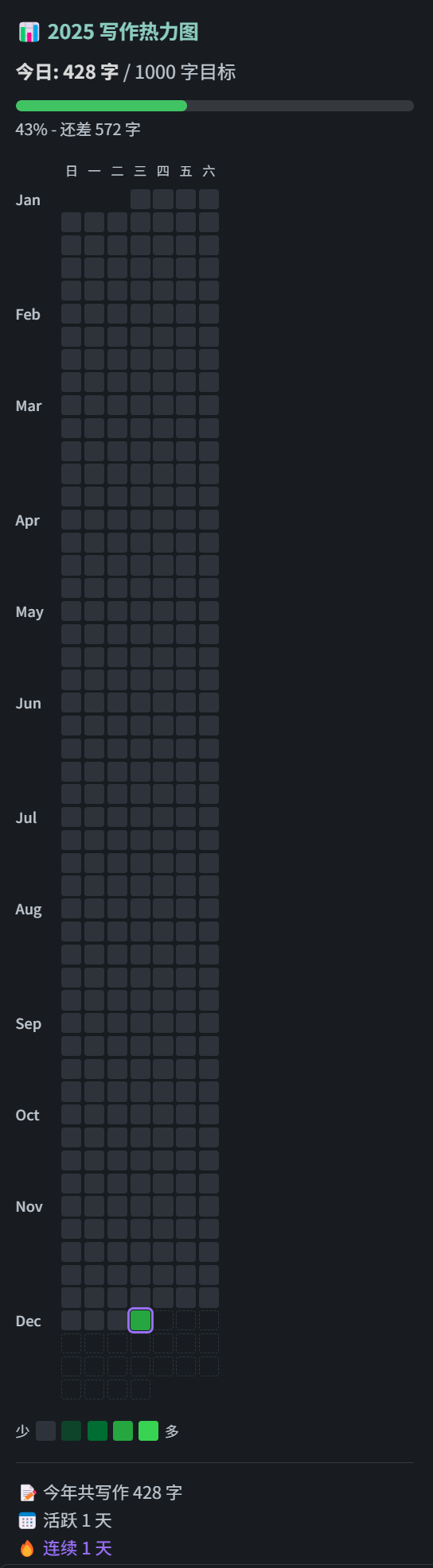
功能
- 📊 自动统计每日新增写作字数
- 🔥 GitHub 风格的热力图可视化
- 📅 支持查看过去一年的写作记录
- 🌙 自动适配深色/浅色主题
- 🇨🇳 支持中文和英文混合统计
安装
从 Obsidian 插件市场安装(推荐)
- 打开 Obsidian 设置
- 进入 第三方插件 → 浏览
- 搜索 "Writing Heatmap"
- 点击安装并启用
手动安装
- 下载最新的 Release
- 解压到
.obsidian/plugins/daily-heatmap/ - 重启 Obsidian 并启用插件
使用方法
- 点击左侧边栏的日历图标 📅
- 或使用命令面板(Ctrl/Cmd + P)搜索"写作热力图"
- 热力图会显示在右侧边栏
统计规则
- ✅ 只统计
.md文件 - ✅ 中文按字符计数,英文按单词计数
- ✅ 自动过滤代码块和 Markdown 语法
- ✅ 只统计新增字数(删除不会减少)
开发
# 安装依赖
npm install

# 开发模式(监听变化)
npm run dev

# 生产构建
npm run build
For plugin developers
Search results and similarity scores are powered by semantic analysis of your plugin's README. If your plugin isn't appearing for searches you'd expect, try updating your README to clearly describe your plugin's purpose, features, and use cases.