Snippet Templater
unlistedby Obsidian
Interactive widget for script templates with live variable substitution and preview.
Snippet Templater for Obsidian
Snippet Templater turns static code blocks and scripts into interactive, dynamic widgets inside Obsidian. It automatically parses variables, renders real-time input fields, and live-substitutes values into syntax-highlighted previews.
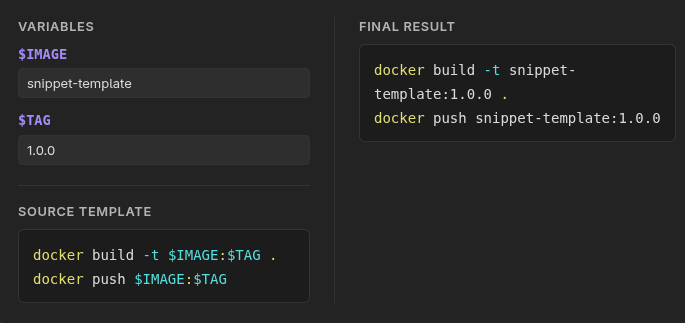
✨ Key Features
| Feature | Description |
| ⚡ Auto Variable Extraction | Detects variables defined as $VARIABLE or ${VARIABLE} instantly. |
| 🎛️ Live Inputs | Generates neat input forms right above or beside your code block. |
| 👁️ Real-Time Preview | Instant updating and substitution as you type into inputs. |
| 🎨 Syntax Highlighting | Preserves full theme colors for Docker, Bash, Python, SQL, YAML, etc. |
| 🏷️ Multiple Fences | Works with snippet-templater, snippet-template, and script-template. |
| 💬 Language Directives | Define language via fence flags (lang:python) or first-line comments. |
🚀 Quick Start & Examples
Wrap your template code inside a supported code block identifier (snippet-template, snippet-templater, or script-template).
1. Bash / Docker Automation
```snippet-template lang:bash
docker build -t $IMAGE:$TAG .
docker push $IMAGE:$TAG
```
How it works:
Extracts
$IMAGEand$TAGvariables.Renders inputs for
IMAGEandTAG.Generates a copy-pasteable script with filled values.
2. Python Scripting
```script-template lang:python
import pandas as pd

df = pd.read_csv("${INPUT_FILE}")
filtered = df[df["status"] == "${STATUS}"]
filtered.to_json("${OUTPUT_FILE}")
```
3. SQL Query Template
```snippet-templater lang:sql
SELECT id, username, email, created_at
FROM users
WHERE status = '$USER_STATUS'
  AND created_at >= '$START_DATE'
LIMIT $LIMIT_COUNT;
```
📖 Syntax & Configuration
Language Overrides
By default, language highlighting falls back to bash. You can specify a custom language in two ways:
-
Header Flag:
```snippet-template lang:python print("Hello, $NAME") ``` -
Inline Comment Directive:
```script-template
// lang: typescript
const user: string = "$USER_NAME";
```
Variable Matching Rules
The parser recognizes variables following standard naming conventions ([A-Za-z_][A-Za-z0-9_]*):
-
Simple format:
$VARIABLE_NAME -
Braced format:
${VARIABLE_NAME}
⚙️ Installation
Option A: Manual Installation
-
Download
main.js,manifest.json, andstyles.cssfrom the latest Releases. -
Navigate to your vault's plugin directory:
<VaultPath>/.obsidian/plugins/snippet-templater/ -
Place the downloaded files in that directory.
-
Reload Obsidian and enable Snippet Templater under Settings → Community plugins.
Option B: Community Plugins (Coming Soon)
Once approved in the official Obsidian Community Catalog, search for Snippet Templater directly inside Obsidian's settings (Settings → Community plugins).
🛠️ Development
Requires Node.js (v18+) and pnpm.
# Install dependencies
pnpm install

# Start development mode (watch mode)
pnpm run dev

# Build for production
pnpm run build

# Run linter
pnpm run lint

# Trigger automated release
pnpm release
📄 License
This project is licensed under the 0-BSD License.
For plugin developers
Search results and similarity scores are powered by semantic analysis of your plugin's README. If your plugin isn't appearing for searches you'd expect, try updating your README to clearly describe your plugin's purpose, features, and use cases.