LLM Wiki Brain
unlistedby jonyfs
See your wiki as a living 3D brain: pages are neurons, links are synapses, and edits, searches and lint results light it up.
LLM Wiki Brain
See your wiki as a living 3D brain inside Obsidian. Each page is a neuron, each [[wikilink]] is a synapse, and pages with more links grow bigger. Built for LLM wikis (wiki/sources, wiki/entities, wiki/concepts, wiki/syntheses, plus wiki/index.md and wiki/log.md), and it works on any vault.
Website and live demo: https://jonyfs.github.io/llm-wiki-brain/ (the real view and engine running in the browser on a made-up wiki; in English, Portuguese, Spanish and French).
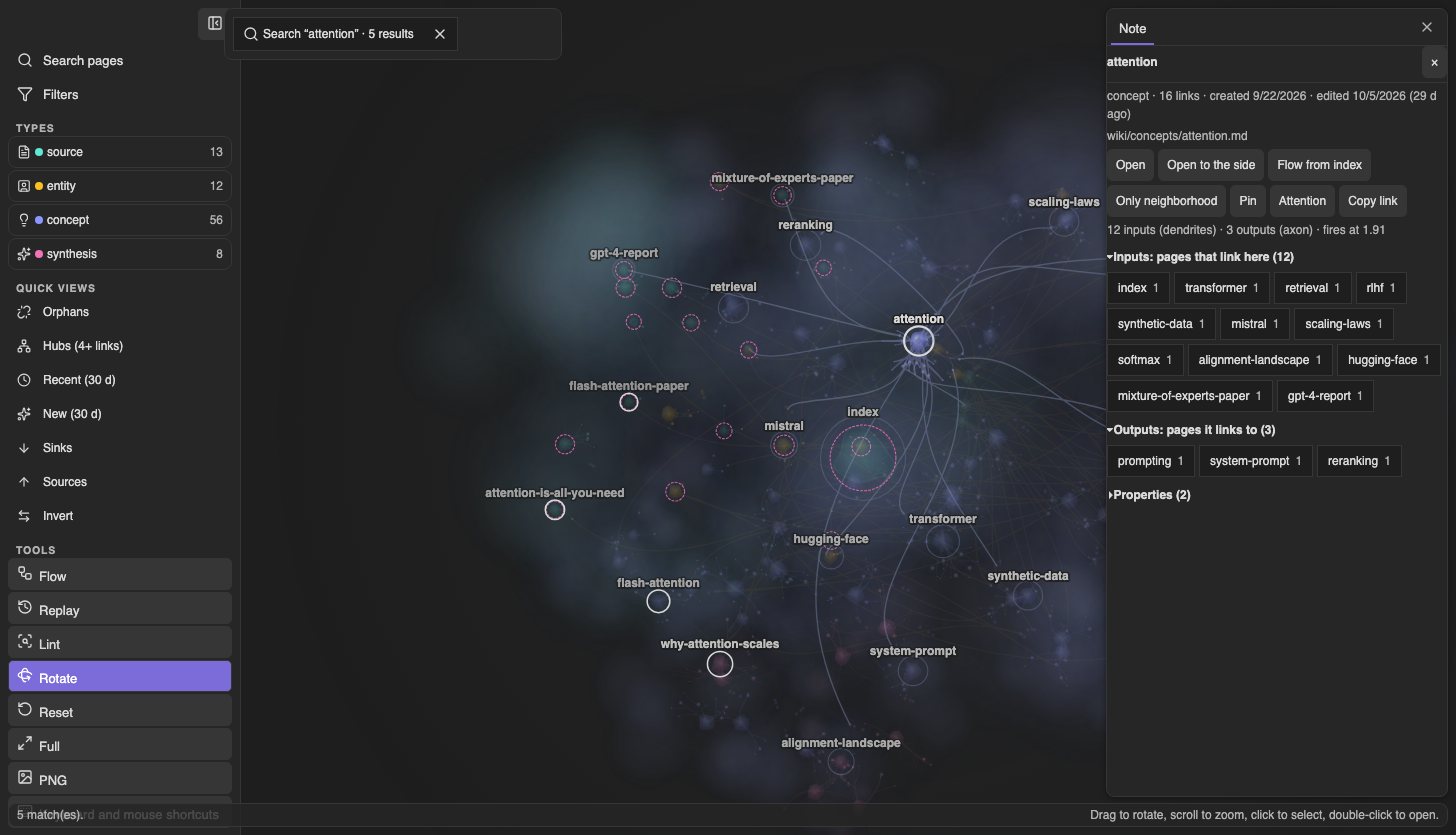
Rendered by the plugin's real view, engine and styles.css on a synthetic demo vault (generic LLM-wiki page names), in Obsidian's default dark theme. See scripts/harness/ui.html.
Contents
Quick start · What you see · The neuron model · Selecting · Search · Filters · Growth: Flow and Replay · Color, size and legend · Export · Keyboard and mouse · Commands · Settings · Languages · Performance · Install · Development
Quick start
- Click the brain icon in the ribbon, or run the command Open brain view.
- Drag to rotate, scroll to zoom, click a neuron to see its inputs and outputs, double-click to open the note.
- Click the search icon and type: what does not match dims.
Enterwalks the matches,Cmd/Ctrl+Enterasks the brain, and the answer spreads along the links. The box folds away after 10 seconds without use and leaves a dot on the icon and a pill while the search still filters. - Press
?on the canvas for every shortcut, and the?next to the search box for the search syntax.
A short card explains the picture the first time you open the view.
What you see
- A brain made of your notes. Linked pages share a region (lobe) of the brain, so clusters of related notes sit together. The soft cloud behind the neurons shows the brain's volume; neurons spread through all of it, also when there are only a few.
- Neurons, not dots. A cell body pulled toward its main dendrites, branches that narrow and fork, an axon with terminal boutons. Busy pages grow extra dendrites. One color per page type: source, entity, concept, synthesis.
- Status line at the bottom: visible pages, links, orphans, broken links, and a note when the page limit left some pages out.
- Active filters appear as removable chips under the search box, and the Filters button shows how many are on.
The type of a page comes from, in order: the type frontmatter field (source, entity, concept, synthesis), a parent folder with one of those names, or a stable guess from the folder name.
The neuron model
A link is a synapse, and the picture follows the biology:
- Direction. A link leaves through the axon of the page that holds it and lands on a dendrite of the page it points to. Signals only travel that way (both ways if the two pages link each other). The panel of a page lists its inputs (pages that link here) and outputs (pages it links to).
- Integrate and fire. Each page adds up what arrives, leaks charge over time, and fires all-or-nothing at a threshold that grows with its number of inputs. The arc around the cell body shows how close it is to firing.
- Ask follows the links. A search answer spreads along outgoing links; a page fed by several matches fires. Links used together grow stronger and fade when idle.
- Inhibition. A frontmatter link under
contradicts,contradiz,contradice,contredit,conflicts,refutesordisputesinhibits: its spikes are red and lower the target's charge instead of raising it. - Myelin. Links between busy pages conduct faster, in jumps like the nodes of Ranvier.
- Attention. The Attention button in a page's panel shows, for a moment, the most similar pages it does not link to (dashed arcs, brighter means heavier weight).
- Ambient signals keep traveling along links so the brain feels alive (off, calm or lively in the settings).
Selecting and the details panel
- Click selects a page and keeps it selected; click empty space or press
Escto clear. Opening a note in Obsidian selects and centers its neuron (a setting turns this off). - Several pages:
Cmd/Ctrl+click adds or removes a page,Alt+drag draws a rectangle that selects what is inside,Alt+click on the cloud selects a whole lobe. A group gets a dashed outline and a counter ("12 pages · 31 links · 3 orphans"). - Actions on a group: isolate it, copy it as
[[links]], make an Obsidian Canvas of it, and, with exactly two pages, play the route between them. - Panel of one page: type, dates (and "3 d ago"), path, a warning if the page has broken links, then Open, Open to the side, Flow from index, Only neighbourhood, Pin, Attention, Copy link; collapsible lists of inputs, outputs and frontmatter properties.
- Neighbourhood: show only the page and the pages within 1 to 3 links (the depth is a filter).
- Pin holds a page where it is; pins are kept between sessions.
- Right-click opens a menu (open, open to the side, copy link, pin, neighbourhood, attention, flow; on a group also isolate and canvas; on empty space reset view, clear filters, export image).
- Hover shows a card (type, inputs, outputs, last edit) and, if you keep the setting on, the note preview from the core Page Preview plugin with its usual modifier key. Hovering a file in Obsidian's file explorer lights its neuron (a setting turns it off).
- The page in focus gets a halo on its neighbours; pages edited in the last day can carry a dashed ring (option in the Filters panel).
Search
Open the search from its icon in the rail (or the command) and type to highlight matches and dim the rest. Enter, or › / ‹, walks the matches with the camera; Shift+Enter goes back; Cmd/Ctrl+Enter asks (the answer spreads along the links); Esc clears, and a second Esc folds the box away. It folds by itself after 10 seconds without use; while it still filters, the icon carries a dot and a pill shows the query. A clickable list shows the first results, Copy puts all of them on the clipboard as [[links]], and "Hide pages that do not match the search" in the Filters panel removes the rest instead of dimming. Suggestions complete the search as you type, and the last 12 searches asked with Enter are remembered.
| Syntax | Meaning |
|---|---|
words | every word must appear in the name, path, headings or tags |
path: file: tag: type: heading: | restrict a term (tag: also matches nested tags: tag:wiki finds #wiki/llm) |
-term | exclude |
"a phrase", path:"my folder" | keep words together |
a or b | either side (each side is an AND of its terms) |
links:>3, links:0, <, <=, >=, = | number of links |
created:<7d, edited:>30d, edited:>2026-01-01 | age (d, w, m, y) or a date |
edited:today, week, month, year | also hoje, semana, hoy, aujourd'hui, and so on |
prop:status=draft, prop:author~ana, prop:status | frontmatter: equals, contains, exists |
is:orphan is:broken is:untyped is:index is:log is:hub | page state (a hub has 8 or more links) |
to:name, from:name | links to a page / is linked from a page |
/regex/ | regular expression on name, path, headings and tags |
With no match, a single word falls back to fuzzy file names (kvcch finds kv-cache). The ? button next to the search box shows these with examples you can click.
Filters
The Filters button opens the panel (a live line says "Showing N of M"):
- type chips (top row), folder and tag (with counts), log operation
- direction: sources (nothing links here), sinks (link nowhere), busy both ways
- minimum and maximum links, edited in the last N days, created in the last N days, orphans only
- filter query: any search syntax, applied as a filter (for example
tag:ai -is:orphan prop:status=draft) - neighbourhood depth (1 to 3) and invert (show what the other filters would hide)
- hidden pages as faint dots, so you still see where the filtered pages are
- Clear filters, and a ✕ button right after the search box that clears the filters and the search in one click
- Saved views: name the current filters and search, save them, pick them again (up to 20)
- One-click presets: Orphans, Hubs, Recent (30 days), New (30 days), Sinks, Sources and Invert replace the active filter set in one click
- Rail: it opens expanded, with a label on every control and three groups (Types, Quick views, Tools) under Search and Filters; the toggle remembers how you left it, and a pane under 640 px folds it into a top bar with a bottom sheet for the filters. Each filter has one home: the quick views in the rail, the switches in the Filters panel. Filters, search, selection and camera are saved with the pane
Filters, search, selection and camera are saved with the pane, so the view comes back as you left it. The log filter shows only the pages a wiki/log.md operation (ingest, query, lint…) touched, matched by page name in the entry title.
Growth: Flow and Replay
- Flow is a wave that leaves the index and reaches every page, hop by hop. Rings spread from the index across the brain; at each hop comets run along the links to the pages reached next, the links just crossed glow and fade, and each arriving page flares. The status line counts the hops and the pages reached ("Flow: hop 3 of 6 · 41 of 89 pages") and ends with a summary. Because an LLM wiki's index links to everything, the links the index holds toward pages that other pages also link are held back: the wave goes first to the pages only the index knows and then spreads through the links between pages, so the hops show how the knowledge is really connected. Links followed backwards are drawn dimmer, and pages with no link at all to the rest of the wiki get a dashed arc from the index at the end. The wave ends on the latest created (or edited) page with a slow double ring; "stay in view" limits it to visible pages. With reduced motion the pages light up hop by hop without the comets. Flow from index on a selected page, and the automatic flow to a page you just created, still send a single packet along the shortest chain of links (a dashed arc where the link is missing).
- Replay empties the brain and the pages return in creation order (or by last edit), each fed from the index. Pause, speed 0.5× to 4×, loop, start from a date (popup date picker), and drag the scrubber to jump to any point. A caption shows the date, the progress and the operations
wiki/log.mdrecorded that day. If file dates are all the same (a vault restored from Git or iCloud), the log's dates place the pages. - Lint rings orphan pages, pages with broken links and pages without a type, with a clickable list.
Color, size and legend
In the Filters panel: Color by type (default), folder, tag, age or links, and Size by links or recency. By type, the Types chips in the rail name the colors; for the other modes a legend in the corner names the four colors. Neuron detail (settings): Auto keeps full neurons and never switches level on its own (a vault over 6,000 notes starts one step lower), High keeps full neurons, Simple draws spheres.
Export
- PNG button (or the command) saves what the view shows as
brain-<date>.pngin the vault root. - Make canvas (group actions or the command) saves the selected notes as an Obsidian Canvas, laid out as the brain shows them, with the links between them as arrows.
Keyboard and mouse
| Input | Action |
|---|---|
drag · Shift+drag or right-drag · wheel · pinch | rotate · pan · zoom at the cursor · zoom on touch |
arrows · + - · 0 | rotate · zoom · reset the camera |
1 2 3 | front, top and side views |
n p or ] [ | next / previous hub |
Alt+arrows | hop to the neighbour in that direction |
Enter · Cmd/Ctrl+Enter · double-click | open the selected note · open to the side (with the canvas focused) |
Esc | clear the selection |
f | open or close the Filters panel (not while typing in a field) |
Shift+f | full screen |
? | list the shortcuts |
Commands
| Command | What it does |
|---|---|
| Open brain view | opens the view (also the ribbon icon) |
| Ask the brain | asks a question; matching pages light up and the answer spreads |
| Send information from the index to the latest page | Flow |
| Replay the wiki growing in creation order | Replay |
| Run wiki lint overlay | Lint |
| Clear highlights | clears marks, waves and routes |
| Focus the search box | jumps to the search |
| Clear filters and search | resets every filter |
| Save the view as an image | PNG export |
| Make a canvas from the selection | Canvas export |
Settings
- Language: Auto (follows Obsidian), English, Portuguese (Brazil), Spanish, French.
- Wiki folder (default
wiki): only pages inside it become neurons; empty means the whole vault. A warning appears if the folder has no notes. - Maximum pages (default 800, up to 10,000): larger vaults keep the most connected pages and the index, and the status line says how many were left out.
- Ambient signals (off, calm, lively), Flow speed, Flow target (the page the wave ends on: latest created or edited), Flow stays in view, Flow to new pages.
- Neuron detail (Auto, High, Simple), Follow the open note, Preview on hover, Light up on file explorer hover.
- Label size, Show performance (frames per second and quality in the status bar), Reduce motion (settle the layout instantly and stop the slow rotation).
Languages
English (default), Portuguese (Brazil), Spanish and French. The plugin follows Obsidian's language; pick another in the settings. Other Obsidian languages show English. To add a language, copy a block in src/i18n.ts; the tests check that every key and every {placeholder} is present.
Performance
Canvas 2D, no WebGL, no worker, no network, no telemetry, no dependencies. Measured on a synthetic vault (see docs/benchmark.md): at 10,000 pages a physics step takes 55 to 70 ms; a frame took 25 to 33 ms on the author's machine before 0.11.0, and 0.11.0 draws more detail (full neurons for the biggest cells at any vault size), so expect more per frame; re-measure on yours. It stays smooth by drawing full neurons only for the biggest ones on screen, links as straight lines past 3,500, and by lowering detail when frames get slow (Neuron detail: Auto). The view pauses when it is hidden. Neuron positions are saved, so the brain does not re-settle on every start. It works on desktop and mobile (touch: drag, pinch).
Install
Requires Obsidian 1.8.7 or newer.
Beta with BRAT: add jonyfs/llm-wiki-brain.
Manual: download main.js, manifest.json and styles.css from the latest release into <vault>/.obsidian/plugins/llm-wiki-brain/, then enable the plugin in Settings → Community plugins.
The plugin is not in the community directory yet.
Development
npm install
npm run dev     # watch build
npm run build   # type-check and production build
npm test        # pure modules: search, filters, physics, neuron model, i18n, ...
site/ is the GitHub Pages website (the design system of the LLM Wiki Template); npm run site builds its generated parts (the demo bundle, the plugin stylesheet, the screenshot) and python3 -m http.server -d site previews it. The Pages workflow deploys it on every push to main that touches the site or the plugin source.
scripts/harness runs the real engine in a browser on a synthetic vault (see its README); ui.html there runs the real view and styles with a small stand-in for the obsidian module, and is how the README image is made. docs/RELEASE-CHECKLIST.md is the manual check to run in a real Obsidian before a release.
Release: bump version in manifest.json, package.json and package-lock.json, add it to versions.json, push the commit and the tag; the GitHub Action runs the build and attaches main.js, manifest.json and styles.css.
Credits
The brain engine is ported from the llm-wiki-template demo graph. MIT licensed.
For plugin developers
Search results and similarity scores are powered by semantic analysis of your plugin's README. If your plugin isn't appearing for searches you'd expect, try updating your README to clearly describe your plugin's purpose, features, and use cases.