Eisenhower Quadrants
unlistedby lucasnad
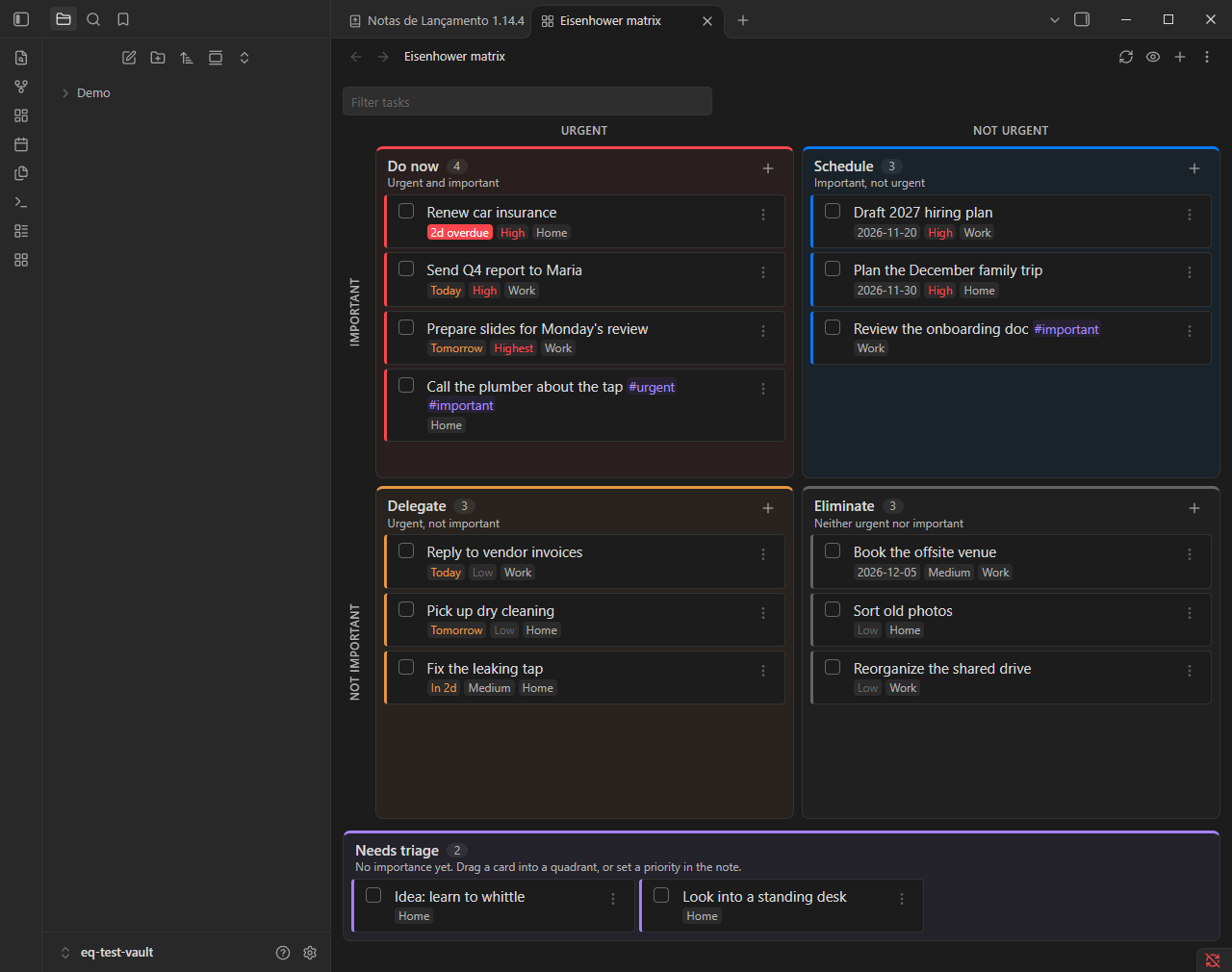
Sort your checkbox tasks into an Eisenhower matrix (matriz de Eisenhower). Urgency comes from due dates, importance from your priority. Drag cards to override.
Eisenhower Quadrants
An Eisenhower matrix (matriz de Eisenhower) for the checkbox tasks you already have in your notes. No new syntax, no separate task database: the plugin reads - [ ] lines from your vault and writes changes back to the same lines.
The idea
The Eisenhower method sorts tasks on two questions, and they are not the same kind of question:
- Urgent? is mechanical. It depends on the calendar, so the plugin computes it from the due date. A task drifts from Schedule to Do now by itself as the deadline gets close, and you never move it by hand.
- Important? is a judgment. Only you know, so the plugin does not guess it. A task with no priority and no tag lands in a Needs triage tray instead of silently being filed under "eliminate".
| Urgent | Not urgent | |
|---|---|---|
| Important | Do now | Schedule |
| Not important | Delegate | Eliminate |
How a task is placed
- Pinned wins. Dragging a card to a quadrant writes a tag such as
#eisenhower/scheduleon the task line. - Urgent when the due date is today, overdue, or within the next N days (default 2), or when the task has an urgent tag (
#urgentor#urgenteby default). - Important when the task has an important tag (
#importantor#importanteby default) or a high or highest priority. Low and lowest priority are not important. Medium priority is not important unless you turn that on. - No importance signal at all means Needs triage (configurable: you can treat such tasks as important or not important instead).
Hover a card to see why it is where it is.
Dates and priorities use the same markers as the Tasks plugin, which is optional:
- [ ] Send the report 📅 2026-10-30 ⏫
- [ ] Renew insurance [due:: 2026-11-05] 🔼
- [ ] Call the plumber #urgent #important
- [ ] Sort old photos 🔽
Priority markers: 🔺 highest, ⏫ high, 🔼 medium, 🔽 low, ⏬ lowest.
Using it
- Open matrix (ribbon icon or command palette) shows every task in the vault. Filter by text, show or hide completed tasks, add a task with the plus button.
- Drag a card to another quadrant, or use the ⋮ menu (also on right click) to Move to…, Open in note, or Return to automatic placement. The menu is the way to move cards on touch screens.
- Click the checkbox to complete a task. It writes
[x]and a✅ datelike the Tasks plugin does; unchecking removes the date. Recurring tasks (🔁,[repeat::]) are completed in the note, so the next occurrence is scheduled properly. - Click the task text to jump to its line in the note.
- Add task (command or plus button) appends a line to a note of your choice (
Eisenhower inbox.mdby default).
Embed a matrix in a note
```eisenhower
```
By default an embedded matrix shows the tasks of the note it sits in. Options:
```eisenhower
folder: Projects/Website
tag: work
completed: true
```
| Option | Meaning |
|---|---|
| (none) | Tasks of the current note |
file: Some note | Tasks of another note (a name or [[link]]) |
folder: Path/To/Folder | Tasks in a folder and its subfolders |
tag: work | Tasks with that tag on their line, or in notes with that tag in their frontmatter |
vault: true | Every task in the vault |
completed: true | Also show completed tasks |
folder and tag can be combined.
Settings
Urgency window, urgent and important tags, medium priority, what to do with unrated tasks, the pin tag prefix, folders to include or ignore, completed tasks, done dates, and the note that receives new tasks.
Install
The plugin is not in the community plugin list yet. Until it is:
With BRAT: install the BRAT plugin, choose Add beta plugin, and enter lucasnad/eisenhower-quadrants.
Manually: download main.js, manifest.json and styles.css from the latest release, put them in <your vault>/.obsidian/plugins/eisenhower-quadrants/, and enable the plugin under Settings → Community plugins.
Requires Obsidian 1.8.7 or later. The layout adapts to narrow panes and phones. Drag and drop uses desktop drag events, so on a touch screen use the ⋮ menu. I have not been able to test on a physical phone yet.
The plugin makes no network requests and collects nothing. It only edits the task lines you act on, never anything else in a note, and it refuses to edit a line that changed in the note since the matrix last read it.
Português
Matriz de Eisenhower para as tarefas com checkbox que você já tem nas notas, sem sintaxe nova. A urgência é calculada pela data de vencimento (uma tarefa passa de Agendar para Fazer agora sozinha conforme o prazo chega) e a importância é decisão sua: tarefa sem prioridade nem tag vai para Para triar, em vez de ser jogada em "eliminar". Arrastar um cartão fixa a tarefa num quadrante gravando uma tag #eisenhower/... na linha. A interface segue o idioma do Obsidian (português do Brasil e inglês).
Datas e prioridades usam os mesmos marcadores do plugin Tasks (📅 2026-10-30, ⏫). Para embutir a matriz numa nota, use um bloco de código eisenhower (opções acima). Instalação por BRAT: lucasnad/eisenhower-quadrants.
Development
npm install
npm run dev      # watch build into main.js
npm test         # unit tests for the parsing and placement logic
npm run lint     # Obsidian's own ESLint rules
npm run build    # type check and production bundle
To try it, symlink or copy the folder to <vault>/.obsidian/plugins/eisenhower-quadrants/ and reload the plugin. The task logic lives in src/tasks.ts and has no Obsidian dependency; everything that touches the vault is in src/service.ts and src/controller.ts.
To release: run npm version patch (it updates manifest.json and versions.json and creates the tag), npm run build, push with git push --follow-tags, then attach the build to a release whose tag equals the version, with no v prefix:
gh release create 1.0.1 main.js manifest.json styles.css --generate-notes
License
For plugin developers
Search results and similarity scores are powered by semantic analysis of your plugin's README. If your plugin isn't appearing for searches you'd expect, try updating your README to clearly describe your plugin's purpose, features, and use cases.