Focus First
approvedby Christian Luger
Prioritize your tasks with the Eisenhower matrix. - This plugin has not been manually reviewed by Obsidian staff.
Focus First




Stop guessing what to work on next. Focus First automatically sorts your Obsidian tasks into an Eisenhower or Value/Effort matrix, so the next right action is always obvious.
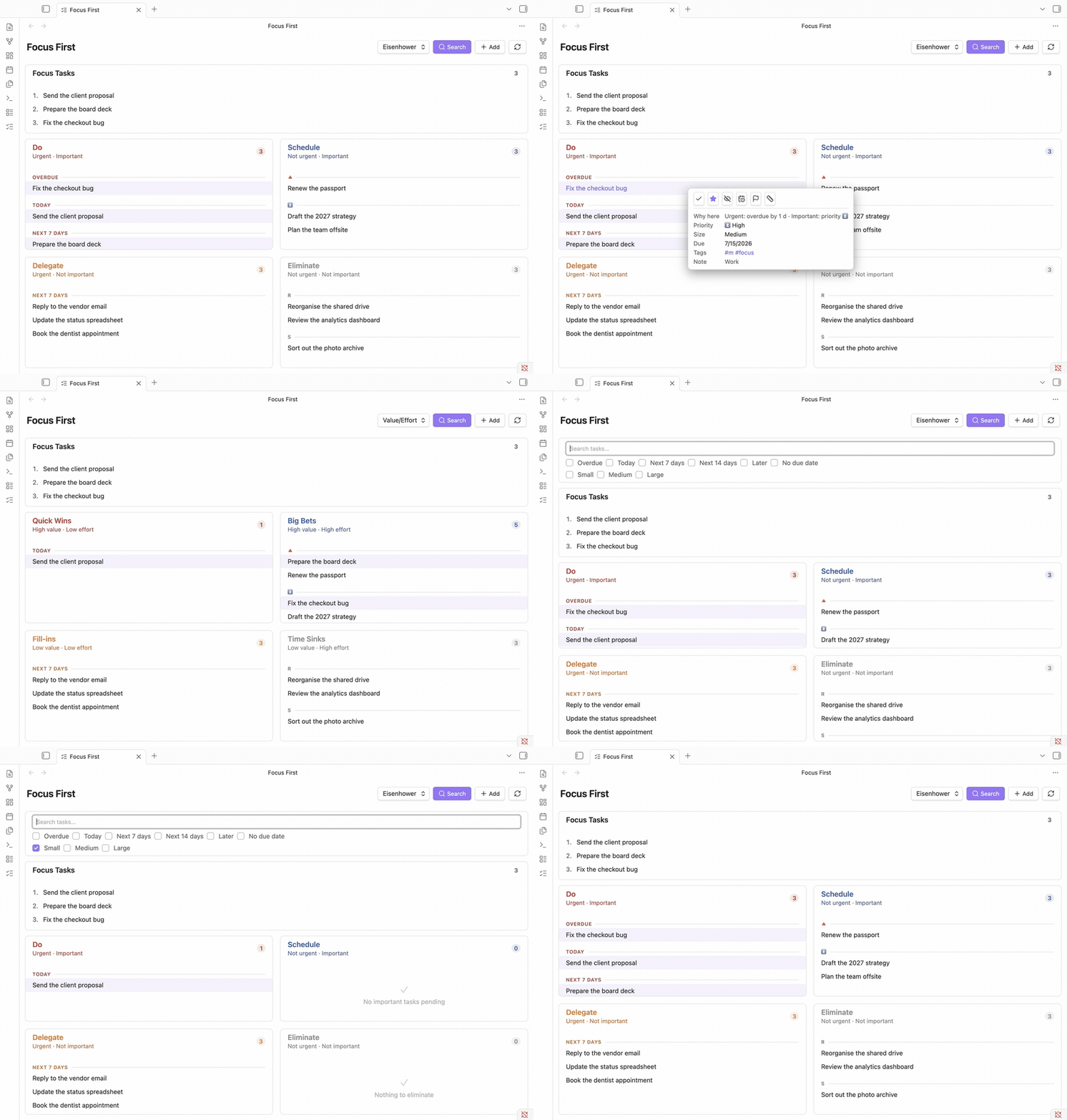
It reads standard checkbox tasks from your vault (compatible with the Tasks plugin format - due dates, priorities, tags) and places each one automatically:
| Urgent | Not urgent | |
|---|---|---|
| Important | Do - handle now | Schedule - plan for later |
| Not important | Delegate - hand off if possible | Eliminate - reconsider or drop |
No manual sorting needed - pin any task to a quadrant with one click, marked with a visible badge, and reset it just as easily.
📖 Full guides, concepts, and reference: Focus First documentation
Features
- Automatic Eisenhower classification - tasks sorted by urgency (due date) and importance (priority), with no setup.
- Two matrices in one view - switch between Eisenhower and Value/Effort, or drag a task between quadrants to re-classify it.
- Triage view - a separate list of every task no matrix has judged yet, so nothing gets lost in "Eliminate"; place each with one click from a hover picker.
- Focus / today plan - an ordered, numbered
#focusshortlist for daily-planning methods like Eat the Frog, Ivy Lee, and MITs. - Task size & quick wins - tag sizes (
#s/#m/#l) and filter the matrix to short tasks. - Details on demand - hover (desktop) or tap (mobile) a task for its "why here" reason, metadata, and one-click actions, each with a brief Undo.
- Capture & embed - quick-add, hide/snooze, search & filters, and embeddable task lists. Works on desktop and mobile, in English and German.
→ See the full feature overview and guides in the documentation.
Documentation
The complete guides live at christian-luger-at.github.io/obsidian-focus-first:
- Prioritization methods - the why behind Eisenhower, Value/Effort, Eat the Frog, Ivy Lee, and MITs
- Getting started
- How tasks are classified
- The two matrices
- Triaging unclassified tasks
- Focus, size & filters
- Embedding tasks in a note
- Settings
Installing the plugin
From the Community Plugins browser (once published)
- Open Settings → Community plugins in Obsidian.
- Disable Safe mode if needed, then click Browse.
- Search for "Focus First" and click Install, then Enable.
Manual installation
- Download
main.js,styles.css, andmanifest.jsonfrom the latest release. - Copy them into
<YourVault>/.obsidian/plugins/focus-first/. - Reload Obsidian and enable Focus First under Settings → Community plugins.
Compatibility
- Requires Obsidian 1.12.0 or later.
- Works on desktop and mobile.
- Works alongside the Tasks plugin - Focus First reads the same checkbox/due-date/priority syntax but doesn't require it (only the code block's query mode needs the Tasks plugin).
Support
Found a bug or have a feature request? Please open an issue.
If Focus First helps you, a ⭐ on the repo makes it easier for others to discover - thank you!
Contributing
Contributions are welcome. See CONTRIBUTING.md for how to report issues, set up the project, and open a pull request, and DEVELOPMENT.md for the local dev/test workflow, the release process, and a demo-vault generator (node scripts/gen-demo-vault.mjs) that spins up a 400-note product-management vault with 100 varied tasks to try the plugin against.
License
Focus First is licensed under the MIT License. © 2026 Christian Luger.
For plugin developers
Search results and similarity scores are powered by semantic analysis of your plugin's README. If your plugin isn't appearing for searches you'd expect, try updating your README to clearly describe your plugin's purpose, features, and use cases.