mish.eza
unlistedby mishti
Replace the file explorer with an eza-style tree, a starship-style prompt and a small command line for making, renaming, copying and deleting notes.
mish.eza
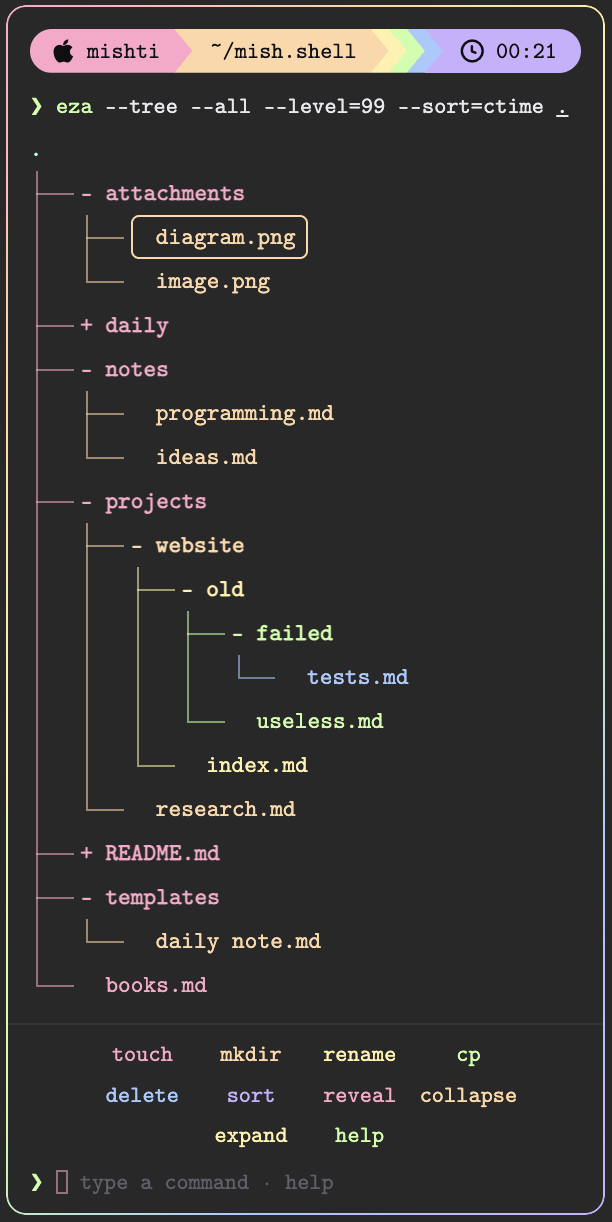
your obsidian file explorer, as eza --tree under a starship prompt.
the sidebar you stare at all day, rebuilt as a terminal.






what you get · tour · commands · install · settings · is it safe? · fonts · palettes · faq
what you get
| the prompt | powerline pills for your name (with a logo for your operating system), the vault, the git branch and the clock. the git pill only shows when the vault is a git repository. |
| a real tree | genuine ├── └── │ lines, one colour per depth. click a folder to fold it, click a note to open it, cmd/ctrl-click for a new tab. right-click any row for obsidian's usual file menu. |
| a little shell | touch mkdir rename mv cp rm and more. tab completion, up and down for history. what you type is coloured as you type it, so typos turn pink before you press enter. rm asks y/n first. |
| reveal pills | names are cut off with an ellipsis so the card never resizes. hover one and a colour pill grows out of it with the whole name. the reveal command lights up the note you have open the same way, and it stays lit. |
| a built-in guide | type help for a full page: every command, every key, and what the colours mean. |
| make it yours | a default palette called mish, eight presets (or your own six colours), three pill shapes, tree lines, sizes, the card's border and position. nearly everything is a setting and everything applies live. |
| zero setup | the font and the icons are bundled. nothing to install but the plugin. |
desktop only.
a quick tour
the shell
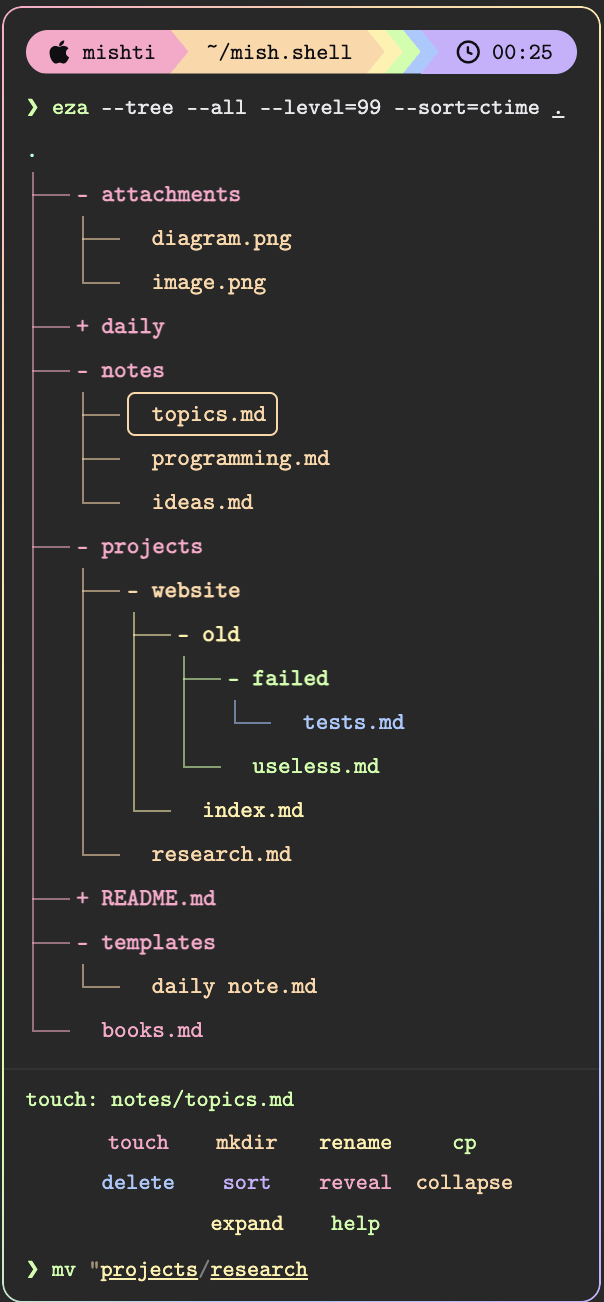
type a command, or click its name in the row above the prompt. what you type is coloured as you type it: green for a command that exists, pink for one that doesn't, and your own folders and files light up when they're real. tab finishes names, up and down bring back earlier lines.
reveal pills
the card never changes size, so a long name ends in …. rest the mouse on it and a prompt-style pill grows out of the name in its depth colour, showing all of it. it never steals the mouse, so nothing flickers as you sweep down the tree.
the reveal command does the same for the note you have open: it unfolds the folders above it, scrolls to it, and lights it up as a pill so you can see exactly where it landed. the pill is tied to the note, not to a spot on the screen: scroll, fold folders or resize the sidebar and it moves with the file (and hides while the note is out of view). hovering other rows doesn't take it away. it goes away when you run another command, open another note, click that note or press esc.
in settings you can switch hover pills off, show them on names that already fit, or change how long the mouse has to rest before one appears.
it asks before it deletes
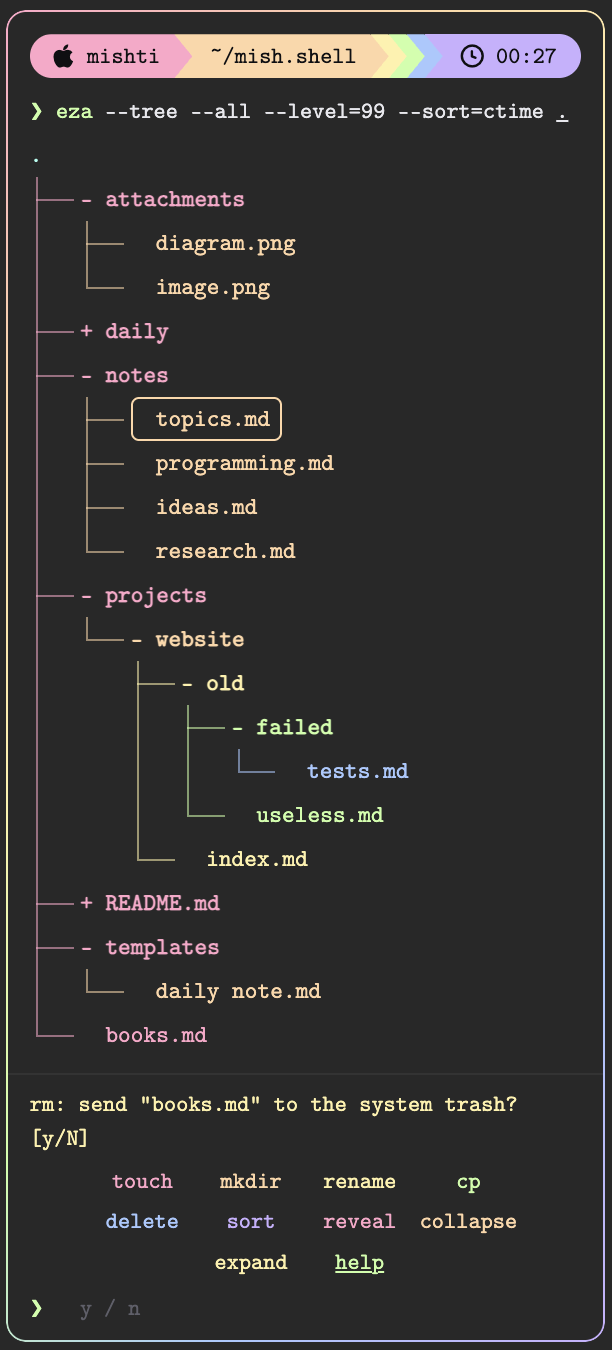
rm and delete don't just do it. the prompt asks you, right there in the shell: no popup, no dialog. type y to go ahead. anything else cancels, even just enter. and even after a y, it goes to your system trash, so you can still fish it back out.
a guide that lives in the panel
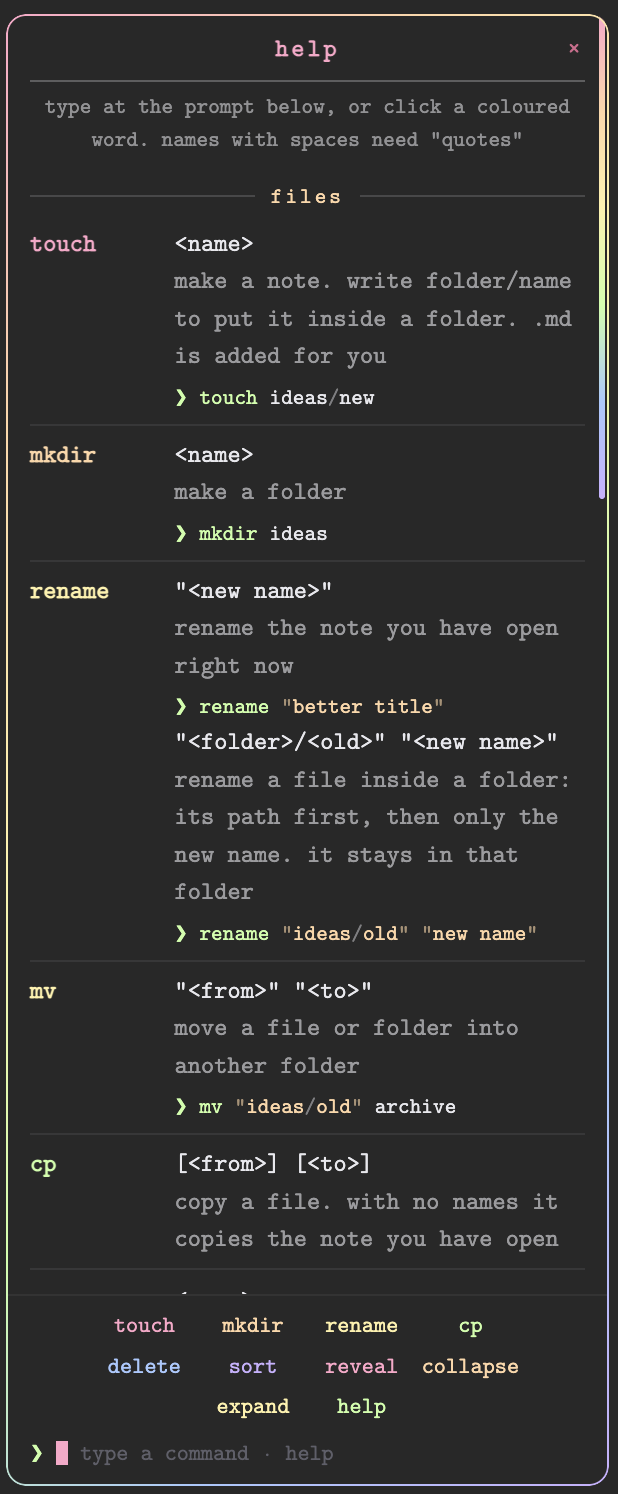
type help and the tree is replaced by a full guide: every command, every key, and what each colour means. esc brings the tree back.
light or dark
it follows your theme.
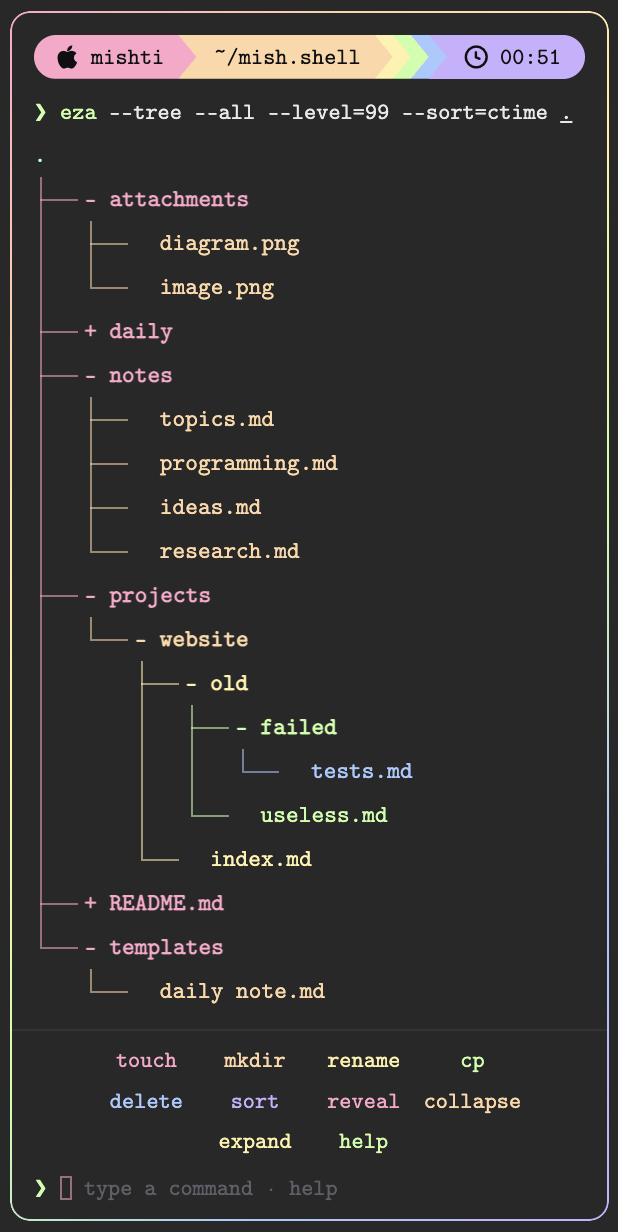 dark | 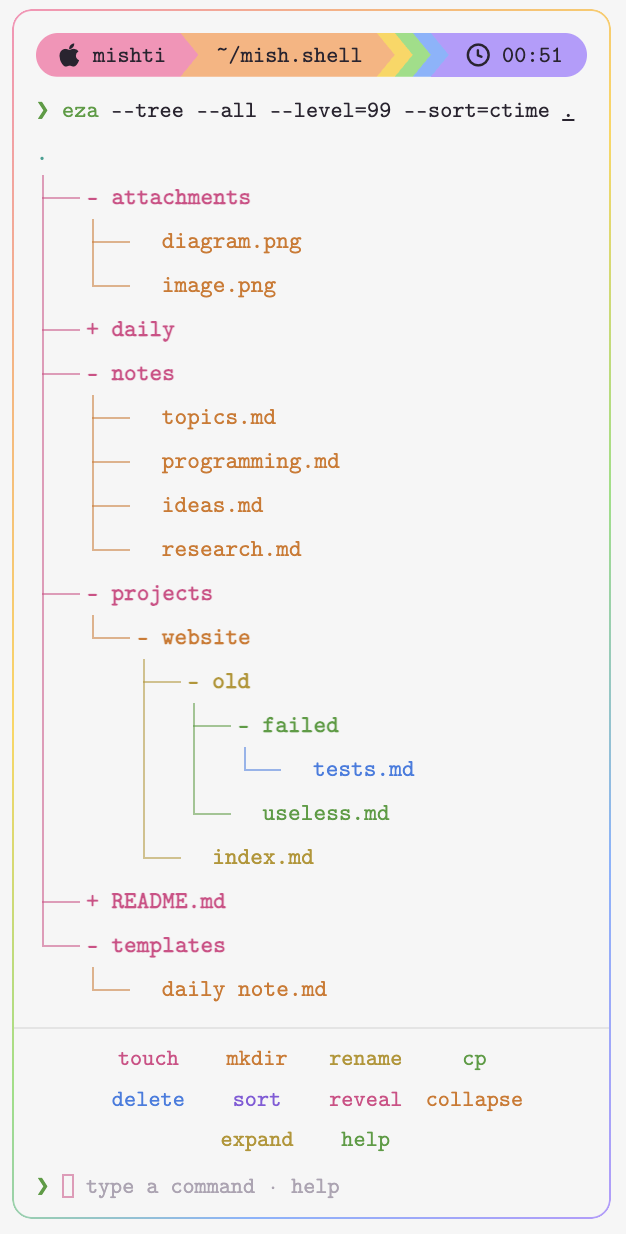 light |
|---|
commands
type them, or click their names in the row above the prompt.
| command | what it does |
|---|---|
touch <name> | make a note. .md is added, and folder/name puts it in a folder (made for you if it is missing) |
mkdir <name> | make a folder |
rename "<new name>" | rename the note you have open |
rename "<folder>/<old>" "<new name>" | rename a file in a folder. it stays in that folder |
mv "<from>" "<to>" | move a file or folder |
cp [<from>] [<to>] | copy a file. no names = copy the open note |
rm <name> / delete <name> | send to the system trash, after a y/n question. add -r for a folder with things in it, -f to skip the question |
sort [name|mtime|ctime|size|ext] | change the order of the tree. no key = step to the next order |
reveal | jump to the open note in the tree and light it up as a pill |
collapse · expand | fold every folder · unfold every folder |
clear | clear the output line |
help | open the guide |
keys: enter runs it · tab finishes a command or a name · ↑ ↓ bring back earlier lines · y / n answer a question · esc empties the prompt, cancels a question or closes the guide.
names with spaces need "quotes", just like a real terminal.
about deleting:
rmanddeleteask[y/N]in the prompt first, then send things to the system trash (never a permanent delete).rm -fskips the question, and you can turn the question off in settings if you'd rather not have it.
good to know
renameandmvgo through obsidian's own file manager, so links to the file are updated for you.- the original explorer is only hidden. run toggle native file explorer from the command palette to bring it back, and redraw the prompt if the panel ever goes missing.
install
with brat: add the beta plugin mishtiiikrishnaa/mish.eza.
by hand: download main.js, manifest.json and styles.css from the latest release into <your vault>/.obsidian/plugins/mish-eza/, reload obsidian, and switch the plugin on.
from obsidian (once it is listed): settings → community plugins → browse → search for mish.eza.
settings
everything applies live. no reload.
| section | what you can change |
|---|---|
| identity | your own user name, or leave it empty and it is detected |
| prompt | show or hide the user, vault, git and time pills. pill shape (arrow, round or flat), custom vault pill text, 12-hour clock, seconds |
| colours | mish (the default: the pastel rainbow it ships with, following your obsidian theme's colours if the theme sets them), catppuccin, dracula, nord, gruvbox, ocean, sunset, forest, greyscale, or your own six colours. plus the text colour on the pills |
| tree | folders first, reverse order, hide .md or every extension, name colours (by depth, by file type, plain), how the open note is marked, follow the open note, font size, row height, indent, line style, thickness and strength |
| hover reveal | switch the pills on or off, show them on names that already fit, how long the mouse rests before one appears |
| card and layout | fit the prompt or fill the sidebar, centre or left, centre or top, border style (rainbow, accent, subtle, none), thickness, rainbow angle, corner radius, outer margin |
| shell | ask before deleting (on by default), show or hide the shell line, the eza --tree line and the row of clickable commands |
| appearance | pick the font (see fonts). the find monospace fonts button asks the browser for the monospace fonts you have installed, and it may ask permission first |
| reset | put the look (colours, pill shape, tree, card and pills) back to the defaults |
is it safe?
short answer: it runs no commands, and it uses no network.
the little shell is not a real shell. what you type is read by the plugin, matched against a short list of words, and turned into calls to obsidian's own file functions. nothing is passed to your operating system, no program is started, nothing is downloaded and nothing is uploaded.
exactly what it touches
| what | how | why |
|---|---|---|
| your vault's files and folders | obsidian's vault api | to draw the tree |
| the note you have open | obsidian's workspace api | to highlight it, to reveal it, and for rename / cp with no names |
.git/HEAD in the vault folder | one small read through obsidian's vault api | the git pill. only when that pill is on. no such file means nothing shows |
| your computer's user name | node's os module | the first pill. this is why the plugin is desktop only |
| your installed fonts | window.queryLocalFonts(), only when you press the find-fonts button | the font menu. the browser asks permission first. the names stay in memory and are never saved or sent anywhere |
data.json in the plugin folder | obsidian's saveData | your settings, which folders are unfolded, and the sort order |
what it changes, and when
only when you type the command:
| command | effect |
|---|---|
touch · mkdir · cp | create a note, a folder, or a copy |
rename · mv | rename or move (obsidian updates links) |
rm · delete | send to the system trash, after you answer y (or with rm -f) |
nothing else in your vault is ever written to. the plugin never edits the contents of your notes.
don't trust it, check it
main.js is plain, readable javascript. no bundler, no minifying. this finds nothing:
grep -nE "child_process|fetch\(|XMLHttpRequest|WebSocket|eval\(|new Function|innerHTML" main.js
and this lists everything it imports. you should see exactly two lines, obsidian and os:
grep -n "require(" main.js
how it fits into obsidian
obsidian has no api for replacing the file explorer, so the plugin does it the only way available: it adds its own panel to the explorer's view and hides the original with css. that depends on obsidian's internal page structure, which can change in an update. if the panel ever misbehaves after an update, run toggle native file explorer, and please open an issue.
make it yours
most of it is in the settings. for anything beyond that, a theme or css snippet can restyle the whole thing through the --vf-* css variables (for example --vf-pink and --vf-mono). each has a default, so set only the ones you care about.
fonts
the default font and the logos are embedded in styles.css, so they work on any machine with nothing to install.
- cmu typewriter text, SIL Open Font License 1.1, as a subset embedded under the name "mish mono".
- six glyphs from symbols nerd font mono, embedded as "mish icons". the three operating system logos come from Font Awesome (CC BY 4.0) and the clock from Octicons (MIT).
the subset covers latin letters, digits and common punctuation. a file name in another script is drawn with your system's monospace font instead. the tree lines themselves are drawn with css, so they never depend on the font.
you can also pick obsidian's monospace font, your system monospace, any common monospace font found on your computer, or your own css font list.
palettes
the colour presets catppuccin, dracula, nord and gruvbox use accent colours from those open source colour schemes. the colours are theirs, not mine, and this plugin isn't affiliated with or endorsed by their authors. all four are MIT licensed. the credits and licence text are in THIRD-PARTY-NOTICES.md.
| preset | from | licence |
|---|---|---|
| catppuccin | catppuccin, the mocha flavour | MIT, © Catppuccin |
| dracula | dracula, the open source palette (not dracula pro) | MIT, © Dracula Theme |
| nord | nord, by Sven Greb | MIT, © Sven Greb |
| gruvbox | gruvbox, by Pavel Pertsev (morhetz) | MIT/X11, as stated by its readme |
mish (the default), ocean, sunset, forest and greyscale are this plugin's own.
faq
what is the "mish" palette? it's the default one, in settings → colours. it's the pastel rainbow the plugin ships with (pink, peach, yellow, green, blue, lilac), and if your obsidian theme sets its own colours it follows those instead. pick another preset or your own six colours any time, and the reset arrow next to the palette brings mish back.
can i get the normal file explorer back? yes. run toggle native file explorer from the command palette. turning the plugin off restores it too.
does it delete my notes?
only when you type rm or delete yourself and answer y (or add -f), and then they go to the system trash, not a permanent delete.
does it run real terminal commands?
no. touch, rm and friends are just names the plugin recognises. each one becomes a call to obsidian's own file functions. see is it safe?.
a pill showed up on the note i revealed. is that a bug?
no, that's the reveal command showing you where it landed. it stays on that note, following it as you scroll or fold things, until you run another command, open another note, click that note or press esc. hover pills can be switched off in settings → hover reveal, which quiets this one too.
why is it desktop only?
it reads your user name with node's os module, which exists on desktop obsidian only.
why does my file name look different in a non-latin script? the bundled font covers latin letters, digits and common punctuation. other scripts fall back to your system's monospace font.
can a theme restyle it?
yes, through the --vf-* css variables. see make it yours.
licence
the plugin's own code is MIT, (c) 2026 mishti. the embedded fonts and the named colour presets keep their own licences: see THIRD-PARTY-NOTICES.md and the licenses/ folder.
made with 🩵 by mishti
For plugin developers
Search results and similarity scores are powered by semantic analysis of your plugin's README. If your plugin isn't appearing for searches you'd expect, try updating your README to clearly describe your plugin's purpose, features, and use cases.