File Assistant
unlistedby Feitong
Provides a smart side panel to categorize and filter document content like headings, highlights, bold text, callouts, etc.
★ 6 starsUpdated 6mo agoMIT
Obsidian File Assistant | 文档助手
English Description
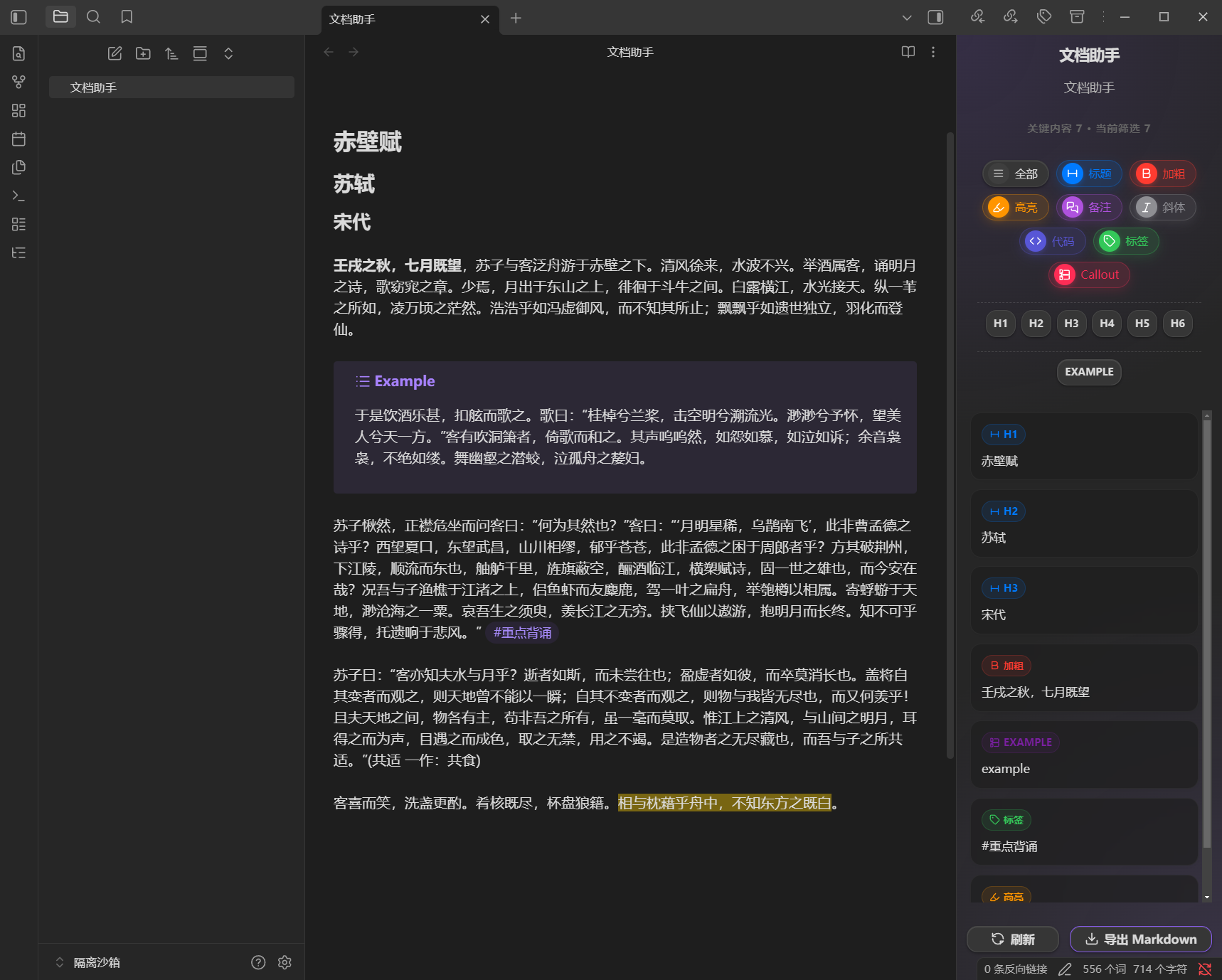
Obsidian File Assistant is a powerful sidebar plugin designed to help you navigate and manage your document content more efficiently. It automatically extracts key elements from your active note and presents them in a clean, interactive side panel.
✨ Key Features
- Smart Filtering: Quickly filter content by Headings (H1-H6), Bold text, Highlights, Callouts, Tags, Code blocks, and more.
- Visual Navigation: Clicking on an item in the sidebar helps you quickly locate it in your document.
- Export Power: Export your filtered results directly to a new Markdown file with one click.
- Interactive UI: A modern, responsive design that stays in sync with your editing.
🖼️ Preview
🚀 Installation
- Download
main.js,manifest.json, andstyles.cssfrom the latest release. - Create a folder
obsidian-file-assistantin your vault's.obsidian/plugins/directory. - Move the three files into that folder.
- Enable the plugin in Settings > Community Plugins.
中文介绍
文档助手 (Obsidian File Assistant) 是一款强大的侧边栏插件,旨在帮助您更高效地浏览和管理文档内容。它能自动提取当前笔记中的关键元素,并在简洁的交互式面板中分类展示。
✨ 核心功能
- 智能过滤:支持按标题 (H1-H6)、加粗、高亮、引用 (Callout)、标签、代码块等多种维度快速筛选内容。
- 可视化导航:在侧边栏点击相应条目,即可快速定位到文档中的对应位置。
- 一键导出:支持将过滤后的结果直接导出为新的 Markdown 文件。
- 现代界面:响应式设计,提供流畅的交互体验,并与您的编辑状态实时同步。
🖼️ 预览
🚀 安装方法
- 从 Release 页面下载
main.js,manifest.json, 和styles.css。 - 在您的库目录
.obsidian/plugins/下创建一个名为obsidian-file-assistant的文件夹。 - 将下载的三个文件放入该文件夹。
- 在 设置 > 第三方插件 中启用插件。
Development | 开发
npm installnpm run devfor development ornpm run buildfor production.
For plugin developers
Search results and similarity scores are powered by semantic analysis of your plugin's README. If your plugin isn't appearing for searches you'd expect, try updating your README to clearly describe your plugin's purpose, features, and use cases.