Plugin Inventar
unlistedby Alexander Waller
Automatically maintain an inventory of all installed plugins per device and Vault. Perfect for Obsidian Sync users to track plugin changes across devices without Git conflicts.
Plugin Inventar
Automatically maintain an inventory of all installed plugins for each of your devices and Obsidian vaults.
Features
- 🔄 Automatic Updates – Inventory updates when Obsidian starts or plugins are installed/enabled/disabled
- 📱 Multi-Device Tracking – Each device maintains its own inventory file (
<VaultName>_<DeviceName>.md) - 🔀 Sync Friendly – Works seamlessly with Obsidian Sync by keeping device-specific files separate (no conflicts)
- ⚙️ Configurable – Choose where inventory notes are stored
- 📊 Clean Format – Organized Markdown table with plugin status, versions, and IDs
Why You Need This
If you use Obsidian Sync across multiple devices, tracking which plugins are installed and enabled on each device is important. This plugin solves that by automatically maintaining a device-specific inventory:
System/Plugin-Inventar/
├── MyVault_macbook.md       # Plugins on your Mac
├── MyVault_windows-desktop.md # Plugins on your Windows PC
└── MyVault_ipad.md          # Plugins on your iPad
Each file is named <VaultName>_<DeviceName>.md so they don't conflict with Obsidian Sync.
Installation
From Obsidian Community Plugins
- Open Obsidian Settings → Community Plugins
- Disable Safe Mode (if enabled)
- Click Browse and search for "Plugin Inventar"
- Click Install
- Click Enable
Manual Installation
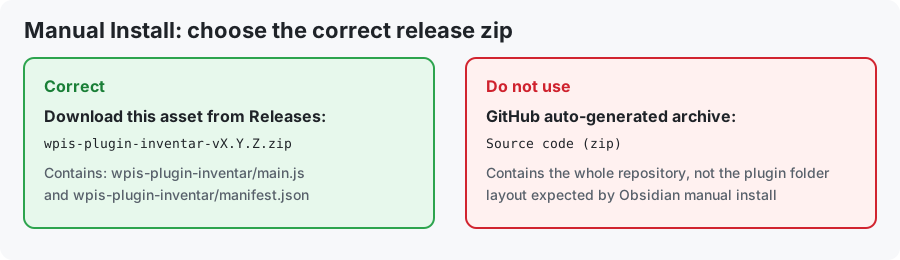
- Open GitHub Releases and download the asset
wpis-plugin-inventar-vX.Y.Z.zipfrom the latest release - Do not use
Source code (zip)because that archive contains the full repository - Extract the zip so that this structure exists in your vault:
.obsidian/plugins/wpis-plugin-inventar/main.jsand.obsidian/plugins/wpis-plugin-inventar/manifest.json - Reload Obsidian (or enable in Community Plugins panel)
Mini screenshot (which zip to use):
Configuration
Inventory Folder
By default, inventory files are stored in System/Plugin-Inventar/. You can customize this in the plugin settings:
- Open Obsidian Settings → Plugin Inventar
- Change the Inventory Folder setting
- Save changes
Recommendation: Use a folder that's included in Obsidian Sync so your inventory is available on all devices.
Usage
Automatic Updates
The inventory automatically updates:
- When Obsidian starts (trigger: "Startup")
- When you install, uninstall, enable, or disable a plugin (trigger: "Plugin change")
Manual Update
You can manually trigger an update:
- Use Command Palette:
Plugin Inventar: Manual Update - Access settings:
Plugin Inventar: Open Configuration
Viewing Your Inventory
Navigate to your configured inventory folder and open the markdown file for your device. You'll see:
# Plugin Inventory – My Vault

- **Device:** My-MacBook
- **Updated:** 2026-04-08T22:56:00.000Z
- **Trigger:** Plugin change

## Installed Plugins (42/45 enabled)

| Status | Name | ID | Version |
|--------|------|----|----|
| ✅ | Obsidian Git | obsidian-git | 1.0.0 |
| ✅ | Dataview | dataview | 0.5.50 |
| ⭕ | Daily Notes | daily-notes | 1.1.0 |
Status indicators:
- ✅ = Plugin is enabled
- ⭕ = Plugin is disabled
Known Issues
Mobile Support
On iOS and Android, the device name will show as "Unknown" because the plugin cannot detect the device name using standard APIs. If this is important for your workflow, please file an issue.
Obsidian Version Compatibility
This plugin requires Obsidian 1.0.0 or later. Earlier versions may not have full event handler support.
Contributing
Contributions are welcome! Please submit issues or pull requests on GitHub.
License
This plugin is released under the MIT License.
Support
For bug reports, feature requests, or questions, please open an issue on GitHub.
Contributing
Found a bug or want a feature? Please open an issue on GitHub.
License
MIT License – See LICENSE for details.
Author
Alexander Waller
WebPoint Internet Solutions, Lauterach, Austria
https://webpoint.at
Credits
This plugin is built with:
Changelog
See CHANGELOG.md for version history.
For plugin developers
Search results and similarity scores are powered by semantic analysis of your plugin's README. If your plugin isn't appearing for searches you'd expect, try updating your README to clearly describe your plugin's purpose, features, and use cases.