by Bennett
Intelligent note ingestion, meeting synthesis, account intelligence, and knowledge graphs powered by your choice of LLM.
Updated todayMIT
VaultFlow
Structured note intake, meeting summaries, and account tracking for Obsidian.


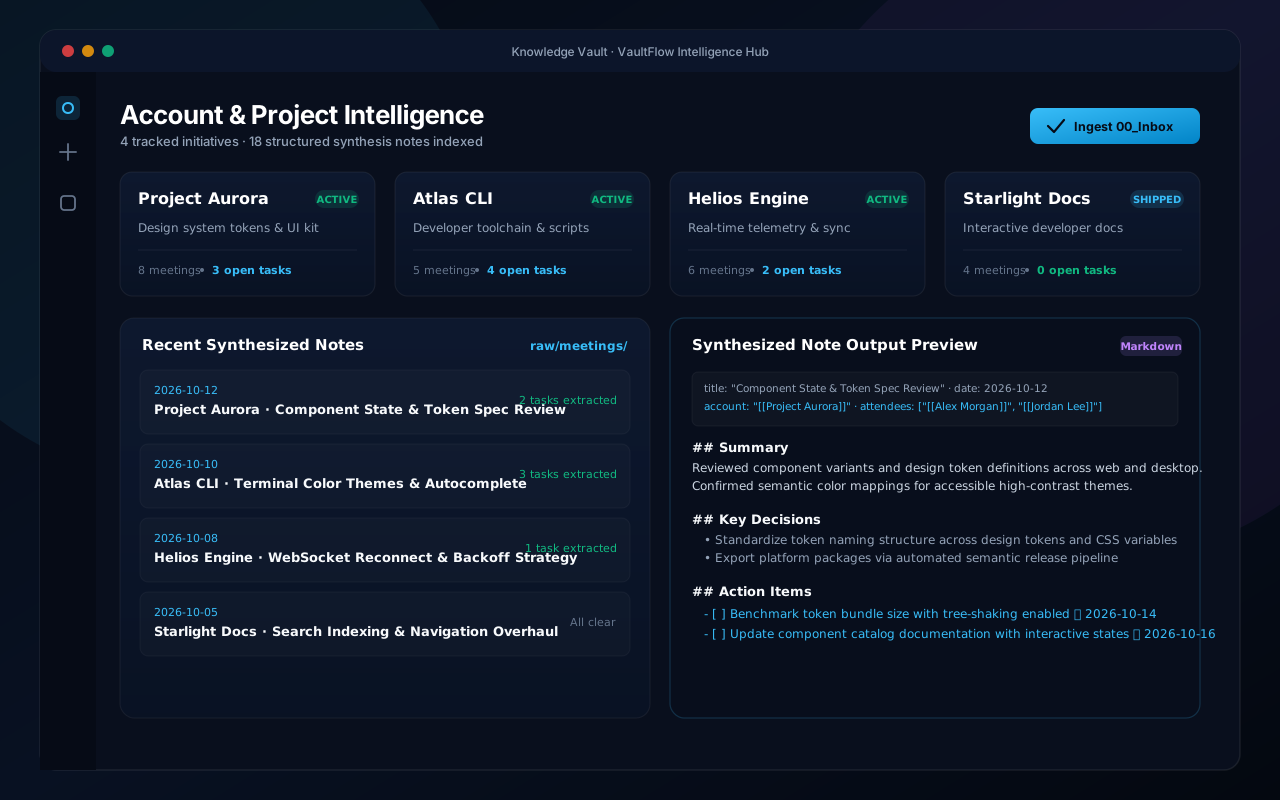
VaultFlow organizes meeting notes and transcripts in your vault. It reads incoming notes, drafts summaries and action items, and connects attendees and accounts using your preferred language model.
Features
- Inbox Processing: Put raw notes or transcripts into
00_Inboxand process them intoraw/meetings/with one click. - Structured Notes:
- Concise summaries
- Attendees linked as
[[WikiLinks]] - Key decisions and discussion points
- Action items formatted as
- [ ]tasks
- Model Choice:
- Google Gemini (1.5 Flash, 1.5 Pro, 2.0)
- Anthropic Claude (3.5 Sonnet, 3.5 Haiku, 3 Opus)
- OpenAI (GPT-4o, GPT-4o-mini, o1-mini)
- Ollama (Local models: Llama 3, Mistral, Qwen)
- Account Overview: Displays account notes, meeting history, and open tasks in a single view.
- Theme Support: Matches light and dark themes using Obsidian's standard CSS variables.
Installation
Community Plugins
- Open Settings → Community plugins.
- Turn off Restricted mode.
- Search for VaultFlow.
- Select Install, then Enable.
Manual Installation
- Download
manifest.json,main.js, andstyles.cssfrom the latest Release. - Move them into
<vault>/.obsidian/plugins/vaultflow/. - Reload Obsidian and turn on VaultFlow in Community plugins.
Configuration
In Settings → VaultFlow:
- Choose your AI provider.
- Enter your API key or local Ollama address.
- Adjust folder paths (
00_Inbox,raw/meetings,Accounts).
Development
git clone https://github.com/Rbm3267/obsidian-flow.git
cd obsidian-flow
npm install
npm run dev    # watch build
npm run build  # production build
License
MIT License © 2026 XD Labs / Bennett Moore.
For plugin developers
Search results and similarity scores are powered by semantic analysis of your plugin's README. If your plugin isn't appearing for searches you'd expect, try updating your README to clearly describe your plugin's purpose, features, and use cases.