by Bennett
Vault operating system, customizable bento dashboard, telemetry, and non-blocking multi-model AI assistant for Obsidian.
VaultOS
A customizable bento dashboard, workspace telemetry, and multi-model AI assistant for Obsidian.


VaultOS adds a dashboard homepage to your vault. It displays your notes, active projects, open tasks, and quick navigation in a clean bento layout, with an integrated AI assistant supporting Gemini, Claude, OpenAI, and local Ollama models.
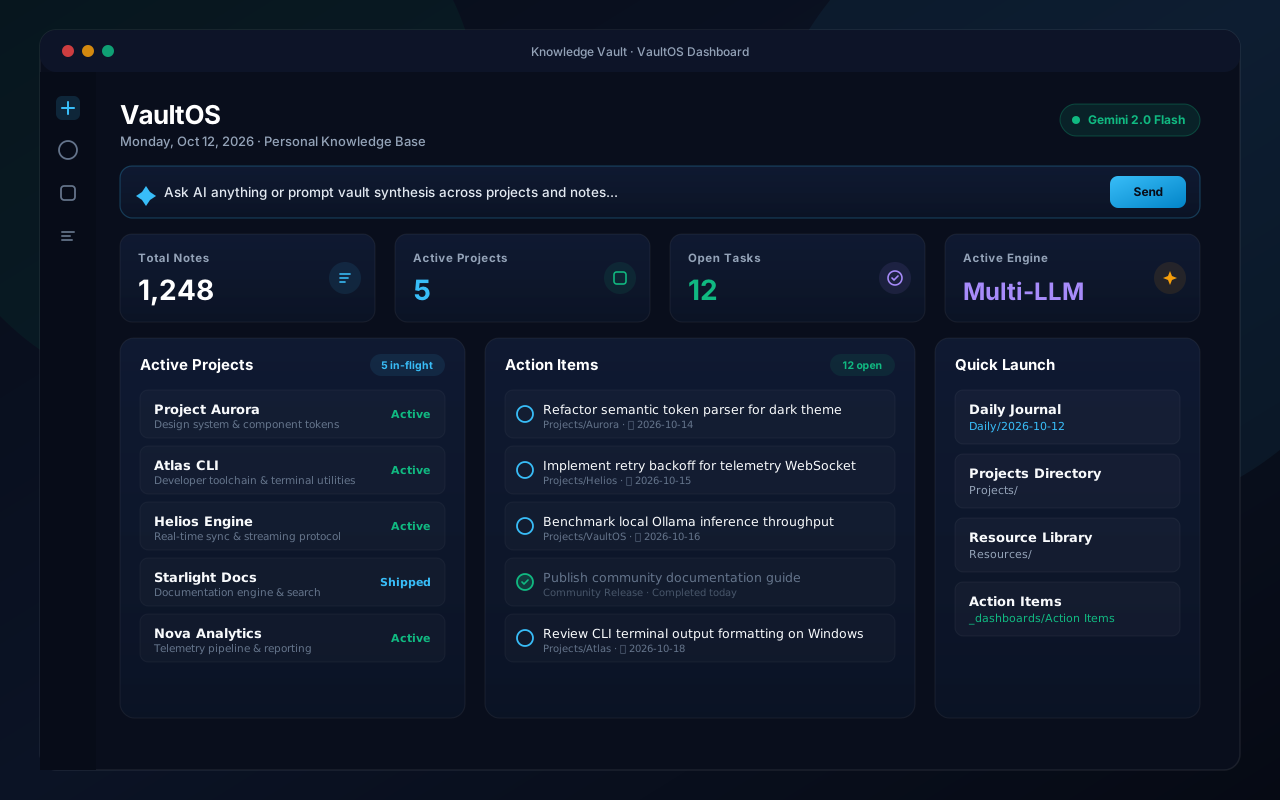
Features
- Bento Dashboard: Overview of total notes, active workstreams, open action items, and model status.
- Multi-Model AI Assistant:
- Google Gemini (1.5 Flash, 1.5 Pro, 2.0)
- Anthropic Claude (3.5 Sonnet, 3.5 Haiku, 3 Opus)
- OpenAI (GPT-4o, GPT-4o-mini, o1-mini)
- Ollama (Local models: Llama 3, Mistral, Qwen)
- Theme Support: Uses Obsidian's native CSS variables to match both light and dark themes without styling conflicts.
- Interactive Tasks: Mark tasks complete directly from the dashboard to update the source note.
- Quick Links: Pinned shortcuts to open frequently used project pages and daily notes.
Installation
Community Plugins
- Open Settings → Community plugins.
- Turn off Restricted mode.
- Search for VaultOS.
- Select Install, then Enable.
Manual Installation
- Download
manifest.json,main.js, andstyles.cssfrom the latest Release. - Create a folder named
vaultosinside.obsidian/plugins/in your vault. - Move the downloaded files into
.obsidian/plugins/vaultos/. - Reload Obsidian and turn on VaultOS under Community plugins.
Configuration
In Settings → VaultOS:
- Choose your default AI provider.
- Enter your API key or local Ollama address.
- Set your preferred project folder and startup options.
Development
git clone https://github.com/Rbm3267/obsidian-vaultos.git
cd obsidian-vaultos
npm install
npm run dev    # watch build
npm run build  # production build
License
MIT License © 2026 XD Labs / Bennett Moore.
For plugin developers
Search results and similarity scores are powered by semantic analysis of your plugin's README. If your plugin isn't appearing for searches you'd expect, try updating your README to clearly describe your plugin's purpose, features, and use cases.