Vibed
approvedby Roman
Browse agent sessions (OpenCode v2/v1, Claude Code, Codex, Cursor): dedicated view or dashboards embedded in any note. Live streaming and chat for OpenCode, read-only transcripts for the rest. - This plugin has not been manually reviewed by Obsidian staff.
Vibed (Obsidian plugin)
An agent-session browser for Obsidian. Browse your OpenCode v2 sessions directly in Obsidian — as a dedicated view or as dashboards embedded in any note — then open any session and watch it stream in real time, send follow-up prompts, and interrupt runs.
Since v0.9 the plugin is multi-backend: alongside interactive OpenCode v2 connectors (local or remote), you can add read-only connectors for OpenCode v1, Claude Code, Codex CLI, and Cursor Agent histories. OpenCode v2 remains the first-class citizen; everything else is a read-only companion.
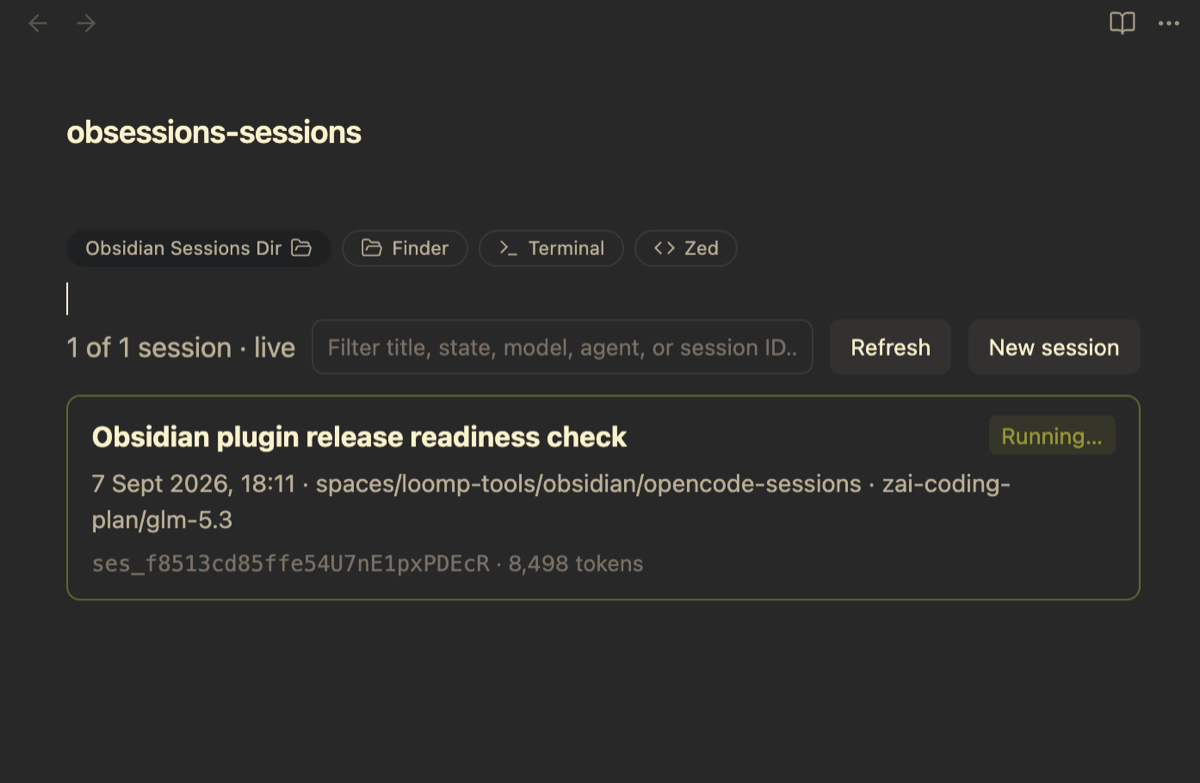

Connectors
Connectors are named backend instances — add as many as you like in settings
(two remote OpenCode servers, three Codex installs, …). The first connector
is created for you: the local OpenCode v2 one (opencode, zero-config).
| kind | default name | source | mode |
|---|---|---|---|
| OpenCode v2 | opencode, opencode-2, … | ~/.local/share/opencode/opencode.db + v2 server API | interactive: live SSE, prompt/stop, approvals, models, new sessions |
| OpenCode v1 | opencode-v1, … | legacy session/message/part tables in the same DB | read-only, historical |
| Claude Code | claude, claude-2, … | ~/.claude/projects/<slug>/<uuid>.jsonl | read-only transcripts |
| Codex CLI | codex, codex-2, … | ~/.codex/sessions/**/rollout-*.jsonl (+ .zst via zstd) | read-only transcripts |
| Cursor Agent | cursor, cursor-2, … | ~/.cursor/projects/*/agent-transcripts/<uuid>/*.jsonl | read-only transcripts |
Names are editable and unique; a second connector of a kind auto-names
<base>-2, -3, … One connector is the default (used by dashboards and
chats that don't name one) — pick it in settings.
OpenCode v2 connector modes
- Local hybrid (default): SQLite
session_v2listing (works when the server is down) + auto-discovered local server (~/.local/state/opencode/ service.json) for live streaming and chat. - API-only: untick Use local database — listing comes from
GET /api/session. - Remote: set a Server URL override (and password). The override is authoritative — no silent fallback to a local server. Pair with API-only listing, or point at a reachable DB path for hybrid mode.
Backend caveats
| titles | per-message time | tokens | cost | tool outputs | |
|---|---|---|---|---|---|
| OpenCode v2/v1 | stored | ✓ | ✓ | ✓ | ✓ |
| Claude Code | ai-title | ✓ | summed on open (incl. cache) | ✖ | ✓ |
| Codex | first prompt | ✓ | cumulative totals | ✖ | ✓ (incl. apply_patch) |
| Cursor | first prompt | ✖ (file mtime only) | ✖ | ✖ | ✖ (never recorded) |
Claude/Cursor project folders encode the directory path lossily
(non-alphanumerics → -); configured Directories entries disambiguate.
Transcripts refresh on the plugin's interval; open chats poll every few
seconds. Very large transcripts (>128 MB) are refused with a clear message.
Features
- Note-embedded dashboards via a
vibedcode block (cards or table layout) — no other plugins required. - Dedicated view (command palette: Open OpenCode sessions, or the ribbon icon).
- Live state tracking from the v2 event stream (
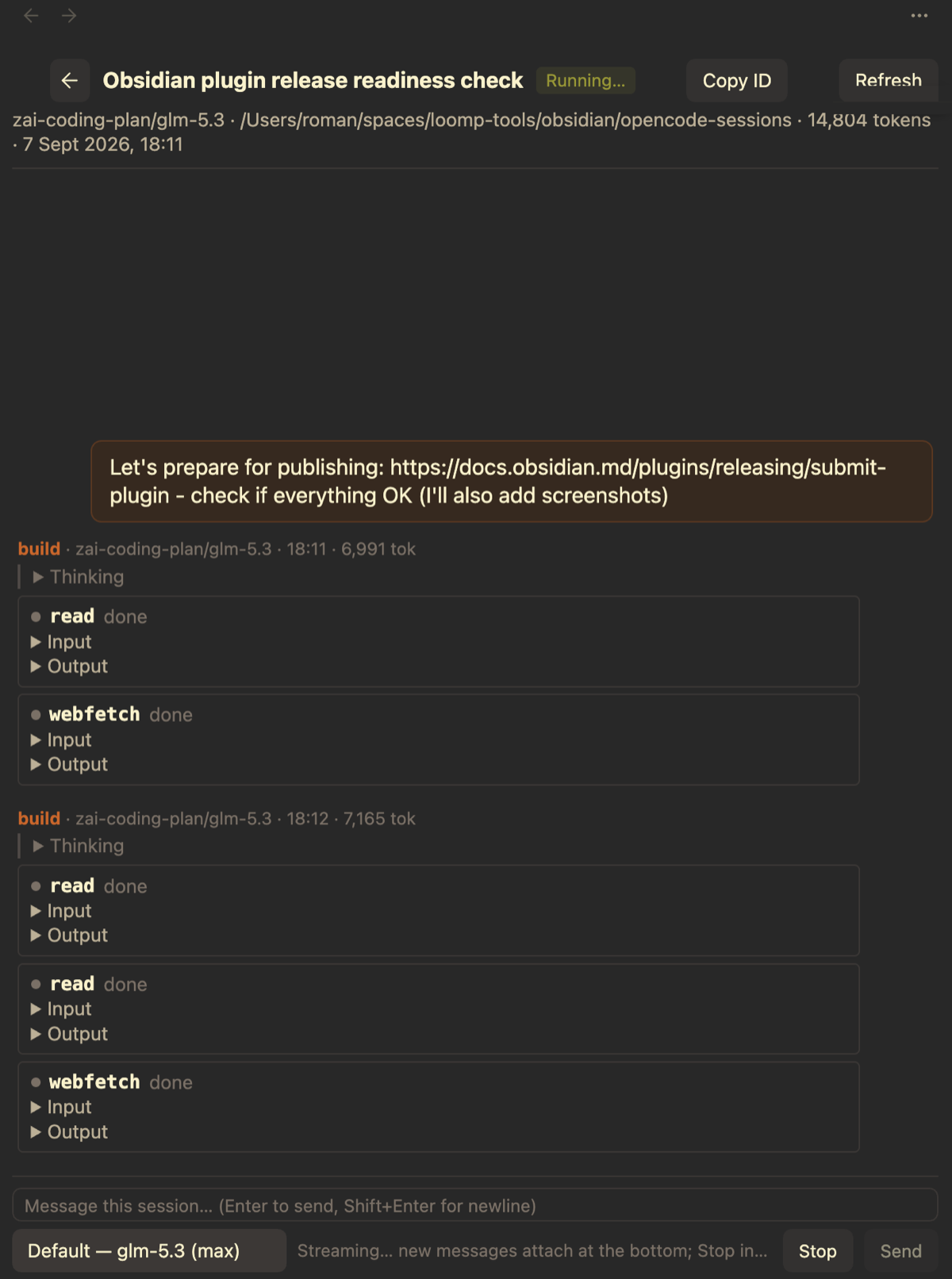
GET /api/event): Running…, Idle, Needs approval, Needs answer, Interrupted, Error — updated the instant they change. Falls back to SQLite heuristics when the server is unreachable. - Session chat view: messages stream in live (text + reasoning + tool calls with input/output); history loads the newest page first and pages in older messages as you scroll to the top. Works for every connector (read-only ones simply don't stream).
- Prompt & stop: send messages to a session and interrupt a running one right from the composer (OpenCode v2 connectors).
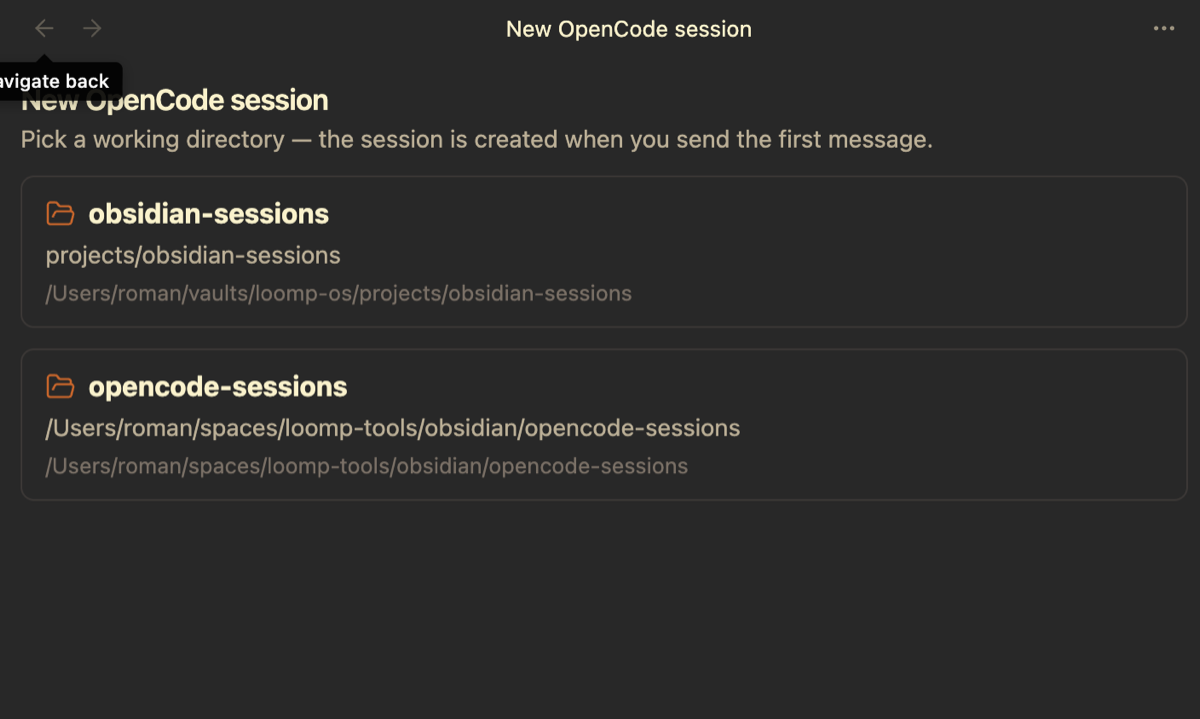
- New sessions: the New OpenCode session command picks one of your configured directories and starts a draft chat; the server session is created with your first message.
- Model selector: defaults match OpenCode exactly — the last-used model and its persisted variant, falling back to the server's location-aware default; existing sessions switch live.
- Agent selector: pick the session's agent (e.g.
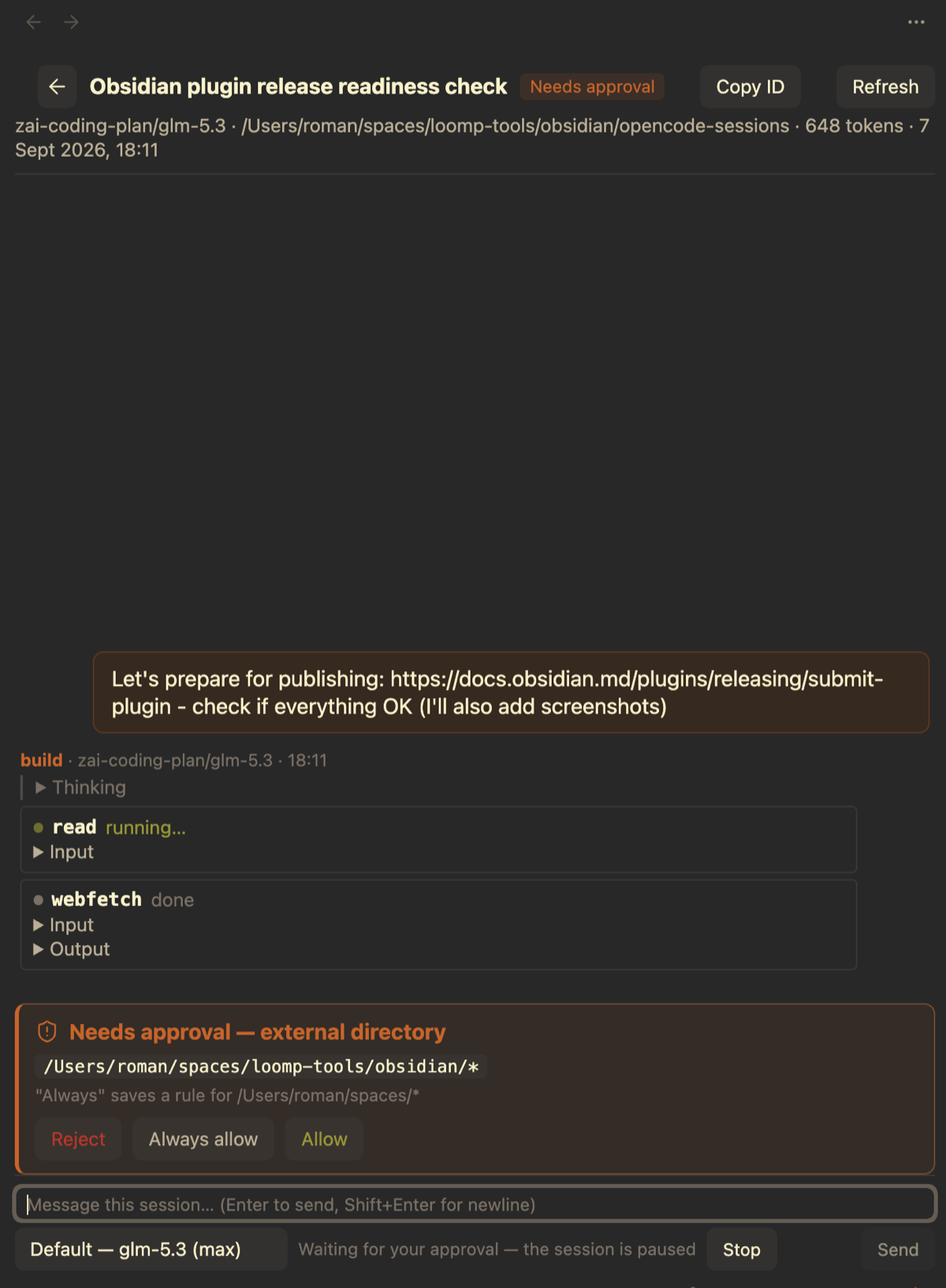
build,plan, custom agents) next to the model selector; hidden and subagent-only entries are filtered out, descriptions show on hover, and existing sessions switch live (drafts apply the choice at creation). - Approvals: permission banners with Allow / Always allow / Reject, synced with replies made anywhere (TUI, other tabs).
- Agent questions: answer the agent's
questiontool inline — options (single/multi-select), yes/no, or custom text — or dismiss it; synced with answers made anywhere. Works across both server generations (form and question APIs). - Offline fallback: when the server is down, v2 chats show the conversation read-only from
session_v2/session_message. - Session notes: attach a markdown note to any session (every connector) — a side panel in the chat view with autosave, backed by a normal vault file found by
session:frontmatter, not filename. See Session notes. - Session tags: note tags (Obsidian semantics — frontmatter
tags:+ inline#tags) become session tags — editable in the notes panel, shown on cards, filterable (#tagin the filter, an advanced filter popover, and atags:widget option). See Session tags & filtering. - Also exposes an API (
globalThis.vibed) for e.g. Datacore JSX consumers.
Screenshots
Live chat with streaming — messages, reasoning, and tool calls appear as they happen; the composer can send follow-ups or stop a running turn:
Approvals in-app — permission requests show up as a banner; allow, always allow, or reject without leaving the note:
New sessions — pick one of your configured directories; the server session is created with your first message:
Embed in a note
A vibed code block renders a dashboard inside any note. The config is
simple key: value lines (or a JSON object).
Session list — a directory dashboard, one card per session:
```vibed
connector: claude
layout: cards
basedir: ~/
dirs:
  - projects/my-project
```
Single session — pin one session id and the block renders a clean widget: just the card, no toolbar (ideal for a project status note):
```vibed
sessions:
  - ses_abc123def456
```
A missing id renders as a dashed "(not found)" card rather than an error.
Options (simple key: value lines or a JSON object):
| Option | Default | Description |
|---|---|---|
connector | default connector | Connector name (e.g. claude, codex-2). Unknown names render an inline error. |
dirs | connector setting | Directories to list sessions for. Relative entries resolve against basedir. On OpenCode connectors this overrides the connector's configured directories; on Claude/Codex/Cursor it adds to them (a filter). |
sessions | – | Explicit session ids (list). With only sessions the block renders a clean widget: just the cards, no toolbar. Missing ids render as dashed "(not found)" cards. |
basedir | – | Prefix for relative dirs; cards/tables show directories relative to it. |
tags | – | Only sessions whose note carries all of these tags (list or comma string; intersected with dirs). |
layout | cards | cards or table. |
pageSize | plugin setting | Sessions per page. |
title | – | Optional heading above the dashboard. |
Click a card (or table row) to open the live chat view; click a session ID to copy it. Sessions with an attached note show a sticky-note button on their card / title cell — click it to open the note file. Tagged sessions show tag chips next to the session ID — click one to filter by it.
Linking to sessions
Markdown links open the chat tab for a session:
[Yesterday's refactor](obsidian://vibed?sessionId=ses_abc123)
[A claude session](obsidian://vibed?connector=claude&sessionId=<uuid>)
opencode-v1:<id>-style prefixed ids also work in Open session by ID (and
in api.open("claude:<uuid>")). Bare ids resolve against the default
connector.
Session notes
Every session chat has a notes toggle (the sticky-note button in the header). It opens a side panel next to the transcript: click Create note and type — edits autosave (600 ms debounce); Open in editor hands the note to the normal markdown editor. Notes work for all connectors, including the read-only ones.
Notes are ordinary vault files. The attachment is a frontmatter id — never the filename — so you can rename or move them anywhere in the vault and they stay attached (the plugin looks them up through Obsidian's metadata cache):
---
session: ses_abc123def456
connector: opencode
title: "Refactor the export pipeline"
created: 2026-09-09T12:00:00.000Z
---

Context, decisions, follow-ups…
By default notes are created in vibed-notes/ at the vault root as
<session-id>-<title>.md — change the folder in Settings → General →
Session notes folder. The panel hides the frontmatter (but preserves it and
any properties you add on save). Editing the note elsewhere syncs back into
an open panel; a note whose session: frontmatter you remove simply reads as
not attached.
Back in the session list, cards and table rows of noted sessions get a sticky-note button that opens the note file directly — it appears and disappears live as notes are created, renamed, or detached.
Session tags & filtering
A session's tags are its note's tags, with full Obsidian semantics —
the frontmatter tags: property plus inline #tags in the body, exactly
what the tag pane and tag: search see. Tag a session from the notes
panel (chips row above the editor: + to add, × to remove — inline
body tags are marked read-only, edit the body for those) or from the
note's properties in the normal editor.
Tags surface in the lists:
-
Cards & tables show tag chips next to the session ID — click a chip to filter by that tag.
-
The filter input is a small query language — prefixes make each criterion explicit, everything ANDs together:
#tag(session tags),is:<state>(is:running,is:idle, …),dir:<path>andmodel:<name>(substrings; quote values with spaces, e.g.model:"Sonnet 4.5"), and free text (matches the session title). Example:#urgent is:running model:"Sonnet 4.5" deploy. -
The funnel button next to the input opens an advanced filter popover — per-criteria chips for Tags, State, Model, and Directory with live counts. It edits the same query string, so what you see in the input is always the truth.
-
Widgets accept a
tags:option (list or comma string); only sessions carrying all of the tags are listed, intersected withdirs:```vibed connector: opencode dirs: - projects/my-project tags: - urgent ```
globalThis.vibed.notes.tags("<sessionId>") returns a session's tags as
[{tag, frontmatter, inline}].
Settings
General — default connector, items per page, refresh interval (seconds;
0 disables the timer), session notes folder (default vibed-notes).
Connectors — one card per connector: editable name, enable toggle, health status, duplicate/delete, and per-kind fields:
- OpenCode v2: server URL override (empty = auto-discover), password,
Use local database toggle, DB path, sqlite3 executable, directories,
custom SQL (
WHEREfragment — qualify columns likesession_v2.titlewhen the listing join makes bare names ambiguous). - OpenCode v1: DB path, sqlite3, directories, custom SQL.
- Claude Code / Cursor: projects root, directories filter.
- Codex: sessions root, zstd executable, directories filter.
Privacy & data access
Vibed runs entirely on your machine and contains no telemetry. For transparency, it does access:
- Files outside your vaults (read-only): OpenCode v2/v1
~/.local/share/opencode/opencode.db, Claude Code~/.claude/projects/, Codex~/.codex/sessions/, Cursor~/.cursor/projects/— that's where the agent histories live. Nothing outside your vault is modified. The only thing written anywhere: session notes you explicitly create, inside your vault (see Session notes). - Local network: the auto-discovered OpenCode v2 server
(
~/.local/state/opencode/service.json) for live streaming, chat, prompts, and approvals. With a remote Server URL override, the plugin talks to that host only — and nothing else. - Helper binaries: the system
sqlite3binary (path configurable) and an optionalzstdfor Codex transcripts are spawned locally, detached. - System clipboard (write-only): used solely when you explicitly copy a session ID (clicking the ID on a card, or the Copy ID button in a chat). The clipboard is never read.
The file reads and helper binaries above are the entire reason the plugin
uses Node's fs and child_process (and therefore is desktop-only) — no
other files are touched and no other commands are run.
Install (manual)
Copy main.js, manifest.json, and styles.css into
<vault>/.obsidian/plugins/vibed/, then enable Vibed under
Settings → Community plugins. Desktop only (spawns sqlite3/zstd, talks to
local servers).
API
globalThis.vibed (version 4):
const api = globalThis.vibed;
api.connectors();                    // [{ id, name, kind, enabled, capabilities }]
api.defaultConnector();              // name of the default connector
const claude = api.connector("claude");
const rows = await claude.list({ dirs: ["/abs/path"] });
await claude.messages("<uuid>", { limit: 100, order: "asc" });
const unsubscribe = api.subscribe(() => {});
api.config();
api.notes.find("ses_…");             // { path, basename } | null — note attached by frontmatter
api.notes.folder();                  // configured notes folder ("vibed-notes")
api.notes.tags("ses_…");             // [{tag, frontmatter, inline}] — Obsidian-semantics tags
api.open("claude:<uuid>");           // also "ses_…" (default connector)
await api.server.health();           // v2-only namespace
await api.server.messages("ses_…", { limit: 100, order: "asc" });
await api.server.prompt("ses_…", "fix the failing test");
await api.server.stop("ses_…");
Rows come pre-formatted: titleLabel, stateLabel, updatedLabel,
modelLabel, directoryLabel, tokensLabel, plus connectorId,
connectorName, source (kind), readOnly, and raw backend fields.
How state detection works
OpenCode v2 (primary): one SSE connection per v2 connector maps
session.execution.* → Running…/Idle/Interrupted/Error and
permission.asked → Needs approval. Fallback (server unreachable): a
session is Running when its latest assistant message has no time.completed
yet, or the newest message is still the user's — within a 15-minute
freshness window.
Read-only backends: freshness heuristics — a transcript whose last line
suggests an open turn (Claude: last line is the user prompt; Codex: last
event is task_started; Cursor: last line is an assistant message without
turn_ended) reads as Running within the same 15-minute window; otherwise
Idle. OpenCode v1 uses the message-table variant of the v2 fallback.
Contact
- Telegram: @romanexe · @romanexeru
- X: @exemplarov
Development
Plain single-file plugin, no build step (main.js is hand-written ES2022).
node --check main.js to syntax-check; node scripts/dashboard-smoke.js
runs the dashboard mount/load/render paths against a stubbed DOM (run it
before releases). Design docs live in spec/.
Excluded from the repo: data.json (local settings) and .hotreload (dev
marker).
For plugin developers
Search results and similarity scores are powered by semantic analysis of your plugin's README. If your plugin isn't appearing for searches you'd expect, try updating your README to clearly describe your plugin's purpose, features, and use cases.