Blur Mode
approvedby dangehub
Blur anything you want to keep your privacy.
★ 9 stars↓ 1,684 downloadsUpdated 8mo agoMIT
Blur Mode Plugin for Obsidian



A plugin for Obsidian that allows you to selectively blur elements in your notes for privacy or focus purposes.
Features
- Selective Blurring: Choose specific elements to blur in your notes
- Preset Management: Create and manage blur presets
- Easy Selection: Visual interface for selecting elements with real-time preview
- Draggable Panel: Convenient preset management panel that can be moved around
- Customizable Blur: Adjust the blur amount to your preference
- Keyword-based Blur: Blur objects containing specified keywords
How to Use
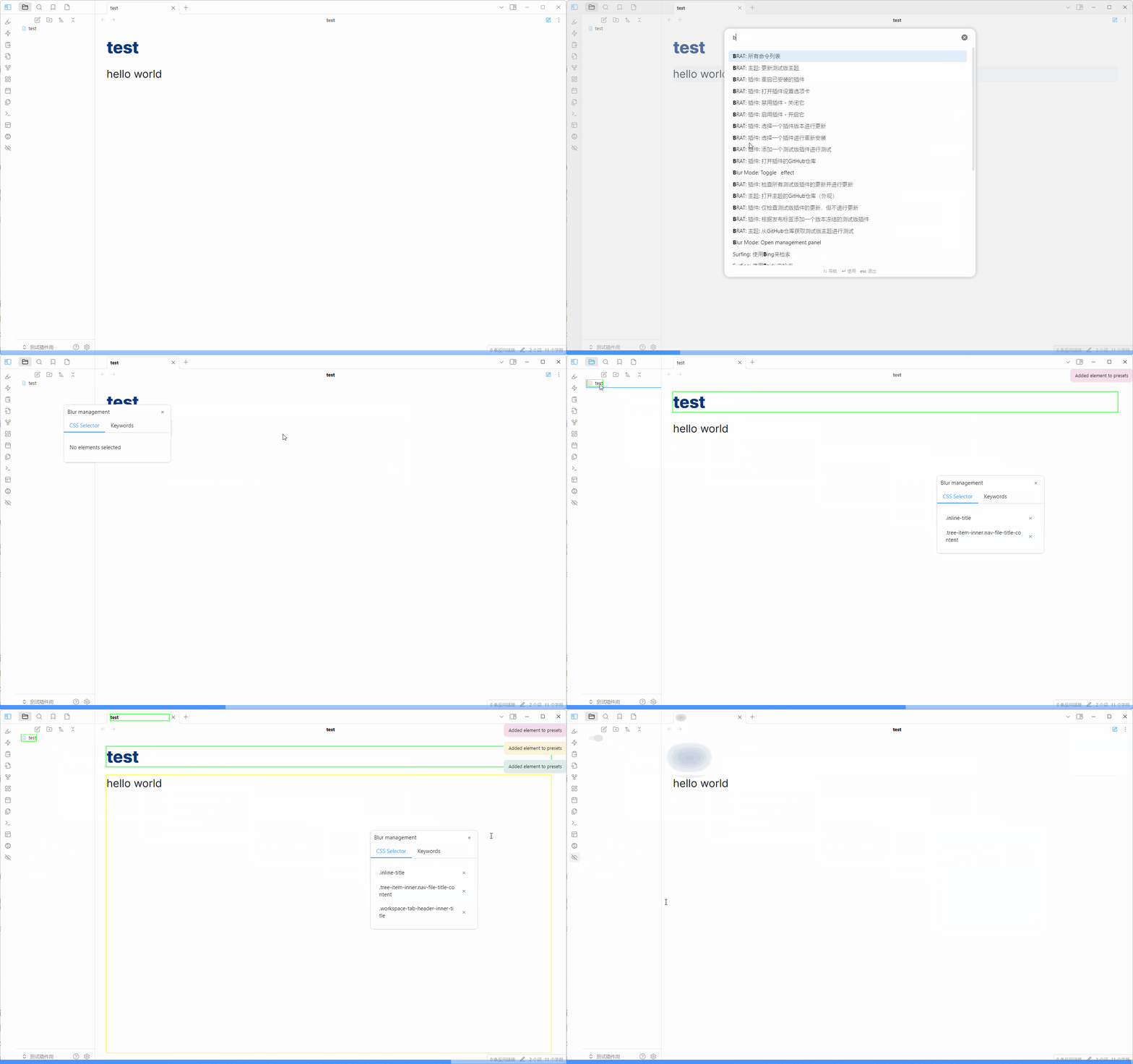
Managing Presets
- Open the command palette (Cmd/Ctrl + P)
- Run the "Blur Mode:Manage Blur Presets" command
- A draggable panel will appear showing your current presets
- Click elements to add them to your preset (yellow highlight)
- Click again to remove them from the preset (red highlight)
- Use the × button in the preset panel to remove specific elements
Toggling Blur Effect
- Click the blur icon in the ribbon to toggle the blur effect on/off
- When enabled, all elements in your presets will be blurred
- When disabled, all elements return to normal visibility
Customizing Blur Amount
- Go to Settings > Blur Mode
- Adjust the "Blur Amount" value (e.g., "0.5em")
- Changes will apply immediately if blur is enabled
Installation
From Obsidian Community Plugins
Manual Installation
- Download the latest release
- Extract the files to your vault's
.obsidian/plugins/obsidian-blurfolder - Reload Obsidian
- Enable the plugin in Community Plugins settings
Development
This plugin is built using TypeScript and the Obsidian API.
Prerequisites
- Node.js
- npm or yarn
- Basic knowledge of TypeScript and Obsidian API
Building
- Clone this repository
- Install dependencies
npm install - Build the plugin
npm run build
Development Commands
npm run dev- Start development build with hot reloadnpm run build- Create production build
Contributing
Contributions are welcome! Please feel free to submit a Pull Request.
License
MIT License - see the LICENSE file for details
Support
If you encounter any issues or have suggestions, please open an issue on GitHub.
Acknowledgments
- Thanks to the Obsidian team for their excellent API
- Inspired by LiteLoaderQQNT-Plugin-Demo-Mode
Changelog
1.0.5
- Adjust code to comply with official requirements
- Add Debug-mode
1.0.4
- Use CSS for styling instead of JS/HTML per Obsidian guidelines
- Add three-color highlight system (red/yellow/green) for element states
1.0.3
- Refactor code
1.0.2
- Use the floating panel to select css and add keywords
- When the blur effect is turned on and off, the ribbon icon will change
1.0.1
- Add keywords blur
- Merges css selectors and keywords
- Use github action to release
1.0.0
- Initial release
- Basic blur functionality
- Preset management
- Customizable blur amount
Future Plans
- Multiple preset support
- Keyboard shortcuts
- Export/Import presets
- Keyword-based blur function to break through the limitations of css selection (such as only blurring specific notes)
For plugin developers
Search results and similarity scores are powered by semantic analysis of your plugin's README. If your plugin isn't appearing for searches you'd expect, try updating your README to clearly describe your plugin's purpose, features, and use cases.