by leo6
Take over mermaid rendering in reading view with theme-aware styling, style packs, pan & zoom, PNG export, and readable error messages.
Best Mermaid
English | 简体中文
Diagrams that feel like they belong in your notes.
Your notes have a theme. Your diagrams don't — the same purple boxes, mismatched fonts, and edges that cross like spaghetti. Best Mermaid re-renders every mermaid diagram in your vault with your theme's own colors, curated styles, and professional layout. No configuration. No new syntax.
Install it, open a note, and it just looks right.
- ✦ Zero config — your existing diagrams look better the moment the plugin loads
- ✦ Follows your theme — light/dark, custom CSS, accent colors: diagrams dress accordingly
- ✦ Style packs — one line switches a diagram to a print-ready or presentation look
- ✦ Stays offline — mermaid and elk are bundled; nothing leaves your vault
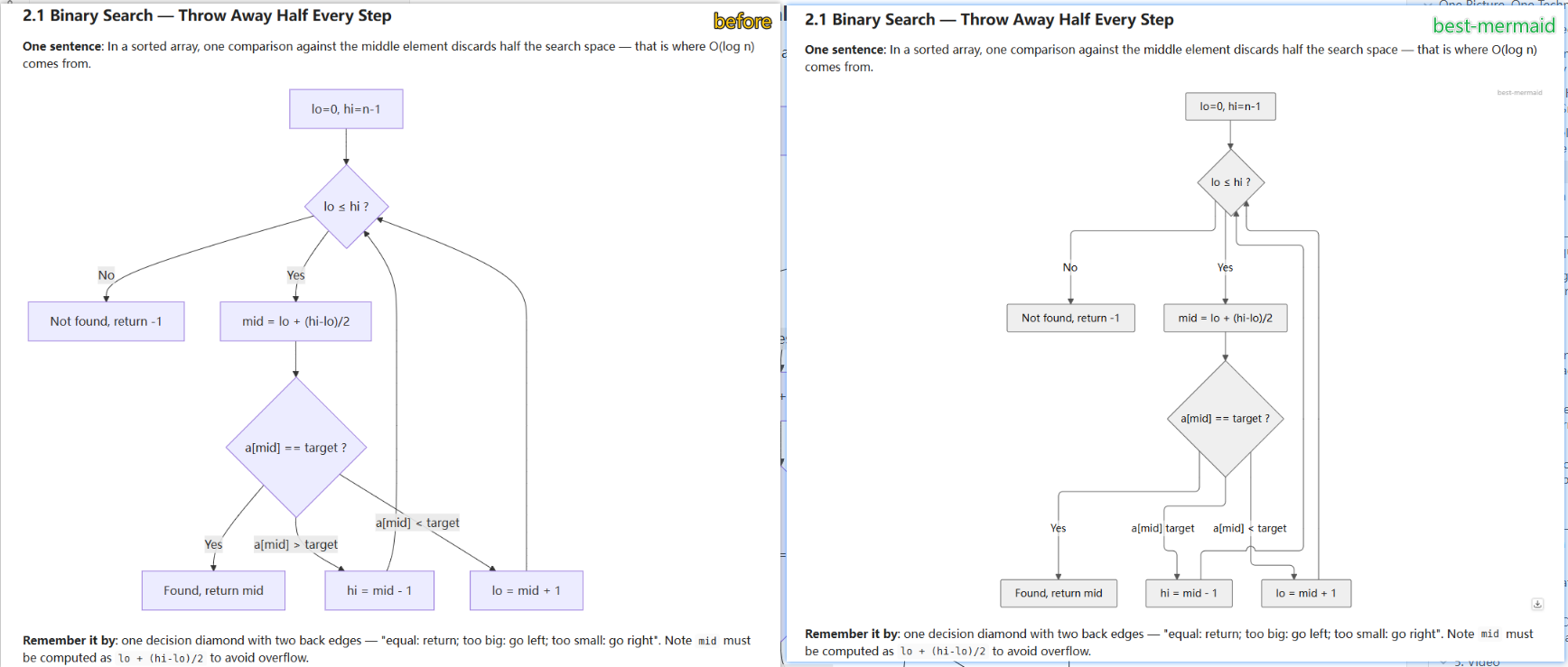
Left: the default Obsidian mermaid renderer. Right: Best Mermaid with the Paper style — theme-matched grayscale palette and clean orthogonal routing.
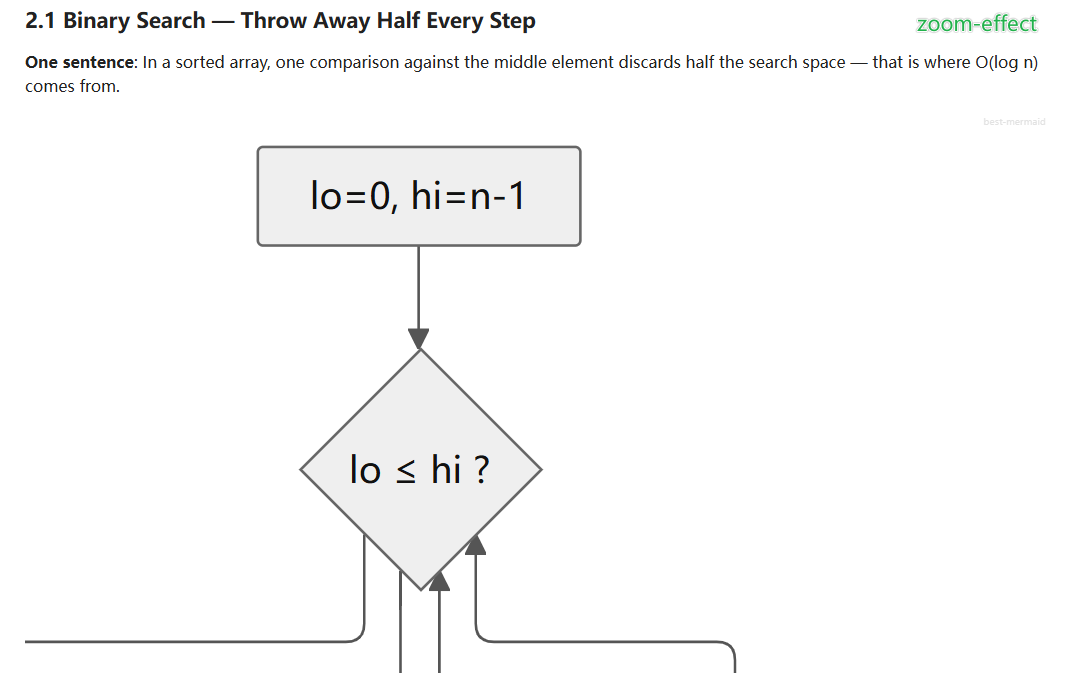
Ctrl + scroll zooms at the cursor (trackpad pinch works too); drag to pan; double-click to reset — zoom stays put across re-renders.
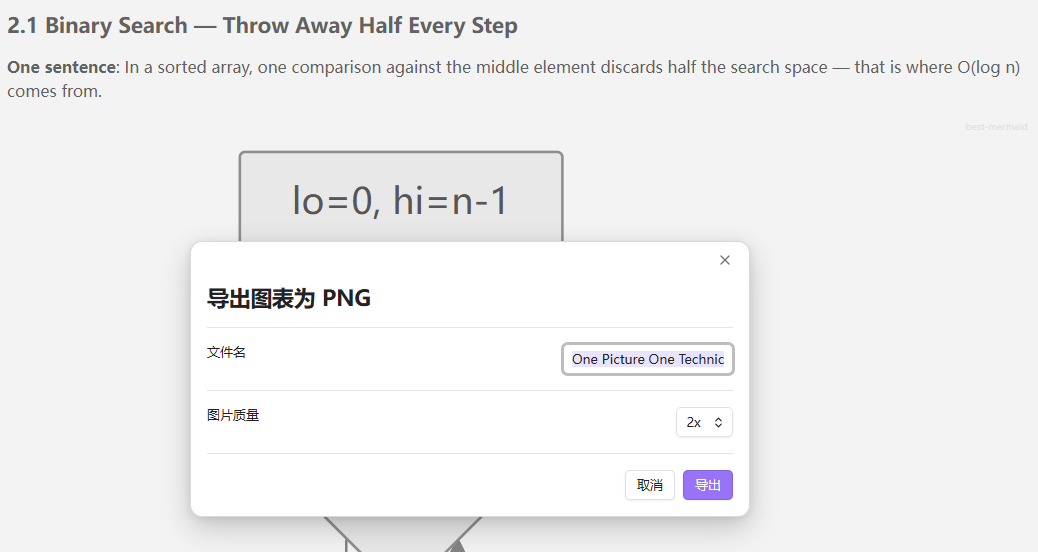
Click the download icon at the bottom-right of any diagram: edit the file name, pick 1x–4x quality, and save anywhere through the native save dialog.
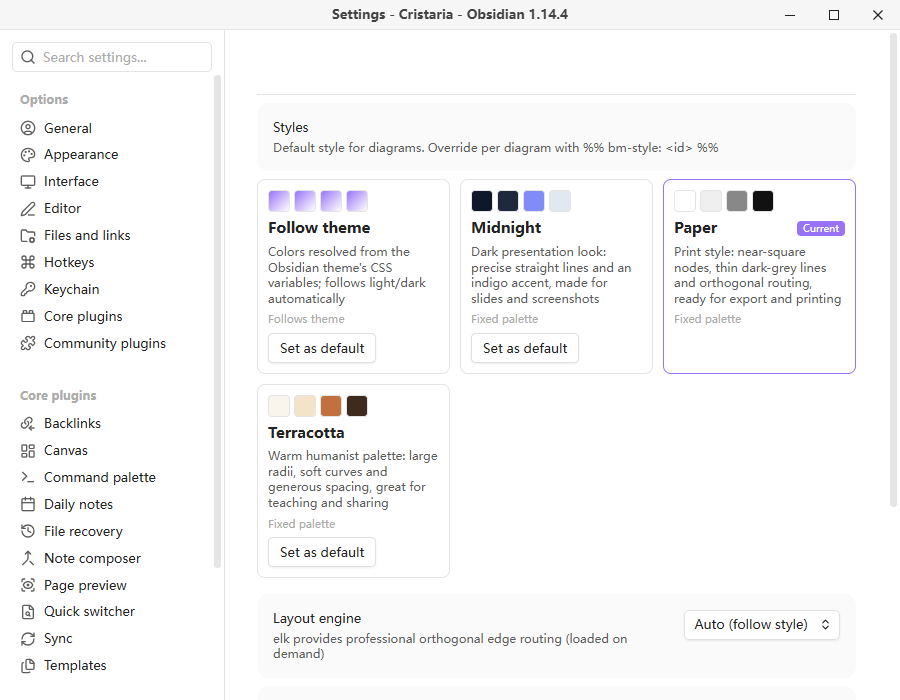
The style gallery: four built-in style packs with live swatches. Pick a default here; override any single diagram with %% bm-style: <id> %%.
Why another mermaid plugin?
There are several mermaid appearance plugins already. Best Mermaid differs in a few ways:
- Style packs, not just color tweaks. Each style is a complete, self-describing card: palette, typography, line style, spacing, and even the layout engine. Switching a style re-lays out the diagram.
- Theme fusion. Diagram colors are resolved from your theme's CSS variables through a probe element, so diagrams follow your light/dark theme (and custom theme CSS) instead of mermaid's fixed palettes.
- Style choice travels with the diagram. A per-diagram directive in the code block keeps your style choice when you copy the block or sync the note.
- Engine and style are linked. The print-oriented style automatically uses the elk layout engine for orthogonal routing; other styles use dagre. You can also pin the engine in settings.
Features
- Take over rendering of
```mermaidblocks in reading view, replacing the built-in renderer - Style packs with a gallery in settings — 4 built-in styles:
- Follow theme — colors resolved from Obsidian CSS variables, follows light/dark
- Midnight — slate night + indigo accent for screenshots and presentations
- Paper — black & white orthogonal routing (elk), print/export friendly
- Terra — warm, humanist palette for teaching and sharing
- Per-diagram style override that lives in the diagram source
%%{init}%%directives respected — in-diagram directives merge over plugin settings (user intent always wins);themeCSSappends instead of replacing- Layout engine: dagre (default) or elk with orthogonal edge routing, switched per style, per diagram, or globally
- Pan & zoom:
Ctrl+ scroll to zoom at the cursor (trackpad pinch works), drag to pan, double-click to reset; zoom state survives re-renders - Horizontal alignment of rendered diagrams (left / center / right)
- Readable errors: syntax problems render as a visible error box with the offending line, never a silent blank
- Render cache + serial render queue: concurrent diagrams can't clobber each other's config; identical diagrams render once
- Fully offline — mermaid and elk are bundled, no network requests, no telemetry
Usage
Write mermaid blocks as usual:
```mermaid
flowchart LR
    A[Start] --> B[End]
```
Pin a style to a diagram (the directive is a comment — Obsidian without this plugin ignores it safely):
```mermaid
%% bm-style: midnight %%
flowchart LR
    A --> B
```
In-diagram customization still works and takes priority over the plugin:
```mermaid
%%{init: {'themeVariables': {'primaryColor': '#ffd54f'}}}%%
flowchart TB
    A[Custom gold] --> B
```
Built-in style ids
| id | name | notes |
|---|---|---|
follow | Follow theme | dynamic, resolves theme CSS variables |
midnight | Midnight | static, dark presentation look |
paper | Paper | static, orthogonal routing via elk |
terra | Terra | static, warm humanist palette |
Interactions (reading view)
| Action | Effect |
|---|---|
Ctrl + scroll / trackpad pinch | zoom anchored at cursor (0.2×–8×) |
| Drag (when zoomed) | pan |
| Double-click | reset to 100% |
| Zoom out below 100% and pause | snaps back to fit |
Limitations
- Live Preview (editing view) still uses Obsidian's built-in mermaid renderer; this plugin takes over the reading view
- Desktop only for now (
isDesktopOnly: true); the bundle includes mermaid + elk (~12 MB)
Development
npm install
npm run dev     # esbuild watch
npm test        # vitest + jsdom, real mermaid render pipeline tests
npm run build   # type-check + production bundle
Manual install for testing: copy main.js, manifest.json, styles.css into <vault>/.obsidian/plugins/best-mermaid/.
License
For plugin developers
Search results and similarity scores are powered by semantic analysis of your plugin's README. If your plugin isn't appearing for searches you'd expect, try updating your README to clearly describe your plugin's purpose, features, and use cases.