CosmoGraph 3D
approvedby Oleg
Explore your vault as an immersive 3D knowledge planet with notes, links, clusters, and procedural terrain. - This plugin has not been manually reviewed by Obsidian staff.
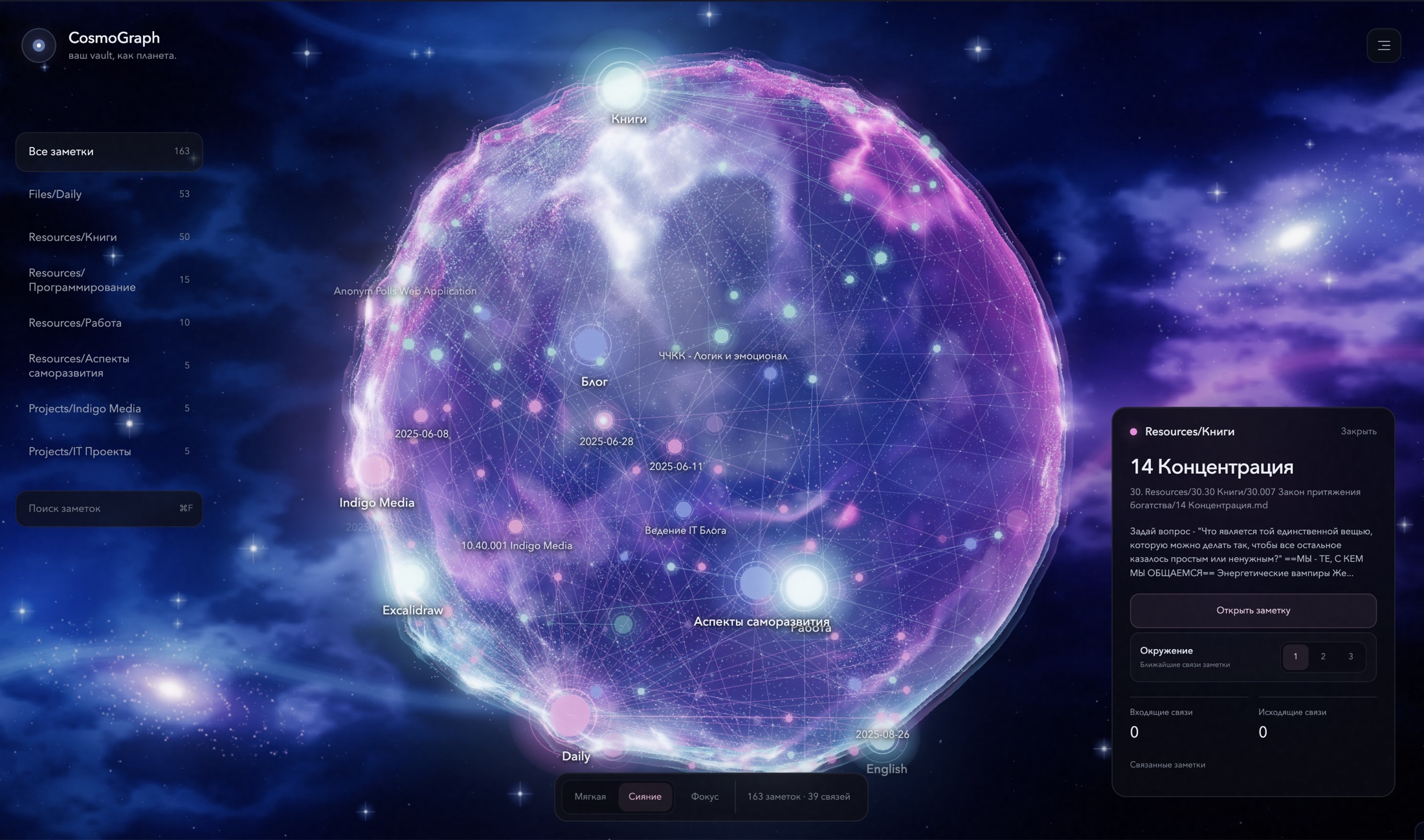
CosmoGraph
A living 3D spherical knowledge graph for Obsidian.
Explore notes, links, folders, and clusters as an interactive cosmic atlas.
Built for visual thinkers who want their vault to feel like a world, not a diagram.
Run locally | Install the plugin | How it works




[!IMPORTANT] CosmoGraph is available in the official Obsidian Community Plugins directory. Install the stable release from Obsidian, or use BRAT to follow beta releases.
Your vault has shape
Most knowledge graphs place notes on a flat canvas or inside an unstructured cloud. CosmoGraph gives the vault a surface, depth, terrain, and a sense of place.
Notes become luminous points on a procedural planet. Links form a network across its surface. Folders become visual clusters. Select any node and the sphere gently rotates to bring it into focus.
CosmoGraph is designed as an immersive alternative to the traditional Obsidian graph view, with a strong emphasis on spatial memory, clarity, and atmosphere.
What CosmoGraph already does
- Renders an interactive 3D spherical knowledge graph with Three.js and WebGL.
- Reads a local folder of Markdown notes directly in the browser.
- Extracts Obsidian-style
[[wikilinks]]and builds note connections. - Groups notes into visual clusters based on their folders.
- Maps nodes and links onto a procedural planetary surface.
- Generates irregular terrain, craters, particles, atmosphere, and depth.
- Adds an optional procedural cosmic backdrop with nebulae, distant galaxies, and stars.
- Adds neighborhood focus with one to three connection hops for tracing related ideas.
- Adapts rendering, labels, and edge budgets for large and very large vaults.
- Supports orbit rotation, inertial dragging, zoom, hover, search, and selection.
- Smoothly rotates the sphere when a note is selected.
- Opens real notes directly from the graph details panel.
- Updates when notes are created, renamed, deleted, or relinked.
- Provides a ribbon action, command palette actions, plugin settings, and an immersive scene mode.
- Keeps vault data local. The plugin does not upload notes to a server.
Install the Obsidian plugin
Install from Community Plugins
- Open Settings → Community plugins in Obsidian.
- Select Browse and search for CosmoGraph 3D.
- Select Install, then Enable.
You can also open the listing directly with Add to Obsidian.
Install with BRAT
- Install and enable BRAT from the Obsidian Community Plugins directory.
- Open Settings → BRAT → Add Beta plugin.
- Enter
https://github.com/n1ghtmare-dev/obsidian-cosmographand select Add Plugin. - Open Settings → Community plugins and enable CosmoGraph 3D.
BRAT installs the latest files from the CosmoGraph GitHub release.
Build from source
git clone git@github.com:n1ghtmare-dev/obsidian-cosmograph.git
cd obsidian-cosmograph
npm install
npm run build:plugin
The build creates main.js in the repository root. Copy these files into your vault:
Your Vault/.obsidian/plugins/cosmograph/
├── main.js
└── manifest.json
Restart Obsidian, open Settings → Community plugins, and enable CosmoGraph 3D. Use the orbit icon in the ribbon or run CosmoGraph 3D: Open 3D knowledge graph from the command palette.
Plugin controls
- Drag to rotate the planet and scroll to zoom.
- Select a node to focus it and inspect its links.
- Select Open note in the details panel to open the Markdown file.
- Use the folder list or search field to filter nodes.
- Use Focus and choose depth 1–3 to isolate the neighborhood around a note or cluster.
- Select a related note in the details panel to move through the graph without leaving the scene.
- Switch between Calm and Radiant visual modes.
- Enable Cosmic background from the scene menu or plugin settings when you want a richer deep-space backdrop.
- Select Scene to hide the interface and leave only the knowledge planet.
Run the web prototype
Requirements
- Node.js 18 or newer
- npm
- A modern browser with WebGL support
Start locally
git clone git@github.com:n1ghtmare-dev/obsidian-cosmograph.git
cd obsidian-cosmograph
npm install
npm run dev
Open the local Vite URL, select Open vault, and choose a folder containing Markdown files.
The browser reads the selected files locally, extracts wikilinks, and generates the spherical graph. No account or external API is required.
Production build
npm run build
npm run preview
How it works
Markdown vault
      |
      v
Local file parser
      |
      v
Notes, wikilinks, and folders
      |
      v
Spherical layout and procedural terrain
      |
      v
Interactive Three.js knowledge graph
| Area | Responsibility |
|---|---|
src/vault.ts | Reads Markdown files and resolves Obsidian-style wikilinks. |
src/graph/SphericalGraph.ts | Builds the terrain, nodes, links, labels, lighting, and interactions. |
src/main.ts | Connects the graph renderer to search, vault selection, and note details. |
src/data/sample.ts | Provides a sample vault graph for instant local preview. |
src/obsidian/plugin.ts | Registers the Obsidian view, commands, ribbon action, and settings. |
src/obsidian/CosmographView.ts | Hosts the full graph interface inside an Obsidian ItemView. |
src/obsidian/vaultGraph.ts | Builds live graph data from the Obsidian vault and metadata cache. |
The renderer remains separate from the Obsidian API, so the web prototype can continue as a visual laboratory while the native plugin uses the same rendering engine inside an Obsidian ItemView.
Plugin roadmap
The native CosmoGraph 3D plugin uses the plugin ID cosmograph. The next milestones are:
- Add controls for clusters, labels, colors, terrain, and performance.
- Optimize rendering for large vaults and lower-powered devices.
- Improve touch controls and performance for mobile devices.
- Continue refining the stable release while shipping experimental features through BRAT.
Why a sphere?
A sphere creates a bounded world instead of an endless canvas. Every cluster has a location, distant areas remain discoverable, and rotation gives navigation a physical rhythm. The procedural relief adds landmarks that can support spatial memory as the vault grows.
The long-term vision is not simply a 3D graph. It is a navigable knowledge planet shaped by your notes.
Privacy
CosmoGraph is local-first.
- Markdown files are read on the user's device.
- The plugin and web prototype make no requests to analytics or storage backends.
- Vault contents are not uploaded by CosmoGraph.
Technology
- TypeScript
- Three.js
- WebGL
- Vite
- CSS2DRenderer
- Unreal Bloom post-processing
- Procedural terrain and particle rendering
Frequently asked questions
Is CosmoGraph already an Obsidian plugin?
Yes. The repository contains both the native Obsidian plugin and the original web prototype. The stable plugin is available from the Community Plugins directory, while beta releases are available through GitHub Releases and BRAT.
Can I visualize my real Obsidian vault?
Yes. The plugin reads the currently open vault automatically. The web prototype can also read a local Markdown folder selected in the browser.
Does CosmoGraph modify my notes?
No. The web prototype reads selected Markdown files and builds an in-memory graph. It does not edit the source files.
What makes CosmoGraph different from other 3D graph views?
CosmoGraph uses a bounded spherical layout with procedural planetary terrain. The product direction focuses on spatial memory, visual identity, and the feeling of navigating a living knowledge world.
Contributing
The project is at an early stage, so focused feedback is especially valuable. Open an issue for rendering bugs, interaction ideas, large-vault performance findings, or Obsidian integration proposals.
If you want to contribute code:
- Fork the repository.
- Create a focused branch.
- Run
npm run buildbefore opening a pull request. - Include a screenshot or short recording for visual changes.
License
CosmoGraph is available under the MIT License.
Turn your vault into a world.
For plugin developers
Search results and similarity scores are powered by semantic analysis of your plugin's README. If your plugin isn't appearing for searches you'd expect, try updating your README to clearly describe your plugin's purpose, features, and use cases.