Dialogue Mode
approvedby patrickchiang
Dialogue mode for editing speech in writing.
Obsidian Dialogue Mode
Obsidian Dialogue Mode is a plugin designed to enhance your writing experience in Obsidian by fading out non-dialogue text, making it easier to focus on the most relevant parts of your writing.
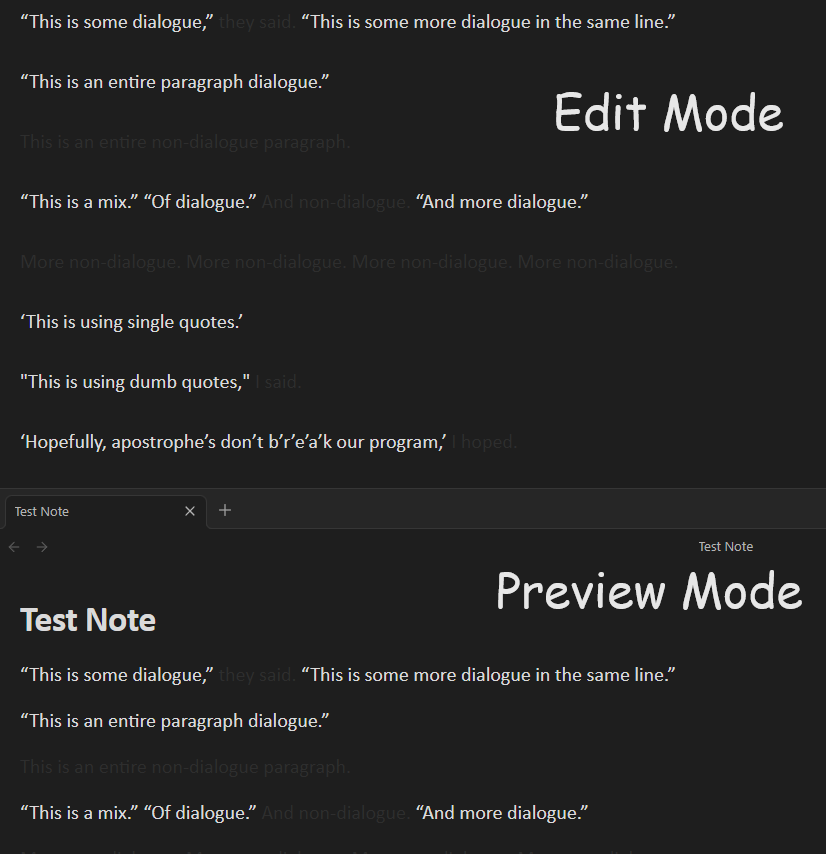
Usage
Dialogue mode is enabled by default.
Toggle Dialogue Mode: Use the command palette (Ctrl+P or Cmd+P) and search for "Toggle dialogue mode" to enable or disable the fade-out effect.
Customizable Fade Intensity: Adjust the fade intensity in the settings tab.
Customizable Dialogue Color: Adjust the color of the text in dialogue.
Installing
- Install the Plugin:
- (Recommended) If installing through Obsidian, go to Settings > Community plugins > Browse and search for "Dialogue Mode".
- If downloading manually, place the plugin files in your Obsidian plugins folder.
- Enable the Plugin: Go to Settings > Community plugins, find "Dialogue Mode" and toggle it on.
- Configure Settings: Adjust the plugin settings to your preference by navigating to Settings > Dialogue Mode Settings.
Advanced Customization
For theming, the faded out color (at max intensity) can be changed via this CSS variable:
--dialogue-excluded-text-color
Development
If you want to contribute or modify the plugin, follow these steps:
- Clone this repo.
- Make sure your NodeJS is at least v16 (
node --version). npm ioryarnto install dependencies.npm run devto start compilation in watch mode.- Feel free to file a pull request with any improvements.
For plugin developers
Search results and similarity scores are powered by semantic analysis of your plugin's README. If your plugin isn't appearing for searches you'd expect, try updating your README to clearly describe your plugin's purpose, features, and use cases.