Eisenhower Matrix for Bases
approvedby Takahiro.N
Display notes from a Base as an Eisenhower matrix and drag cards to update their properties. - This plugin has not been manually reviewed by Obsidian staff.
Eisenhower Matrix for Bases
Display notes from an Obsidian Base as a 2×2 Eisenhower matrix — urgency × importance — and drag cards between quadrants to write the classification back to each note's frontmatter. Runs fully locally (no network, no telemetry).
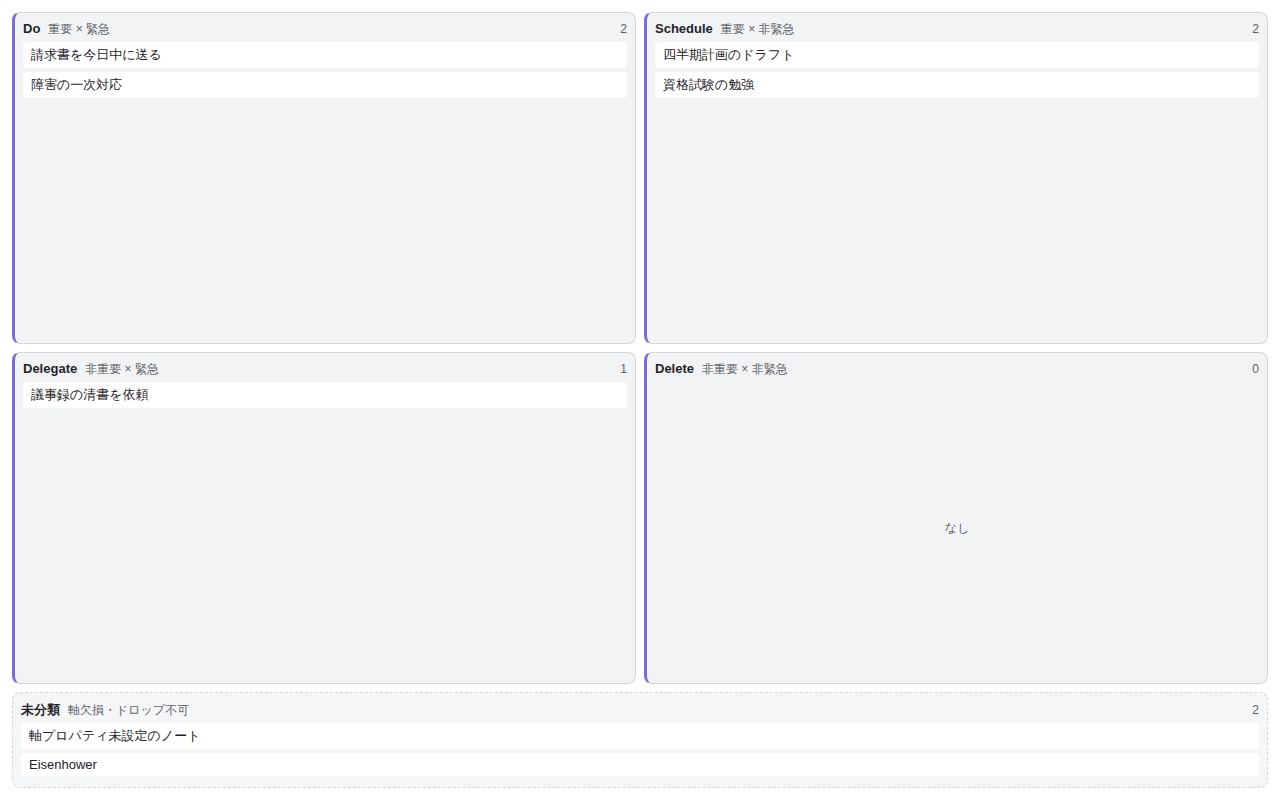
The interface language follows Obsidian automatically, or can be forced to English or Japanese in settings.
- A perspective the built-in Bases views (table / cards / kanban) can't give: a two-axis urgent × important overview with in-place, persisted re-classification.
- Write-back uses the standard
app.fileManager.processFrontMatterAPI — no custom storage. isDesktopOnly: true— classification is mouse/keyboard drag-and-drop; touch support is planned for a later version.
How to use
- Prepare a Base — create or open a
.basecontaining the notes you want to triage. - Add the view — in the Base's view switcher, add a view of the type "Eisenhower Matrix" provided by this plugin.
- Set the axis properties — in Configure view, pick the boolean
note.*properties to use for urgency and importance (defaults:urgent/important). Non-writableformula/file.*properties can't be selected. The plugin settings tab lets you change the default properties, quadrant labels/colors, the uncategorized-zone display, and the display language (Auto / English / Japanese). - Drag cards to classify — each note is placed into one of the four quadrants from its two axis values. Dragging a card to another quadrant (mouse or keyboard) writes the corresponding
true/falseback to the frontmatter. Notes whose axis properties are unset go to the Uncategorized zone, from which you can drag them into a quadrant. Notes holding non-boolean values are shown locked to prevent accidental overwrites. - Undo the last move — right after re-classifying, use the "Undo" toast, or the command "Eisenhower Matrix for Bases: Undo last move" (assign any hotkey in Settings → Hotkeys), to revert one step. It is a dedicated undo, independent of Obsidian's Ctrl+Z, and keeps only the single most recent move. A card that started uncategorized is returned to Uncategorized by removing its axis properties.
v1 supports boolean axes (
true/false). Numeric and tag axes are under consideration for a future version.
Daily operation (v0.2)
Property badges are off / empty by default (unchanged until you opt in); the completion toggle and the stagnation indicator are on by default (completion writes the done property; stagnation flags cards idle for more than 14 days), while the setup diagnostics surface only on misconfiguration. All are configurable — or can be disabled — in settings.
- Completion toggle — each card shows a check button (the completion property defaults to the boolean
done; change it to another boolean property or clear it in settings to disable). Click it (or pressxwhile the card is focused) to writedone: truewithout opening the note. Let a Base filter decide whether finished notes disappear: adddone != trueto the Base and completed cards drop out automatically; if you keep them, the "dim completed notes" option marks them instead. Toggling flips completion on/off, and the last toggle can be reverted with the same Undo as a drag. Cards whose completion property holds a non-boolean value (e.g. a date) disable the check to protect the existing value. - Property badges — show up to 3 read-only badges (due date, tags, project, …) under each card title, chosen per view (with a settings default). Because they're read-only,
formulaandfile.*properties can be shown too. An optional toggle emphasizes due-like values (YYYY-MM-DDon or before today). - Stagnation indicator — cards untouched for longer than a threshold (14 days by default; change, or disable with 0, in the settings tab) get a subtle stagnation badge (clock icon + elapsed days). It is a read-only marker based on last-modified time (
mtime), so automated processing (Linters, Templater, sync) also resets it — noted in the settings. - Setup diagnostics — if you assign the same property to both axes (which locks every card 🔒), an in-view banner explains the cause and the fix. A one-line hint also shows which urgency / importance properties are currently resolving the classification when everything falls to Uncategorized.
Installation
Community plugin (submitted)
Once listed, install it from Obsidian → Settings → Community plugins → Browse by searching for "Eisenhower Matrix for Bases".
Manual installation
Download main.js / manifest.json / styles.css from the Releases page, place them in <Vault>/.obsidian/plugins/eisenhower-bases-view/, then enable the plugin in Settings.
日本語
Obsidian の Bases(コアのデータベース機能)のカスタムビューとして、緊急度×重要度の 2×2 Eisenhower マトリクスを提供するプラグイン。ノートを 4 象限(Do / Schedule / Delegate / Delete)に配置し、カードのドラッグで frontmatter プロパティを書き戻して分類を永続化する。完全ローカル動作(ネットワーク通信・テレメトリなし)。
- 既存の Bases ビュー(テーブル / カード / カンバン)ではできない「緊急×重要」の 2 軸俯瞰と、その場での再分類(永続化)を実現する。
- 書き戻しは標準の
app.fileManager.processFrontMatterを用いる。 isDesktopOnly: true(マウス DnD のため当面デスクトップ限定・タッチ対応は将来)。
使い方
- Base を用意する — 対象ノート群を含む
.baseを作成 / オープンする。 - ビューを追加する — Base のビュー追加で、本プラグインが提供する種別 「Eisenhower Matrix」 を選ぶ。
- 軸プロパティを設定する — ビュー設定(Configure view)で、緊急度・重要度に使う boolean の
note.*プロパティを指定する(既定はurgent/important)。書き戻せないformula/file.*プロパティは選べない。プラグイン設定タブで既定プロパティ・象限ラベル / 色・欠損ノート表示・表示言語(Auto / 英 / 日)を変更できる。 - カードをドラッグして分類する — 各ノートは両軸の値で 4 象限に配置される。カードを別象限へドラッグ(マウス / キーボード)すると、その象限に対応する
true/falseが frontmatter に書き戻される。軸プロパティが未設定(欠損)のノートは「未分類ゾーン」に入り、そこから象限へドラッグして分類できる。boolean 以外の値を持つノートは誤書き換えを防ぐためロック表示になる。 - 直前の移動を元に戻す — 分類し直した直後の「元に戻す」トースト、またはコマンド 「Eisenhower Matrix for Bases: 直前の移動を元に戻す」(設定 → ホットキーで任意のキーを割り当て可能)で 1 手戻せる。Obsidian 標準の取り消し(Ctrl+Z)とは統合していない独立した専用コマンドで、保持するのは直前の 1 手のみ。元が未分類だったカードは軸プロパティを削除して未分類へ戻す。
v1 は boolean 軸(
true/false)に対応する。数値・タグ軸は将来のバージョンで検討する。
日常運用(v0.2)
追加プロパティバッジは既定オフ(空)でオプトインするまで従来どおり。完了トグルと滞留インジケータは既定で有効(完了トグル=プロパティ done、滞留=14 日)で、診断バナーは設定ミス時のみ出る。いずれも設定で変更・無効化できる。
- 完了トグル — 各カードにチェックボタンが出る(完了プロパティは既定で boolean の
done。設定で別の boolean プロパティ名に変えたり、空にして無効化できる)。クリック(またはカードにフォーカス中にxキー)でノートを開かずにdone: trueを書き込める。完了ノートを消すか残すかは Base 側のフィルタに委ねる方針で、Base にdone != trueを張れば完了カードは自動で消える。残す場合は「完了ノートを淡色表示」オプションで目印にできる。チェックは押すたびに完了 / 未完了を切り替えられ、直前の 1 手はドラッグ移動と同じ**「元に戻す」**で戻せる。完了プロパティが日付など boolean 以外の値を持つカードは、既存の値を守るためチェックを無効化する。 - 追加プロパティバッジ — カードのタイトル下に、期日・タグ・プロジェクトなどを読み取り専用のバッジで最大 3 個表示できる(ビューごと+設定で既定を選択)。読み取り専用なので数式や
file.*系プロパティも表示できる。期日らしい値(YYYY-MM-DDで今日以前)を強調するトグルも用意した。 - 滞留インジケータ — 最終更新から一定日数(既定 14 日・設定タブで変更、0 で無効)を超えて動いていないカードに、控えめな滞留バッジ(時計アイコン+経過日数)を付ける。最終更新日時(
mtime)に基づく読み取り専用の目印で、Linter・Templater・同期などの自動処理でも更新日時はリセットされる点に注意(設定画面に明記)。 - 設定ミス診断バナー — 緊急度軸と重要度軸に同じプロパティを割り当てて全カードが移動不可(🔒)になったとき、原因と直し方をビュー内バナーで説明する。全ノートが未分類に落ちたときは、いまどの緊急度 / 重要度プロパティで分類しているかを 1 行で示す。
インストール
コミュニティプラグイン(申請中)
掲載後は、Obsidian の設定 → コミュニティプラグイン → 閲覧 から「Eisenhower Matrix for Bases」を検索してインストールできる。
手動インストール
Releases から main.js / manifest.json / styles.css を取得し、対象 Vault の <Vault>/.obsidian/plugins/eisenhower-bases-view/ に配置して、設定でプラグインを有効化する。
Support / 支援
This plugin is free and open source (MIT). If it helps you, you can support its development:
- GitHub Sponsors (recurring): https://github.com/sponsors/nakata5577
- Ko-fi (one-time tip): https://ko-fi.com/nakata5577
本プラグインは無料・オープンソース(MIT)です。役立ったら開発の支援をいただけると励みになります(GitHub Sponsors:継続/Ko-fi:単発)。Obsidian のプラグイン詳細ページの「Donate」からも同じ導線にアクセスできます。
開発 / Development
| 目的 / Purpose | コマンド / Command |
|---|---|
ビルド(型チェック+esbuild 本番バンドル → main.js) / Build | npm run build |
| 開発(esbuild watch) / Dev watch | npm run dev |
| 型チェックのみ / Type-check only | npm run typecheck |
| テスト / Test | npm test |
| Lint | npm run lint |
| フォーマット / Format | npm run format |
Issue 駆動 + Git Flow + git worktree + TDD(Red-Green-Refactor)+ Spec 駆動 + 多段コードレビューを採用する。詳細は CLAUDE.md と .claude/rules/、要件は docs/要件定義書.md、設計は docs/design/ を真実源とする。
前提 / Requirements
- 動作確認に Obsidian デスクトップ(1.12.0 以上・Bases コアプラグイン有効)/ Obsidian desktop 1.12.0+ with the Bases core plugin enabled
- 開発に Node.js / npm、GitHub 連携に
gh(GitHub CLI)、フック実行にpython3
プラグイン id:
eisenhower-bases-view/ name:Eisenhower Matrix for Bases/minAppVersion1.12.0(スパイク #16 の実機検証〔1.12.7〕で確定)。
このプロジェクトは Claude Code エージェント開発ワークフロー・テンプレート v1.9.0 から生成。
For plugin developers
Search results and similarity scores are powered by semantic analysis of your plugin's README. If your plugin isn't appearing for searches you'd expect, try updating your README to clearly describe your plugin's purpose, features, and use cases.