Folder Timeline
approvedby R
Turn any folder into a Timeline/Gantt view. 把任意目录变成时间轴/甘特图。 - This plugin has not been manually reviewed by Obsidian staff.
Turn any folder into a timeline
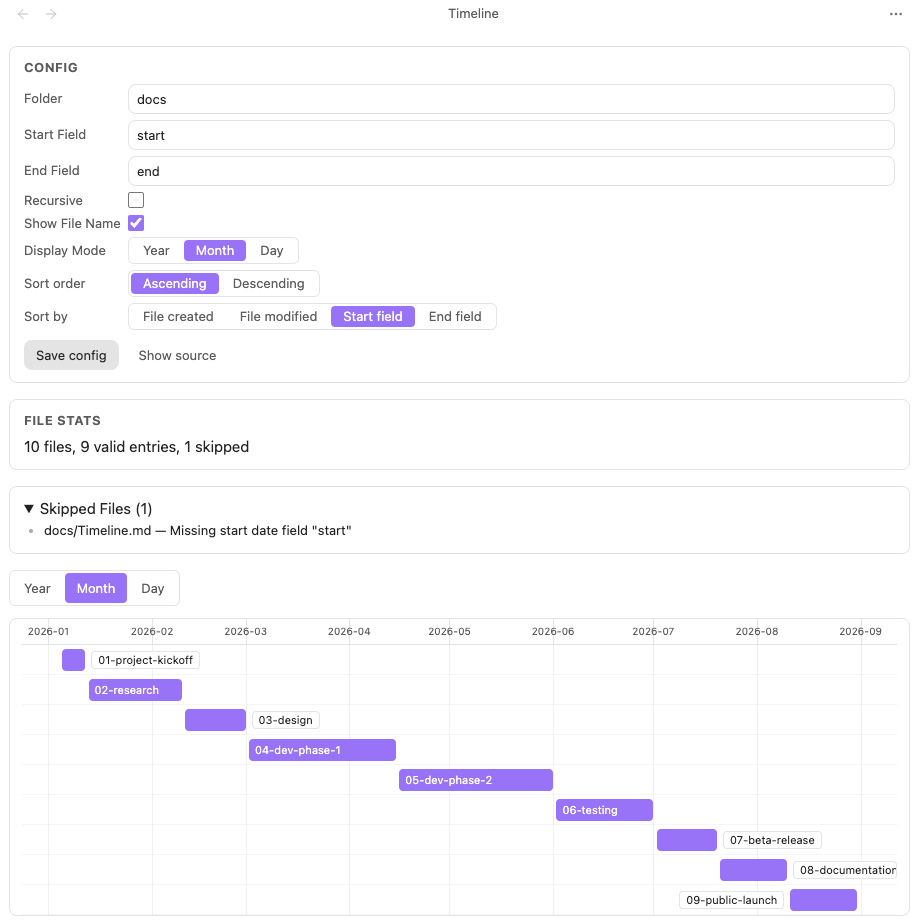
Usage
Folder Mode — treat a folder as a timeline:
- Click the timeline icon in the left ribbon, or right-click a folder in the file explorer.
- The plugin creates a view config file and opens the timeline.
- Add
start/endfields to any note's frontmatter to put it on the axis.
Base Mode — embed a timeline inside any Obsidian Base:
- Open a
.basefile → Layout → + Add View → Timeline. - In the view options, pick your Start date property and End date property.
- The timeline renders instantly. Filtering, sorting, and grouping are all handled by Base — you only configure the time fields.
View config file
A view config file is any regular Markdown file. When its frontmatter contains timeline: true, it is recognized as a view config file. You can edit and save it through the in-view form, or edit the file directly.
---
timeline: true
folder: ""
recursive: false
startField: "start"
endField: "end"
showFileName: true
displayMode: "month"
sortBy: "start"
sortOrder: "asc"
---
| Field | Type | Required | Default | Description |
|---|---|---|---|---|
timeline | boolean | yes | - | The file is treated as a view config file only when this is true. |
folder | string | yes | - | Folder to display, a path relative to the vault root; empty string means the vault root. |
recursive | boolean | no | false | Whether to scan all subfolders under folder recursively. |
startField | string | yes | - | Start-time field name; read from each file's frontmatter. |
endField | string | yes | - | End-time field name. |
showFileName | boolean | no | true | Whether to show the file name on the bar. |
displayMode | "year" | "month" | "day" | no | "month" | Timeline scale granularity. |
sortBy | "created" | "modified" | "start" | "end" | no | "start" | Sort key for bars (top to bottom). |
sortOrder | "asc" | "desc" | no | "asc" | Sort direction: ascending / descending. |
Time value formats: common Obsidian frontmatter formats are supported, such as 2026-08-06, 2026-08-06T20:30:00, 2026-08-06 20:30, etc. A note with a start but no end renders as a single-point event (a circular marker); a start later than the end is treated as an invalid item and summarized in the view.
Features
- Obsidian Base integration — add Timeline as a native Base view type alongside Table, Board, Calendar, and Gallery. Use Base's built-in filters, sorts, and grouping; the timeline just renders your data.
- Hand-drawn timeline (zero third-party Gantt/Timeline dependencies): year / month / day scales; range auto-covers all items; bars correctly cross year and month boundaries.
- Bar interaction: hover feedback; click / Enter (keyboard-focusable) opens the note in Obsidian; optional file name on the bar when space permits.
- Performance: viewport rendering keeps hundreds to thousands of files scrolling at 60 fps.
- In-view config editing (folder mode): edit the form to write back to the config file's frontmatter and refresh instantly.
- Edge-case friendly: broken config, missing folder, empty folder, notes without time fields, start after end — all show a clear message instead of crashing.
- Local-first: no network requests, no telemetry, no remote code execution.
Installation
From Obsidian Community Plugins (recommended)
- Open Obsidian → Settings → Community plugins → Browse
- Search for "Folder Timeline" and click Install
- Enable the plugin
Manual
- Download the latest Release
- Extract and copy the folder to
<your-vault>/.obsidian/plugins/ - Restart Obsidian and enable the plugin in Settings
Development
pnpm install   # install dependencies (package manager is pinned to pnpm)
pnpm dev   # build in watch mode
pnpm build # production build, outputs main.js
pnpm lint  # run ESLint
License
MIT
For plugin developers
Search results and similarity scores are powered by semantic analysis of your plugin's README. If your plugin isn't appearing for searches you'd expect, try updating your README to clearly describe your plugin's purpose, features, and use cases.