Markline
approvedby hotoo
Timeline view from Markdown
Obsidian Markline
This is fork of Markline, show timeline view from markdown in Obsidian editor.
Feature
- Show timeline view in Obsidian Editor with
marklinecode blockquote. - Add markline code blockquote by command.
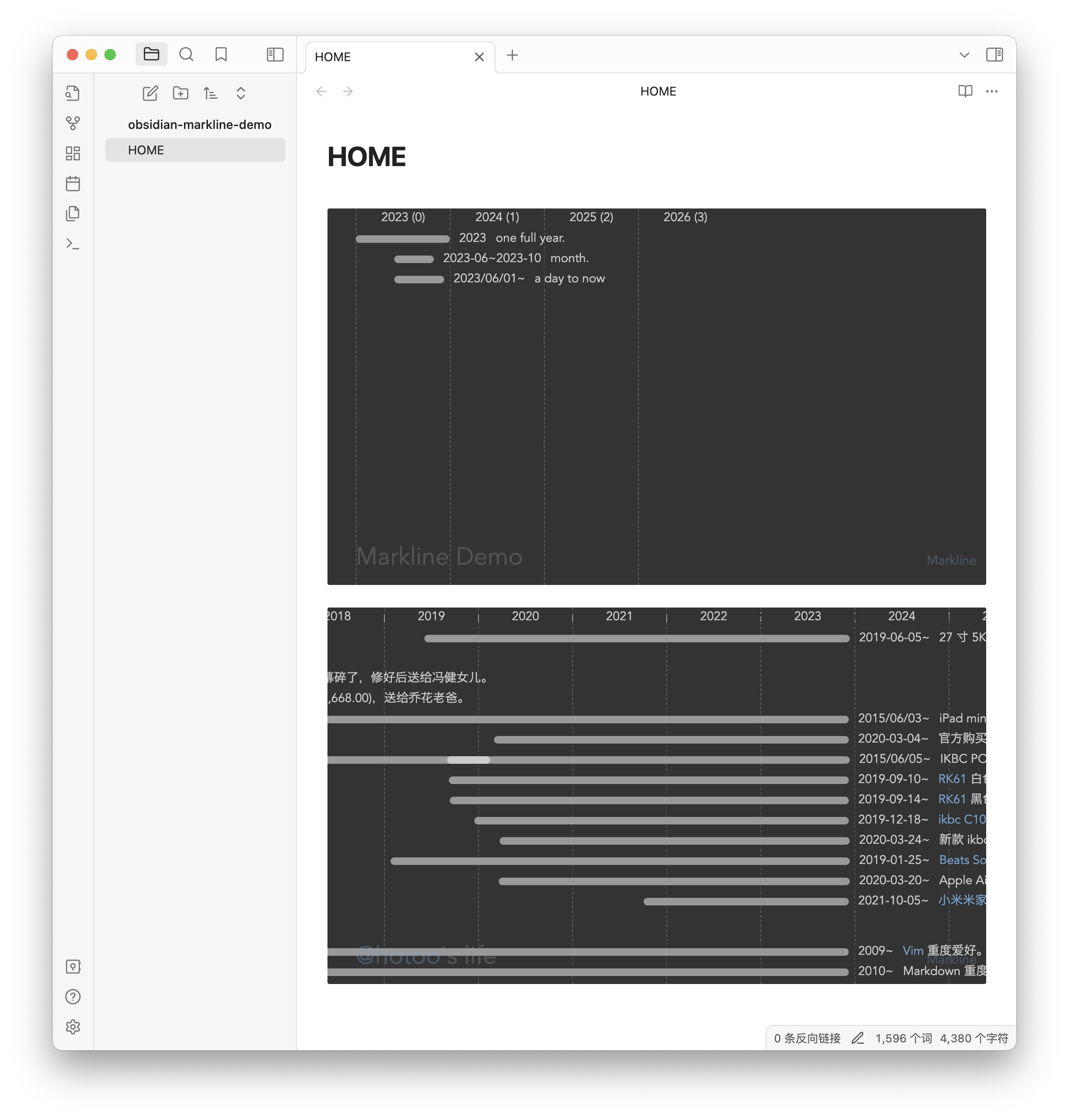
Install
Community plugins:
Click link https://obsidian.md/plugins?id=markline to install.
or:
- Menu: Obsidian -> Perferences...
- If "Restricted mode" is off, click "Turn on community plugins" button.
- Click "Browser" button.
- Search "Markline".
- Open and click "Install" -> "Enable" button.
Manual installation:
- Unzip the latest release into your
<vault>/.obsidian/plugins/marklinefolder. - Reload Obsidian.app
- Enable the plugin in the settings of community plugins section.
You can also use the BRAT plugin to install the latest release.
Examples
```markline
# My Documnet Title
## group name (optional)
- 2023 A full year event.
- 2023-01~2023-03 subevent
- 2023-05~2023-08 subevent 2
- 2023-01 month event name.
- 2023-01-02 event name with [link](https://github.com/hotoo/obsidian-markline).
## another group
- 2013 another list item.
- 2013-05-05 yet another list item.
```
Markdown
Markdown is so easy, and so powerful, you can use it to build the timeline graph.
Markline use subsets of markdown now:
Dates
* 1986 for year.
* 1986/06 for month.
* 1986/06/28 is a good day.
* 1986-06-28 you also can use this date format.
Date Ranges
* 2012~2014 year to year.
* 2012~2014/02 year to year.
* 1986/06/28~1986/08/14 from date to another date.
* 2012~ year to now.
Header
# title

## h2 group name
### h3 group name
#### h4 group name
##### h5 group name
###### h6 group name
Meta
Between title and group or lines, we can set meta data in markdown by key-value pair.
# title

- age: show
- date: 2014/01/01
- author: @hotoo
- mention: https://twitter.com/{@mention}

----

# Group 1

* 2014 line 1.
Now we support meta data:
-
age: show age after year in top header line. default is hide, if want show, set:- age: show -
mention: set mention enable, and mention base url. default mention is disable.# @Mention Demo - mention: https://github.com/{@mention} ---- - 2014 @hotoo mention @lizzie{@mention}is placeholder for mention name. -
hashtag and colors: direct use
#FF0000or hashtag custom tags styles.# #HashTag Demo - tags: - #tag-name: background-color, text-color - #life: yellow, #f00 - #job: rgb(255,255,255), rgba(255,0,0,0.5) - #some-tag: red ---- - 2014 this is my #life - 2023 this line color is red #f00 ## Group #F00 - 2023 all events in this group is red. - 2023 red line. ## Group #F00 #0F0 - 2023 all events in this group is red bar and green text. - 2023 red bar and green text.
following meta data support come soon.
-
theme: set different theme, by build-in theme name, or theme css file url.- theme: light - theme: http://www.example.com/theme.css -
year-length: set date column width. -
date-type: show date type byyear,month, ordate -
author: set author information.
List
* 2014 list item
  * 2014/01 sub list item

- 2014 another list item
  - 2014/01 another sub list item
Horizontal
for anonymous group.
* 2014 line 1

----

* 2015 line 2
Link
* 2014 this is a [link](url)
* 2014 this is a [[inner link]]
Image
* 2014 this is an image: 
* 2014 this is an internal image: ![[image file]]
Strong
* 2014 this is **strong** text.
* 2014 this is __another strong__ text.
Emphasized
* 2014 this is _emphasized_ text.
* 2014 this is *another emphasized* text.
Delete
* 2014 this is ~delete~ text.
* 2014 this is ~~another delete~~ text.
Want more markdown syntax feature? make issues, fork and pull request.
References
For plugin developers
Search results and similarity scores are powered by semantic analysis of your plugin's README. If your plugin isn't appearing for searches you'd expect, try updating your README to clearly describe your plugin's purpose, features, and use cases.