Search - Graph Highlighting
approvedby Hall
Applies your global search query to the graph view filter in real time and highlights hovered search results in the graph. - This plugin has not been manually reviewed by Obsidian staff.
Search - Graph Highlighting
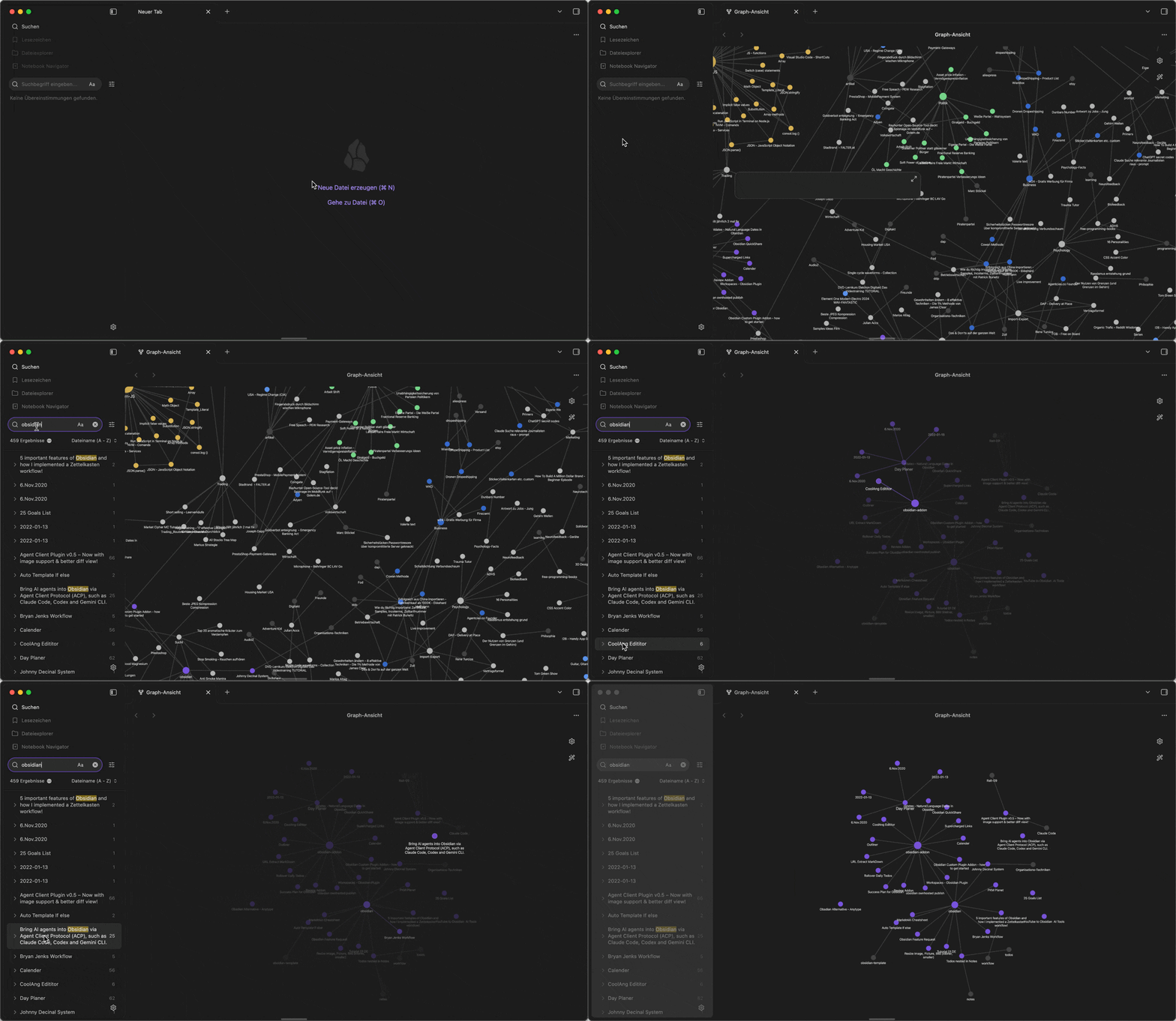
An Obsidian plugin that connects the global search with the graph view: whatever you type into the search is applied to the graph filter in real time, so the graph always shows the same results as the search list. Hovering a search result highlights the corresponding node in the graph.
Features
- Live filter sync — typing in the global search applies the same query (slightly debounced) to the filter of every open graph view, as if you had typed it there yourself. Search operators like
tag:,path:, orfile:work the same way in both. - Hover highlighting — hovering a search result in the results list highlights the corresponding node in the graph, with the same effect as hovering the node directly: the node and its connections light up while the rest fades back.
- Late-opened graphs — if you open the graph after searching, the current query is applied on open.
- Local graphs — optionally apply both features to local graph views as well.
Settings
- Sync enabled — toggle the filter sync (also available as a command: Toggle sync).
- Also filter local graphs — additionally applies the search query to open local graph views.
- Highlight node on search result hover — toggle the hover highlighting.
- Clear graph filter when search is empty — when the search query is cleared, the graph filter is cleared as well. If disabled, the last filter is kept.
- Debounce delay (ms) — how long to wait after the last keystroke before updating the graph.
There is also a command Apply search query to graph now that pushes the current query to the graph once, even while sync is disabled.
Installation
From the community plugin browser
Once the plugin is accepted into the community plugin directory: Settings → Community plugins → Browse, search for "Search - Graph Highlighting", install and enable it.
Manual
Copy main.js and manifest.json from the latest release into your vault at:
<vault>/.obsidian/plugins/graph-search-sync/
Then enable the plugin under Settings → Community plugins.
Via BRAT
Add aldaw/graph-search-sync in the BRAT plugin.
How it works (and a caveat)
The graph view has no public plugin API. This plugin uses the same internal code paths that Obsidian itself uses:
- The filter query is written into the graph's filter input and dispatched through the same event path as real typing, so Obsidian re-evaluates the filter itself.
- Hover highlighting sets the renderer's highlight node exactly like a native pointer-over on the node does.
If a future Obsidian update renames these internals, the plugin degrades gracefully: the graph simply stops following the search until the plugin is updated. Nothing breaks and no data is touched.
Development
npm install
npm run build   # produces main.js
npm run dev     # watch mode
License
For plugin developers
Search results and similarity scores are powered by semantic analysis of your plugin's README. If your plugin isn't appearing for searches you'd expect, try updating your README to clearly describe your plugin's purpose, features, and use cases.