Home Dashboard

一个 Obsidian 首页插件:打开 Obsidian 就能看到一个汇总了随手记、待办、日记和回顾的首页,配上会轻轻摇动的竹林背景。
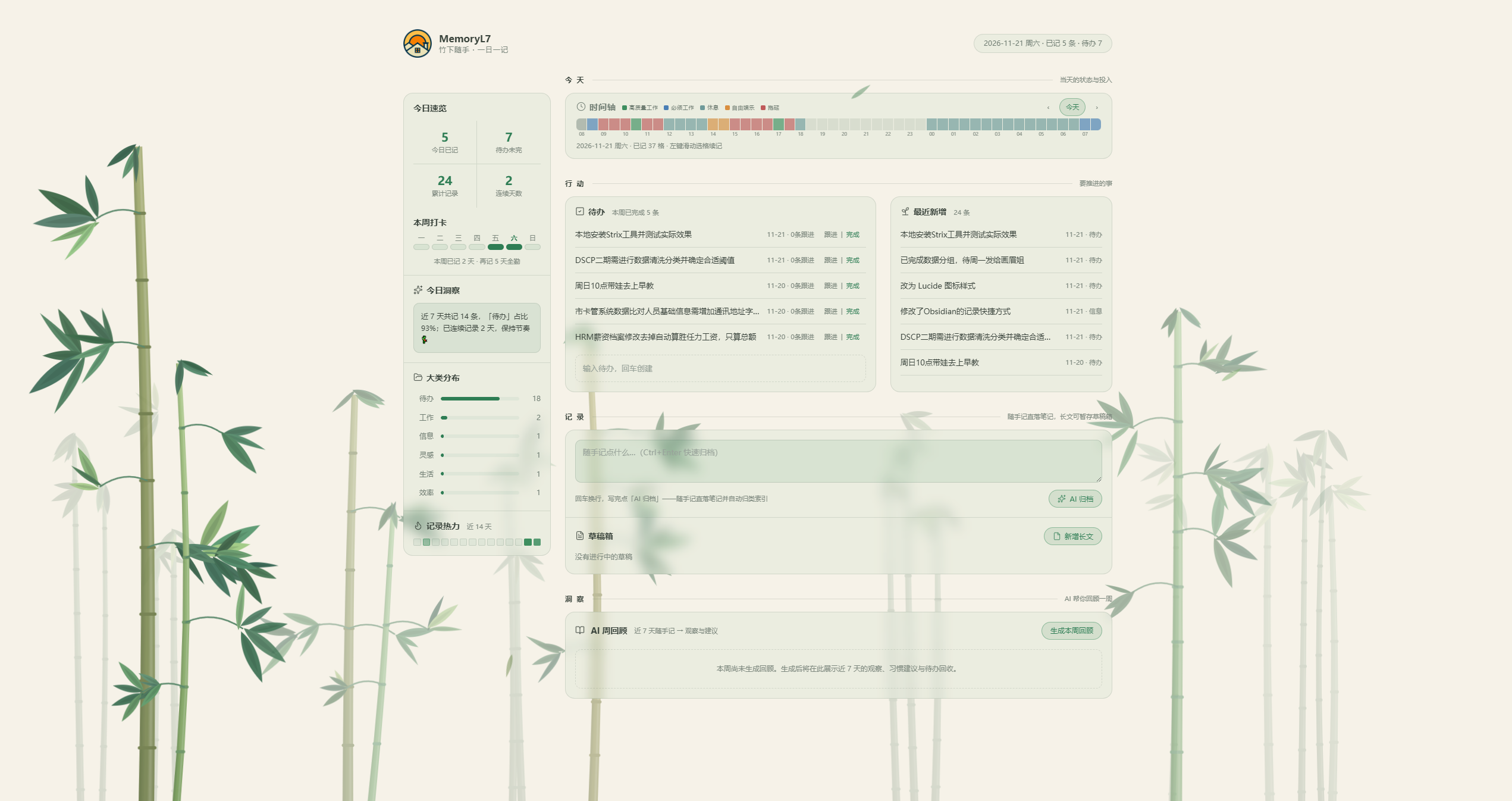
它能做什么
- 打开就是首页:启动 Obsidian 后自动进入 Home 页面,不用自己找笔记
- 随手记:想到什么就输什么,回车保存,可以自动整理到对应的笔记里
- 待办:在首页直接看到要做的事、最近新增的条目,也能直接添加
- 一日一记:按天记录自己的状态和投入
- 一周回顾:让 AI 帮你回顾最近 7 天的记录,给出观察和建议
- 今日速览:今天记了几条、还有几件事没做完、连续记录了多少天
- 本周打卡:一眼看到这一周哪几天记了、哪几天还没记
- 时间轴:一天当中什么时候记了什么,左右滑动看详情
- 草稿箱:没写完的长文先放这里,随时接着写
- 竹林背景:会随风摆动的竹林,让首页不那么枯燥
- 跟随主题:Obsidian 切换深色、浅色,首页也会跟着变
安装
从 Releases 下载
main.js、manifest.json、styles.css 三个文件,放进
<vault>/.obsidian/plugins/home-dashboard/ 文件夹,然后在 Obsidian
设置的"第三方插件"里启用 Home Dashboard。
也可以自己从源码构建:
npm install
npm run build
构建后同样把 main.js、manifest.json、styles.css
复制到上面的文件夹并启用。
License
English
An Obsidian plugin that turns a vault into a personal dashboard: open Obsidian and you land on a Home page that gathers your quick notes, todos, daily logs and weekly reviews — with a gently swaying bamboo garden in the background.
What it does
- Home on launch: the dashboard opens automatically when Obsidian starts
- Quick capture: type a thought, press Enter, and it is saved — and can be filed into the right note automatically
- Todos: see what is due and what was recently added, add new ones directly from the dashboard
- Daily log: record how your day went
- Weekly review: let AI look back over your last 7 days and offer observations and suggestions
- Today at a glance: notes captured today, open todos, and your current streak
- Weekly check-in: see at a glance which days you logged this week
- Timeline: when during the day you captured what; slide to see details
- Drafts: park unfinished longform pieces and pick them up anytime
- Bamboo garden: an animated bamboo grove that sways in the wind
- Theme aware: follows Obsidian's light and dark themes
Install
Download main.js, manifest.json and styles.css from
Releases into
<vault>/.obsidian/plugins/home-dashboard/ and enable the plugin, or build
from source:
npm install
npm run build
For plugin developers
Search results and similarity scores are powered by semantic analysis of your plugin's README. If your plugin isn't appearing for searches you'd expect, try updating your README to clearly describe your plugin's purpose, features, and use cases.