Agent Comments
approvedby IvyYang1999
Feishu-style inline comments stored right in your Markdown. Highlight text, leave a note, @ an AI coding session to reply. - This plugin has not been manually reviewed by Obsidian staff.

Agent Comments
Comments alongside your notes. @ an agent to reply.
Works on its own; stored as plain text in the Markdown.



Install in Obsidian · Website · 中文说明 ↓
What it does
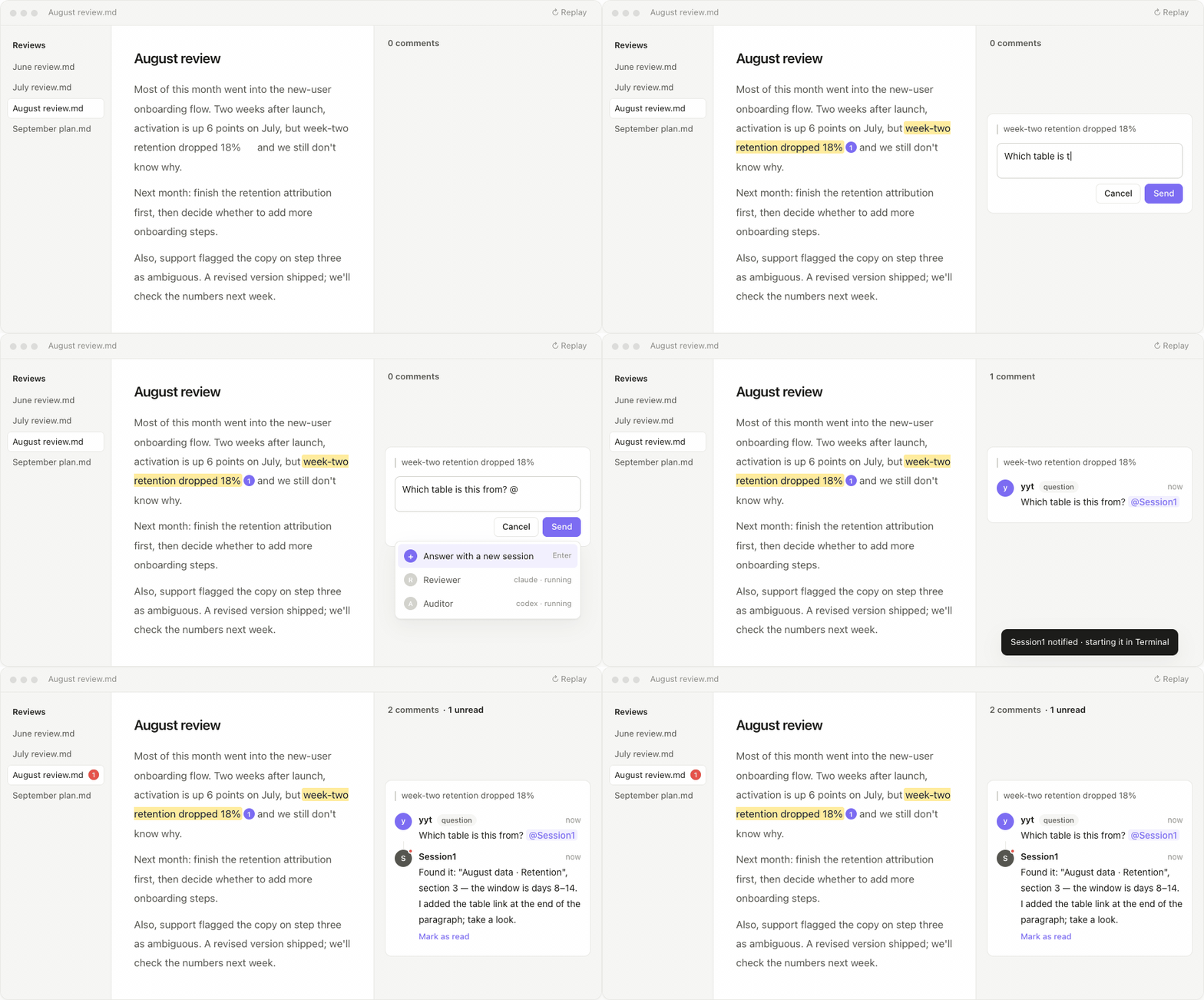
Highlight → comment. Select text, right-click Add inline comment. A card appears in the right sidebar, level with the passage, and follows it as you scroll. The note itself only gets a soft highlight and a small counter.
@ a real session. Type @ in a comment to pick a running Claude Code / Codex session on your machine — or choose Answer with a new session and the plugin starts one in Terminal (macOS). The letter is dropped into that session's mailbox; a small hook (installed on request) injects it into the session's context; the session reads the note and writes its reply back into the file.
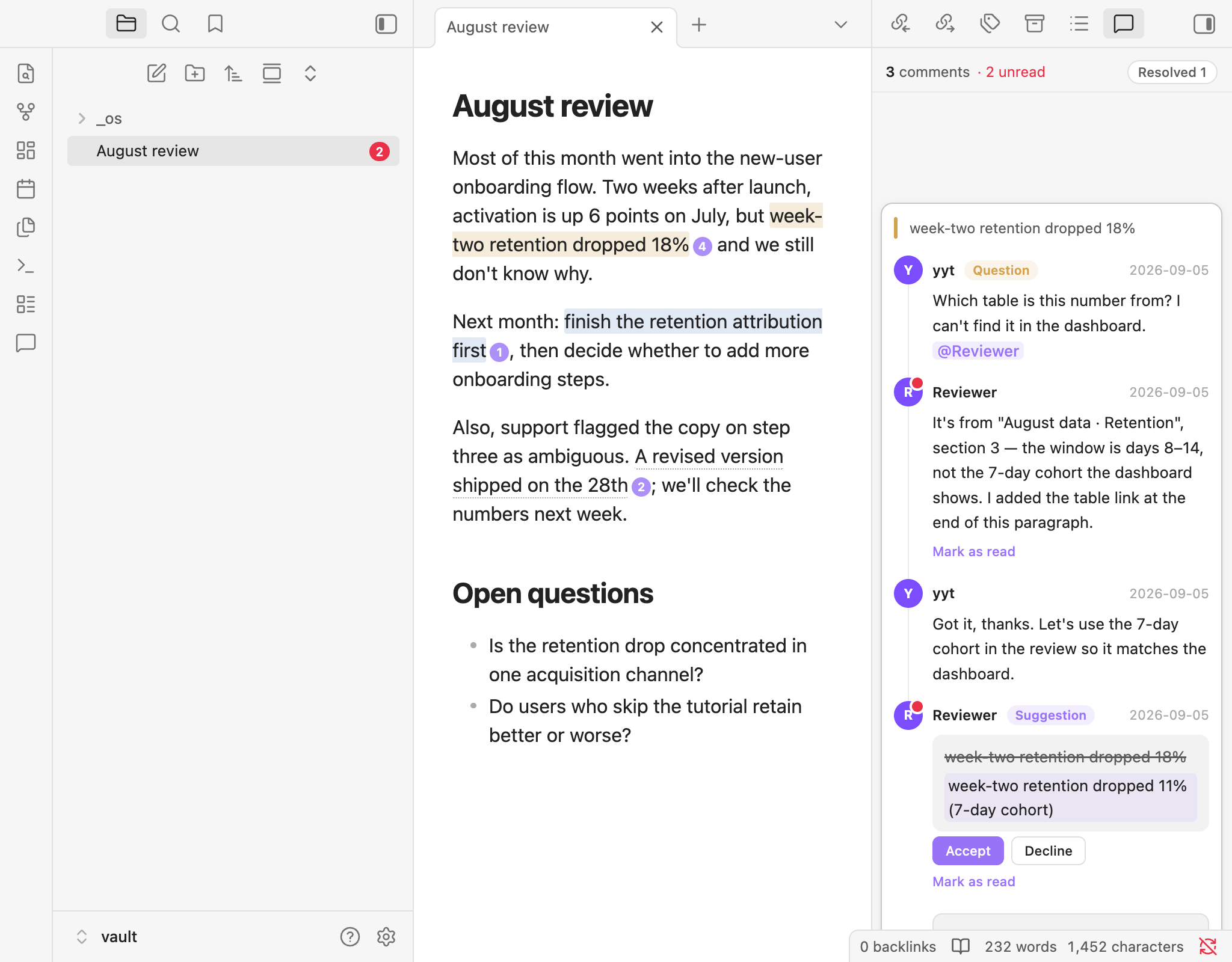
Suggested edits. A reply can carry a replacement for the highlighted passage — from a person or from the AI session. The card shows old → new with Accept / Decline; nothing in the note changes until you accept.
Unread, at a glance. Replies from other people or AI get a red dot, the panel header shows N comments · M unread, and the file explorer shows a red count on the document. Mark as read with one click, resolve a thread when it's done, react with an emoji. One switch turns the unread signals off.
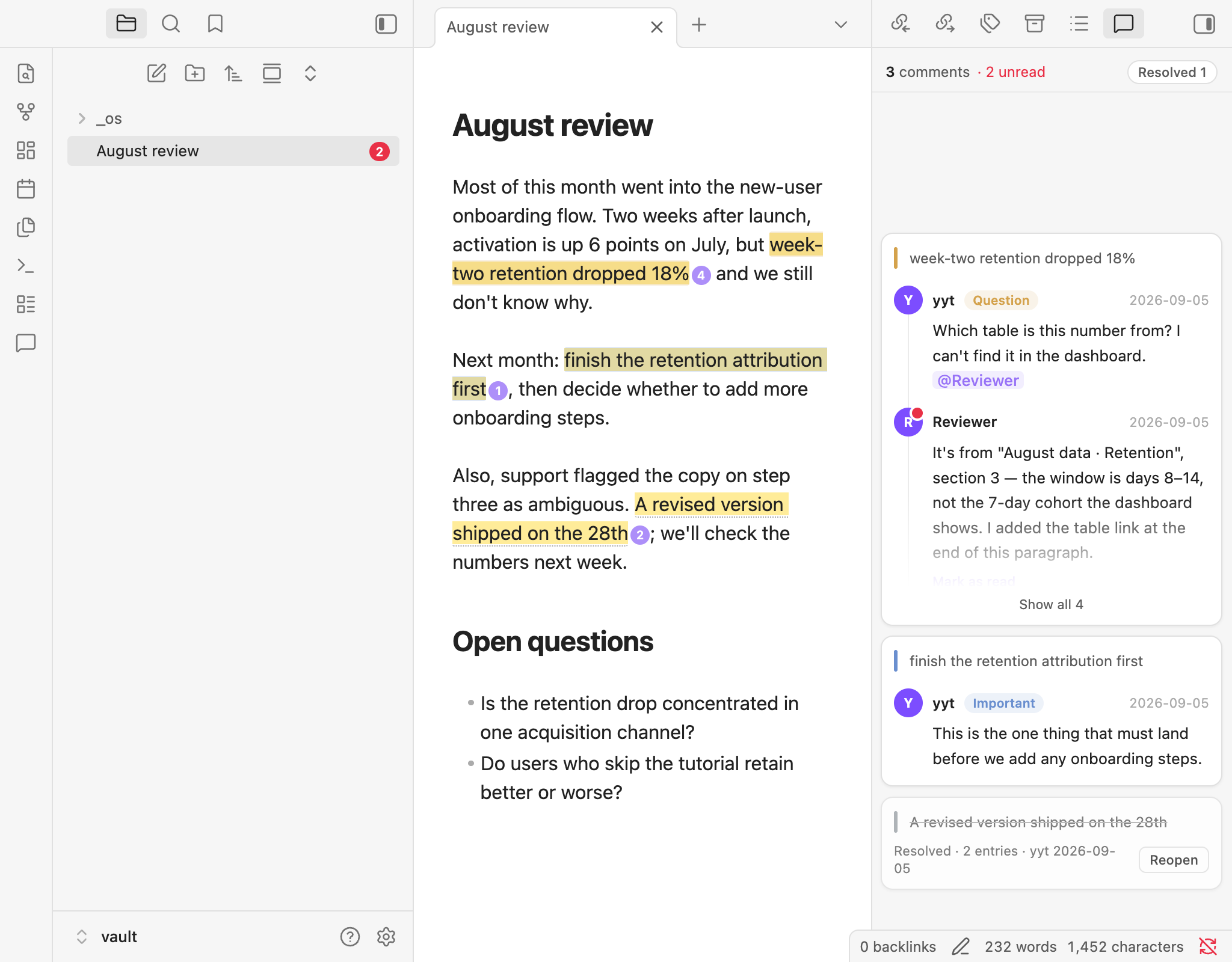
Editing and reading view, desktop and mobile. The same highlight and badge appear in reading view, with the raw markup hidden. Long threads fold to a preview until you expand or focus them.
Plain text storage. A comment is one line of CriticMarkup-style text next to the passage:
{==retention dropped 18% in week two==}{>>yyt|2026-09-05|question: Which table is this from? [@Session1](agent:3f9a12c0)<<}
No database, no sidecar files. It syncs with iCloud / Git / Obsidian Sync like any other text, diffs cleanly, and stays readable without the plugin.
Install
Obsidian → Settings → Community plugins → Browse → search Agent Comments. Or open obsidian://show-plugin?id=inline-comments.
Pre-release builds: BRAT → Add a beta plugin → IvyYang1999/obsidian-inline-comments.
Obsidian 1.8+, desktop and mobile. Session discovery, the hook, and Answer with a new session (which launches Terminal) are desktop features; the last one is macOS only for now.
Using @
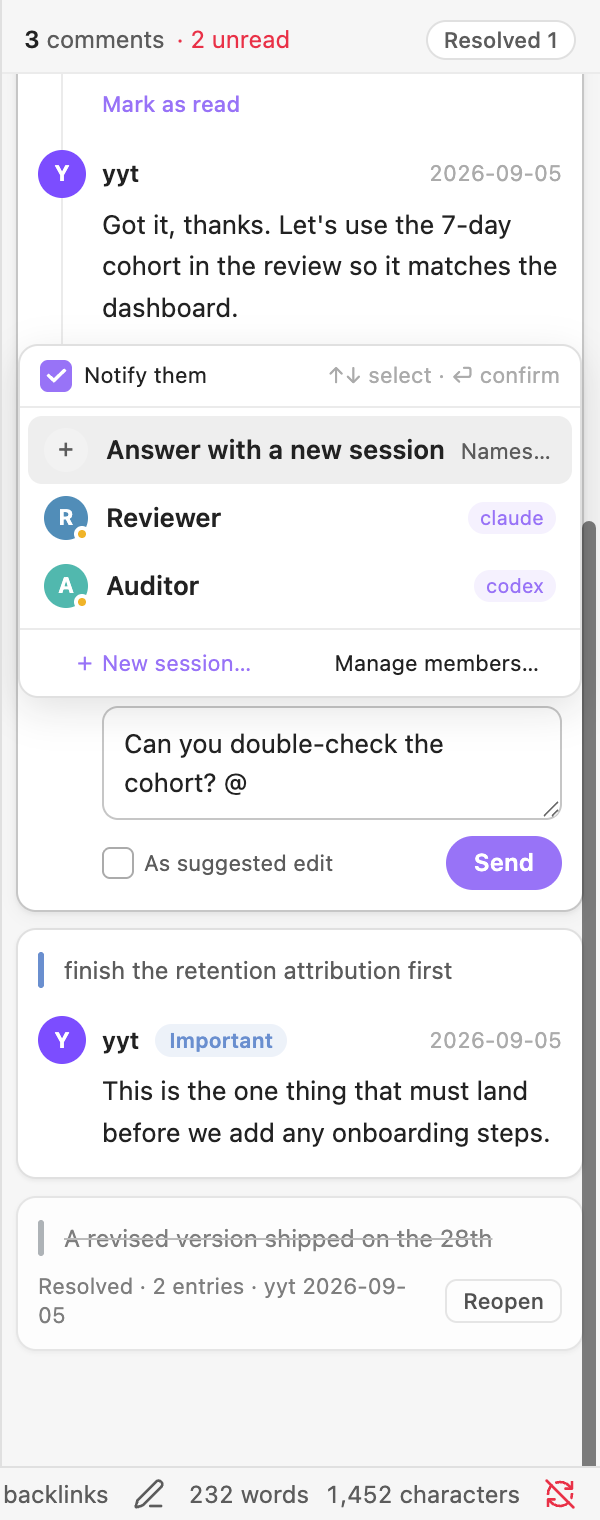
- Manage members (from the
@dropdown or the settings tab) lists the Claude Code / Codex sessions running on this machine. Give one a name to make it mentionable — or just@a name that doesn't exist yet and the plugin creates the session for you. - Install hook, once. It adds three entries (
UserPromptSubmit,Stop,SessionStart) to~/.claude/settings.json, backs the file up first, touches nothing else, and Uninstall removes exactly those entries. - Write
@Namein a comment and send. The letter lands in<vault>/<mailbox root>/<session-id-prefix>/; the session sees it the next time it speaks or finishes, reads the note, and appends a reply.
The plugin never talks to the network. Letters and replies are local files in your vault; what your AI tool does with them is up to that tool.
The UI follows Obsidian's language (English or 中文); you can pin either in settings.
Settings
| Setting | What it does |
|---|---|
| Author name | Signs your comments; your own replies never count as unread |
| Unread notifications | Master switch for red dots, Mark as read, the header count and the explorer badge |
| Show resolved | Keep resolved threads in the panel (collapsed) or hide them |
| Mention delivery / mailbox root | Where letters are written |
| Panel background | Follow sidebar, follow editor, or a custom colour |
| Comment types | Built-in agree / disagree / question / important / note, plus your own with a colour |
Development
npm install --legacy-peer-deps
npm run build      # tsc + esbuild → main.js
npm test           # vitest, pure functions
npm run e2e        # boots an isolated Obsidian and runs ~70 UI assertions
Design notes live in DESIGN.md. Releases are built by CI from a version tag and ship with build-provenance attestations.
中文
Agent Comments——在 Obsidian 笔记的原文旁边留言(划线评论),@ 一个 Agent 来回复。评论以纯文本形式紧挨着原文存在 .md 里,不联网、不建库。
- 划线,即评论。 选中文字右键「添加划线评论」,卡片挂在右侧栏、与原文水平对齐、跟着滚动。
- @ 一个正在跑的会话。 打
@点名本机的 Claude Code / Codex 会话,或「用新会话回答」让插件在终端里替你开一个;留言以文件送到它手里,它读完文档把回复写回原位。 - 修改建议。 回复可以附带对划线原文的替换文本(人或 AI 都能提),卡片上显示 原文 → 改法,点「采纳」原文才会变。
- 未读一眼看清。 别人或 AI 的回复带红点,面板顶部常驻「N 条评论 · M 未读」,文件目录里对应文档也挂红色角标;看完点「标为已读」,聊完点「解决」,也可以加个 emoji 反应。设置里「未读通知」一键关掉。
- 编辑与阅读视图、桌面与手机。 阅读视图里同款高亮 + 角标,原始标记隐藏;超长线程折叠成预览。
安装:Obsidian 设置 → 第三方插件 → 浏览,搜 Agent Comments;或直接打开 obsidian://show-plugin?id=inline-comments。Obsidian 1.8 以上,桌面与手机;会话发现、hook、「用新会话回答」(开终端)是桌面能力,最后一项目前仅 macOS。预发布版用 BRAT 添加 IvyYang1999/obsidian-inline-comments。
官网中文版:https://agent-comments.yytyyf.com
关于隐私:插件本身不联网。@ 只是往你电脑上的一个文件夹写一个文件,会话在你自己的终端里跑;首次 @ 需要在「管理成员」里点一次「安装 hook」——它只往 ~/.claude/settings.json 加三条,可一键卸载。
作者 yytyyf · MIT
For plugin developers
Search results and similarity scores are powered by semantic analysis of your plugin's README. If your plugin isn't appearing for searches you'd expect, try updating your README to clearly describe your plugin's purpose, features, and use cases.