SideNote2
unlistedby vicky
Side comments for both humans and agents.

Aside






Side note index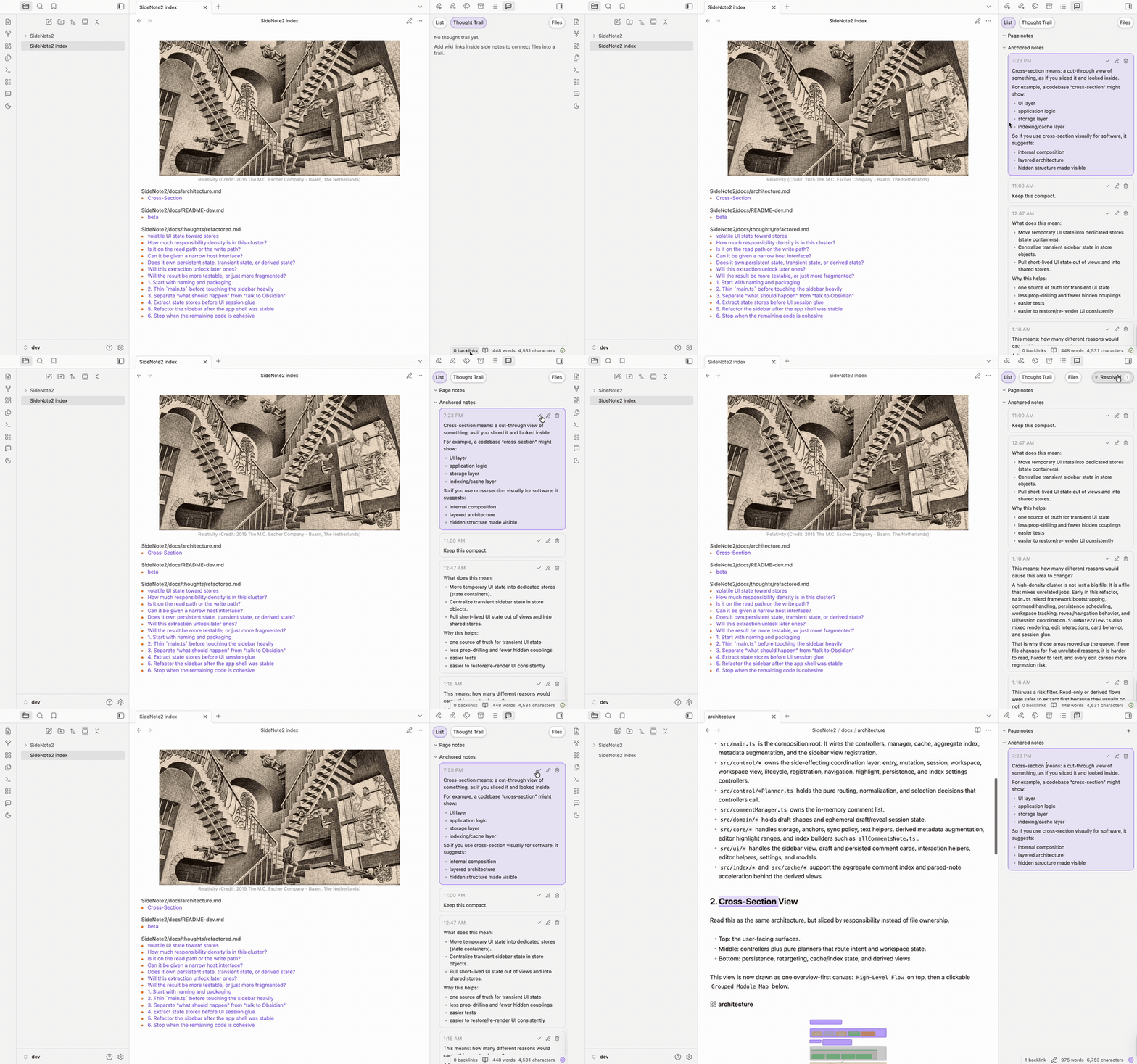
|
Agent reply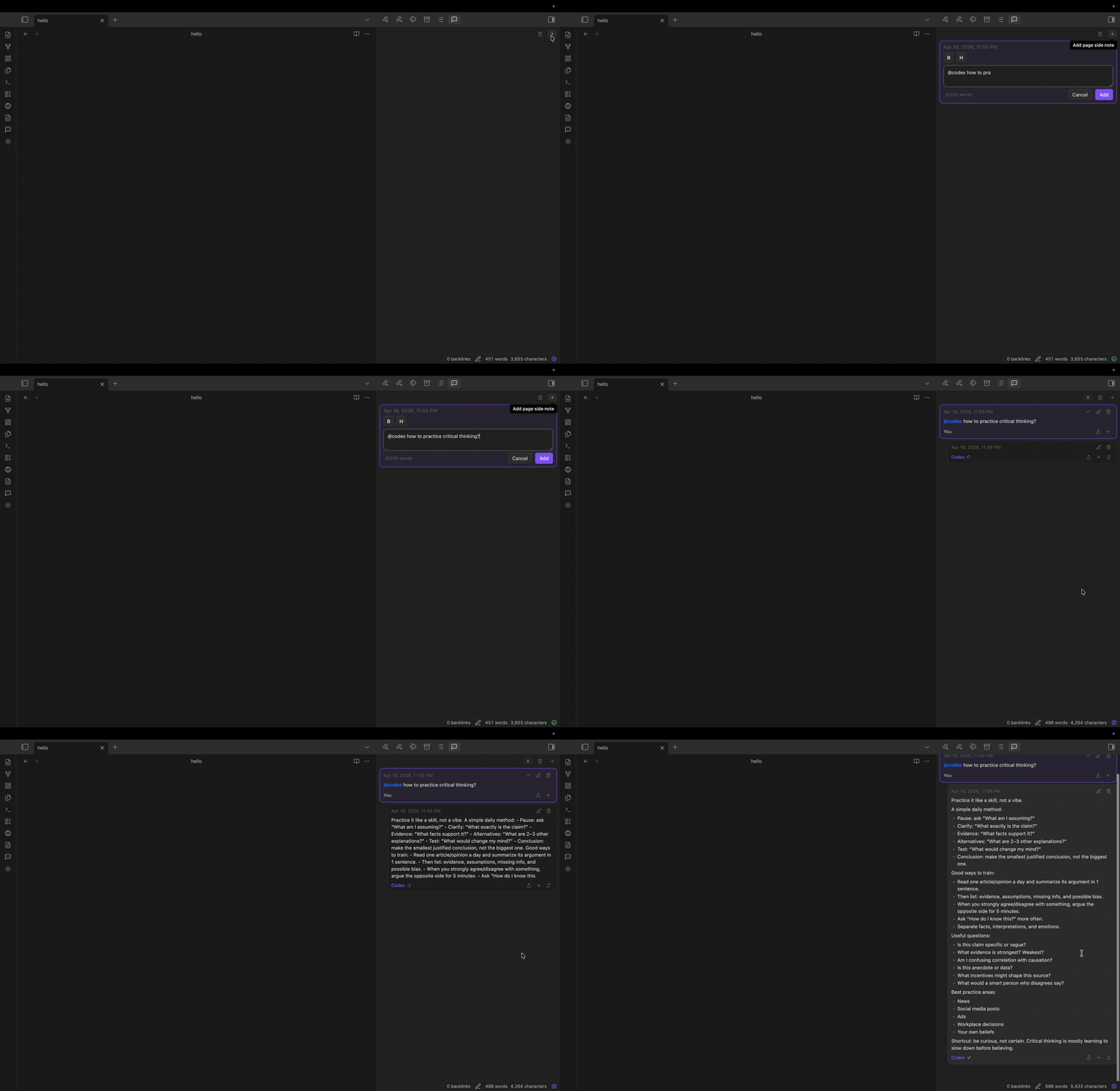
|
Features
- Uses a dedicated sidebar for drafting, editing, and deleting comments.
- Pin any saved card independently, including replies. The pinned filter keeps pinned replies beside their parent context in the original conversation order, and pins sync across devices.
- Jump through the current sidebar search results with the up/down buttons beside the input, or Enter / Shift+Enter. The counter tracks highlighted matches; tag search navigates matching file rows.
- Adds page notes for vault files displayed in an Obsidian file-backed view, except the generated
🐰 Aside Index.md, including files displayed by viewer plugins. Selection-anchored notes remain Markdown-only. Aside does not add previews for formats Obsidian or its installed plugins cannot display. - Supports Obsidian-style
[[wikilinks]]inside side comments to link existing notes or create new markdown notes. - Type
#in a side note to search existing tags or add a new one. - Type
@todoto mark follow-ups that appear in the Todo index tab. - Browse, filter, and batch-apply local side-note tags from the active note sidebar.
- Generates
🐰 Aside Index.mdas a vault-wide comment index. - Lets the index sidebar switch between the comment list and a thought-trail graph built from side-note wiki links. The graph follows those links across connected markdown files, so it can show multi-step trails instead of only direct one-hop links.
- Built-in agent help on desktop Obsidian. Type
@codex,@claude,@cursor,@gemini, or@deepseekin a thread to get a reply, create anchored side notes, or apply explicit edits to the source note. - Agents and scripts explains local agent setup and the
/create-script <request>,/update-script /script-name <request>,/pdf-to-markdown, and/script-nameworkflows.
Optional Advanced Capabilities
Scripts and Publishing are optional advanced capabilities. Scripts defaults on when an agent is available, or when existing runs or registered vault scripts are found; a saved on/off choice takes precedence. Publishing is off by default. Ordinary agent replies do not require Scripts.
- To create or run trusted local slash and script commands, turn on Settings → Aside → Scripts (advanced) → Enable scripts. Turning Scripts off blocks new slash and script command execution and script-oriented Generate actions, but it does not delete registered scripts, history, or saved replies. Disabled script-like text remains ordinary note or agent text. This setting is not a sandbox or security boundary; review every script and run only code you wrote or trust.
- To publish files from
public/, turn on Settings → Aside → Publishing (advanced) → Enable publishing. Turning Publishing off hides Publishing settings details and disables new Publish, Republish, and Unpublish actions. It preserves saved publishing configuration—it does not delete it—and does not unpublish existing remote content.
See Agents and scripts for agent, script, security, and privacy details. Advanced features covers Scripts and Cloudflare Pages Publishing setup.
How to Get Started
- Install Aside from Obsidian's Community plugins browser.
- Optional: install and sign in to the local agent CLI you want to use on the same machine.
- Optional: install the Aside skill for better agent workflows.
$skill-installer install https://github.com/vicky469/aside/tree/main/skills/aside
@deepseek requires a configured OpenCode CLI. Aside runs the model currently selected by OpenCode and passes --auto for headless execution; permissions explicitly denied in OpenCode remain denied. Because Aside does not pass --model, the DeepSeek label does not guarantee that the active OpenCode model is still a DeepSeek model.
Workflow
- Open a file in an Obsidian file-backed view.
- Add a side note.
Markdown selections can use
Add comment to selection; any supported file-backed view can use the sidebarAdd page notefor the whole file. - Write your comment in the sidebar.
Type
@todofor follow-ups, or type@codex,@claude,@cursor,@gemini, or@deepseekto ask a local agent. The@deepseekmention runs the model currently configured in OpenCode.
The Agent tab is optional and hidden by default; enable Show agent tab under Aside settings when you want the focused agent view.
Glossary
-
thread
One Aside discussion attached to one target. A thread can have one first entry and later replies. -
entry
One message inside a thread. The first saved entry creates the thread. Later child entries are replies in the same thread. -
page note
A thread attached to the whole file, not to a text selection. Page notes work in supported file-backed views, including files displayed by viewer plugins. The generated🐰 Aside Index.mdis an aggregate view, not a page-note target. -
anchored note
A thread attached to a specific text selection in a markdown note. Selection-anchored notes remain Markdown-only; other file-backed views support page notes only. -
orphaned note
An anchored thread whose original text can no longer be matched in the file. The thread still exists; its anchor is just currently missing. -
🐰 Aside Index.mdThe generated vault-wide index note. It is derived output, not the source of truth. -
thought trail
The graph view built from[[wikilinks]]inside side-note threads.
Writing in Side Notes
| Action | How it works |
|---|---|
| Save draft | Click Save. |
| Insert a newline | Press Enter. |
| Mark a todo | Type @todo in the note. |
| Ask a local agent from a side note | Type @codex, @claude, @cursor, @gemini, or @deepseek in the note, then save it. |
| Link a note | Type [[ to open note suggestions and insert an Obsidian wikilink. |
| Add a tag | Type # to open tag suggestions and insert a tag. |
| Reopen link or tag suggestions | Press Tab while the cursor is inside an unfinished [[... or #... token. |
| Bold or highlight text | Use the sidebar B and H buttons to wrap the current selection with **bold** or ==highlight==. |
| Cancel a draft or edit | Press Esc. |
Commands
Aside: Add comment to selection
Reporting Bugs
Open a GitHub issue using the bug report template:
https://github.com/vicky469/aside/issues/new?template=bug_report.yml
For suspected vulnerabilities or other sensitive security issues, do not file a public issue. Email vickyli819@proton.me instead.
License
MIT
Keep Aside brewing.

For plugin developers
Search results and similarity scores are powered by semantic analysis of your plugin's README. If your plugin isn't appearing for searches you'd expect, try updating your README to clearly describe your plugin's purpose, features, and use cases.