Library Shelf
approvedby toyotathief
Library shelves for books and movies. Entries live as rows in a ledger note — no file per title unless it earns one. - This plugin has not been manually reviewed by Obsidian staff.
Library Shelf
Library shelves for books and movies. Entries live as rows in a ledger note with an optional note attached
The ledger
Any note with a fenced json or yaml block shaped { library: [ … ] }. The
rest of the note is left alone, so a ledger can carry prose and render its own
shelf.
```yaml
library:
  - title: Hiroshima Diary
    author: Michihiko Hachiya
    shelf: Non-Fiction
    isbn: "9780807845479"
    status: active
  - title: Arrival
    director: Denis Villeneuve
    year: 2016
    shelf: Sci-Fi
    status: done
    rating: 5
    finished: [2024-08-19, 2026-01-04]
```
Only title is required, it will sort with any category.
Fields
| Field | |
|---|---|
title | Required |
author / director | Whichever is set is displayed |
year | |
status | wishlist · active · done · abandoned · reference |
rating | A number. Halves are fine |
finished | A list of dates — a reread is another entry, not an overwrite |
shelf | Free-text grouping |
cover | Image URL. Overrides derivation |
isbn / asin | Derives a cover when cover is unset |
note | Path to a real note, once one exists |
Adding entries
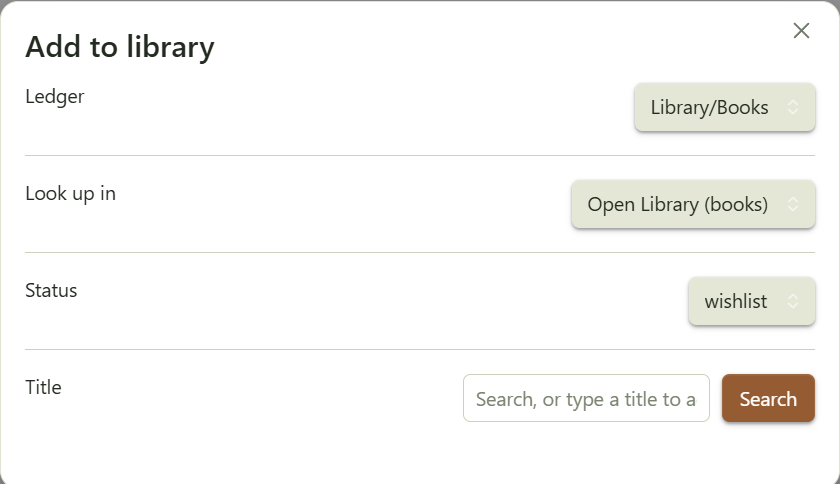
Command palette → Add to library. Pick a ledger, search, click a result; the entry is appended to the ledger's data block in whatever format that block already uses. "Don't look up" adds a bare title.
Books search Open Library. No API key. Films search TMDB. Needs a free key in settings.
1. Make a Books and Movies note, seed with:
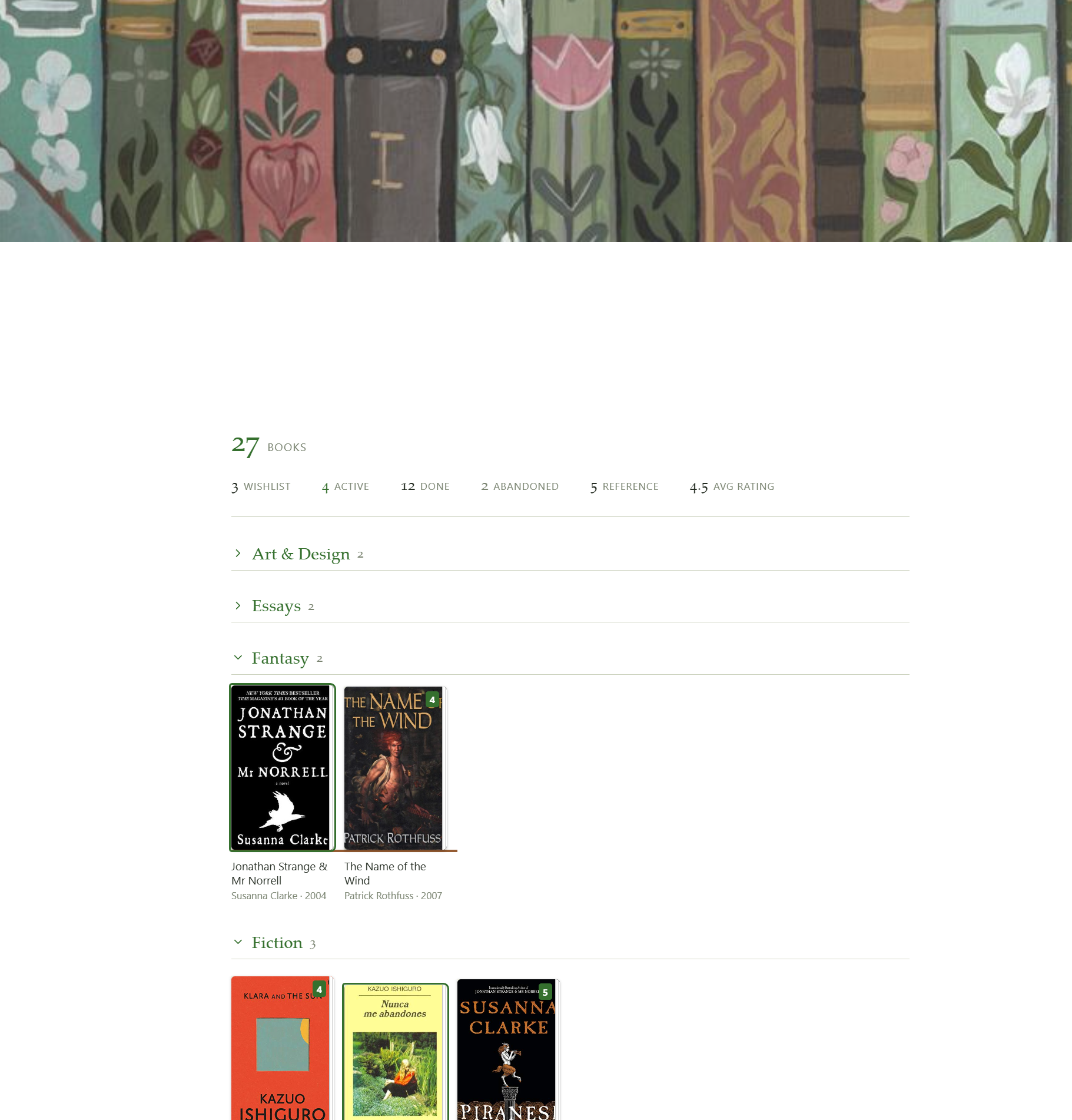
```library-shelf
group: shelf
total: books
stats: true
```

```yaml
library:
  - title: Everything Is F*cked
    author: Mark Manson
    shelf: Non-Fiction
    isbn: "9780062888433"
    status: done
    rating: 3.5
  - title: Miss Sunflower
    author: Sugano Manami
    shelf: Fiction
    isbn: "4840137390"
    status: wishlist
```
The Movies note is the same with
total: movies. Droptotalandstatsand the grid still renders, but you lose the count and the clickable status breakdown above it.
2. Make Library hub note and seed with:
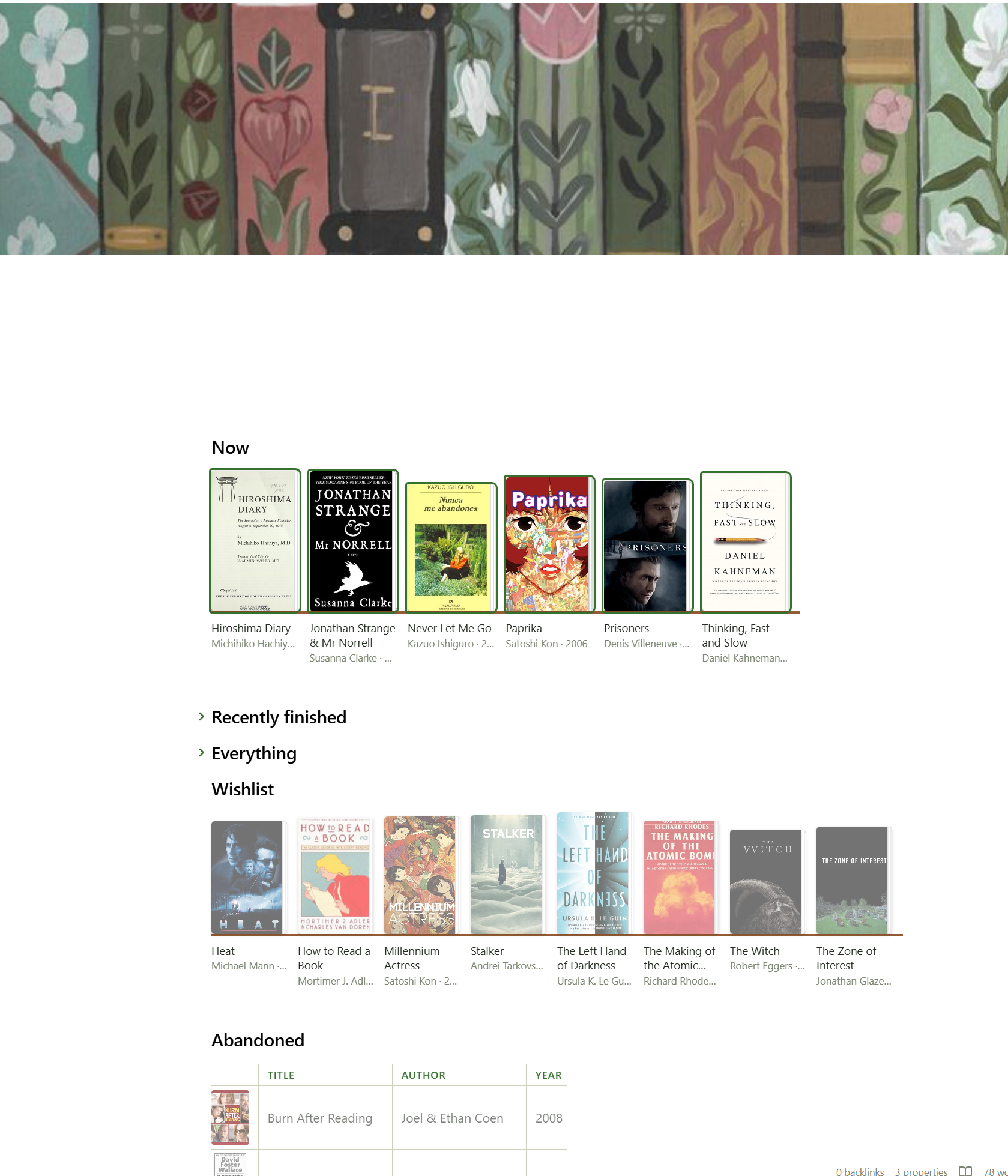
## Now

```library-shelf
from: [Library/Books, Library/Movies]
where:
  status: active
size: 96
empty: Nothing on the go.
```
3. Lookup and append. Command palette → Add to library. Ledger
Library/Books.md, status wishlist, search your book.
- you get the entry instead of a second row — with its status, rating and sitting count — and three choices: record another sitting (appends today to
finished), change its status, or add it as a separate entry anyway.
Giving media its own note
Command palette → Create note for a library entry.
- Pick a ledger, click a title: it makes the note, drops a
library-cardblock in it and writesnote:inot ledger row. Entries that already have a note aren't listed.
By hand: create the note, add note: <path> to the corresponding ledger entry, and add the block below to the start of the note:
A library-card block renders the entry at the top of its own note:
```library-card
```
Library Hub View
A hub is one note of library-shelf blocks reading across every ledger, each under
its own heading. The whole thing, in one paste:
## Now

```library-shelf
from: [Library/Books, Library/Movies]
where:
  status: active
size: 96
empty: Nothing on the go.
```

## Recently finished

```library-shelf
from: [Library/Books, Library/Movies]
where:
  status: done
sort: -finished
limit: 12
size: 96
```

## Everything

```library-shelf
from: [Library/Books, Library/Movies]
group: medium
size: 88
```

## Wishlist

```library-shelf
from: [Library/Books, Library/Movies]
where:
  status: wishlist
size: 88
```

## Abandoned

```library-shelf
from: [Library/Books, Library/Movies]
where:
  status: abandoned
layout: table
columns: [cover, title, author, year]
empty: Nothing abandoned. Suspicious.
```
With no from, the block reads the note it's in.
Which entries to show
| Option | |
|---|---|
from | Which ledgers to read — from: [Library/Books, Library/Movies] |
where | Only entries matching these fields — where: {status: active} |
sort | What order — sort: -finished puts the most recent first |
limit | Show at most this many |
How to arrange them
| Option | |
|---|---|
group | Split into sections, each with a heading and a count — group: shelf. Entries missing the field land under "Unshelved" |
total | The big number above the shelf — total: books prints "27 books" |
stats | The status breakdown under that number. Click one to filter the shelf. Needs total |
How it looks
| Option | |
|---|---|
size | How wide each cover is, in px |
layout | grid (default) or table |
columns | Which columns a table shows. Default: cover, title, author, year, rating |
empty | What to say when nothing matches |
-
activegets an accent outline -
wishlistdims until hover -
abandoneddesaturates. Editing a ledger repaints every open shelf that reads it. -
totalcounts everythingwherematched, beforelimittrims the display — a number that shrinks when you cap the grid isn't a total. -
Group headers fold. Click one to collapse its shelf.
Appearance
Four CSS variables are the tuning knobs, settable on .lib-shelf in a snippet:
| Variable | |
|---|---|
--lib-plinth | Shelf board colour. Defaults to the theme's third accent |
--lib-paper | Fore-edge colour |
--lib-book-gap | Space between books |
--lib-display | Serif face for shelf names and counts |
Covers
An explicit cover always wins. Otherwise, with Derive covers enabled:
isbn→ Open Library. Free, no key, but coverage is patchy — it misses a lot of manga and older printings.asin→ Amazon's image CDN. Unofficial, but it resolves.
Anything that fails to load falls back to a titled card in the theme's accent colour. Misses are common enough that this is a normal state, not an error.
Settings
Ledger folder · notes folder · default layout · cover width · derive covers · TMDB API key.
Logic checks without Obsidian
main.js requires obsidian at load, so testing outside the app means stubbing
it. The parser, query layer, cover resolution and append round-trip are all
covered that way, with recorded output.
Licence
MIT.
For plugin developers
Search results and similarity scores are powered by semantic analysis of your plugin's README. If your plugin isn't appearing for searches you'd expect, try updating your README to clearly describe your plugin's purpose, features, and use cases.