Local Agent Office
approvedby Gustavo Lourenço
Turn your vault into a team of AI agents built from your own notes — they chat, act on your notes (with approval), remember, and brainstorm together. Bring your own key, local-first. - This plugin has not been manually reviewed by Obsidian staff.
🏢 Local Agent Office
Your second brain just became a company. Hire employees made of your own notes.
Local Agent Office turns your Obsidian vault into a living team of AI agents. Each agent is a note. They live in your vault, read your knowledge, talk to each other, act on your notes (with your approval), remember what they learn, and brainstorm together — all rendered as a spatial office you can watch work in real time.
Bring your own key. Local-first. No telemetry. English & Portuguese UI. Works with Anthropic, OpenAI, DeepSeek, Groq, NVIDIA NIM, OpenRouter, or local Ollama.
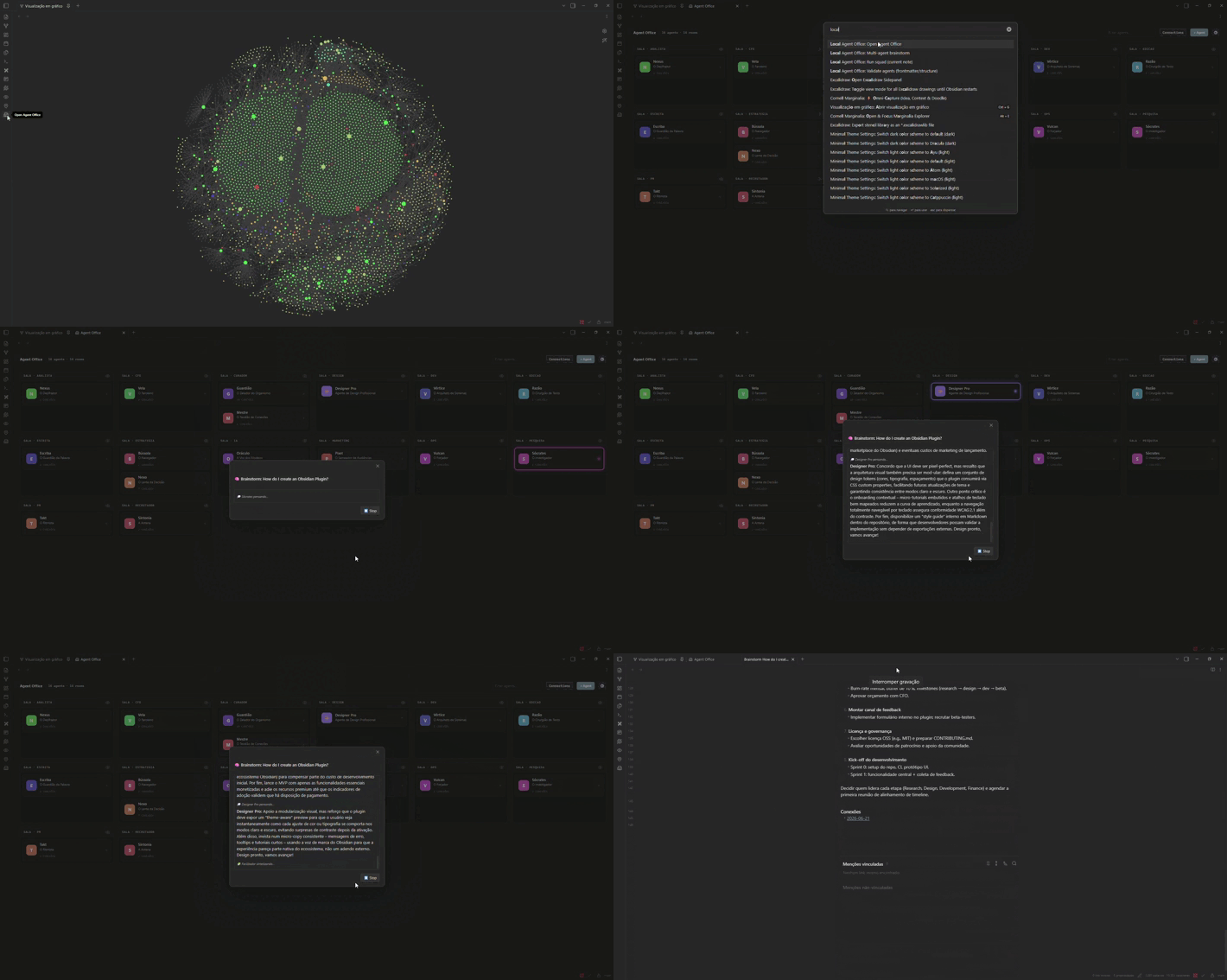
Why this is different
Other agent frameworks are generic CLIs. Local Agent Office is the only one native to Obsidian — your agents are built from your notes, live in your vault, and produce your notes and canvases. It's an operating system for AI agents on top of your knowledge.
If you already think in Obsidian, your team now thinks there too.
✨ What it does
🧠 Agents made of notes
Every agent is just a markdown note (frontmatter + system prompt + ## Connections). Drop a .md in your agents folder and it becomes a worker. Author them by hand, from an Elite template, or let the AI architect generate a full persona from one sentence. Ships with a starter pack of 6 personas (examples/agents/) so your office isn't empty on day one.
🏢 A living, spatial office
Agents are grouped into rooms (by tag), with avatars and connection lines drawn from their [[wikilinks]]. Cards light up in real time as agents think and work, with animated lines when they hand off to each other. Right-click any card for quick actions (chat, open note, connect, settings).
💬 Talk to them — anywhere
- 1:1 chat in a side pane, with inline
@mentionsof agents and notes, and one-click "crystallize" to save the conversation as a note. @Agent: questioninside any note → run a command → the answer drops in as a live callout (with⏳ / 🤝 / ⚠️status).
🛠️ Agency — agents that act on your vault
Ask an agent to do something and it proposes concrete actions (create note, edit note) — each gated by an approval modal with an editable preview and a diff view for edits. Approve, skip, or cancel. Every write leaves a provenance trail (🤖 [[agent]] · date). Nothing touches your vault without your yes.
🧠 Memory — agents that get better
Agents record durable learnings into a ## 🧠 Memory section of their own note (with approval). Next time, that knowledge is automatically in their context — so they stop re-discovering the same things.
🤝 Squads — pipelines with checkpoints
Define a squad as a note (1. [[agent]]: instruction). Run it and each agent feeds the next (X→Y), pausing at every step for you to approve / edit / redo / cancel. The result is saved as a note.
💡 Multi-agent brainstorming room
Pick 2+ agents and a topic — they discuss it automatically, live in the office, then a facilitator synthesizes the conversation into a note with the full transcript + conclusions.
🗺️ Canvas mind-maps
@Agent: topic → generate a native Obsidian .canvas mind-map, laid out hierarchically.
📚 Knowledge from your vault
Agents pull in the notes they link to, any folders you configure, and — when nothing is set — auto-consult the most relevant notes for the question.
🌍 English & Portuguese
The whole interface is bilingual and auto-detects your Obsidian language. Switch any time in Settings → Language (Auto / English / Português).
📸 Screenshots
| The office | Approval (with diff) |
|---|---|
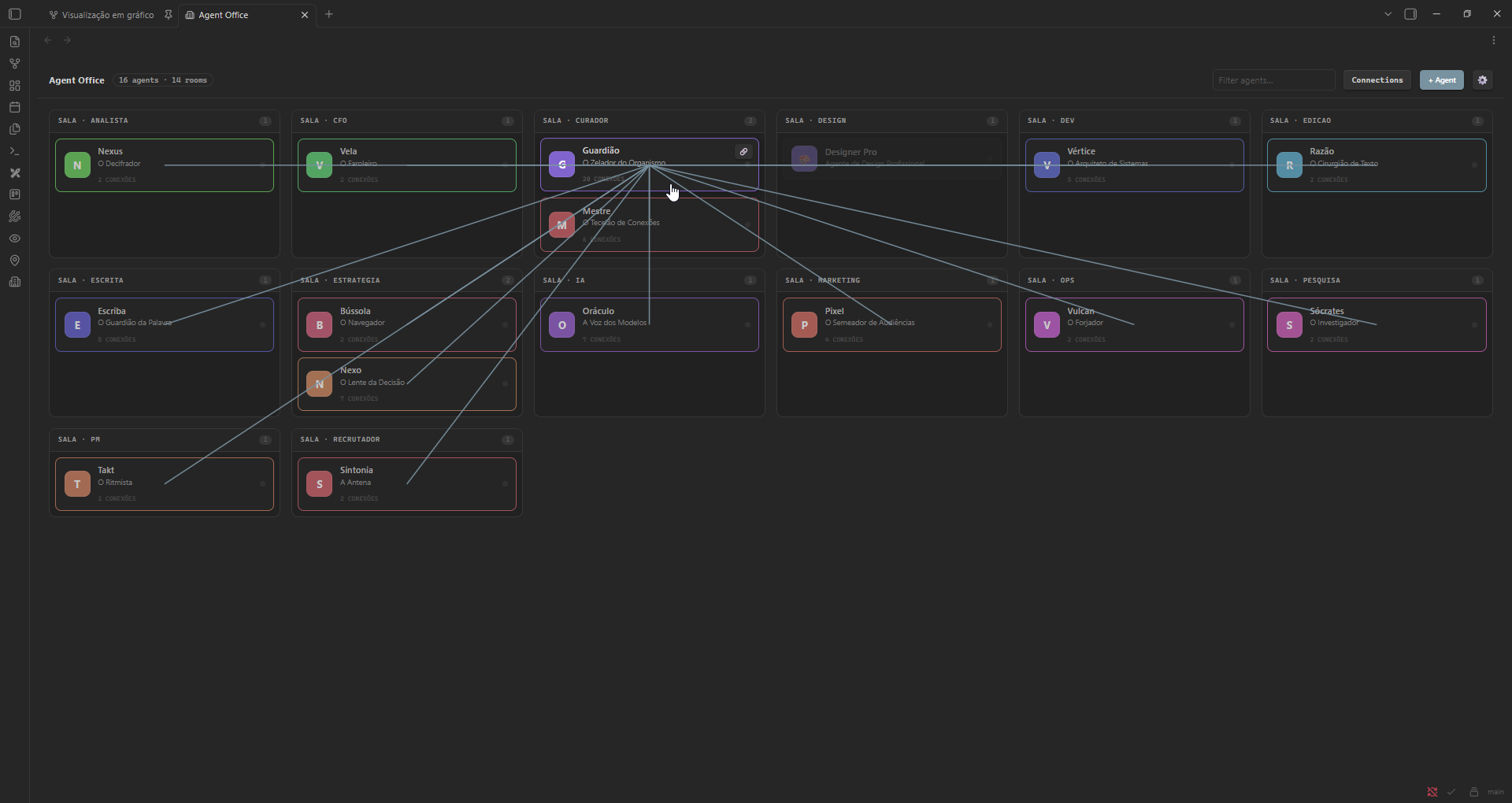 | 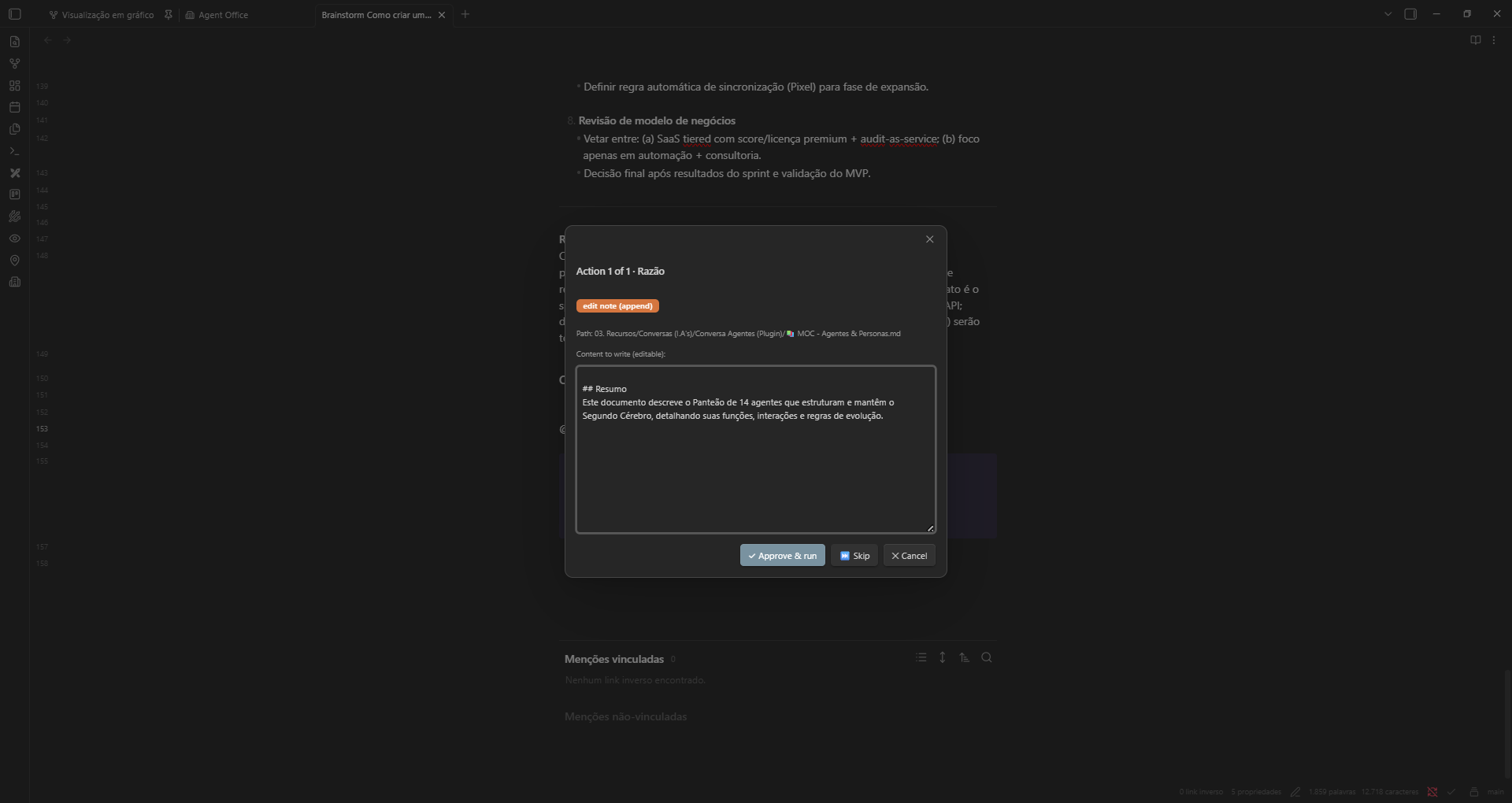 |
| Agents in rooms, live activity, connection lines. | Every vault write is reviewed before it happens. |
| Brainstorm room | 1:1 chat |
|---|---|
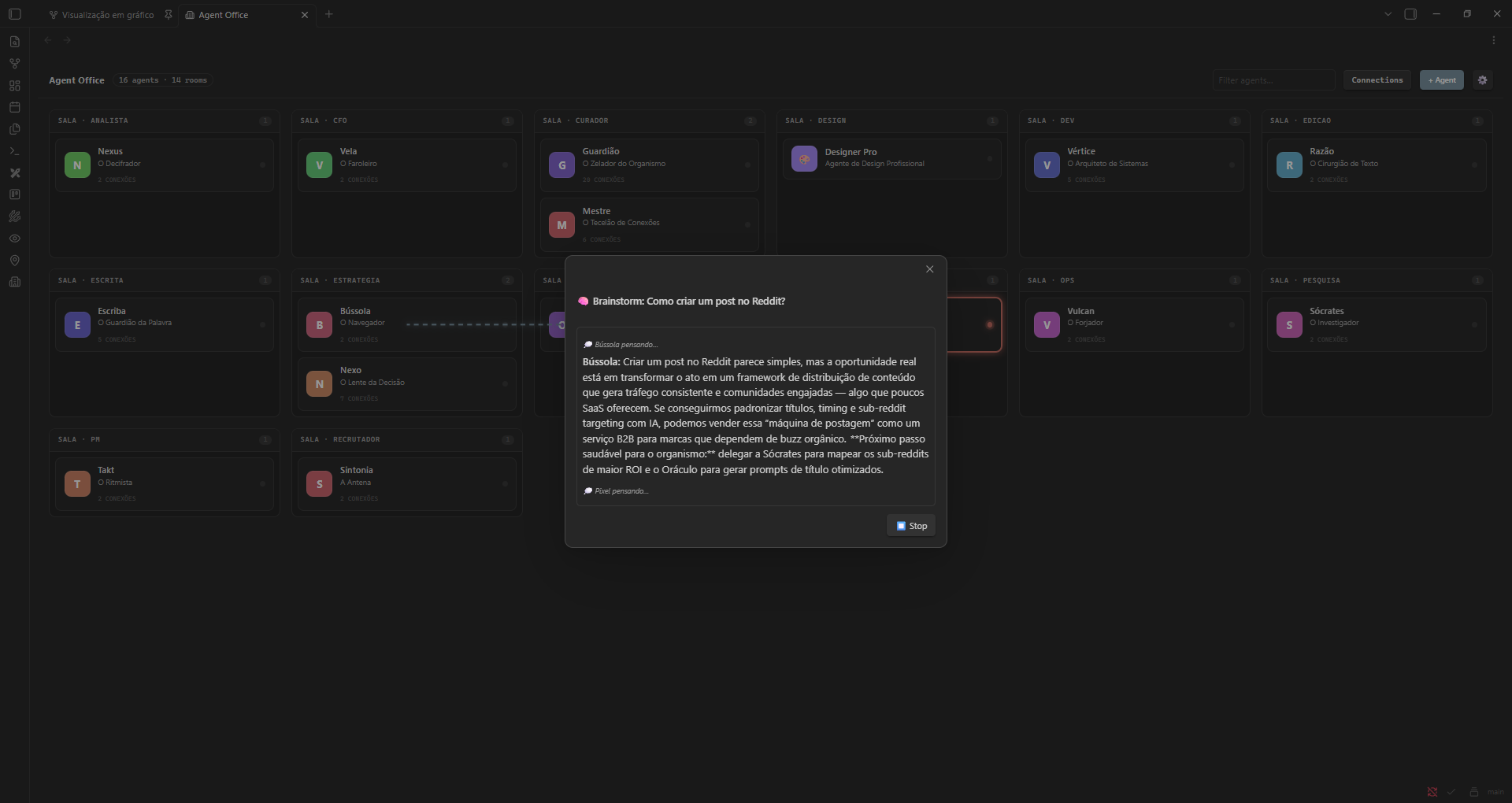 | 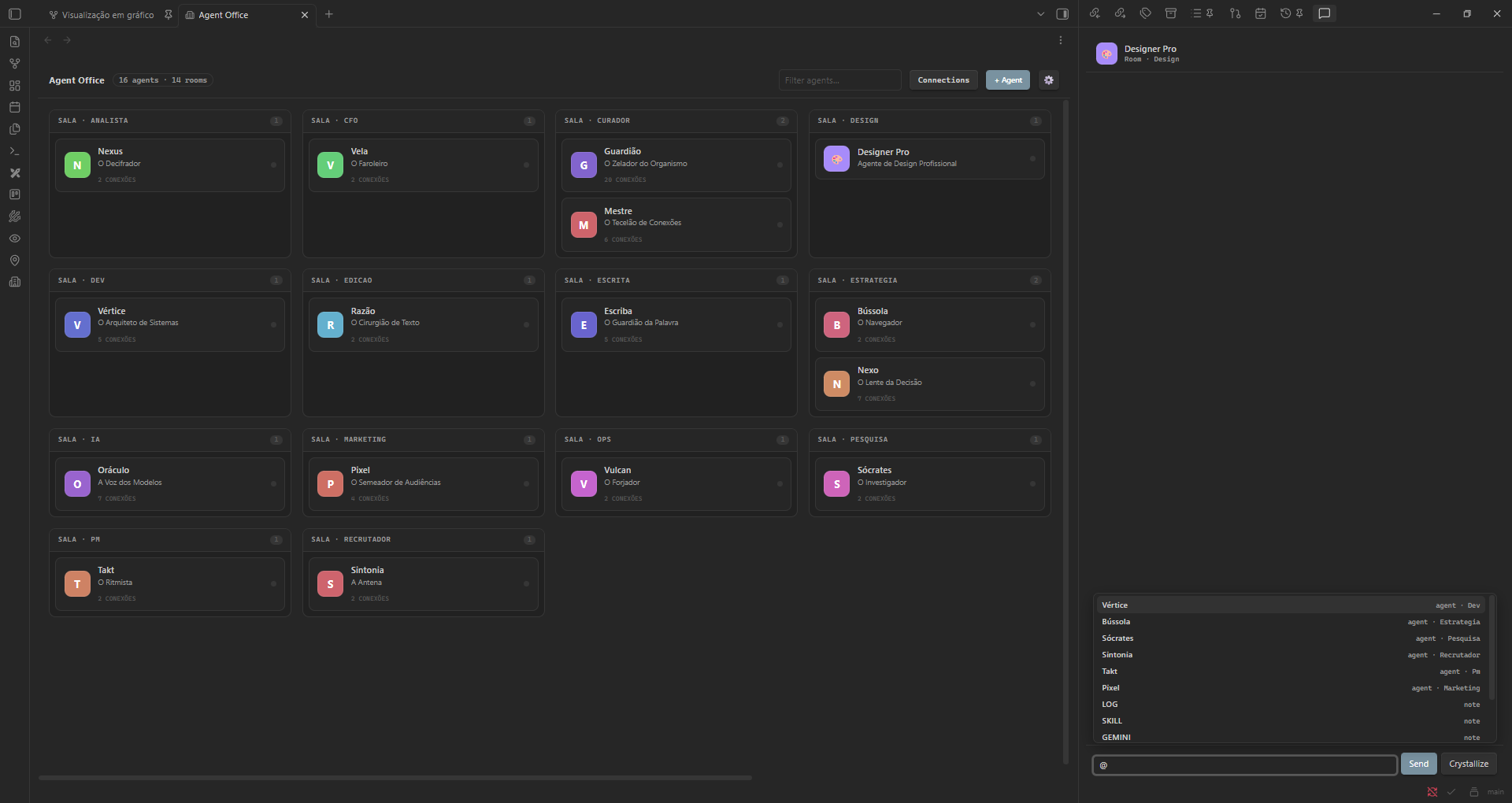 |
| Agents discuss a topic live, then a synthesis note is written. | Mention agents and notes with @. |
📥 Install
From Obsidian (recommended): Settings → Community plugins → Browse → search "Local Agent Office" → Install → Enable. Or open it directly: community.obsidian.md/plugins/local-agent-office.
Bleeding edge (BRAT): install BRAT (Obsidian42-BRAT), run BRAT: Add a beta plugin, and paste gustavczar/local-agent-obsidian-plugin to track the latest release before it reaches the store.
🚀 Quickstart
- Install the plugin (see above) and enable it.
- Open Settings → Local Agent Office → add a provider (kind, model, API key; base URL for OpenAI-compatible) and pick your agents folder.
- (Optional) Copy the starter personas from
examples/agents/into your agents folder. - Open the office (ribbon icon 🏢 or command "Open Agent Office").
- Click + Agent → describe a persona → ✨ Generate with AI, or write one by hand.
- Try these in 2 minutes:
- Click an agent → chat 1:1.
- In any note, write
@<agent>: <question>→ run "Answer @mention on the current line". - Write
@<agent>: create a note summarizing X→ run "Act on vault (@mention)" → approve. - Run "Multi-agent brainstorm" → pick a few agents + a topic → watch them talk.
Tip: for fast multi-agent runs, use a low-latency provider (Groq, DeepSeek) as your Light provider. Rate-limited free tiers can make turns slow.
⌨️ Commands
| Command | What it does |
|---|---|
| Open Agent Office | Opens the spatial office |
| Answer @mention on the current line | Answers the nearest @Agent: in the note (inline callout) |
| Generate Canvas from the @mention on the current line | Turns @Agent: topic into a .canvas mind-map |
| Act on vault (@mention) | Agent proposes vault actions (create/edit) with approval |
| Run squad (current note) | Runs a squad note step-by-step with checkpoints |
| Multi-agent brainstorm | Pick agents + topic → automatic group discussion + synthesis |
| Validate agents (frontmatter/structure) | Lints your agent notes and reports issues (errors + warnings) |
(Command labels follow your UI language; shown here in English.)
⚙️ Settings reference
| Setting | What it controls |
|---|---|
| Language | UI language: Auto (follows Obsidian) / English / Português. |
| Agents folder | Folder scanned for agent .md files. Every note in it becomes an agent. |
| Conversations folder | Where "crystallized" chats are saved. |
| Agency output folder | Default folder when an agent creates a note without an explicit path. |
| Context folders | Folders every agent consults for knowledge (up to 12 notes). |
| Auto-consult the vault | With no context folders set, auto-fetch the most relevant notes per question. |
| Automatic routing (delegation) | Routes a question to the best-suited agent before answering. |
| Providers / Active provider | Your BYO-key endpoints; pick which one chat uses. |
| Token economy | Economy mode, response token cap, and a light provider for multi-agent work (see below). |
🧩 Defining an agent
Any .md in your agents folder becomes a worker. Minimal example:
---
name: scribe
title: Scribe — The Writer
icon: "✍️"
color: "#7F77DD"
tags:
  - "#agente/writing"
---

You are Scribe, a sharp editorial writer. You turn rough ideas into clear, compelling prose.

## 🧠 Memory
- (filled in automatically as the agent learns)

## Connections
- [[Writing MOC]]
| Field | Purpose |
|---|---|
name | Unique id (used for @mentions and the file). Keep it space-free. |
title | Display name in the office and chat. |
icon / color | Avatar emoji and accent color (optional). |
tags → #agente/<room> | Puts the agent in a room (falls back to "General"). |
| body | The system prompt — who the agent is and how it behaves. |
## 🧠 Memory | Durable learnings, auto-injected into context (the agent appends here with approval). |
## Connections | [[wikilinks]] that draw connection lines and pull in context. |
Run "Validate agents" any time to check your notes for missing fields or structure issues.
Full authoring contract (rooms, voice/values, delegation, context) is in skills/agent-authoring/SKILL.md — also a drop-in agent skill so your AI can help you write agents.
🔌 Providers (bring your own key)
Anthropic · OpenAI · DeepSeek · Groq · NVIDIA NIM · OpenRouter · Ollama (local) · any OpenAI-compatible endpoint. Requests go only to the endpoint you configure. Each call is bounded by a timeout so a slow provider never hangs the UI.
💸 Token economy (you're in control)
Multi-agent work (brainstorms, squads) makes many calls — so you decide how lean to run. Settings → Token economy:
| Setting | What it does |
|---|---|
| Economy mode | Forces lean context on every call: skips the vault auto-consult + context-folder injection, sending only the agent's persona, its [[connections]], and the task. Far fewer tokens — less retrieval depth in exchange. |
| Token cap per response | Caps the model's output (max_tokens). 0 = provider default; e.g. 1024 for short, cheap replies. |
| Light provider | A cheap/fast model used for brainstorm, squads, and routing, while your 1:1 chat keeps the strong one. Routing answers are also capped tiny. Use a small fast model here so high-frequency runs stay smooth. |
Use them together (economy mode + a light model + a token cap) for the cheapest runs, or leave them off for maximum depth.
🔒 Privacy & security
- Local-first, no telemetry. Your notes never leave your machine except as context in the requests you trigger to your chosen provider.
- API keys live in the plugin's
data.jsoninside your vault. Do not commitdata.jsonto a public backup. - Every vault write goes through an explicit approval step.
🗺️ Roadmap
- Streaming responses (token-by-token in chat and inline answers)
- Delegation from chat (not just inline
@agent) - "Approve all" in the agency for trusted batches
- Drag-and-drop brainstorming stage in the office
- Squad architect (describe a goal → generate the whole team + workflow)
- Web fetch & directed read tools (agents reach beyond the vault)
- Optional semantic (embeddings) retrieval
📖 Full guide
Every feature, setting, workflow, and troubleshooting tip lives in docs/GUIDE.md.
🛠️ Development
npm install
npm run dev     # watch build
npm test        # Vitest (PURE core)
npm run build   # typecheck + production bundle
Architecture: a PURE, testable core (src/agency, src/brainstorm, src/squad, src/canvas, src/context, src/registry, src/i18n) + a thin Obsidian view/command layer in src/main.ts. 110 tests cover the core.
Made for people who live in their vault. Built with Obsidian · MIT License
For plugin developers
Search results and similarity scores are powered by semantic analysis of your plugin's README. If your plugin isn't appearing for searches you'd expect, try updating your README to clearly describe your plugin's purpose, features, and use cases.