by Yinno
Foldable Markdown tables with rich cell editing, groups, and nested records.
TreeTable
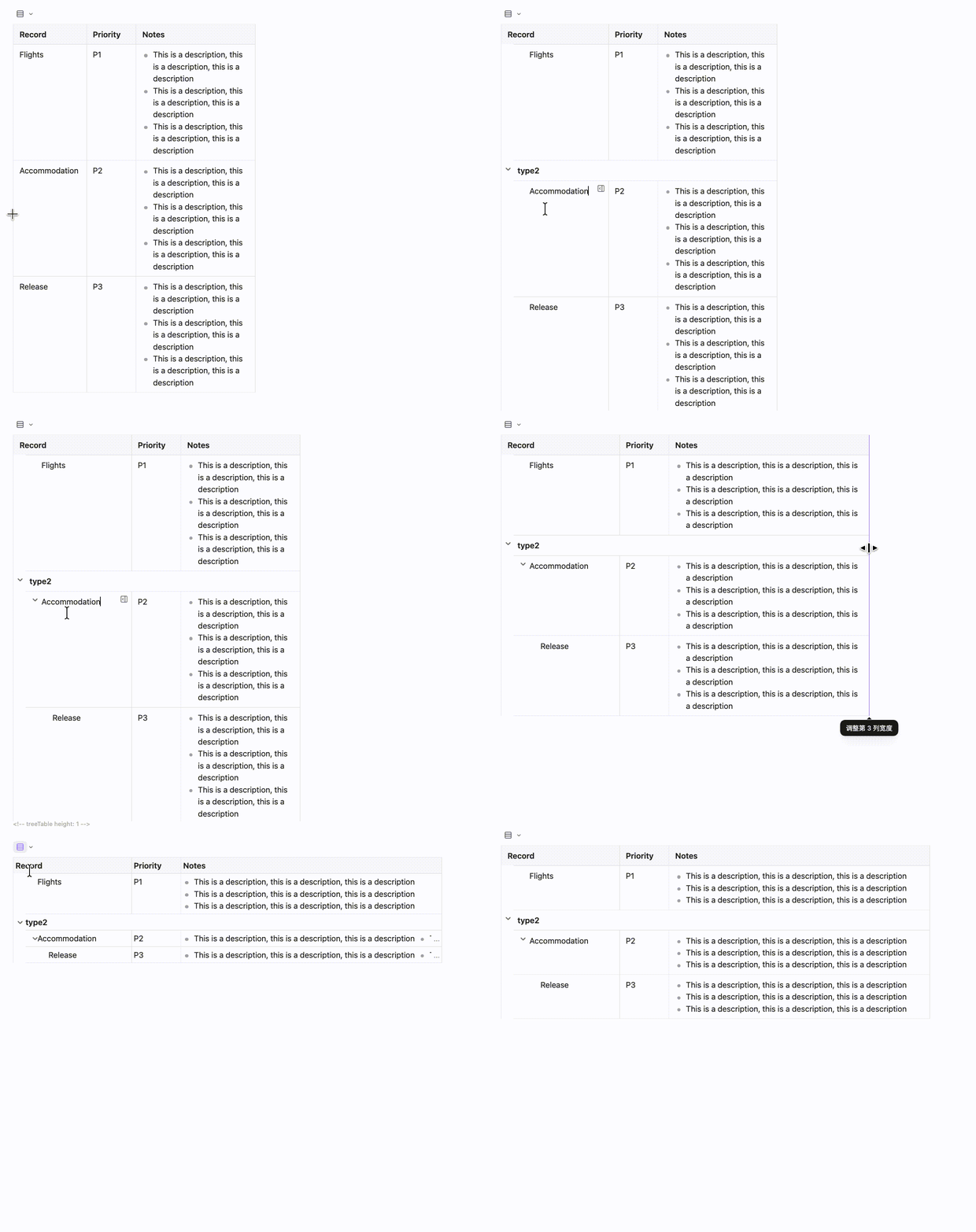
TreeTable enhances ordinary Markdown tables with foldable groups, nested records, rich cell editing, and draggable column widths. It keeps the table as Markdown data, so your existing notes and AI workflows remain easy to read and edit.
Features
- Groups and nested records: use simple
#,>and>>markers to make a table behave like a foldable tree. - Rich Markdown cells: edit lists, tasks, images, embeds, and fenced code blocks directly in a cell.
- Column widths: drag the visible separators to resize columns.
- Single-line display: switch long tables to a compact one-line view for scanning.
How to use
- Create a normal Markdown table.
- In the first column, use
#for groups and>/>>for child records. - Click the arrow beside a group or record to fold or unfold it. Click a cell to edit it.
Copy this table to try it:
| Record | Notes |
| --- | --- |
| # Travel |  |
| Flights | Book tickets |
| > Accommodation | Compare hotels |
| >> Tokyo | Stay three nights |
| # Work |  |
| Release | Prepare notes |
# Travel and # Work are groups; > Accommodation is a child record; >> Tokyo is a second-level child. The table remains understandable Markdown when TreeTable is disabled.
Feature details
TreeTable supports common Markdown content in cells, including lists, tasks, images, embeds, and fenced code blocks. When another enabled plugin provides an interactive code block, TreeTable preserves its display and leaves that block's lifecycle to the other plugin.
Columns without a manual width adapt to their content. You can drag a column to set its width; explicit width metadata can also be written in a header cell, for example <!-- width=240 -->. Row-height controls also work with ordinary Markdown tables.
For compact wide tables, use # Group<br>Field in a column header to create a horizontal header group.
FAQ
- Tree-aware dragging for records or whole groups is not supported yet; move the complete subtree in source mode.
- Plugins that rewrite table rows, such as Advanced Tables, may affect tree markers or width metadata. Test compatibility on a copy first.
Pricing & Authors
If TreeTable helps your workflow, you can support the author through GitHub Sponsors.
License
MIT © Yinno
For plugin developers
Search results and similarity scores are powered by semantic analysis of your plugin's README. If your plugin isn't appearing for searches you'd expect, try updating your README to clearly describe your plugin's purpose, features, and use cases.