Mermaid Node Spacing
approvedby isaya
Changes mermaid node spacings only. - This plugin has not been manually reviewed by Obsidian staff.
Mermaid Node Spacing
An Obsidian plugin that globally adjusts Mermaid flowchart node and rank spacing in every diagram — no need to repeat %%{init: ...}%% in each code block.
Before & After
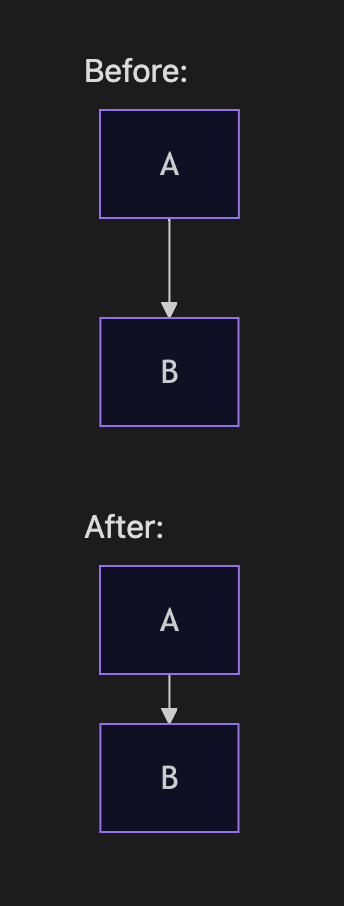
The example above uses a simple A → B flowchart. With this plugin, rank spacing (vertical gap between rows) and node spacing (horizontal gap between nodes) are reduced globally, so long vertical charts take up less room in your notes.
Why?
Mermaid's default flowchart layout uses generous spacing (nodeSpacing: 50, rankSpacing: 50). For note-taking workflows with many stacked nodes, that whitespace adds up quickly.
This plugin hooks into Obsidian's Mermaid API and merges your spacing preferences into every render — equivalent to adding this to each diagram:
%%{init: {'flowchart': {'nodeSpacing': 20, 'rankSpacing': 25}}}%%
flowchart TD
    A --> B
Settings
Open Settings → Community plugins → Mermaid Node Spacing:
| Setting | Description | Plugin default | Mermaid default |
|---|---|---|---|
| Node spacing | Horizontal distance between nodes on the same rank | 20 | 50 |
| Rank spacing | Vertical distance between ranks (rows) | 25 | 50 |
Changes apply immediately and re-render open Markdown preview panes.
Installation
Manual
- Download or clone this repo.
- Copy the
mermaid-spacingfolder into your vault's.obsidian/plugins/directory. - Enable Mermaid Node Spacing under Settings → Community plugins.
- Reload Obsidian if prompted.
Your folder should look like:
.obsidian/plugins/mermaid-spacing/
├── main.js
├── manifest.json
└── ...
From source
If you have the TypeScript source, build with your usual Obsidian plugin toolchain and copy the output main.js + manifest.json into the plugin folder.
Compatibility
- Obsidian: 1.5.0+
- Platforms: Desktop and mobile (
isDesktopOnly: false)
License
Author
For plugin developers
Search results and similarity scores are powered by semantic analysis of your plugin's README. If your plugin isn't appearing for searches you'd expect, try updating your README to clearly describe your plugin's purpose, features, and use cases.