Nautilus Log
approvedby accessiblefish
A visual time-blocking and daily planning plugin: fixed events stay pinned to a spiral timeline, flexible tasks fill the gaps, and a now-pointer pushes unfinished tasks forward. - This plugin has not been manually reviewed by Obsidian staff.
Obsidian Nautilus Log
A visual time-blocking and daily planning plugin for Obsidian, ported from 404KSG's roam-nautilus-log for Roam Research.
English · 简体中文
Inspired by YNAB's core philosophy "Give every dollar a job", this plugin applies the concept to time management: "Give every minute a job."
Key Features
Inherited Core Philosophy
- A plan that fits time. See Planned demand, Available time, fixed Events, remaining capacity, and work that cannot fit today.
- Flexible scheduling without a black box. Events keep their time; unfinished tasks move forward in list order.
- A day shaped around you. Start at any whole hour and continue past midnight when the plan belongs to a late or overnight schedule.
- Low-friction execution. Work from estimates alone, run a standalone POMO, or optionally track tasks with CLOCK: records (legacy LOGBOOK:: entries still read).
- A useful daily review. Compare Planned and Actual time without leaving your markdown notes.
Obsidian-Native Enhancements
Compared to the original Roam version, this port brings native Obsidian workflows and quality-of-life updates:
- Markdown-Native Parser: Uses native Obsidian Markdown list items (- [ ]) instead of Roam's internal block syntax.
- Built-in Completion Timestamp: Automatically appends completion timestamps (e.g., d08:47) upon task completion for effortless tracking.
See the user guide for the Execution Layer (CLOCK tracking, POMO, daily review), settings, and commands.
Quick Start
Installation
- Via BRAT: Add
accessiblefish/obsidian-nautilus-login the BRAT settings. - Manual: Download the latest release from the Releases tab and place main.js, manifest.json, and styles.css into your vault's .obsidian/plugins/obsidian-nautilus-log/ folder.
Usage
Open today's Daily Note. The plugin detects daily notes by filename (default YYYY-MM-DD); if yours differ, set Daily note date format in the plugin settings.
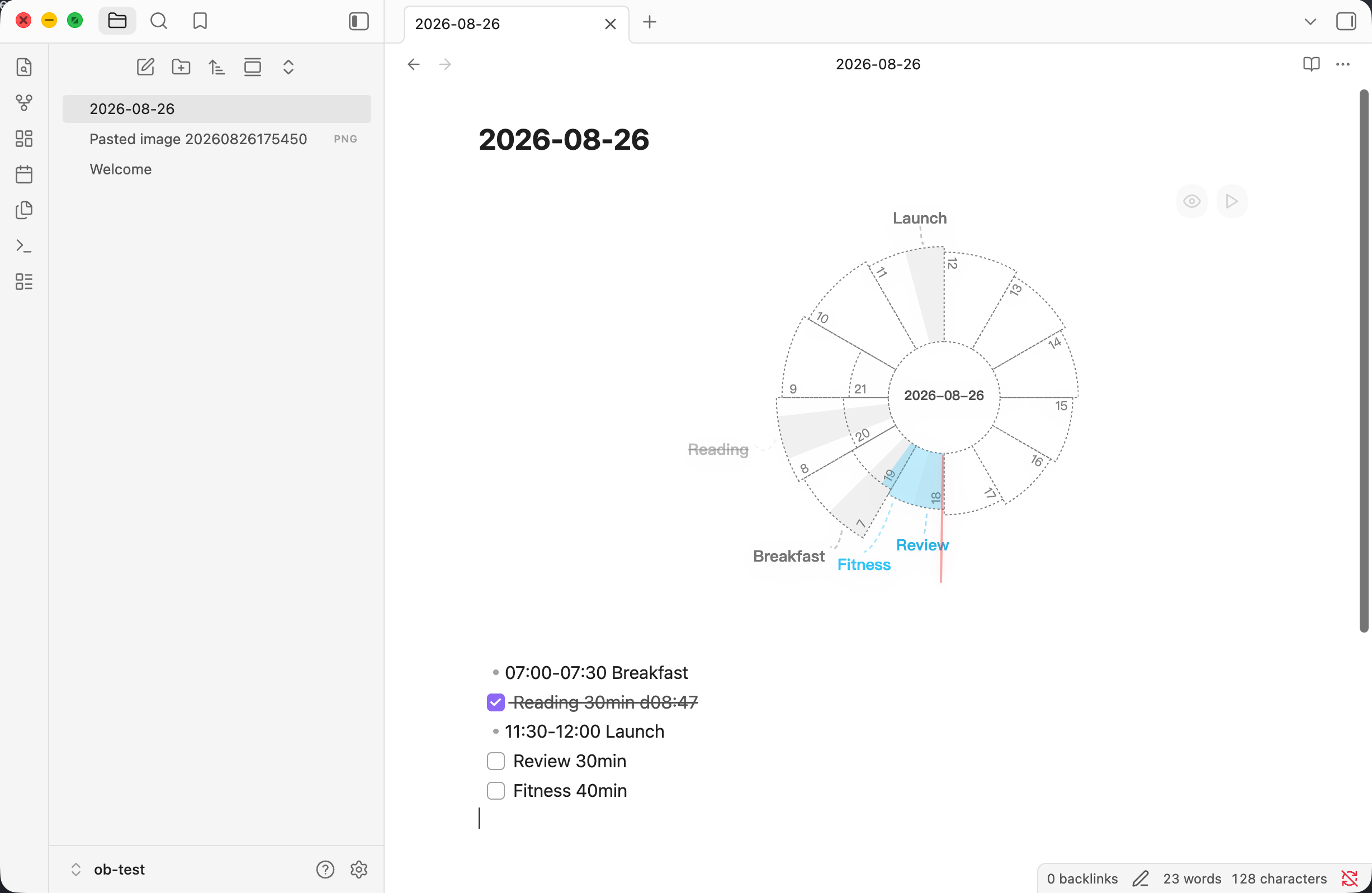
Insert a Nautilus code block:
```nautilus
```

- 07:00-07:30 Breakfast
- [x] Reading 30min d08:47
- 11:30-12:00 Lunch
- [ ] Review 30min
- [ ] Fitness 40min
Write your fixed events and tasks immediately following the block. Use simple duration estimations (e.g., 30min, 45m, 1h30m). Tasks without an explicit duration fall back to the default time configured in settings.
Note: This plugin modifies your notes. Checking off a task below a nautilus block appends a
dHH:MMcompletion timestamp to that line; unchecking removes it. This is the only write the plugin performs, and it can be turned off in the plugin settings ("Stamp completion time").
Credits & Acknowledgements
- Original concept & Roam plugin: Nautilus by Tomáš Barys.
- Enhanced fork: Nautilus Enhanced by hopeserena.
- Direct port source: roam-nautilus-log by 404KSG.
- Obsidian Port: Re-architected and maintained for Obsidian.
License
For plugin developers
Search results and similarity scores are powered by semantic analysis of your plugin's README. If your plugin isn't appearing for searches you'd expect, try updating your README to clearly describe your plugin's purpose, features, and use cases.