Reset Font Size
approvedby luckman212
Add a button and command to reset the font size back to its default value.
Reset Font Size
Why
Ever found yourself "zoomed in" on your notes with seemingly no way to get the text back to its normal size? Pressing cmd/ctrl+0 doesn't work, nor does quitting and re-launching Obsidian.

This can happen after accidentally (or intentionally) zooming in or out with the mouse wheel, trackpad, or keyboard shortcuts.
What
This is a small plugin I wrote that aims to solve that problem by adding a button and a command to reset the font size back to a user-configurable default value. Yes, you can also do this manually from Settings > Appearance > Font Size, but this is faster (and optionally resets both the font size and the global window zoom level in one step).
How
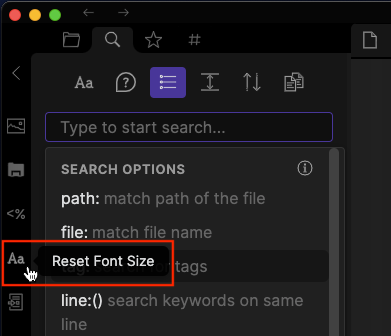
The command can be bound to a hotkey or triggered from the command palette. You can also trigger it from the button on the sidebar ribbon.
Screenshots
Sidebar
Command Palette

Hotkey
I suggest Cmd+Shift+0 (or Ctrl+Shift+0 on Windows) as a keybinding.
For plugin developers
Search results and similarity scores are powered by semantic analysis of your plugin's README. If your plugin isn't appearing for searches you'd expect, try updating your README to clearly describe your plugin's purpose, features, and use cases.