Simple Mindmap
approvedby creative781
A powerful keyboard-centric mind map plugin with bi-directional link support. - This plugin has not been manually reviewed by Obsidian staff.
Simple Mindmap (English)
Simple but powerful — a fast mind map built for effective writing!
An Obsidian plugin for creating mind maps quickly and easily. A clean, no-frills mind-mapping tool optimized for writing.
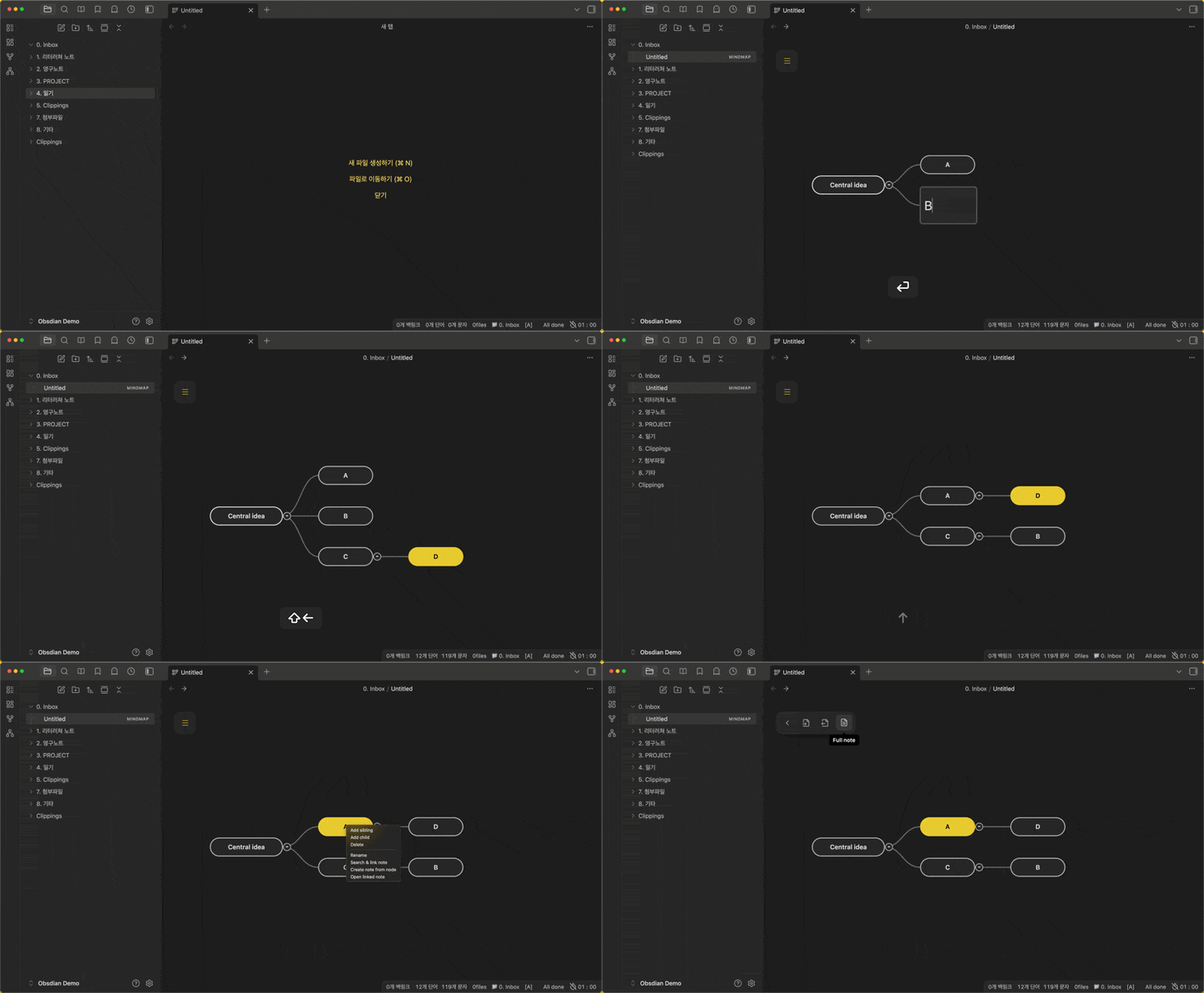
Key features
- Mind map editing — Create, rename, delete, collapse, and reorder nodes, with multi-select and undo — every essential covered.
- Layout modes — Outline (rightward list) or radial (balanced left/right of the center topic).
- Every action on a hotkey — Assign customizable shortcuts to every feature in settings for fast keyboard-driven work.
- Note integration — Search your vault to link existing notes to a node, or create a new Obsidian note from a node.
- Mouse-friendly — Drag-and-drop to move nodes, freely adjust the map's size and position, and reach every feature from the right-click menu.
- Markdown — Turn an existing note list into a mind map, export a mind map as an outline, or merge linked notes (Full note).
- Full-note compile — Combine a map's outline with its linked notes into a single, finished document.
- Tablet support — Works on tablets without a keyboard (finger long-press for context actions).
Default hotkeys
| Action | Hotkey |
|---|---|
| Create child | Tab |
| Create sibling | Enter |
| Edit node text | Shift + Enter |
| Delete node | Delete |
| Search and link note | Shift + Ctrl + Enter |
| Create new note from node | Ctrl + Shift + N |
| Open linked note | Ctrl + Shift + L or double-click |
| Navigation | Arrow keys |
| Reorder nodes | Shift + Arrow keys |
Installation
Community plugins (after approval)
Search for ObsiMap in Obsidian Settings → Community plugins.
Manual installation
- Download
main.js,manifest.json, andstyles.cssfrom the latest release. - Create a folder named
obsimapinside your vault's.obsidian/plugins/directory. - Place the downloaded files in that folder.
- Enable the plugin in Obsidian settings.
BRAT (beta)
- Install the BRAT plugin.
- Go to Plugins → BRAT → Add Beta plugin.
- Use:
https://github.com/Creative781/obsimap
License
MIT
Connect
- YouTube: Creative781
- Blog: Creative781 Blog
Support
- Buy me a coffee: Support the developer
Update history
Your support helps updates faster.
- ☑ Community review fixes (2026-07-19) — CSS classes for static styles, safer timers, typed settings load, and declarative settings search support.
- ☑ Sidebar paint bleed fix (2026-07-18) — Clip the map view so nodes and selection glow no longer show through adjacent panes.
- ☑ Radial mind map (2026-07-18) — Choose outline or radial layout in settings; place topics on both the left and right of the center node.
Coming next
- Node highlight — Emphasize selected nodes with a different color or shape
Simple Mindmap (한국어)
심플하지만 강력하다! 효과적인 글쓰기를 위한 빠른 마인드맵!
옵시디안에서 쉽고 빠르게 마인드맵을 만들 수 있는 플러그인입니다. 글쓰기에 최적화되어 군더더기를 제거한 깔끔한 마인드맵 도구입니다.
주요 기능
- 마인드맵 편집 — 노드 생성·이름 변경·삭제·접기·순서 변경, 다중 선택, 실행 취소 등 마인드맵 필수 기능 제공
- 레이아웃 — 목록형(오른쪽) 또는 방사형(중심 기준 좌우 균형)
- 모든 기능 단축키 제공 — 모든 기능을 설정에서 단축키에 배당해 빠르게 작업
- 노트 연동 — 보관함에 있는 노트를 검색해 마인드맵에 연결하거나, 마인드맵의 노드를 옵시디안 노트로 생성
- 마우스 활용 — 드래그앤 드롭으로 노드를 옮기고, 마인드 맵의 크기와 위치를 손쉽게 조정. 마우스 우클릭만으로 모든 기능 사용 가능
- Markdown — 기존 노트 목록 가져와 마인드맵으로 바꾸거나, 마인드맵을 아웃라이너로 내보내기, 연결 노트 통합(Full note)
- Full note 생성 — 마인드 맵의 개요와 연결된 노트로 하나의 완성된 글 생성
- 태블릿 지원 — 키보드 없는 태블릿에서도 동작(손가락 롱프레스)
기본 단축키
| 기능 | 단축키 |
|---|---|
| 자식 노드 생성 | Tab |
| 형제 노드 생성 | Enter |
| 노드 텍스트 편집 | Shift + Enter |
| 노드 삭제 | Delete |
| 노트 검색 및 연결 | Shift + Ctrl + Enter |
| 노드에서 새 노트 생성 | Ctrl + Shift + N |
| 연결된 노트 열기 | Ctrl + Shift + L 또는 더블 클릭 |
| 노드 간 이동 | 방향키 |
| 노드 위치 재정렬 | Shift + 방향키 |
설치
커뮤니티 플러그인 (승인 후)
설정 → 커뮤니티 플러그인에서 ObsiMap 검색.
수동 설치
- 최신 릴리즈에서
main.js,manifest.json,styles.css다운로드 - 보관함
.obsidian/plugins/obsimap폴더 생성 후 파일 복사 - 설정에서 플러그인 활성화
베타 (BRAT)
- BRAT 설치
- Plugins → BRAT → Add Beta plugin
- URL:
https://github.com/Creative781/obsimap
라이선스
MIT
소통
- 유튜브: Creative781
- 블로그: Creative781 블로그
후원
- 바이미커피: 개발자 후원하기
업데이트 히스토리
여러분의 후원이 업데이트를 더 빠르게 하는 데 도움이 됩니다.
- ☑ 커뮤니티 리뷰 대응 (2026-07-19) — 정적 스타일을 CSS 클래스로 분리, 타이머/타입 정리, 설정 검색용 declarative API 추가.
- ☑ 사이드바 잔상 수정 (2026-07-18) — 맵 뷰를 클리핑해 노드·선택 glow가 옆 패널에 비치지 않도록 수정.
- ☑ 방사형 마인드맵 (2026-07-18) — 설정에서 목록형·방사형을 고를 수 있고, 중심 주제 기준으로 왼쪽·오른쪽에 노드를 배치합니다.
다음 업데이트 예고
- 노드 강조 — 특정 노드만 색이나 모양을 바꿔 눈에 띄게 표시할 수 있는 기능
For plugin developers
Search results and similarity scores are powered by semantic analysis of your plugin's README. If your plugin isn't appearing for searches you'd expect, try updating your README to clearly describe your plugin's purpose, features, and use cases.