SmartPick
pendingby BCS
Smart text selection toolbar with custom commands and AI features.
SmartPick
SmartPick is a smart text selection toolbar for Obsidian, designed to enhance your workflow with custom commands and powerful AI capabilities.
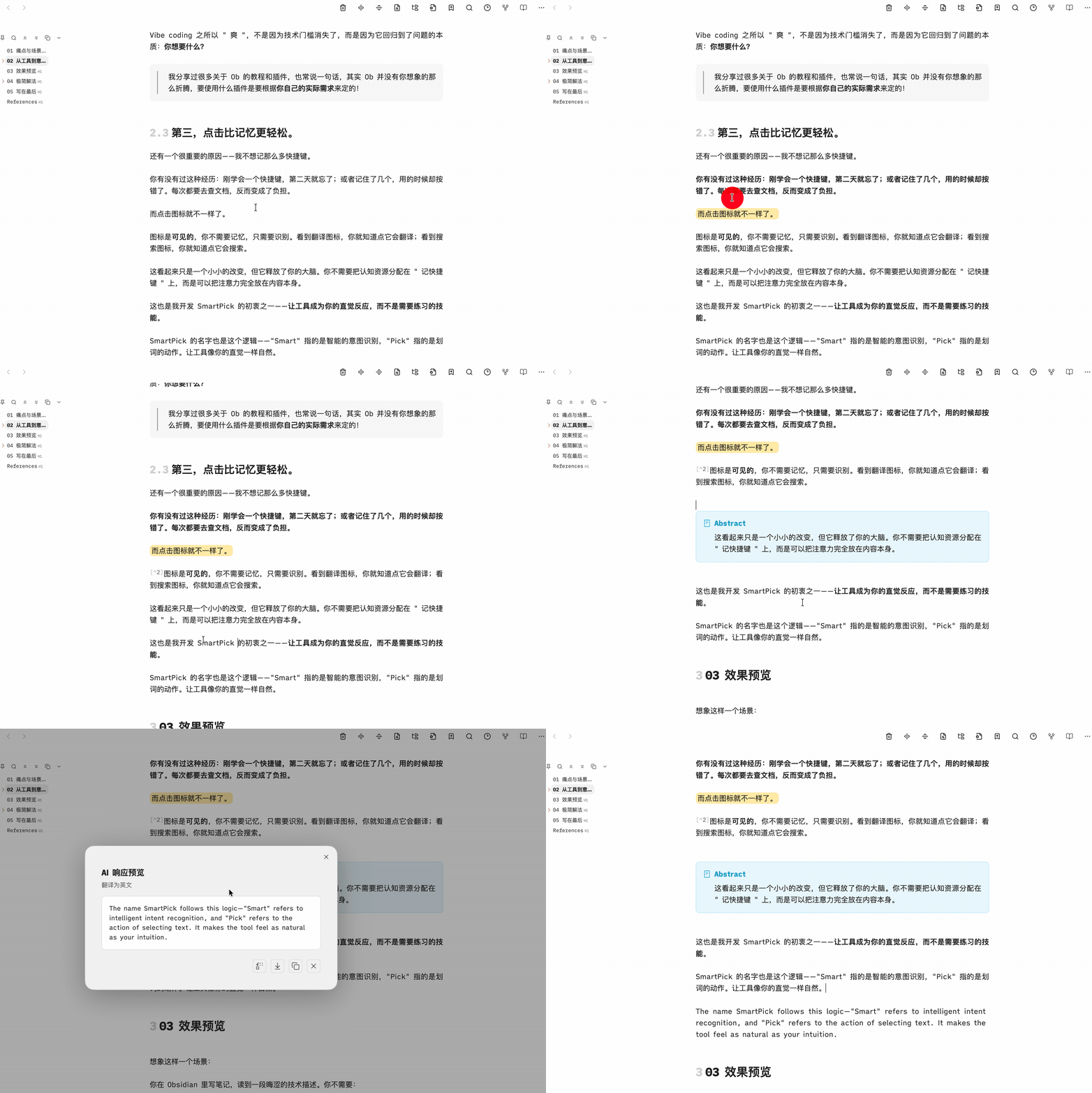
✨ Features
- Smart Toolbar: Automatically appears when you select text.
- AI Integration: Seamlessly connect with AI models (OpenAI, Claude, etc.) to process selected text. Summarize, translate, or explain with a single click.
- Custom Commands: Bind your favorite Obsidian commands to the toolbar.
- Shortcuts & Links: Trigger system shortcuts or open external links (Google, DeepSeek, etc.) directly.
- Group Organization: Organize your commands into groups for easier access.
- Drag & Drop Customization: Easily rearrange toolbar items using drag and drop.
- Custom Prompts: Create and manage your own prompt templates for AI commands.
- URL Scheme Support: Add and execute URL Scheme commands directly from the toolbar.
- Bilingual Support: Fully localized in English and Chinese.
- Markdown Rendering: AI responses are rendered in rich Markdown format.
🚀 Installation
Via BRAT (Beta)
- Install Obsidian42 - BRAT via Community Plugins.
- Open BRAT settings and click "Add Beta plugin".
- Enter the repository URL:
https://github.com/bcs/SmartPick. - Click "Add Plugin", then enable "SmartPick" in the Community Plugins list.
Manual Installation
- Download the latest release from the Releases page.
- Extract the files into your Obsidian vault's plugins folder:
.obsidian/plugins/smartpick/. - Reload Obsidian and enable the plugin in Settings.
📖 Usage
- Select Text: Highlight any text in your editor.
- Use Toolbar: Click on any icon in the floating toolbar to execute the command.
- AI Actions: Click the AI icon to start a conversation based on the selected text.
⚙️ Configuration
- Prompt Templates: Add and manage custom prompts for the AI.
- Interface Language: Switch between English and Chinese.
🤝 Contributing
Contributions are welcome! If you have any ideas or bug reports, please open an issue or submit a pull request.
📄 License
This project is licensed under the MIT License - see the LICENSE file for details.
For plugin developers
Search results and similarity scores are powered by semantic analysis of your plugin's README. If your plugin isn't appearing for searches you'd expect, try updating your README to clearly describe your plugin's purpose, features, and use cases.