Diagrammo Diagrams
pendingby Diagrammo
Render bar, line, pie, sequence, arc, timeline, and other diagrams from plain-text dgmo code fences.
Diagrammo Diagrams for Obsidian
Render Diagrammo diagrams inline in your Obsidian notes using ```dgmo code fences. Works on desktop and mobile.
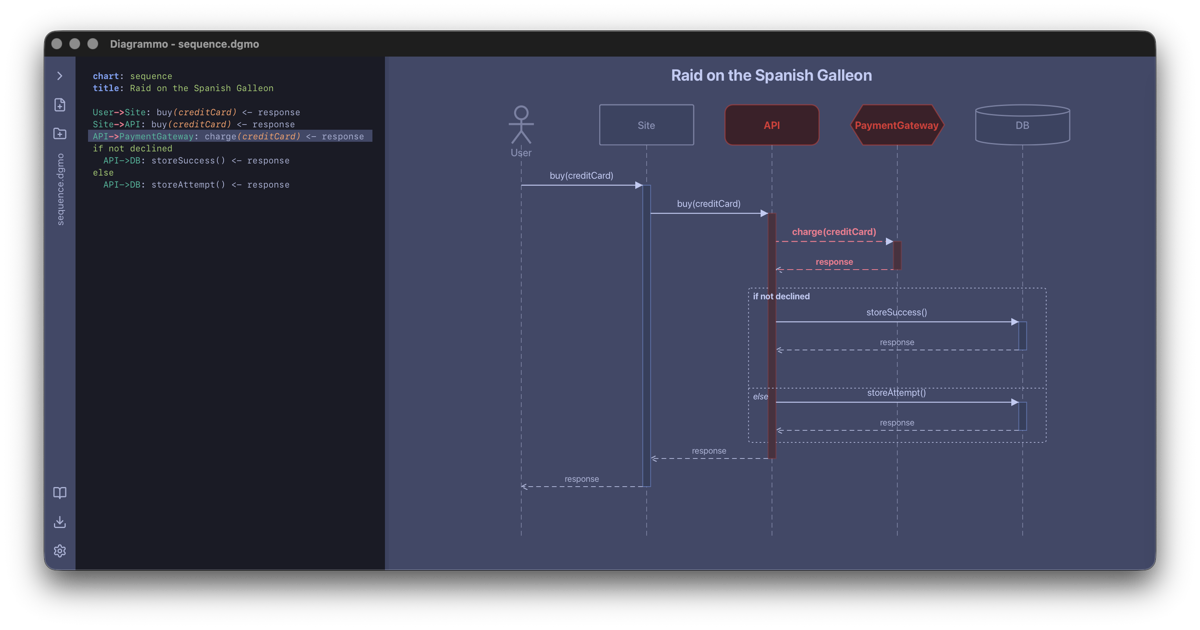
Supported chart types
All chart types from @diagrammo/dgmo are supported:
| Framework | Types |
|---|---|
| ECharts | bar, bar-stacked, line, multi-line, area, pie, doughnut, radar, polar-area, scatter, sankey, chord, function, heatmap, funnel |
| D3 | slope, wordcloud, arc, timeline, venn, quadrant, flowchart, class, er, org |
| Sequence | sequence (with participant type inference, collapsible sections, activation bars) |
Mermaid-backed chart types (quadrant via Mermaid) are not yet supported in the plugin.
Usage
Write a fenced code block with the dgmo language tag:
```dgmo
bar Quarterly Revenue
xlabel Quarter
ylabel Revenue ($M)

Q1 4.2
Q2 4.8
Q3 5.1
Q4 5.9
```
The diagram renders inline in reading mode and live preview.
Example note
Open the command palette (Cmd/Ctrl + P) and run:
Diagrammo Diagrams: Create example note with all chart types
This creates a Diagrammo Examples.md file in your vault with working examples of every supported chart type.
Settings
| Setting | Description | Default |
|---|---|---|
| Palette | Color palette for all diagrams — all 8 dgmo palettes available (nord, solarized, catppuccin, rose-pine, gruvbox, tokyo-night, one-dark, bold) | nord |
| Theme | Light, dark, or auto (follows Obsidian's theme) | auto |
| Chart height | Height in pixels for ECharts-based diagrams (100–2000) | 400 |
Install
From Obsidian Community Plugins
- Open Settings > Community Plugins > Browse
- Search for "Diagrammo Diagrams"
- Click Install, then Enable
Manual install
- Download
main.js,manifest.json, andstyles.cssfrom the latest release - Create a folder:
<vault>/.obsidian/plugins/dgmo/ - Copy the three files into that folder
- Enable the plugin in Settings > Community Plugins
Development
Prerequisites
- Node.js 18+
Setup
npm install
Commands
npm run build     # One-shot build → main.js (esbuild, CJS bundle)
npm run dev       # Watch mode (rebuilds on save, inline sourcemaps)
The build bundles everything (including @diagrammo/dgmo and echarts) into a single main.js in the repo root, which Obsidian loads directly. obsidian, electron, and CodeMirror packages are externalized.
Project structure
src/
├── main.ts       # Plugin lifecycle, markdown post-processor, example note command
├── render.ts     # Rendering dispatcher (routes to ECharts or D3 based on chart type)
├── settings.ts   # Settings tab UI (palette dropdown, theme, chart height)
└── examples.ts   # Example note content with all chart types
Dependencies
@diagrammo/dgmo^0.2.6— diagram parsing and rendering (npm dependency, bundled by esbuild)echarts^5.6.0— chart rendering for ECharts-backed typesobsidian^1.7.2— Obsidian plugin API (dev only, externalized)
Testing locally
- Run
npm run dev(watch mode) - Symlink or copy the repo into your vault's
.obsidian/plugins/dgmo/folder - Enable the plugin in Obsidian settings
- Edit a note with a
```dgmocode fence — changes rebuild automatically
Releasing
GitHub release
- Bump
versionin bothpackage.jsonandmanifest.json(must match) - Build:
npm run build - Commit and push
- Create a GitHub release with tag
<version>(e.g.,1.0.1) - Attach these files to the release:
main.jsmanifest.jsonstyles.css
Obsidian Community Plugins
The plugin is listed in the Obsidian Community Plugins registry. New versions are picked up automatically from GitHub releases — just publish a new release with the required files attached.
Links
- diagrammo.app — full desktop editor
- @diagrammo/dgmo — the dgmo markup library and CLI
- dgmo syntax reference
License
MIT
For plugin developers
Search results and similarity scores are powered by semantic analysis of your plugin's README. If your plugin isn't appearing for searches you'd expect, try updating your README to clearly describe your plugin's purpose, features, and use cases.