Privacy Mosaic
pendingby IvicaudaxW2
Privacy-focused blur and mosaic masking for text and images using ++content++ syntax.
privacy-mosaic
Privacy mosaic is an Obsidian plugin for hiding sensitive text and images behind a blur or mosaic-style mask. It uses ++content++ syntax and supports both hover reveal and double-click reveal.
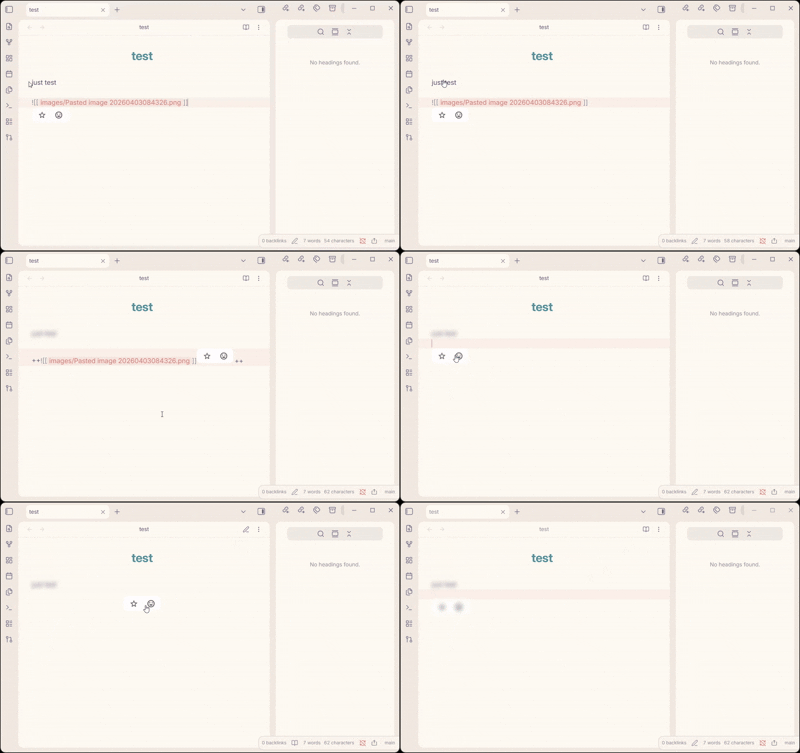
Features
- Privacy-focused masking for text and image content
- Simple
++content++syntax for inline text and image embeds - Works in both reading mode and live preview
- Supports hover reveal or double-click reveal
- Adjustable blur strength and transition duration
- Commands for wrapping a selection and revealing all masked content
Usage
Basic syntax
This is normal text and ++this is masked text++.

Here is a masked image: ++![[photo.png]]++

Here is a masked external image: ++![[photo.png]](https://photo.png)++

Multiple items: ++secret A++ and ++secret B++
Commands
| Command | Description |
|---|---|
Toggle mosaic on selection | Wrap or unwrap the current selection with ++...++ |
Reveal/hide all mosaic | Show or hide all masked content in the current view |
You can assign hotkeys in Settings -> Hotkeys by searching for Privacy Mosaic.
Settings
| Setting | Default | Description |
|---|---|---|
| Enable in editing mode | On | Apply masking in live preview |
| Reveal mode | Hover | Reveal on hover or by double-click |
| Blur strength | 8px | Blur intensity from 1 to 20 |
| Transition duration | 200ms | Animation duration from 0 to 500 ms |
License
For plugin developers
Search results and similarity scores are powered by semantic analysis of your plugin's README. If your plugin isn't appearing for searches you'd expect, try updating your README to clearly describe your plugin's purpose, features, and use cases.