Flash Navigator
pendingby iyioon
Flash-style label-based navigation with Vim workflows.
Obsidian Flash Nav
Flash-style label navigation inspired by folke/flash.nvim.
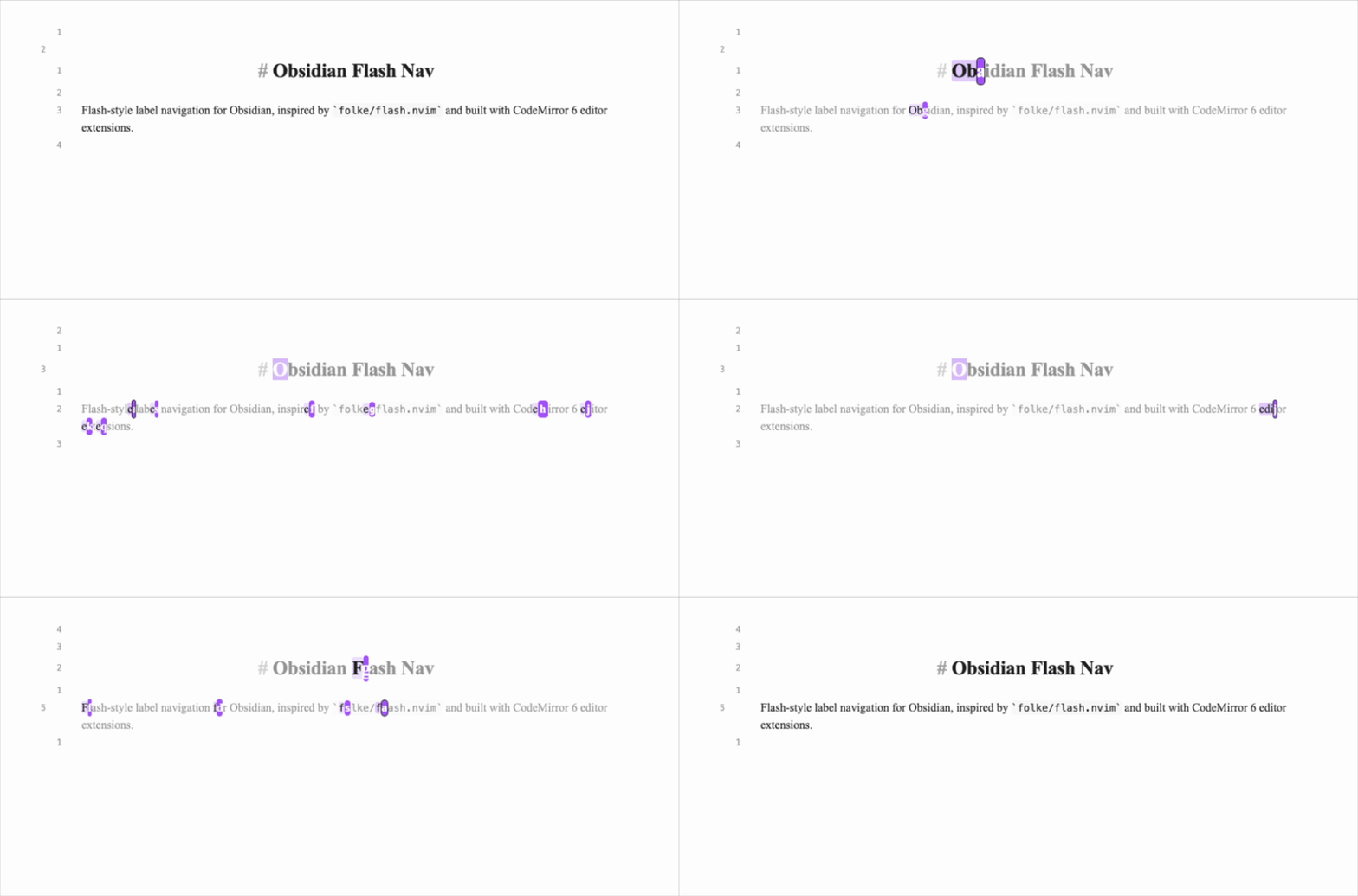
Fast flow:
- Trigger
Start jump(or mappedsin Vim normal mode). - Type a search pattern.
- Press the label character to jump.
Features
- Start flash mode from command palette:
Start jump - Type a pattern, see label hints, press label to jump
- Controls:
Backspaceedit pattern,Enterjump current target,Esccancel - Vim-friendly workflow via Obsidian hotkeys or
.obsidian.vimrc - Configurable settings:
- label alphabet
- label reuse mode (none/lowercase/all)
- label current match toggle
- label color and current label color (with reset to current accent)
- search direction (closest/forward/backward)
- search scope (viewport/current line/document)
- case sensitive and smart-case matching
- auto-jump on single match
- backdrop dim opacity
Setup (Development)
Based on the official Obsidian build workflow: https://docs.obsidian.md/Plugins/Getting+started/Build+a+plugin
- Clone this repository.
- Run
npm install. - Run
npm run dev(watch mode) ornpm run build.- Run
npm run testfor matcher/labeler unit checks.
- Run
- Copy this repo into your vault plugin folder:
<Vault>/.obsidian/plugins/flash-navigator/
- In Obsidian, enable Community plugins and turn on
Flash Navigator.
Vim Mapping (.obsidian.vimrc)
If you use obsidian-vimrc-support, add this to your vault root .obsidian.vimrc:
" Optional: release default 's' behavior
nunmap s
vunmap s

" Alias Obsidian command id to a short ex command
exmap flash obcommand flash-navigator:flash-nav-start

" Map normal mode and visual mode s to flash
nmap s :flash<CR>
vmap s :flash<CR>
Notes:
- Command id is
flash-navigator:flash-nav-start. <CR>is required for ex command mappings in recent codemirror-vim versions.- Visual mode requires
vmap s :flash<CR>; without it, Vim keeps default visual substitute behavior. obcommandis provided byobsidian-vimrc-supportand may change; fallback is direct Obsidian hotkey binding.- Run
:obcommandto inspect available command ids.
Project
- GitHub issues: https://github.com/iyioon/obsidian-flash-nav/issues
- GitHub milestones: https://github.com/iyioon/obsidian-flash-nav/milestones
- Release process:
docs/RELEASING.md - Automated releases on tag push:
.github/workflows/release.yml
Performance Profiling (Dev)
To enable compute profiling logs in the developer console:
globalThis.__FLASH_NAV_PROFILE__ = true
Disable it with:
globalThis.__FLASH_NAV_PROFILE__ = false
When enabled, slow refresh cycles (>= 8ms) are logged with pattern length, match count, scope, and direction.
Contributing
When opening a PR:
- Link the issue/milestone item.
- Mention relevant Obsidian docs used for implementation decisions.
- Include verification notes (mode tested, vault setup, expected behavior).
References
- Obsidian build guide: https://docs.obsidian.md/Plugins/Getting+started/Build+a+plugin
- Editor extensions: https://docs.obsidian.md/Plugins/Editor/Editor+extensions
- View plugins: https://docs.obsidian.md/Plugins/Editor/View+plugins
- State fields: https://docs.obsidian.md/Plugins/Editor/State+fields
- Plugin guidelines: https://docs.obsidian.md/Plugins/Releasing/Plugin+guidelines
- Submit plugin: https://docs.obsidian.md/Plugins/Releasing/Submit+your+plugin
- flash.nvim: https://github.com/folke/flash.nvim
For plugin developers
Search results and similarity scores are powered by semantic analysis of your plugin's README. If your plugin isn't appearing for searches you'd expect, try updating your README to clearly describe your plugin's purpose, features, and use cases.