Flash Navigation
pendingby Erl-koenig
Jump to any visible text instantly by typing characters and using labeled shortcuts for fast navigation.
Flash Navigation for Obsidian
A powerful navigation plugin for Obsidian that lets you quickly jump to any visible text using search labels. Inspired by flash.nvim and similar tools.





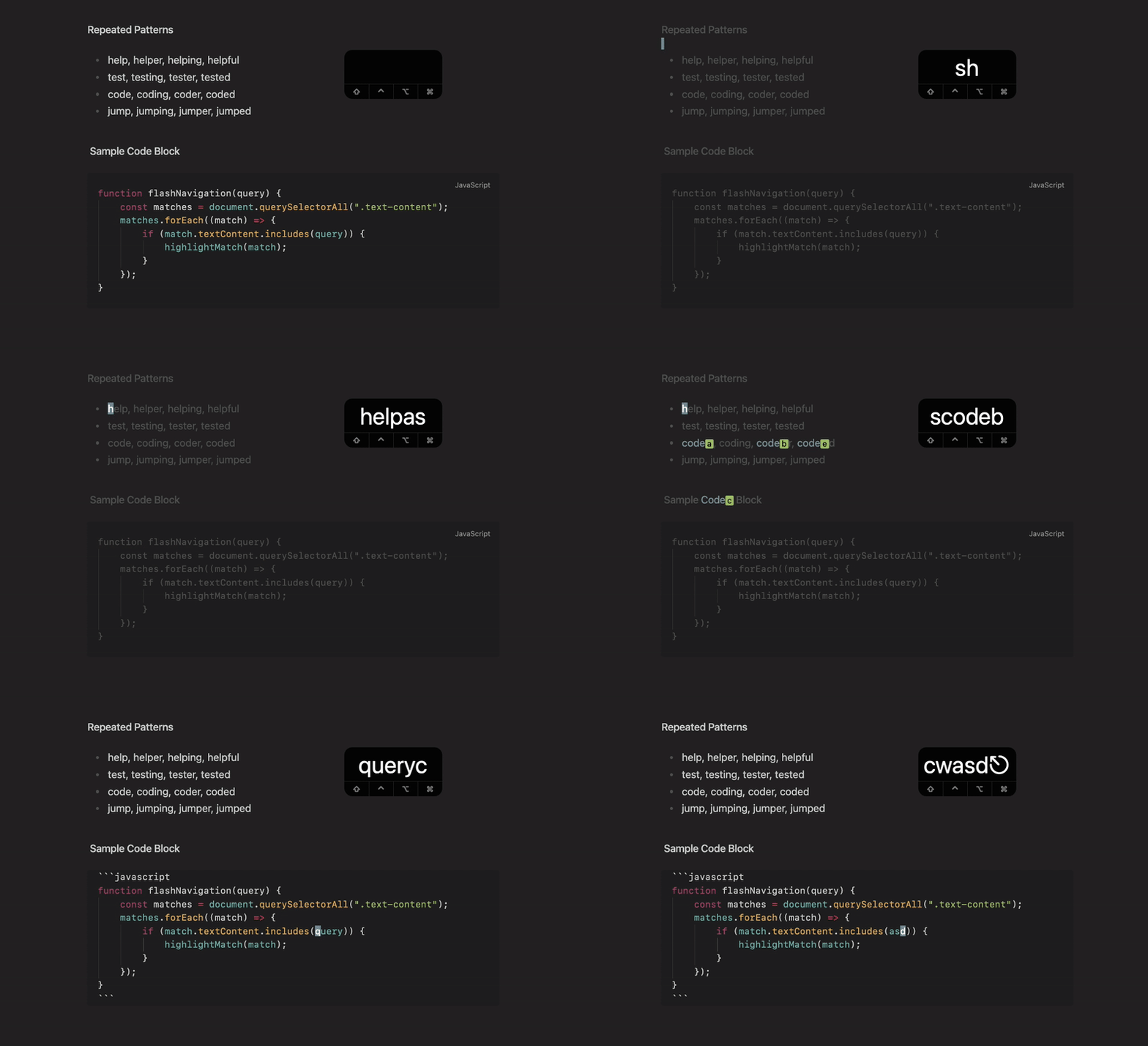
Features
- 🔍 Smart Search: Type characters to highlight matching text throughout your document
- 🏷️ Jump Labels: Automatically assigns labels to matches for instant navigation
- ⚡ Fast Navigation: Jump to any visible location with a single keypress
- 📊 Live Search Display: Real-time status bar shows what you're typing as you search
- 🎨 Customizable Appearance: Fully customizable colors and styling
- 📝 Precise Highlighting: Only highlights the exact characters you've typed
Installation
From Obsidian Community Plugins
- Open Obsidian Settings
- Go to Community Plugins and disable Safe Mode
- Click Browse and search for "Flash Navigation"
- Install and enable the plugin
Manual Installation
- Download the latest release from GitHub
- Extract the files to
VaultFolder/.obsidian/plugins/obsidian-flash-navigation/ - Reload Obsidian and enable the plugin in Settings
Setup
Basic Usage
Add a command to trigger flash navigation. You can use:
- Command Palette: Search for "Start Navigation"
- Hotkey: Set a custom hotkey in Obsidian Settings > Hotkeys
Vim Mode Setup (Recommended)
If you use Vim mode with the Vimrc plugin, add this to your .obsidian.vimrc:
" Unmap the default 's' command and remap to flash navigation
nunmap s
exmap flashNav obcommand flash-navigation:start-navigation
nmap s :flashNav<CR>
Usage
- Start: Trigger the flash navigation command (e.g.
sremap in vim mode or via hotkey) - Search: Type characters - matching text gets highlighted and your search query appears in the status bar with a ⚡ icon
- Jump: Press a label character (a-z, A-Z, 0-9) to jump to that location
- Refine: Continue typing to narrow down matches
- Exit: Press
EscapeorBackspaceuntil search is empty
Example
1. Press 's' to start flash mode
2. Type "hel" - all instances of "hel" get highlighted and status bar shows "⚡ hel"
3. See labels: hel[a]lo, hel[b]p, hel[c]icopter
4. Press 'a' to jump to "hello"
Behavior:
- Uses specified label characters; if exhausted, fills remaining labels with
?. - Automatically exits flash mode if:
- No matches are found (similar to flash.nvim)
escapeis pressedbackspaceis pressed until search is empty- Scrolling happens (mousewheel, scrollbar, etc.)
- The active view changes (e.g. switching files)
Customization & Colors
The plugin offers various customization options in Settings:
- Search Behavior: Case sensitivity and custom label characters
- Auto toggle source mode: Automatically toggle source mode when entering/leaving flash-mode
- Visual Styling: Colors and font weights for dimmed text and matches
- Label Styling: Appearance and position of jump labels
- Status Bar Item: Customize the statusbar item position, visibility and icon
Color Customization
All colors are optional and will use your current Obsidian theme colors as defaults:
- Dim Color: Uses faint text color (for non-matching text)
- Match Color: Uses accent color (for highlighted matches)
- Label Background: Uses green color (for jump label backgrounds)
- Label Text: Uses inverted accent text color (for jump label text)
- Question Mark Labels: Uses yellow color (for overflow labels)
Development & Contribution
Feel free to open an issue on GitHub for feature requets or bug reports.
Contributions are welcome.
Acknowledgments
- Inspired by flash.nvim and flash.vscode
- Built for Obsidian
- Uses CodeMirror 6 decorations for text highlighting
License
This project is licensed under the MIT License.
Say Thanks
This plugin is developed by Erl-koenig.
If you find this plugin helpful, consider supporting its development


For plugin developers
Search results and similarity scores are powered by semantic analysis of your plugin's README. If your plugin isn't appearing for searches you'd expect, try updating your README to clearly describe your plugin's purpose, features, and use cases.