Tasks CalDAV Sync
pendingby José Coelho
Bidirectional sync between tasks and CalDAV servers.
Tasks CalDAV Sync
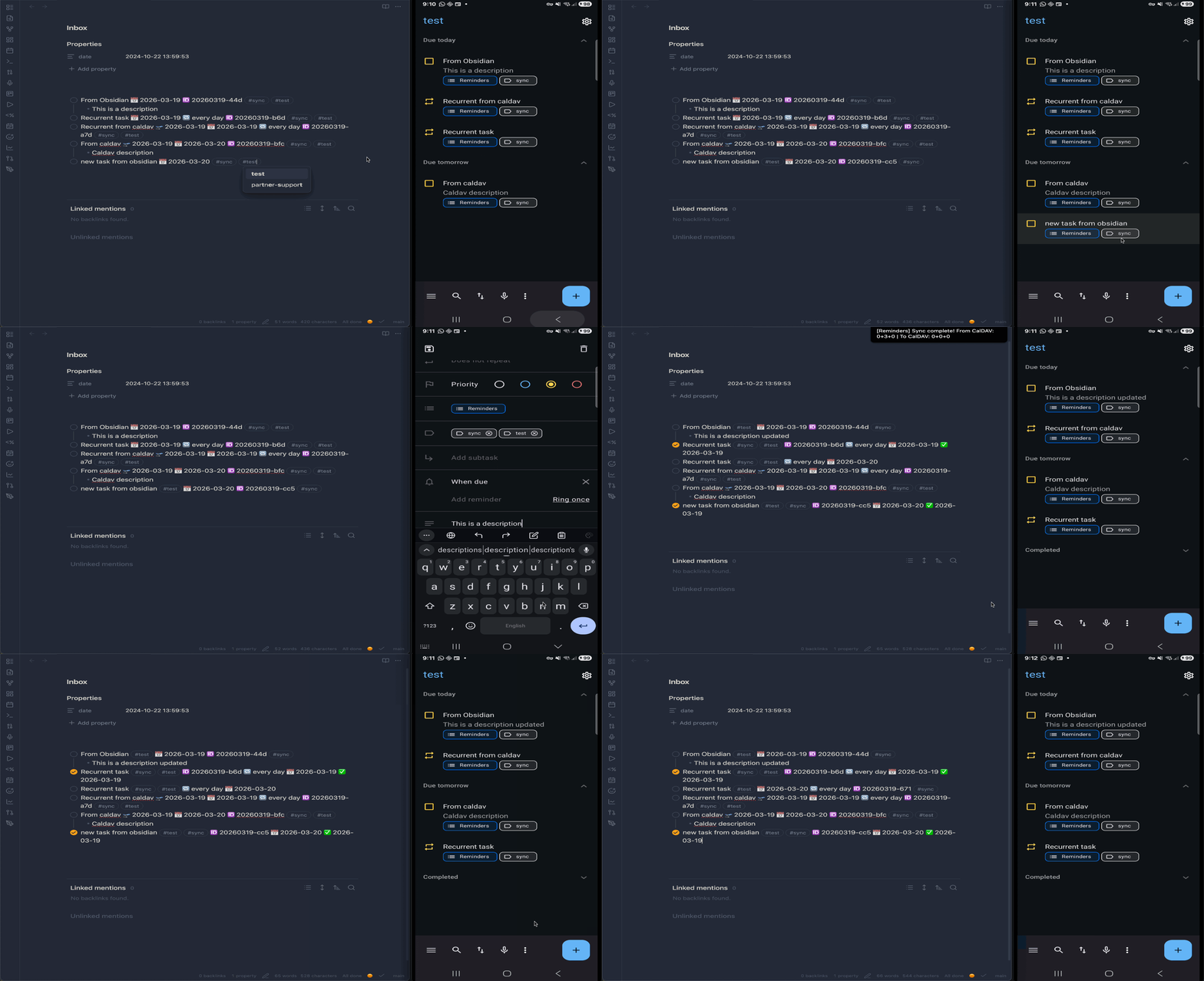
Bidirectional sync between obsidian-tasks and any CalDAV server (Nextcloud, Radicale, Fastmail, iCloud, etc.).
Works with the obsidian-tasks plugin — syncs task status, dates, priorities, recurrence, tags, and notes as standard VTODO items.
Features
- Multi-calendar support — sync different tags to different calendars and servers (tasks must have the tag on both sides — Obsidian
#tagand CalDAVCATEGORIES) - Bidirectional sync — push tasks to CalDAV servers and pull changes back
- Auto-sync — configurable interval (default: 5 minutes)
- Dry-run mode — preview what will sync before committing changes
- Conflict detection — manual resolution or auto-resolve with Obsidian wins
- Task notes — indented bullet points below a task round-trip as VTODO DESCRIPTION
- Recurrence —
RRULEround-trips between CalDAV and obsidian-tasks format - Delete detection — three-way diff detects deletions on either side
- Reconciliation — automatically matches identical tasks when switching calendars or after lost sync data, preventing duplicates
Requirements
- Obsidian v0.15.0+
- obsidian-tasks plugin (must be installed and enabled)
- A CalDAV server with VTODO support
Installation
From Community Plugins
Not yet available — waiting for review.
Using BRAT (recommended)
- Install the BRAT plugin
- Open BRAT settings → Add Beta Plugin
- Enter
josecoelho/obsidian-tasks-caldavand click Add Plugin - Enable "Tasks CalDAV Sync" in Settings → Community Plugins
BRAT will also handle future updates automatically.
Manual
- Download
main.js,manifest.json, andstyles.css(if present) from the latest release - Create
VaultFolder/.obsidian/plugins/obsidian-tasks-caldav/ - Copy the downloaded files into that folder
- Restart Obsidian and enable the plugin in Settings → Community Plugins
Configuration
Open Settings → Tasks CalDAV Sync. Add one or more calendars, each with:
| Setting | Description |
|---|---|
| Tag | Only tasks with this tag are synced — on both sides (Obsidian tags and CalDAV CATEGORIES must match) |
| Calendar name | Name of the calendar on the server |
| Server URL | CalDAV server endpoint |
| Username / Password | CalDAV credentials |
Global settings:
| Setting | Description | Default |
|---|---|---|
| Sync interval | Auto-sync period in minutes | 5 |
| New tasks destination | File where incoming CalDAV tasks are created | Inbox.md |
| New tasks section | Optional heading within the destination file | — |
| Sync completed tasks | Include completed tasks in sync | off |
| Delete behavior | What happens when a task is deleted on one side | ask |
Conflict resolution
Two modes:
- Manual (default) — sync pauses when conflicts are detected, requiring review
- Auto-resolve Obsidian wins — automatically keeps the Obsidian version on conflict
Usage
Commands
Open the command palette (Ctrl/Cmd + P) to access:
| Command | Description |
|---|---|
| Sync with CalDAV now | Run an immediate sync |
| Preview sync (dry run) | See what would change without applying |
| View sync status | Show last sync time and any conflicts |
| Inject task IDs | Add unique IDs to selected tasks |
| Validate task IDs | Check document for valid/invalid task IDs |
Task IDs
Each synced task needs a unique ID. The plugin uses the obsidian-tasks native format:
- [ ] Buy groceries 🆔 20260213-a1b
Use the "Inject task IDs" command to add IDs to existing tasks, or the plugin will assign them automatically during sync.
Metadata mapping
| Obsidian | CalDAV | Direction |
|---|---|---|
| Task text | SUMMARY | ↔ |
| Indented bullets | DESCRIPTION | ↔ |
📅 due date | DUE | ↔ |
🛫 start date | DTSTART | ↔ |
✅ done date | COMPLETED | ↔ |
🔁 recurrence | RRULE | ↔ |
| Priority emoji | PRIORITY (1-9) | ↔ |
| Tags | CATEGORIES | ↔ |
| Status (done/cancelled) | STATUS | ↔ |
Task notes
Indented bullet points below a task are synced as the VTODO DESCRIPTION field:
- [ ] Plan vacation 🆔 20260213-x2c
    - Research flights
    - Book hotel
    - Pack list
These notes round-trip to/from CalDAV clients like Thunderbird or Tasks.org.
Known limitations
- Priority round-trip is lossy — obsidian-tasks uses emoji-based priorities (⏫🔼🔽) while CalDAV uses numeric PRIORITY (1-9). Obsidian→CalDAV maps correctly, but CalDAV→Obsidian does not write priority emojis back into the task markdown.
- Internal obsidian-tasks API — This plugin accesses obsidian-tasks' internal
getTasks()method, which is not part of the official public API. Future obsidian-tasks updates could break this integration.
Tested CalDAV servers
- Radicale (E2E test suite)
- Fastmail
Should work with any CalDAV server that supports VTODO (Nextcloud, iCloud, Synology, Baikal, etc.).
Development
npm i            # install dependencies
npm run dev      # watch mode
npm run build    # production build with type checking
npm test         # run all tests (unit + E2E, requires Docker for Radicale)
See CLAUDE.md for architecture details and testing guidelines.
License
MIT
For plugin developers
Search results and similarity scores are powered by semantic analysis of your plugin's README. If your plugin isn't appearing for searches you'd expect, try updating your README to clearly describe your plugin's purpose, features, and use cases.