Personal Finance
pendingby Lucas Berta
Visualize your monthly finances, summary cards, daily balance chart, monthly evolution and spending by category.
💰 Personal Finance — Obsidian Plugin
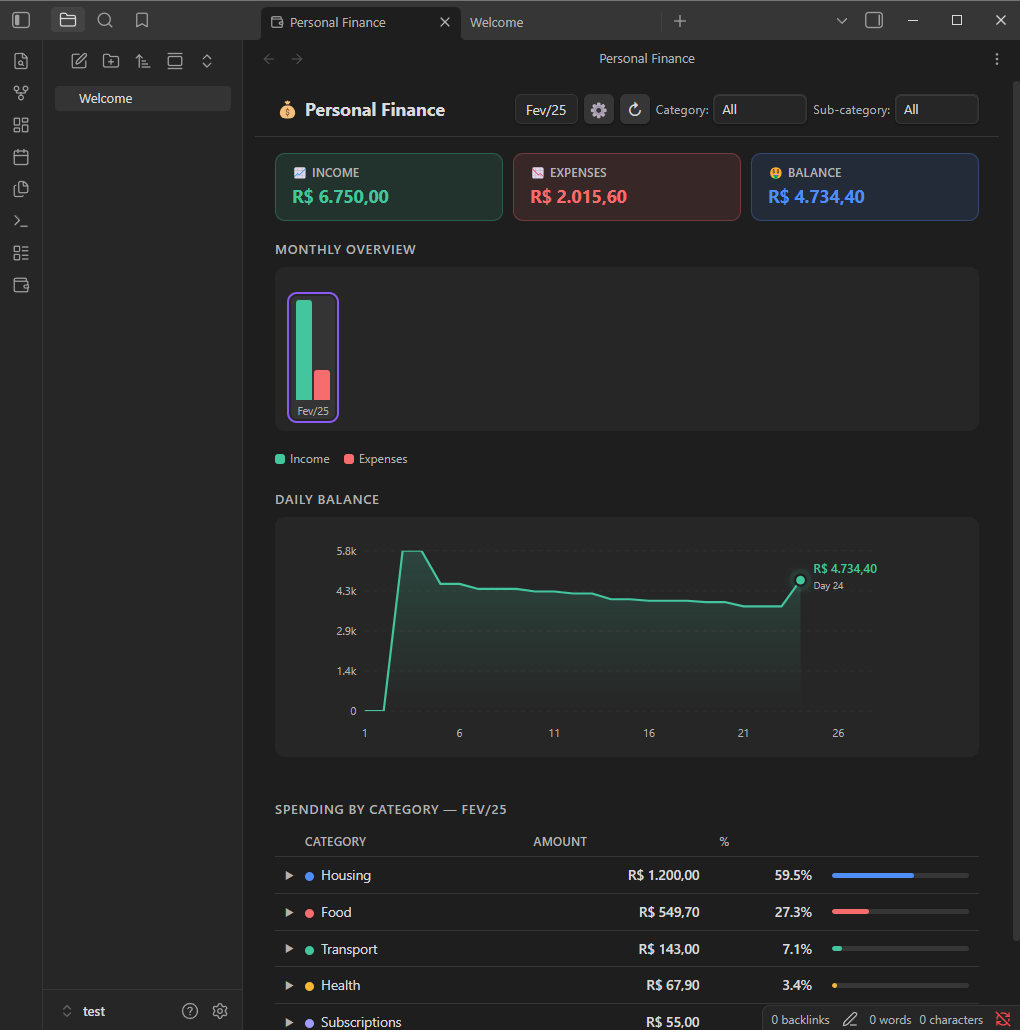
Track and visualize your monthly finances directly in Obsidian — summary cards, daily balance chart, monthly evolution, and spending by category, all powered by a simple CSV file.

✨ Features
- Summary cards — Income, Expenses, and Balance for the selected month (negative balance shown in red with a
−sign) - Daily balance chart — cumulative line chart day by day, with colored area (green = positive, red = negative)
- Monthly bar chart — income × expenses across all months; click any bar to navigate to that month
- Category breakdown table — sorted by amount, with proportional progress bar and percentage
- Category & sub-category filters — filter the entire page simultaneously
- Auto-refresh — detects changes to the CSV and updates automatically
- Mobile-friendly — responsive layout for small screens
📋 CSV Format
The plugin reads a CSV file with the following columns (column names are case-insensitive):
| Column | Required | Example |
|---|---|---|
date | ✅ | 2025-01-15 |
category | ✅ | Food |
sub-category | — | Groceries |
description | — | Weekly shopping |
amount | ✅ | $9,120.00 or -$200.00 |
accumulated-value | — | ignored by the plugin |
- Dates must be in
YYYY-MM-DDformat - Positive values = income; negative values = expenses
- Currency prefix (
$) and thousand separators are handled automatically - Empty rows or rows without a valid date are silently ignored
Minimal example:
date,category,sub-category,description,amount,accumulated-value
2025-01-05,Salary,,January salary,$9120.00,$9120.00
2025-01-10,Food,Groceries,Weekly shopping,-$350.00,$8770.00
2025-01-15,Transport,Fuel,Gas station,-$200.00,$8570.00
🚀 Installation
Via Community Plugins (recommended)
- Open Obsidian → Settings → Community plugins
- Click Browse and search for
Personal Finance - Install and enable the plugin
Manual
- Download
main.jsandmanifest.jsonfrom the latest release - Copy both files to
<vault>/.obsidian/plugins/personal-finance/ - Reload Obsidian and enable the plugin under Settings → Community plugins
⚙️ Configuration
- Click the 💰 icon in the left ribbon (or open the Command Palette and run
Open Financial Overview) - Click the ⚙ button in the top-right corner to set the path to your CSV file
- The path is relative to the vault root
The default path is personal-finance.csv (vault root).
📸 Screenshots
🛠️ Development
# Clone the repository
git clone https://github.com/YOUR_USER/personal-finance
cd personal-finance

# No dependencies — the plugin is plain CommonJS JavaScript
# Copy files to your vault to test:
cp main.js manifest.json <vault>/.obsidian/plugins/personal-finance/
To publish a new version:
- Update
versioninmanifest.jsonandversions.json - Create a Git tag matching the version exactly (e.g.
1.0.1) - GitHub Actions will automatically create a release with the required files attached
📄 License
MIT © Lucas Berta
For plugin developers
Search results and similarity scores are powered by semantic analysis of your plugin's README. If your plugin isn't appearing for searches you'd expect, try updating your README to clearly describe your plugin's purpose, features, and use cases.