Budget Planner
unlistedby Ivan Kalinichenko
A minimalist budget planning tool. Create, track, and manage budgets using markdown code blocks directly in your notes.
★ 9 starsUpdated 1mo agoMIT
Budget Planner


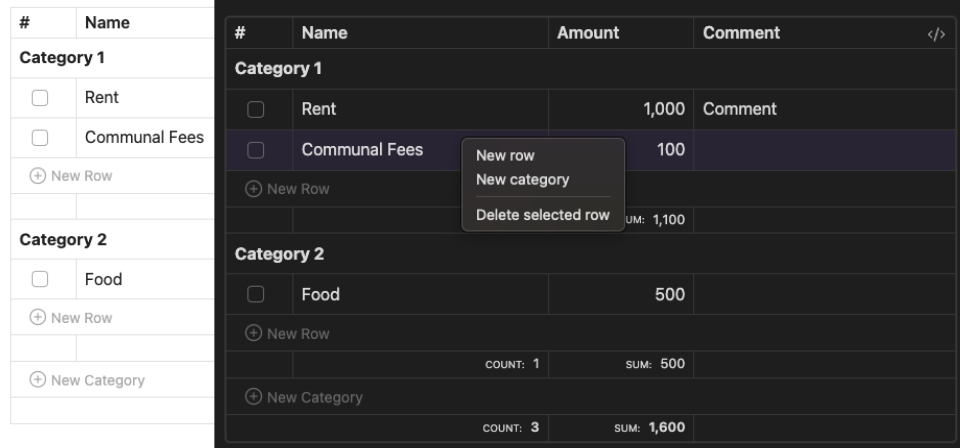
A minimalist budget planning plugin that lets you manage finances directly in your notes using markdown code blocks.
✨ Features
- 📝 Native markdown code block syntax
- 📊 Category-based expense organization
- ✅ Interactive checkboxes for expense tracking
- 🔄 Auto-formatting and alignment
- 📈 Column sorting capabilities
- 💰 Automatic category and total summations
- 🔧 Seamless Obsidian integration
📖 Usage
Quick Start
- Open a note in Obsidian where you want to add a budget planner
- Use the command palette (Cmd+P on macOS or Ctrl+P on Windows/Linux) and search for
Insert Budget Planner - Start editing your budget!
Examples
Create budgets using the budget code block:
Online Services:
	[x] | Spotify   | 4.99
	[ ] | Youtube   | 16.99
	[ ] | 1Password | 6.95
Entertainment:
	[ ] | Netflix   | 12.99
🚀 Installation
- Download
budget-planner-X.Y.Z.zipfrom the latest GitHub release - Extract the archive into your vault's
.obsidian/plugins/folder — this will create abudget-planner/subfolder - Reload Obsidian
- Enable plugin in Settings > Community Plugins
🤝 Contributing
- Fork the repository
- Create feature branch (
git checkout -b feature/amazing-feature) - Commit changes (
git commit -m 'Add amazing feature') - Push to branch (
git push origin feature/amazing-feature) - Open Pull Request
📄 License
MIT License - see LICENSE for details
💬 Support
🔖 Docs
For plugin developers
Search results and similarity scores are powered by semantic analysis of your plugin's README. If your plugin isn't appearing for searches you'd expect, try updating your README to clearly describe your plugin's purpose, features, and use cases.